10 Best 4 Bay Hard Drive Enclosure with Cooling Fans (November 2026) Expert Guide
Written by Jamie · Updated November 2026
Finding the right external storage solution is crucial for modern data management. A 4 Bay Hard Drive Enclosure with Cooling Fans offers expandable capacity while protecting your drives from overheating during intense use.
We compared ten leading models based on speed, build quality, cooling efficiency, and compatibility. Our analysis focuses on real-world performance and reliability for both personal and professional storage needs.
Each pick highlights specific strengths like USB speeds, fan control, and drive support. Prices and availability change frequently, so verify details on the product page before making your final selection decision.
Top 3 Picks for Best 4 Bay Hard Drive Enclosure with Cooling Fans
Best Budget
MAIWO 4 Bay Hard Drive Enclosure with USB-C & 10 Gbps Speed, 4-Bay DAS Design for 3.5” SATA HDDs with 2 Cooling Fans, USB3.1 HDD Enclosure Daisy Chain Expansion, DAS(NO RAID)
CENMATE Aluminum 4 Bay Hard Drive Enclosure with Cooling Fan for 2.5“/3.5" SATA HDD/SSD with USB A/C 3.0, Support Hot Swappable, Tool-Free HDD Enclosure, DAS(NO RAID/NAS)
As an Amazon Associate we earn from qualifying purchases.
Top 10 Best 4 Bay Hard Drive Enclosure with Cooling Fans in 2026 Compared
The following table provides a side-by-side comparison of all ten reviewed models. It highlights key specifications such as supported drive sizes, maximum capacity, transfer speeds, and unique features to help you identify the best fit.
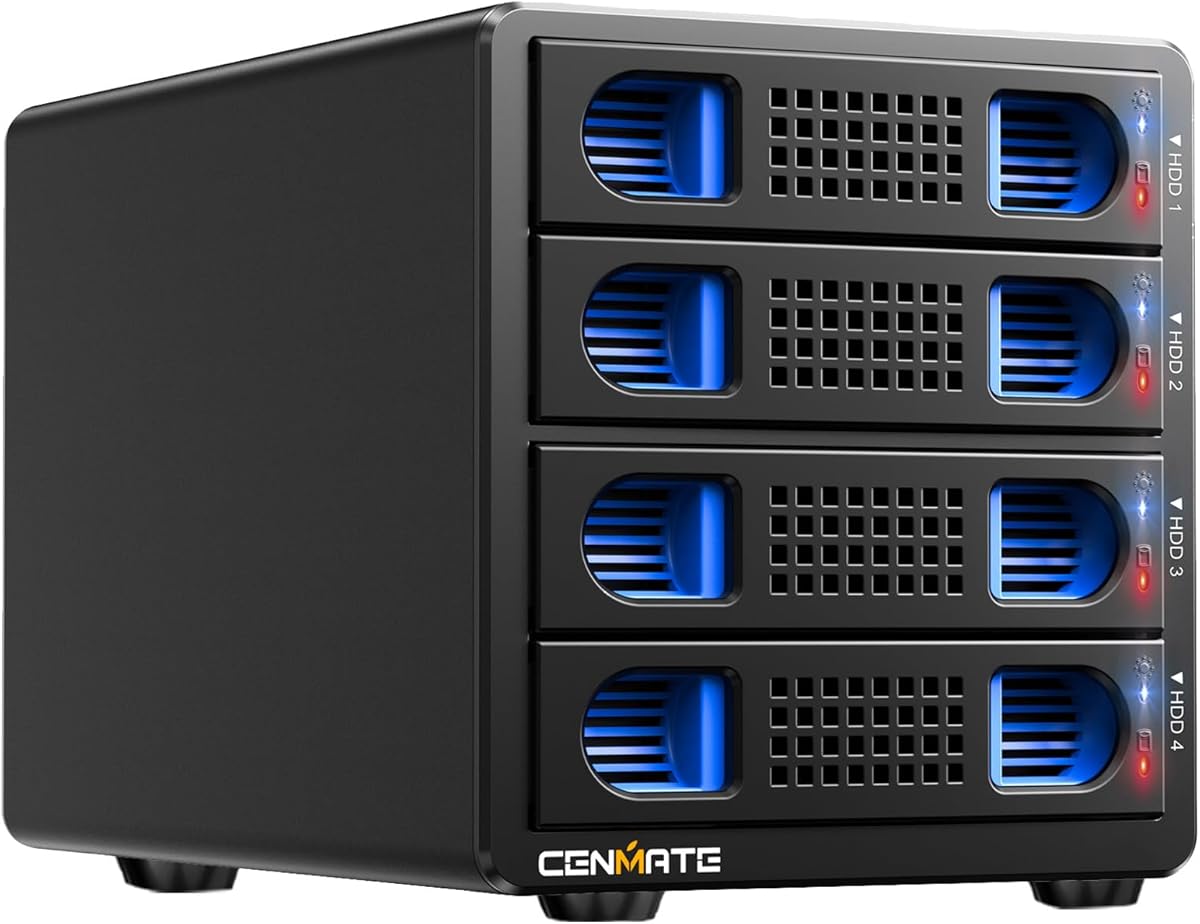
CENMATE Aluminum 4 Bay Hard Drive Enclosure with Cooling Fan for 2.5“/3.5" SATA HDD/SSD with USB A/C 3.0, Support Hot Swappable, Tool-Free HDD Enclosure, DAS(NO RAID/NAS)
USB 3.0 with UASP
Up to 80TB support
Aluminum alloy chassis
2 inch cooling fan
The CENMATE Aluminum 4 Bay Hard Drive Enclosure stands out as a reliable option for general users. It holds a solid rating and offers a balanced mix of performance and build quality. The inclusion of both USB-A and USB-C cables ensures flexibility across different host devices.
Pros
Supports large capacity drives up to 20TB each
Aluminum chassis aids passive heat dissipation
Tool-free design allows quick drive access
Includes both USB A and C cables
Cons
Fan noise may disturb noise sensitive users
No Thunderbolt support available
We may earn a commission when you buy through this link, at no additional cost to you.
Its standout feature is the robust aluminum alloy construction which helps manage heat alongside the built-in 2 inch fan. This dual cooling approach is critical for maintaining drive health during long file transfers. The enclosure supports drives up to 20TB each allowing a massive total capacity of 80TB for extensive storage needs.
While the cooling fan is effective it operates at around 40 to 50 decibels. This noise level is acceptable for office environments but might be noticeable in quiet home setups. The tool-free design compensates for this by making drive swaps incredibly fast without needing screwdrivers or extra tools.
This enclosure is ideal for individuals or businesses needing reliable external storage without complex RAID configurations. The plug and play compatibility across Windows Mac and Linux makes it a versatile choice. Its stable power supply ensures consistent performance for daily data backups and file management tasks.
Robust Cooling System
The combination of aluminum alloy material and a dedicated fan ensures drives stay within safe temperature ranges even under load.
High Capacity Support
Supporting up to 80TB total capacity makes this unit suitable for media libraries and large project archives without needing multiple devices.
CENMATE Aluminum 4 Bay 10Gbps Hard Drive Enclosure with Cooling Fan for 2.5“/3.5" SATA HDD/SSD with USB A/C 3.2 Gen 2, Support Hot Swappable, Tool-Free HDD Enclosure, DAS(NO RAID/NAS)
USB 3.2 Gen 2
Up to 10Gbps speed
Hot swappable bays
Up to 80TB total
This model improves on the previous version by upgrading the interface to USB 3.2 Gen 2 offering significantly faster data transfer rates. It is an excellent choice for users who move large video files frequently and need speed without sacrificing reliability. The overall build quality remains consistent with the brand reputation.
Pros
Faster data transfer speeds via USB 3.2 Gen 2
Maintains 20TB per drive capacity support
Hot swappable functionality without power down
Compatible with Thunderbolt 3 and 4
Cons
Fan noise similar to previous model
Requires compatible USB host for max speed
We may earn a commission when you buy through this link, at no additional cost to you.
Key strengths include the ability to transfer 1GB files in seconds which is a major productivity boost. The enclosure supports hot swapping which allows you to replace drives while the system is running. This feature is essential for environments where uptime is critical and minimizing downtime is necessary.
One trade-off is that maximum speed depends on your computer's ports. Older systems might not utilize the full 10Gbps potential. Also the cooling fan noise remains a consideration for quiet spaces. However the performance gains usually outweigh this for professional workflows involving heavy data throughput.
Users needing high throughput for creative work should consider this model. It fits well for video editors and professionals needing quick access to archives. The USB-C interface ensures it works with modern laptops while maintaining backward compatibility with older ports for broader utility.
High-Speed Interface
The USB 3.2 Gen 2 port delivers speeds up to 10Gbps enabling rapid file transfers that save valuable time during work sessions.
Hot Swap Convenience
Hot swappable bays allow you to change drives without shutting down the enclosure reducing workflow interruptions significantly.
MAIWO 4 Bay Hard Drive Enclosure with USB-C & 10 Gbps Speed, 4-Bay DAS Design for 3.5” SATA HDDs with 2 Cooling Fans, USB3.1 HDD Enclosure Daisy Chain Expansion, DAS(NO RAID)
USB-C & 10 Gbps
2 cooling fans
Daisy chain expansion
HD-TV video output
The MAIWO 4 Bay Hard Drive Enclosure offers unique features like daisy chaining and an HD-TV port making it versatile beyond simple storage. It is designed to handle massive data needs with support for up to 96TB total capacity. The inclusion of two fans provides robust cooling for sustained operation.
Pros
Supports daisy chaining for expansion
Includes HDMI port for direct display
Smart fan activation based on temperature
High capacity support up to 96TB
Cons
Lower overall rating than competitors
Limited to 3.5 inch drive focus
We may earn a commission when you buy through this link, at no additional cost to you.
Its key strengths lie in the intelligent heat management system where fans activate only when temperatures exceed 48 degrees Celsius. This approach saves energy and reduces noise during light use. The HD-TV port allows users to connect the enclosure directly to a television for media playback without needing a computer.
Despite its features the product has a lower rating which may indicate mixed user experiences or reliability concerns. It focuses primarily on 3.5 inch drives which limits flexibility for those needing smaller form factors. Users should verify compatibility with their specific drives before purchasing.
This enclosure is best for media enthusiasts who want direct TV connectivity. It is a cost-effective solution for expanding storage without complex network setups. The daisy chain feature allows linking multiple devices for extreme storage expansion in a compact setup.
Media Connectivity
The HD-TV port enables direct video output to a TV allowing instant access to media files without booting a computer.
Intelligent Cooling
Fans are activated automatically by temperature sensors ensuring cooling only happens when necessary for efficiency.
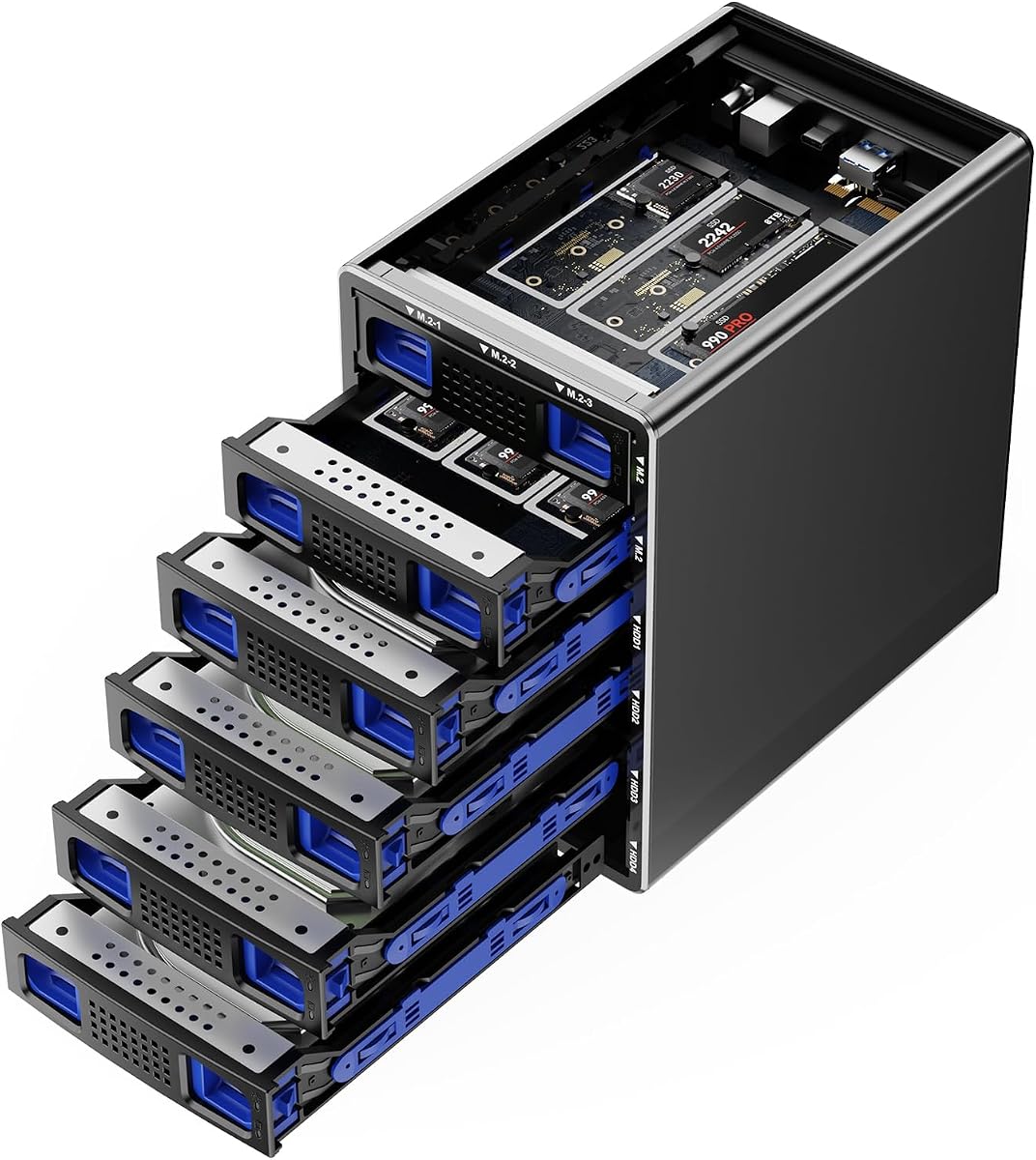
CENMATE Hybrid 4*2.5/3.5" SATA HDD/SSD+6* M / B+M Key M.2 NVMe Enclosure with Cooling Fan and USB A/C 3.2 Gen 2, Hard Drive Enclosure Support 4*22TB HDD+6*8TB 2230/2242/2260/2280/22110 SSDs
Hybrid HDD and NVMe slots
Up to 136TB total
USB 3.2 Gen 2
Tool-free trays
This hybrid enclosure is unique because it supports both traditional SATA drives and modern M.2 NVMe SSDs simultaneously. It allows users to combine the high capacity of HDDs with the speed of SSDs in one unit. The design is highly modular and offers exceptional storage density.
Pros
Supports both SATA and NVMe drives
Massive 136TB total capacity potential
Silent fan operation
Tool-free installation design
Cons
Higher price point for flexibility
Complex drive management
We may earn a commission when you buy through this link, at no additional cost to you.
The standout feature is the ability to hold up to four 22TB HDDs and six 8TB NVMe SSDs. This flexibility is rare in external enclosures and caters to power users who need distinct storage tiers. The aluminum alloy build ensures heat is managed effectively even with high-speed drives generating heat.
One trade-off is the complexity of managing different drive types which might be overwhelming for casual users. Also the cost is higher due to this versatility. However the convenience of having both storage types accessible via one cable outweighs these issues for specific workflows.
This unit is ideal for hybrid workstations needing both archival storage and fast scratch disks. It simplifies cable clutter by providing a single point of access for diverse drives. Users looking to maximize drive diversity should prioritize this model over standard SATA only options.
Drive Versatility
Combining SATA HDDs and NVMe SSDs in one unit allows optimized storage layouts without buying multiple enclosures.
Massive Capacity
Supporting up to 136TB total capacity ensures the unit remains relevant for years of growing data needs.
WAVLINK 4-Bay Hard Drive Enclosure for 3.5" and 2.5'' SATA HDD/SSD Featuring 10Gbps USB-C 3.2, Max 88TB Capacity, Built-in Temp-Controlled Cooling Fans, 4K HDMI Stunning Video Output, Aluminum Shell
USB 3.2 Gen 2
4K HDMI port
Temp controlled fans
Hot-swappable bays
The WAVLINK 4-Bay enclosure distinguishes itself with a high-speed HDMI port that supports stunning 4K video output. It is designed for users who want to connect directly to a display for media playback or presentations. The build quality is robust ensuring reliable operation in various settings.
Pros
Supports 4K@60Hz video output
Includes secondary USB-C port
Dedicated ON/OFF power switches per bay
High-quality aluminum construction
Cons
Requires host USB-C support for HDMI
2.5 inch mounting brackets not included
We may earn a commission when you buy through this link, at no additional cost to you.
Key strengths include the independent power switches for each bay which provide granular control over which drives are active. The dual built-in fans activate only when necessary to maintain cool operating temperatures. The secondary USB-C port allows for daisy-chaining or connecting peripherals without using host ports.
Users must ensure their host device supports video output via USB-C for the HDMI feature to work. Additionally mounting brackets for 2.5 inch drives are not included which is an extra consideration for smaller drive owners. These minor details do not detract from the overall functionality but should be noted.
This enclosure is perfect for digital signage or home theater setups. It offers a convenient way to access large video libraries directly on a TV screen. The fast USB speeds ensure smooth playback of high-resolution media files without lag or stuttering.
Video Output Capability
The HDMI interface supports 4K resolution enabling high fidelity media playback directly from the drive enclosure.
Independent Power Control
Separate power switches for each bay allow selective drive activation for better energy management and cooling.
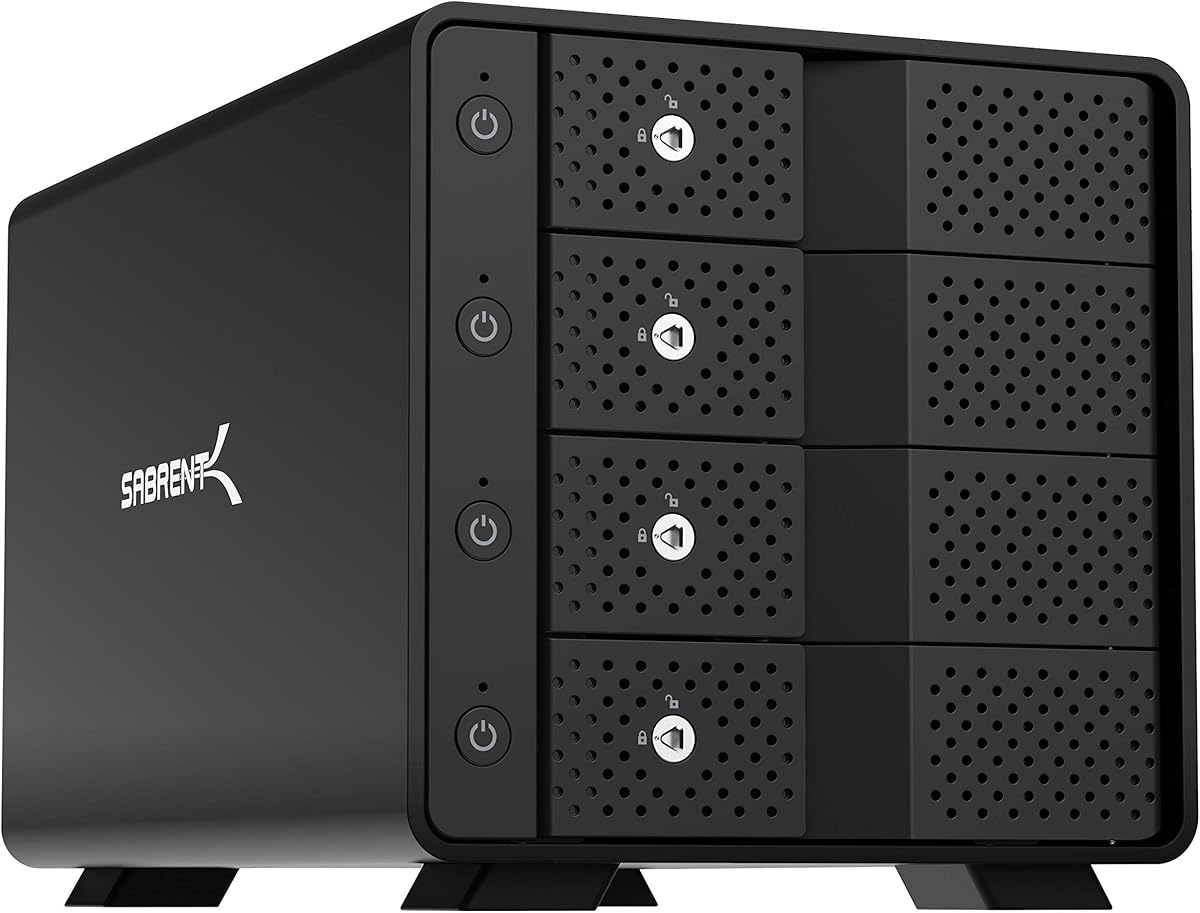
SABRENT USB 3.0 4-Bay 2.5in SATA SSD/HDD Docking Station, Fan (DS-4SSD)
USB 3.0 interface
2.5 inch drives only
Magnetic cover design
Whisper-quiet fan
This SABRENT docking station is specifically designed for 2.5 inch SATA SSDs and HDDs making it a specialized choice. It supports up to four drives with a total capacity of 64TB. The design focuses on quiet operation and ease of access for frequent drive changes.
Pros
Optimized for high performance 2.5 inch drives
Magnetic cover ensures fast drive access
Designed for continuous 24/7 operation
Compact form factor for desks
Cons
Does not support 3.5 inch drives
Limited to 5Gbps transfer speeds
We may earn a commission when you buy through this link, at no additional cost to you.
Key strengths include the whisper-quiet fan which maintains silence during operation. The magnetic cover allows quick access to drives without tools. It is engineered for continuous 24/7 operation which is rare in consumer docking stations. This reliability makes it suitable for always-on backup scenarios.
The limitation to 2.5 inch drives means it cannot support larger desktop HDDs. Users with standard 3.5 inch drives will need a different solution. The USB 3.0 speed is adequate but slower than newer USB-C options available in the market.
This station is ideal for users with portable SSDs or laptop drives who need a central hub. It is perfect for developers needing quick access to multiple OS images. The compact design saves desk space while providing robust cooling for smaller drives.
Compact Design
Optimized for 2.5 inch drives it offers a space-saving solution for users who rely on portable storage media.
24/7 Operation
Engineered for continuous use it handles long-term storage needs without overheating or performance throttling.
CENMATE 4 Bay Hard Drive Enclosure with Cooling Fan for 2.5/3.5" SATA HDD/SSD with USB A/C 3.0, eSATA Cable, 3.5 Hard Drive Reader Supports 80TB Capacity(NO RAID/NAS)
USB 3.0 and eSATA
Up to 80TB support
JMS567+JMB575 chip
Stable power supply
This model stands out by including an eSATA interface alongside the standard USB connection. It is a practical choice for systems that still utilize eSATA ports for high-speed direct connections. The enclosure supports up to 80TB total capacity with a focus on reliability and stability.
Pros
Includes eSATA connectivity
Supports large drives up to 80TB
Stable power adapter included
Plug and play on most OS
Cons
No hot swapping via eSATA
Limited eSATA functionality without RAID
We may earn a commission when you buy through this link, at no additional cost to you.
Key strengths include the inclusion of both USB and eSATA cables ensuring compatibility with older machines. The stable power adapter ensures consistent performance for high-speed data transmission. The aluminum chassis combined with a cooling fan helps maintain safe operating temperatures for all drives.
Users should note that eSATA functionality is limited unless the host port supports RAID. This limitation makes USB the preferred connection for most users. Additionally the lack of hot swapping via eSATA requires a reboot to switch drive modes on some systems.
This enclosure is best for users maintaining older infrastructure or needing a backup connection type. It bridges the gap between modern USB and legacy eSATA standards. The dual interface ensures longevity and usability even as technology evolves.
Dual Connectivity
Supporting both USB and eSATA allows flexible connection options for various computer generations and setups.
Reliable Power
The dedicated power adapter ensures consistent voltage delivery for stable data transfer performance over time.
WAVLINK 4-Bay Hard Drive Enclosure for 3.5" and 2.5'' SATA HDD/SSD Featuring 10Gbps USB-C 3.2, Max 128TB Capacity, Built-in Temp-Controlled Cooling Fans, 4K HDMI Stunning Video Output, Aluminum Shell
USB 3.2 Gen 2
Up to 128TB capacity
Dual cooling fans
4K HDMI output
The WAVLINK 128TB model offers an impressive total storage potential by supporting up to 32TB drives per bay. It is designed for users who need massive external storage capacity without compromising on speed or connectivity. The aluminum shell provides robust physical protection for the drives.
Pros
Supports up to 128TB total storage
Includes HDMI for direct media playback
High-speed USB-C data transfer
Aluminum shell for durability
Cons
Requires 32TB drives for max capacity
2.5 inch brackets not included
We may earn a commission when you buy through this link, at no additional cost to you.
Key strengths include the support for 4K HDMI output which simplifies media viewing. The dual cooling fans ensure that high-capacity drives remain cool under heavy loads. The fast USB-C interface ensures data moves quickly between the enclosure and the host computer.
Achieving the maximum 128TB capacity requires specific high-capacity drives which are expensive and less common. The absence of brackets for 2.5 inch drives is another consideration for mixed setups. These factors should be weighed against the need for massive single-device storage.
This enclosure is ideal for video production houses or archiving needs. It serves as a central hub for large project files and backups. The combination of speed and capacity makes it a powerful tool for professional workflows.
Massive Capacity
Supporting up to 128TB total storage allows users to archive years of data in one single device.
Media Output
The HDMI output enables direct viewing of media on external screens without computer involvement.
CENMATE Aluminum 4 Bay Hard Drive RAID Enclosure with Cooling Fan for 2.5/3.5" SATA HDD/SSD with USB A/C 3.0, eSATA Cable, 3.5 Hard Drive Reader Supports 80TB Capacity, 8 RAID Modes, DAS(NO NAS)
8 RAID modes
Up to 80TB support
USB 3.0 and eSATA
Cooling fan included
This enclosure offers a significant advantage with support for eight different RAID modes. This allows users to prioritize data redundancy or speed based on their needs. The aluminum build ensures durability and helps dissipate heat from the drives effectively during intensive operations.
Pros
Supports multiple RAID configurations
Data redundancy with RAID 1 or 5
Includes both USB and eSATA cables
Supports up to 80TB capacity
Cons
Switching modes requires power cycle
Complex setup for non-technical users
We may earn a commission when you buy through this link, at no additional cost to you.
Key strengths include the ability to configure RAID 0 for speed or RAID 1 for mirroring data. The inclusion of both USB and eSATA cables provides versatile connection options. The cooling fan works in tandem with the metal body to keep drives stable.
Changing RAID modes requires disconnecting power and using a screwdriver to toggle switches which can be complex. Also the computer must support RAID functions for eSATA to work properly. These steps are manageable but add complexity compared to simple JBOD setups.
This unit is best for users needing basic RAID protection without buying a full NAS. It simplifies redundancy for backup drives and ensures data safety. Technical users who want control over data layout will appreciate this flexibility.
RAID Support
The enclosure supports eight RAID modes allowing flexible data protection strategies without network complexity.
Flexible Connectivity
Dual USB and eSATA interfaces ensure compatibility with a wide range of storage hosts and legacy systems.
SABRENT 4-Bay USB-C 10Gbps Hard Drive Enclosure, Docking Station (DS-SC4B)
Independent controller per bay
USB-C 10Gbps
92mm active fan
Up to 80TB capacity
The SABRENT DS-SC4B stands out for its professional build quality and dedicated controller architecture. Each drive bay has its own controller ensuring stable independent connections. This design minimizes the risk of drive interference and improves overall reliability for critical data.
Pros
Dedicated controller for each drive bay
High-speed USB-C connectivity
Security features including Kensington slot
Reliable 24/7 operation support
Cons
Premium price compared to others
Larger physical footprint
We may earn a commission when you buy through this link, at no additional cost to you.
Key strengths include the USB-C 10Gbps port which supports fast data transfer. The enclosure includes a Kensington security slot and locking key for physical safety of drives. The active cooling with a 92mm fan ensures the enclosure can handle continuous operation without overheating.
The higher price point reflects the professional features and build quality. It is bulkier than some other options but offers superior stability. Users must use a USB-C to USB-C connection for the most reliable link which may limit some laptop usage.
This docking station is ideal for professionals requiring reliable high performance storage. It fits well in office environments where data integrity is paramount. The security features and dedicated controllers make it a top choice for business users.
Professional Reliability
Dedicated controllers for each drive bay ensure stable connections and prevent performance bottlenecks during multi-drive usage.
Physical Security
Includes a Kensington slot and locking key to protect the enclosure and drives from theft or unauthorized access.
We may earn a commission when you buy through this link, at no additional cost to you.
Buying Guide – How to Choose the Best 4 Bay Hard Drive Enclosure with Cooling Fans
Selecting the right enclosure involves evaluating several technical aspects to ensure compatibility and performance.
Interface Speed and Type
The interface type determines how fast data can move between your computer and the enclosure. Modern units offer USB 3.2 Gen 2 with speeds up to 10Gbps. Older models might stick to USB 3.0 which caps at 5Gbps. Always check your computer's ports to match the enclosure for maximum performance.
Check your computer's available ports to ensure they match the enclosure's interface for optimal speed and compatibility.
Drive Capacity and Size
Enclosures support different maximum drive sizes such as 3.5 inch or 2.5 inch drives. Some units support up to 20TB or 32TB per drive. Confirm the total capacity matches your current and future needs. Ensure the enclosure includes necessary brackets for smaller drives.
Verify the maximum supported capacity and physical size requirements to avoid issues with drive fit or future upgrades.
Cooling Mechanism
Effective cooling is critical to prevent drive failure. Look for units with active fans and aluminum chassis. Some fans activate only when needed to reduce noise. Others run continuously which might be louder. Consider your environment noise sensitivity when choosing.
Select a cooling system that balances heat management with noise levels based on your workspace environment.
Hot Swapping Support
Hot swapping allows you to remove drives without powering off the unit. This saves time and reduces wear on systems. Some models support this feature fully while others require rebooting. Check the product details for explicit mention of hot swap capabilities.
Prioritize models that explicitly support hot swapping to maximize workflow efficiency and reduce downtime.
RAID vs DAS Functionality
Direct Attached Storage (DAS) treats drives individually which is simple to use. RAID enclosures combine drives for speed or redundancy. Consider if you need RAID 1 for mirroring or RAID 0 for speed. RAID adds complexity but improves data safety.
Decide if you need RAID capabilities for redundancy or DAS simplicity based on your data protection requirements.
Build Quality and Materials
Build quality affects durability and heat dissipation. Aluminum enclosures offer better heat transfer than plastic ones. Metal housing provides physical protection for drives. A solid build ensures long-term reliability for daily use.
Opt for aluminum or metal housings to ensure better heat dissipation and physical protection for your drives.
Additional Features
Extra features like HDMI output or USB-C ports add value. Some units allow direct media playback on TVs. Others support daisy chaining for multiple drives. Assess if these features align with your usage scenarios.
Review additional features like HDMI ports or extra USB slots to see if they provide value for your specific workflow.
Warranty and Support
A good warranty protects your investment against defects. Some manufacturers offer lifetime support or extended warranties. Reliable customer service helps resolve technical issues quickly. Check the support policy before purchasing.
Look for units with strong warranty coverage and responsive customer support to ensure peace of mind.
How to Use and Care for Your 4 Bay Hard Drive Enclosure with Cooling Fans
To start install your drives into the tool-free trays. Ensure they click securely into place. Connect the power adapter first to stabilize the unit before connecting the USB cable. This prevents sudden power fluctuations during boot.
For regular use connect the enclosure via USB and wait for your operating system to recognize the drives. Do not disconnect the USB cable while data is transferring. Always use the eject function in your system to safely remove the device.
Maintenance involves keeping the vents clean of dust to ensure airflow. Check that the fan is spinning freely when active. Avoid placing the unit in direct sunlight or near heat sources to prevent overheating.
Frequently Asked Questions
Do I need drivers to use these enclosures?
Most modern enclosures are plug and play and do not require manual driver installation on Windows macOS or Linux. The operating system automatically detects the drives. However if you enable advanced features like RAID you might need specific software.
Can I use 3.5 inch and 2.5 inch drives together?
Yes most 4 bay enclosures support mixing both drive sizes in the same unit. You just need to ensure 2.5 inch drives are properly seated with provided brackets. Some models exclude brackets so check the product details before purchasing.
Is USB-C better than USB-A?
USB-C offers faster transfer speeds and reversible connectivity. It is generally preferred for modern setups. However USB-A is still common so many units include adapters or both ports to ensure versatility.
How loud are the cooling fans?
Cooling fans usually operate between 40 to 50 decibels which is noticeable in quiet rooms. Some fans activate only when temperatures rise. If noise is a concern look for models with intelligent temperature controlled fans.
Does the enclosure support external power?
Yes these enclosures come with external power adapters to ensure stable power for multiple drives. Using the provided adapter is critical for preventing power failures. Do not rely solely on USB power for these units.
Can I use this enclosure for video editing?
Yes enclosures with USB 3.2 Gen 2 speeds support 4K video editing workflows. Ensure your drives are fast enough to match the connection speed. Some units also offer HDMI output for direct viewing of media.
What is the maximum capacity supported?
Capacities vary by model but many support up to 20TB or 32TB per drive totaling 80TB or 128TB. Always check the specific product details to confirm support for high capacity drives you intend to use.
Do these enclosures work with Mac?
Most units are compatible with macOS but drives might need to be formatted in APFS or ExFAT. Some advanced RAID features may not be supported on Mac. Ensure the unit is plug and play for your operating system.
Final Thoughts on Choosing the Best 4 Bay Hard Drive Enclosure with Cooling Fans
We have reviewed ten top models ranging from budget-friendly options to professional grade units. The CENMATE Aluminum 4 Bay offers great value while the SABRENT DS-SC4B leads in reliability for professionals.
Prioritize speed and cooling based on your data needs. If you transfer large files regularly a USB 3.2 Gen 2 unit is essential. For noise sensitive environments look for models with smart fan control features.
Prices and specifications change frequently so always verify current details on the product page before buying. Choosing the right enclosure now ensures your data remains safe and accessible for years to come.