
Microsoft Surface Dock (Pd9-00003),Black
4.5Editor score
Magnetic surface connect cable
Multiple USB 3.0 ports
Gigabit Ethernet included
Compare the top 10 docking stations for Surface Pro to find the perfect match for your workflow and budget needs.
Finding the right docking station for your Surface Pro can transform your mobile device into a powerful desktop workstation. Whether you need multiple monitors or fast data transfer, the right dock expands your capabilities significantly.
We have compared ten top-rated models based on connectivity options, charging power, display support, and overall build quality to help you make an informed decision for your specific setup requirements.
Each pick highlights key strengths and potential trade-offs so you can choose confidently. Please note that prices and availability may change frequently, so check current listings before purchasing your ideal device.
4.5Editor score

4.4Editor score

4.8Editor score
This side-by-side comparison highlights the key specifications and features of each top-rated docking station to help you quickly identify the model that best fits your specific productivity needs and budget constraints.



The Microsoft Surface Thunderbolt 4 Docking Station stands out as a top choice for users demanding maximum speed and reliability. With a rating of 4.4 stars, it delivers lightning fast connectivity and versatile options for all your peripherals.
We may earn a commission when you buy through this link, at no additional cost to you.
Its Thunderbolt 4 ports allow you to transfer data and stream media effortlessly. The dock supports up to two 4K monitors, elevating your visual experience significantly for work or entertainment purposes.
While the price is higher than many alternatives, the rapid charging technology ensures your laptop powers up in just 2.5 hours. The eco friendly design using recycled ocean-bound plastic adds value for environmentally conscious buyers.
This dock is ideal for professionals who need robust performance and future proof connectivity. If you prioritize speed and screen real estate, this model is the clear recommendation for your desktop setup.
Thunderbolt 4 ports enable rapid data transfer and media streaming without bottlenecks in your workflow.
Connect up to two 4K monitors for stunning visuals that boost productivity and entertainment quality.
We may earn a commission when you buy through this link, at no additional cost to you.
The Microsoft Surface Dock offers an affordable entry point for transforming your Surface into a desktop PC. Rated 4.5 stars, it features a magnetic surface connect cable that simplifies setup for many users instantly.
We may earn a commission when you buy through this link, at no additional cost to you.
It includes four USB 3.0 ports and two Mini DisplayPort outputs to handle common peripherals. The gigabit Ethernet port ensures a stable network connection for downloading movies or transferring files quickly.
Despite its age, this dock remains widely compatible with older Surface models like Pro 3 through Pro 6. The external power supply allows you to power up your laptop while managing all connected devices effectively.
Choose this model if you need a reliable budget-friendly dock with standard ports. It is perfect for users who do not require the latest USB-C or Thunderbolt speeds for their daily tasks.
The surface connect cable transforms your device into a desktop with a simple plug-in motion.
USB 3.0 ports enable high speed data transferring for efficient file management.
We may earn a commission when you buy through this link, at no additional cost to you.
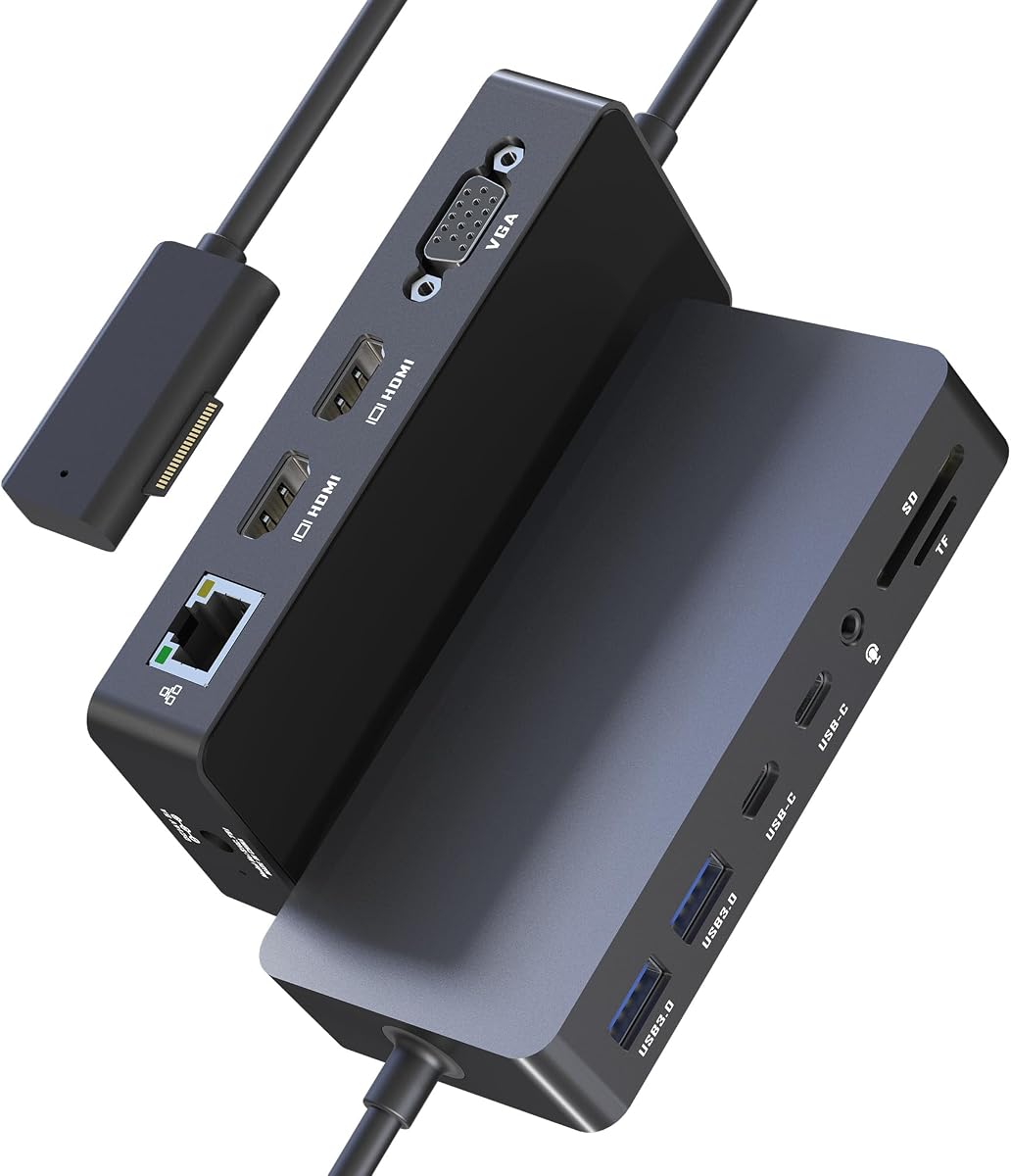
This 12-in-1 Surface Docking Station provides extensive connectivity options including triple display support for enhanced productivity. With a rating of 4.1 stars, it connects via Surface Connection technology for seamless integration.
We may earn a commission when you buy through this link, at no additional cost to you.
It offers two HDMI ports supporting 4K at 30Hz and a VGA port for 1080P at 60Hz. The integrated SD and TF card slots allow rapid photo transfers up to 104MB/s for creative professionals.
While the VGA port is older technology, it adds flexibility for legacy projectors. The 100Mbps Ethernet ensures stable network downloads, and the 3.5mm jack supports your wired headphones comfortably.
This hub is best for users needing multiple screens and card readers. If you have older displays and a Surface device, this model offers a solid all-in-one solution for your workspace.
Extend your workflow with HDMI and VGA ports that boost efficiency three times.
USB C and USB A ports deliver 5Gbps speeds for rapid file transfers instantly.
We may earn a commission when you buy through this link, at no additional cost to you.
This Surface Docking Station boasts a high 4.8 rating and delivers 72W power to charge devices while running peripherals simultaneously. It is designed for creative professionals who need robust workstations on the go.
We may earn a commission when you buy through this link, at no additional cost to you.
With two HDMI ports and one VGA, it supports triple displays for massive screen real estate. The 5Gbps data transfer speed eliminates wait times when moving large design files or 4K footage quickly.
The 100Mbps Ethernet port ensures lag-free calls and stable downloads. The minimalist design pairs seamlessly with your Surface laptop reducing desk clutter while maximizing functionality efficiently.
Ideal for remote workers needing a reliable setup at home or office. This dock ensures plug-and-play connectivity without driver headaches, making it a top pick for efficient mobile professionals daily.
Transform your device into a robust workstation with HDMI and VGA ports for multitasking.
Lag-free calls and stable internet ensure seamless connectivity for hybrid work.
We may earn a commission when you buy through this link, at no additional cost to you.
This dock transforms your Surface into a powerhouse workstation with dual 4K HDMI and a VGA port for triple-screen setups. Rated 4.2 stars, it consolidates all your needs into one all-in-one dock.
We may earn a commission when you buy through this link, at no additional cost to you.
It supports 4K at 30Hz for crystal-clear viewing and a 72W charging capability keeps your laptop running. The SD and TF slots allow photographers to access photos directly at speeds up to 104MB/s.
Universal compatibility ensures it works with Surface Pro 3 through 12 and various Laptop models. The 100Mbps Ethernet guarantees stable connections for video conferences and uninterrupted streaming services.
Choose this if you need triple screen capability without breaking the bank. It is perfect for creatives who require high-resolution outputs and fast data access for their daily projects.
Maximize multitasking with dual 4K and one VGA port for extended viewing.
Say goodbye to your original charger with fast charging that keeps you powered.
We may earn a commission when you buy through this link, at no additional cost to you.
The NEW Microsoft Surface Dock 2 turns your Surface into a desktop PC with next-gen ports and dual 4K support at 60Hz. Rated 4.5 stars, it features a 199W power supply for ample power.
We may earn a commission when you buy through this link, at no additional cost to you.
It offers two front-facing and two rear-facing USB-C ports plus two USB-A ports. The longer Surface Connect cable at 80 cm provides more flexibility in desk placement options.
Support for security locks via Kensington compatible slots adds safety for office environments. The 1 gigabit Ethernet ensures fast network speeds for heavy file transfers and media streaming.
This is the premium choice for those needing high refresh rate displays and robust power. It suits power users who demand the fastest performance and latest connectivity standards available.
Enjoy smooth visuals with dual monitors running at 60Hz for a seamless experience.
Connect with USB-C and USB-A ports for all your modern and legacy devices.
We may earn a commission when you buy through this link, at no additional cost to you.
This Surface Dock 2 variant offers immersive visuals with dual 4K monitors at 60Hz and includes a 199W power supply. Rated 4.8 stars, it is compatible with a wide range of Surface devices.
We may earn a commission when you buy through this link, at no additional cost to you.
The versatile port options include two front USB-C and two rear USB-C gen 2 ports. A 3.5mm audio jack supports your headphones while the gigabit Ethernet ensures stable network performance.
The Kensington-compatible security lock support protects your investment in public spaces. It works flawlessly with Surface Pro 4 through 7 and Surface Book models for versatile use.
Ideal for users seeking reliability and high resolution displays. This dock delivers seamless connectivity for daily tasks making it a smart choice for professional work environments.
Quickly convert your Surface into a desktop PC with next-gen ports.
Enjoy dual 4K monitors at 60Hz for high-resolution visuals.
We may earn a commission when you buy through this link, at no additional cost to you.
This dock features dual 4K at 60Hz HDMI outputs and supports MST for triple display setups. Rated 4.3 stars, it transforms your device into a desktop powerhouse with essential ports.
We may earn a commission when you buy through this link, at no additional cost to you.
The 1000Mbps Gigabit Ethernet ensures smooth video conferencing and fast downloads. With dedicated 100W DC charging, it guarantees your laptop stays charged while peripherals run simultaneously.
Integrated SD and TF card slots support up to 2TB for rapid photo offloading. The USB-C and USB-A ports provide 5Gbps data transfer speeds for massive files quickly.
Perfect for video editors and designers needing screen real estate and data speed. This dock bridges the gap between mobile tablet and high-performance desktop effectively.
Elevate visual experience with dual 4K at 60Hz and VGA outputs.
Move massive files in seconds with 5Gbps USB speeds.
We may earn a commission when you buy through this link, at no additional cost to you.
This renewed Microsoft Surface Dock 2 offers dual 4K at 60Hz and includes an original 199W power supply. Rated 4.7 stars, it supports 10Gbps data transfer and multi-screen connectivity.
We may earn a commission when you buy through this link, at no additional cost to you.
It features two USB-C ports and two USB-A ports for high-efficiency expansion. The 10Gbps data transfer ensures rapid file handling and stable network performance for streaming.
Rigorous durability testing ensures consistent performance with integrated thermal management. The included USB-C cable adds convenience for setup across various Surface devices efficiently.
Choose this renewed option for premium features at a lower cost. It is perfect for those wanting top performance without the full price of a new unit.
Deliver 199W Power Delivery charging and 10Gbps data transfer.
Tested for durability with integrated thermal management for consistent results.
We may earn a commission when you buy through this link, at no additional cost to you.
This docking station uses surface connection technology with two Mini DP ports to connect monitors. Rated 4.2 stars, it features high-speed transmission of video audio and data for a tidy desktop.
We may earn a commission when you buy through this link, at no additional cost to you.
It includes four USB 3.0 ports and a gigabit network card port. The resolution for single DP is 4K at 60Hz, while dual output supports 4K at 30Hz and 1080P at 60Hz.
Compatible with Surface Pro 3 through 8 and various Laptop models. The magnetic surface connection cable simplifies setup connecting peripherals with ease effectively.
Ideal for users with older Surface devices needing reliable expansion. It offers a stable connection ensuring your internet speed and peripheral needs are met.
High-speed transmission of video and audio keeps your desktop tidy.
Connect USB devices and audio gear with 4x USB 3.0 ports.
We may earn a commission when you buy through this link, at no additional cost to you.
Selecting the right dock requires evaluating ports, charging power, and display support to match your specific workflow needs.
Check whether the dock supports dual or triple monitors at the resolution you need. Some models handle 4K at 60Hz for smooth visuals while others are limited to 30Hz.
Ensure the dock can drive your external screens without flickering or performance drops.
Look for docks that offer adequate wattage to charge your Surface while running peripherals. Higher wattage models like 199W ensure your device stays powered during intensive tasks.
Adequate charging ensures you do not lose battery life when connected to the dock.
Evaluate the number and types of USB ports available for your peripherals. Ensure you have enough USB-C and USB-A ports for your specific devices.
Select a dock that balances modern and legacy ports to match your current setup.
Consider whether you need a gigabit Ethernet port for stable network connections. A 3.5mm audio jack is also essential for connecting headphones or speakers directly.
These features ensure smooth communication and media playback during your workday.
High-speed data transfer is critical if you move large files often. Look for Thunderbolt or USB 3.0 support that offers rapid synchronization.
Fast transfer speeds save you time when working with large design files or media.
Durable docks with thermal management ensure consistent performance over time. Consider the physical design and how it fits on your desk.
A well-built dock reduces wear and tear from frequent plugging and unplugging.
Verify that the dock works with your specific Surface Pro or Laptop model. Some docks are optimized for Surface Connect while others require USB-C.
Always check compatibility lists before purchasing to avoid connection issues.
Compare the price against the features you need to find the best value. Higher cost models may offer better performance but standard models often suffice.
Choose a dock that meets your essential needs without unnecessary extra costs.
Connect the power supply to the dock first and plug your Surface device into the appropriate port. This ensures stable charging and prevents power fluctuations during operation.
Attach your peripherals such as monitors keyboards and mice before turning on your device. Most docks are plug and play but restarting your laptop may help detect new hardware.
Keep the dock in a well-ventilated area to prevent overheating. Avoid exposing the cables to heavy traffic areas to reduce wear and tear over time.
Not all models support 4K at 60Hz. Some entry-level docks only support 4K at 30Hz or lower resolutions. Always check the specific display capabilities listed in the product details before purchasing to ensure compatibility with your monitor.
Yes many docking stations include sufficient power delivery to charge your Surface Pro while driving external monitors. Look for models with higher wattage power supplies like 199W or 72W to ensure stable charging and performance.
Surface Connect docks use a proprietary magnetic connector designed specifically for Microsoft devices. USB-C docks use standard USB-C ports which may be more versatile but might not support all features like charging on older models.
Most Surface docking stations are optimized for Windows and Microsoft Surface devices. While some USB-C docks may work with macOS, features like charging and display support may be limited or require additional adapters.
Many modern docks are plug and play and do not require additional drivers. However installing the latest Windows updates and checking the manufacturer website ensures optimal performance and stability for all connected devices.
Check the product compatibility list to confirm support for your specific Surface Pro or Laptop model. Look for mentions of Surface Connect ports or USB-C compatibility that match your device's output options.
We have highlighted the top picks ranging from the Microsoft Surface Thunderbolt 4 Docking Station to versatile 12-in-1 hubs. Each model offers unique strengths for different productivity and budget needs.
Prioritize charging power and display support to ensure your dock meets your daily workflow demands. Consider data speeds and port variety for the best long-term value.
Remember that prices and availability fluctuate so verify current listings before finalizing your purchase. This guide aims to simplify your choice so you can expand your workspace efficiently.