
Logitech G F310 Wired Gamepad Controller Console
4.4Editor score
Budget-friendly price point
Familiar Xbox 360 layout
Six-foot cord length
This guide compares the top fightpads for PC including wired and wireless options for fighting games across platforms like PS5 and Xbox.
Choosing the right fightpad for PC can significantly improve your gaming experience during intense fighting matches. A quality controller offers precision inputs and durability essential for competitive play.
We compared ten top-rated options based on compatibility layout design, and user feedback. Each pick highlights key strengths to help you find the best fit for your setup.
Every section details what makes each controller stand out along with potential drawbacks to consider. Prices and availability may change so verify current listings before making a final decision.
4.4Editor score

4.4Editor score

4.2Editor score
The following table provides a side-by-side overview of all ten fightpads selected for this guide. Use this to quickly compare key specifications and features.



The HORI Fighting Commander OCTA stands out as a top choice for serious PC fighting game enthusiasts. With a solid 4.1 rating from users it delivers tournament grade performance in a compact form factor.
We may earn a commission when you buy through this link, at no additional cost to you.
Its key strength lies in the Micro Switch buttons and Short Throw Analog Stick which ensure fast and accurate inputs during intense matches. The adjustable D-Pad sensitivity allows players to tailor the controller to their specific playstyle preferences.
While the wired connection may limit mobility for some it ensures zero lag which is critical for competitive play. The need for a companion app to customize settings adds a slight layer of complexity but offers valuable flexibility.
Players seeking a reliable and officially licensed controller that works across PS4 PS5 and PC should strongly consider this model. It offers a balanced mix of durability precision and customization for serious gamers.
The Micro Switch buttons provide tactile feedback and rapid actuation ideal for executing complex combos in fighting titles.
Adjustable D-Pad settings and companion app support let users fine-tune the controller to match their exact gameplay needs.
We may earn a commission when you buy through this link, at no additional cost to you.
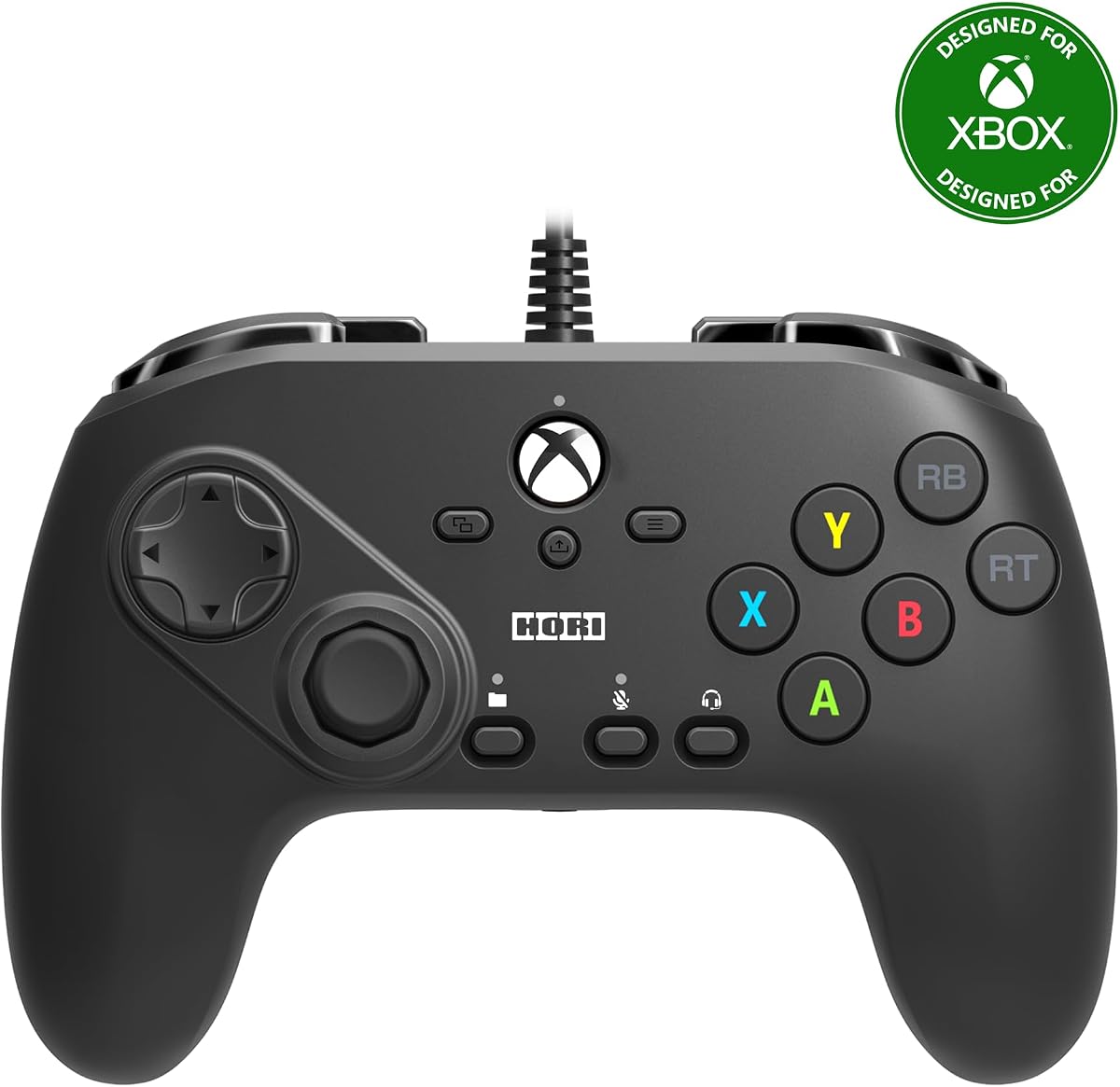
This HORI model is tailored for Xbox Series X|S and One users but also works well on PC. Its design prioritizes fighting game mechanics with a six-button layout and micro Switch buttons for durability.
We may earn a commission when you buy through this link, at no additional cost to you.
The ability to save and switch between four profiles using the companion app is a major advantage for players who engage in multiple games. This feature allows quick transitions between different character setups or game styles.
However the lower user rating suggests some inconsistencies in quality or performance compared to other models. Users might find the PC experience slightly less optimized than the Xbox specific features.
Xbox gamers looking for an official licensed fightpad that supports profile switching will find this unit useful. It is a solid option for console owners who also play on Windows PCs.
The companion app allows saving up to four profiles enabling quick switches during gameplay without needing to reconfigure manually.
Designed specifically for fighting games the layout and button response are tuned for fast inputs and accurate directional commands.
We may earn a commission when you buy through this link, at no additional cost to you.
The 8Bitdo M30 offers a classic design reminiscent of retro controllers while providing modern connectivity through USB-C. It is officially licensed for Xbox but works seamlessly on Windows PCs too.
We may earn a commission when you buy through this link, at no additional cost to you.
Its virtually lag-free connection makes it suitable for fast-paced fighting games where timing is critical. The inclusion of the 8BitDo Ultimate Software allows for deeper customization of buttons and profiles.
The custom profile switch button lets users change configurations on the fly which is helpful during multiplayer sessions or testing different setups. The 3.5mm audio jack adds convenience for headset users.
Retro gaming fans and those who prefer a simpler controller layout will appreciate this model. It balances nostalgia with modern performance features essential for PC fighting game players.
The controller mimics classic layouts but includes modern USB-C connectivity for low latency performance on PC.
Support for 8BitDo Ultimate Software and a custom profile switch gives users extensive control over button mapping and settings.
We may earn a commission when you buy through this link, at no additional cost to you.
The DOYOKY Leverless Controller is a standout for users who demand deep customization and cross-platform compatibility. Its built-in OLED display shows settings instantly without needing to open menus.
We may earn a commission when you buy through this link, at no additional cost to you.
Hot-swappable switches allow users to change the tactile feel of the controller without soldering which is a significant plus for maintenance and personalization. The reinforced USB-C port ensures durability over time.
Customization happens via a web browser making it accessible but potentially confusing for non-technical users. The SOCD clean modes help comply with tournament rules which is essential for competitive play.
Players who want a highly adaptable controller for PC and other platforms will find this model invaluable. Its unique features make it a top contender for those seeking specific control configurations.
The OLED screen displays current input mode and SOCD settings so you can verify settings during gameplay without stopping.
Included spare switches and a puller let you swap button feels quickly without needing tools or soldering skills.
We may earn a commission when you buy through this link, at no additional cost to you.
The Akko FUNBOX leverless controller uses next-generation Hall Effect switches that eliminate physical wear for long-term durability. Its Rapid Trigger feature allows for adjustable actuation points which improves reaction times.
We may earn a commission when you buy through this link, at no additional cost to you.
A full-color LCD screen serves as a control hub letting you change settings and animations without installing drivers. The intuitive aluminum dial simplifies menu navigation which enhances the overall user experience.
While the price is higher than standard controllers the advanced features justify the cost for serious competitors. The Tournament Lock mode ensures compliance with official rules which is vital for e-sports players.
Competitive gamers who value precision and long-term reliability will appreciate this controller's innovative technology. It is a premium choice for those looking to maximize performance in fighting games.
Contactless magnetic switches avoid friction and debris buildup ensuring the controller maintains performance over years of use.
Settings can be adjusted through a browser driver allowing deep customization without the need for complex software installations.
We may earn a commission when you buy through this link, at no additional cost to you.
This version of the HORI Fighting Commander OCTA is specifically designed for PC users and Tekken enthusiasts. It retains the core tournament grade features of the standard model with a focus on accuracy.
We may earn a commission when you buy through this link, at no additional cost to you.
The analog slide pad is useful for navigating game lobbies and menus which enhances the overall gaming experience. Microswitch buttons ensure responsive inputs that are crucial for executing precise combos in Tekken.
While it shares many features with other HORI models the specific licensing and design tweaks make it ideal for fans of the Tekken series. However it may not offer unique benefits for other fighting games.
Tekken players on PC looking for a licensed controller tailored to the game will find this model appealing. It combines reliable performance with brand-specific features that appeal to dedicated fans.
The controller is optimized for Tekken 8 with layout and features that align well with the game mechanics and controls.
An analog slide pad adds utility for navigating menus which is a common task during online matches or tournaments.
We may earn a commission when you buy through this link, at no additional cost to you.
For users prioritizing cable-free play this wireless OCTA Pro offers the same tournament grade performance as the wired version. It works with PS5 and Windows 11/10 ensuring broad compatibility across modern platforms.
We may earn a commission when you buy through this link, at no additional cost to you.
The swappable D-pad allows users to switch between different styles which can adapt the controller to different games or personal preferences. Programmable rear buttons add versatility for executing complex moves.
Wireless connectivity may introduce slight latency for highly competitive scenarios though modern tech minimizes this. The included USB-C charging cable with a lock feature helps prevent accidental disconnects during intense sessions.
Players who value freedom of movement and want a high-quality licensed controller will benefit from this model. It is a strong choice for those who prefer wireless setups without sacrificing performance.
Wireless capability reduces cable clutter and allows for a more comfortable setup during long gaming sessions at a distance.
Swappable D-pads let you choose the exact tactile feel and layout that suits your specific fighting game preferences.
We may earn a commission when you buy through this link, at no additional cost to you.
This renewed version of the HORI Fighting Commander OCTA provides an affordable entry point into tournament grade controllers. It retains the core features of the new model including the eight-button layout and programmable macros.
We may earn a commission when you buy through this link, at no additional cost to you.
Buying renewed can save money but may involve some variability in condition which is a factor to consider before purchasing. The controller still works across PS5 PS4 and PC making it versatile for multi-platform users.
The inclusion of official Sony licensing ensures compatibility and quality standards are met even for renewed units. Users should inspect the item upon arrival to ensure it meets their expectations for performance.
Budget-conscious gamers looking for a reliable controller without the full price tag might find this option appealing. It offers a balance of cost savings and trusted brand quality for casual and semi-competitive players.
Renewed items allow access to high-end controllers at a lower price point while maintaining the original features and design.
Compatible with multiple consoles and PC this controller adapts easily to different gaming setups and devices.
We may earn a commission when you buy through this link, at no additional cost to you.
The Logitech G F310 is a budget-friendly option that remains popular for its simplicity and reliability. It works with a wide range of PC titles from classics to modern releases making it versatile for various games.
We may earn a commission when you buy through this link, at no additional cost to you.
Profiler software allows users to map keyboard and mouse commands to the gamepad which expands its utility for games without native controller support. The familiar Xbox 360 layout means no learning curve is required.
The floating D-pad design offers responsive directional changes which is beneficial for fighting games. A six-foot cord provides enough slack to play comfortably without needing to sit close to the monitor.
Casual players or those on a tight budget will appreciate this controller's value and ease of use. It is a solid choice for entry-level gaming where high-end features are not a priority.
This controller delivers reliable inputs at a low price point making it accessible for gamers who do not want to invest heavily.
Support for old and new titles ensures that you can use this pad across many years of PC gaming experiences.
We may earn a commission when you buy through this link, at no additional cost to you.
The HORI Fighting Stick Mini offers a compact take on the traditional arcade stick which is appealing for players who prefer a joystick over a fightpad. Its small form factor makes it highly portable for LAN parties.
We may earn a commission when you buy through this link, at no additional cost to you.
It features a classic 8-button layout and a durable joystick which ensures consistent inputs during intense matches. The eight-foot cable provides flexibility for setup on various desks or surfaces.
Switching to a stick requires some adjustment for those accustomed to pads but the benefits of precise directional inputs are significant for many fighters. The official licensing guarantees compatibility with PS5 PS4 and PC.
Players looking for a portable and affordable arcade stick will find this model effective. It bridges the gap between full-sized sticks and standard pads with a focus on mobility and ease of use.
The compact design allows you to carry the stick easily to events while still retaining the feel of a traditional arcade cabinet.
The 8-button layout mirrors standard arcade standards helping players transition seamlessly from machine to home console.
We may earn a commission when you buy through this link, at no additional cost to you.
Selecting the right fightpad involves considering several key factors to ensure it meets your specific gaming needs and setup.
Ensure the controller supports your specific operating system and console models. Many controllers are designed for PlayStation or Xbox and may need extra steps to work on PC.
Always check for official licensing to guarantee smooth integration with your games and system settings.
Wired controllers typically offer zero latency which is critical for competitive fighting games. They also eliminate the need for frequent charging or battery management.
Wireless options provide freedom of movement but may introduce slight lag or battery concerns. Choose based on your priority between performance and convenience.
Standard fightpads feature six buttons which are common for fighting games. Some models offer eight buttons or leverless designs which provide different tactile experiences.
Consider your preference for traditional layouts versus specialized designs like levers or sticks that mimic arcade cabinets.
Materials like Micro Switches and reinforced ports extend the lifespan of the controller under heavy use. Look for robust build quality to withstand intense gaming sessions.
High-quality materials ensure the controller remains reliable over time which is important for long-term investment.
Features like adjustable D-Pad sensitivity and hot-swappable switches allow you to tailor the controller to your playstyle. Companion apps or browser tools can simplify these adjustments.
More customization options provide flexibility for different games and personal preferences enhancing the overall experience.
Fightpads range from affordable budget options to premium models with advanced features. Determine how much you are willing to spend based on your commitment level to fighting games.
Higher prices often correlate with better durability and features but budget options can still offer excellent performance for casual players.
Some controllers include Tournament Lock modes or specific compliance features required for official competitions. Check if the model supports SOCD cleaning rules if you plan to compete.
Tournament-ready features ensure your controller meets standards for competitive play which can be crucial for serious gamers.
Reading user feedback helps identify real-world performance and potential issues that may not be obvious from product descriptions. Look for consistent praise or common complaints across multiple reviews.
Real user experiences provide valuable insights into reliability and ease of use over extended periods.
Connect your controller via USB or pair wirelessly following the manufacturer instructions. Install any required drivers or companion apps to enable full functionality and customization.
Regularly clean the buttons and D-Pad with a soft cloth to prevent dust buildup. Avoid exposing the controller to liquids or extreme temperatures that could damage internal components.
Store the controller in a dry safe place when not in use to prevent wear and tear. If using a wired model keep the cable coiled loosely to avoid internal wire damage.
Most fightpads work with games that support game controllers but some older titles may need additional mapping software. Using tools like XInput wrappers can enable compatibility with games designed for keyboards or mice.
A fightpad is a handheld controller with buttons and directional inputs while a joystick uses a physical stick for movement. Joysticks often mimic arcade cabinets which some players prefer for specific games.
Yes many PS fightpads are compatible with PC especially if they have USB connectivity. Officially licensed models usually include drivers or support for Windows systems.
Wireless models have improved significantly but wired connections still offer the lowest latency for competitive scenarios. Choose wireless if mobility is a priority and your device supports low-latency Bluetooth.
Visit the manufacturer website to find the latest firmware and download tools. Connect the controller via USB and follow the on-screen instructions to complete the update process.
Yes certain models like the HORI Fighting Commander OCTA TEKKEN Edition are tailored for Tekken. These often include specific features or layouts optimized for the game mechanics.
Our guide highlights ten distinct fightpads catering to various preferences from budget picks to premium customization options. Whether you prefer wireless convenience or wired precision there is a model suited to your needs.
Prioritize factors like compatibility durability and button layout to find a controller that enhances your gameplay experience. Consider whether you need tournament-ready features or just casual gaming comfort.
Prices and stock fluctuate so always verify current listings before purchasing. We hope this comparison helps you select the perfect fightpad for your PC setup.