
Canon PIXMA TR7120
4.3Editor score
Compact stylish design
Affordable ink system
Reliable wireless setup
Finding the right all in one printer for MacBook Air requires careful consideration of wireless compatibility, print quality, and overall design. Mac users often need devices that integrate smoothly with AirPrint and support professional document needs without compromising on aesthetics or performance.
We have evaluated ten top-rated models based on connectivity features, print speeds, and user feedback to create this comprehensive comparison. Each device offers unique benefits ranging from cost-effective ink systems to advanced scanning capabilities tailored for home office environments.
Every recommendation highlights key strengths and potential trade-offs to help you make an informed decision for your specific workflow. Please note that availability and pricing may change frequently, so always verify current details before finalizing your purchase online.
4.3Editor score

3.9Editor score

4.3Editor score
As an Amazon Associate we earn from qualifying purchases.
This side-by-side comparison highlights the core specifications and capabilities of each selected printer model. We focus on essential metrics such as print speeds, connectivity options, paper handling, and unique features that matter most to Mac users.





The HP OfficeJet Pro 8125 stands out as a versatile all in one printer for MacBook Air users needing professional output. Its high speed and smart features make it ideal for busy home offices producing reports and presentations regularly.
We may earn a commission when you buy through this link, at no additional cost to you.
Key strengths include its fast print speeds reaching up to twenty pages per minute for black documents. The large touchscreen simplifies navigation while the dual-band Wi-Fi ensures stable connections for wireless printing from Mac devices.
While ink costs can be high without the Instant Ink service, the included trial helps offset initial expenses. Some users may find photo quality less vibrant compared to dedicated photo printers though text remains sharp.
This model suits professionals who prioritize speed and reliability over premium photo features. The AI formatting tools further enhance usability by optimizing layouts automatically for cleaner printouts.
HP AI removes unwanted content from web pages and emails ensuring prints look professional without manual adjustments.
Made with over 45 percent recycled plastic content this printer supports eco-friendly practices without sacrificing performance.
We may earn a commission when you buy through this link, at no additional cost to you.
The Epson EcoTank ET-2903 redefines value with enough ink to last up to three years right out of the box. It is a perfect all in one printer for MacBook Air users who print frequently and want to avoid recurring cartridge costs.
We may earn a commission when you buy through this link, at no additional cost to you.
Its supertank system eliminates cartridge waste while the uniquely keyed bottles prevent messy refills. Photo prints benefit from high resolution making it suitable for creative projects alongside standard documents.
Although the initial price is higher than cartridge models the long-term savings are substantial. Print speeds are adequate for home use but may feel slow compared to laser alternatives.
Buyers seeking low-cost-per-page printing and high-quality photos will find this model ideal. The included features like AirPrint ensure seamless integration with Apple ecosystems.
Each replacement ink bottle set equals about eighty cartridges significantly reducing long-term expenses for frequent printing needs.
Engineered with a permanent printhead this printer delivers consistent reliability with a duty cycle robust for daily use.
We may earn a commission when you buy through this link, at no additional cost to you.
The Canon PIXMA TR7120 offers exceptional value for budget-conscious users needing a reliable all in one printer for MacBook Air. Its compact design and vibrant output make it a top choice for home offices and hybrid workers.
We may earn a commission when you buy through this link, at no additional cost to you.
Features like automatic two-sided printing and a hybrid ink system keep operational costs low. The OLED display provides clear status updates while dual-band Wi-Fi ensures stable connectivity across networks.
While the input tray holds fewer sheets than larger models it suits light to moderate printing tasks well. Photo quality is impressive for general use though not comparable to dedicated photo printers.
This printer is perfect for those prioritizing affordability without sacrificing essential features. Mobile printing via AirPrint and the Canon PRINT app enhances convenience for Mac users.
Dual-band Wi-Fi ensures stable and consistent connections preventing dropouts during important printing jobs.
Print documents and photos up to 8.5 by 11 inches with or without borders for creative and professional needs.
We may earn a commission when you buy through this link, at no additional cost to you.
The Canon PIXMA TS6520 is a versatile compact all in one printer for MacBook Air users seeking simple functionality. Its hybrid ink system delivers sharp text and vivid colors making it suitable for everyday documents and photos.
We may earn a commission when you buy through this link, at no additional cost to you.
Easy setup allows quick connection to Mac devices while the OLED display shows ink levels clearly. Automatic two-sided printing helps save paper costs over time without manual intervention.
The lack of an automatic document feeder limits efficiency for scanning multi-page documents. However this trade-off keeps the unit smaller and more affordable for home environments.
Ideal for casual users who value design and ease of use. Mobile printing options ensure you can print directly from tablets or smartphones easily.
Print directly from smartphones or tablets using the Canon PRINT App and Apple AirPrint services.
Designed to fit seamlessly into any workspace its small footprint complements your environment without sacrificing functionality.
We may earn a commission when you buy through this link, at no additional cost to you.
The Brother Work Smart 1360 delivers practical features for home office printing as an all in one printer for MacBook Air. It balances speed and convenience with cloud connectivity options for modern workflows.
We may earn a commission when you buy through this link, at no additional cost to you.
Print speeds reach up to sixteen pages per minute allowing quick completion of tasks. The color display simplifies menu navigation while cloud support enables easy printing from popular storage services.
The paper tray holds a generous amount reducing the need for frequent refills during busy periods. However the single-sided document feeder handles fewer pages which may slow down scanning tasks.
This model suits users needing reliable everyday printing without complex setup. Mobile apps allow remote monitoring of ink levels to prevent unexpected outages.
Print from and scan to popular cloud apps like Google Drive and Dropbox directly from the display.
Monitor ink usage with Page Gauge to help ensure you do not run out during important tasks.
We may earn a commission when you buy through this link, at no additional cost to you.
The HP Envy 6155 combines style and function as an all in one printer for MacBook Air designed for home use. Its True-to-Screen tech ensures photos and documents look as vibrant on paper as on your display.
We may earn a commission when you buy through this link, at no additional cost to you.
Features like AI formatting optimize web pages and emails for cleaner prints without wasted paper. The large touchscreen makes navigation smooth while dual-band Wi-Fi maintains stable connections effortlessly.
Print speeds are moderate which is acceptable for occasional home use but slower for high-volume tasks. The Instant Ink trial helps reduce initial costs though subscription fees apply later.
Best suited for users who value aesthetics and photo quality. The sustainable design using recycled plastic content appeals to eco-conscious buyers.
Print documents and photos that look as vibrant as they do on your screen with HPs P3 technology.
Made with at least 60 percent recycled plastic content this model supports environmental sustainability goals.
We may earn a commission when you buy through this link, at no additional cost to you.
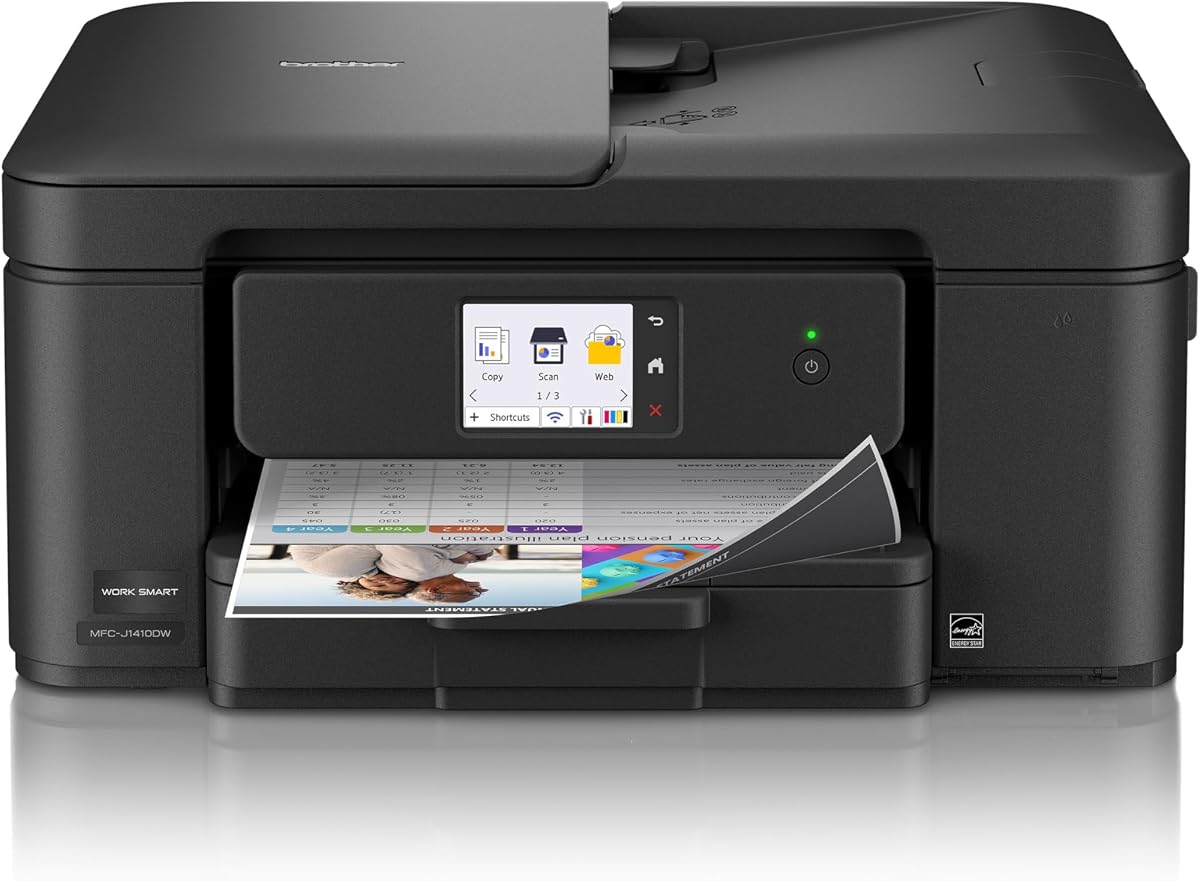
The Brother Work Smart 1410 focuses on productivity for small offices needing an all in one printer for MacBook Air. Its fast speeds and cloud features streamline daily document handling efficiently.
We may earn a commission when you buy through this link, at no additional cost to you.
Automatic duplex printing saves paper while the large touchscreen provides clear control over settings. Cloud app integration allows easy scanning to services like Dropbox and OneDrive without extra software.
While the subscription trial offers added benefits users should note it may end after a few months. Print quality is reliable for text though photo reproduction remains standard.
Ideal for small offices needing balanced performance and connectivity. Mobile apps help manage tasks remotely ensuring workflows stay uninterrupted.
Seamless integration with the cloud allows printing and scanning to popular services directly from the display.
Use the Brother Mobile Connect app for easy menu navigation and device management from your phone.
We may earn a commission when you buy through this link, at no additional cost to you.
The HP OfficeJet 3830 brings voice capabilities to home printing as an all in one printer for MacBook Air. Its compatibility with Alexa allows hands-free ordering and printing which is convenient for busy households.
We may earn a commission when you buy through this link, at no additional cost to you.
AirPrint support ensures easy connection to Mac devices without installing extra drivers. The compact design fits well in small spaces while the quiet mode minimizes noise during operation.
Being an older model it lacks some advanced smart features found in newer units. Print speeds are standard which works for occasional use but may feel slow for large batches.
Recommended for users valuing voice control and simplicity. Instant Ink readiness helps manage supplies automatically without manual tracking.
Print from anywhere using your smartphone or tablet with the free HP ePrint app and Alexa support.
Optional quiet mode helps keep noise to a minimum ensuring peaceful work environments.
We may earn a commission when you buy through this link, at no additional cost to you.
The Canon PIXMA TR8620a offers comprehensive features as an all in one printer for MacBook Air including fax capabilities. Its high capacity and voice support make it suitable for home offices needing robust document handling.
We may earn a commission when you buy through this link, at no additional cost to you.
Voice commands enable smart reorders for ink supplies without subscriptions. Auto two-sided printing and dual feeds support efficient workflows while the SD slot allows direct image printing from cameras.
The larger footprint may require more desk space than compact models. While priced higher the added features like fax justify the cost for specific business needs.
Best for users needing fax and large capacity in one unit. Alexa integration simplifies maintenance tasks significantly.
Alexa ensures you never have too much or too little ink supplies without needing a subscription.
Micro SD slot allows printing photos directly from camera cards for creative projects.
We may earn a commission when you buy through this link, at no additional cost to you.
The Canon PIXMA TR4720 provides simple functionality as an all in one printer for MacBook Air including fax capabilities. Its Energy Star rating ensures it remains power efficient during daily use at home.
We may earn a commission when you buy through this link, at no additional cost to you.
Mobile printing support allows convenient output from phones while the document feeder handles multi-page tasks easily. Alexa notifications help monitor ink levels effectively without manual checks.
Print speeds are slower than premium models which may delay large batch jobs. Photo quality remains basic but acceptable for general documents and school projects.
Ideal for budget-conscious users needing fax features. Low energy consumption and simple setup make it accessible for all skill levels.
ENERGY STAR certified this printer reduces energy use without impacting core performance.
Mobile printing and mobile scanning from smartphones ensures convenience for busy users.
We may earn a commission when you buy through this link, at no additional cost to you.
Choosing the right printer involves evaluating compatibility, speed, and cost features that matter most to your specific needs.
Ensure the printer supports AirPrint for seamless Mac integration without installing extra drivers. Dual-band Wi-Fi also provides stable connections for reliable wireless printing across devices.
Look for printers with AirPrint certification to guarantee easy setup and trouble-free communication with your MacBook.
Consider print speeds measured in pages per minute to match your workload volume. Higher speeds reduce wait times during busy periods while quality affects document clarity.
Prioritize models with fast speeds if you print large batches regularly for better efficiency and productivity.
Cartridge printers may have lower upfront costs but higher long-term expenses. Supertank systems offer better value for heavy users through refillable tanks that last years.
Calculate cost per page based on ink prices to choose the most economical option for your usage patterns.
A larger input tray reduces frequent refills which is convenient for high-volume printing tasks. Automatic document feeders streamline scanning multi-page documents without manual page handling.
Select a tray capacity that suits your monthly print volume to maintain smooth operations without interruptions.
Mobile apps allow printing directly from smartphones or tablets making remote work easier. Cloud app support enables scanning to services like Dropbox for seamless digital workflow integration.
Ensure the printer supports major mobile platforms like iOS and Android for versatile connectivity options.
Compact designs save desk space in small home offices while touchscreens simplify operation. Ensure the size fits your workspace comfortably without blocking other essential equipment.
Opt for a model with dimensions that align with your available space and aesthetic preferences.
Some printers include fax capabilities or voice command support for enhanced functionality. These features add value if you need to send faxes or control devices hands-free.
Decide if extra features like fax or voice control are necessary for your specific home office requirements.
Check warranty terms to ensure adequate protection against defects and malfunctions. Reliable customer support channels help resolve issues quickly if the printer needs maintenance.
Choose a brand known for strong support and clear warranty policies for peace of mind.
Start by downloading the latest printer drivers from the manufacturers official website for macOS compatibility. Connect the printer to your home Wi-Fi network using the setup menu on its display.
Regularly print test pages to prevent ink nozzles from clogging during periods of inactivity. Replace ink cartridges or refill tanks promptly when low-level notifications appear to avoid print defects.
Clean the exterior surfaces with a soft cloth and ensure proper ventilation to prevent overheating. Follow the manufacturers maintenance guidelines to extend the lifespan of your device efficiently.
Most modern wireless printers support AirPrint natively allowing connection without additional software. Check the specific model details to confirm AirPrint compatibility before purchasing for guaranteed ease of use.
Supertank models like the Epson EcoTank generally offer the lowest cost per page due to refillable tanks. Cartridge printers may have higher ongoing expenses despite lower initial purchase prices.
Yes most all in one printers allow scanning directly to a Mac via AirPrint or manufacturer software. This creates digital copies of documents efficiently for easy storage and sharing.
Dual-band Wi-Fi uses both 2.4GHz and 5GHz frequencies for stronger connectivity. This reduces connection issues and improves speed when printing from multiple devices simultaneously.
Instant Ink is optional but can reduce costs by delivering cartridges before they run out. You can still use regular cartridges though standard prices may be higher than subscription rates.
Connect your phone to the same Wi-Fi network and use the printer app or AirPrint. Select the photo file and choose print settings to output high-quality images without cables.
Duplex printing automatically prints on both sides of the paper saving ink and reducing waste. This feature is common in most reviewed models for efficient document production.
Some models include built-in fax capabilities while others focus on print scan and copy. Verify the feature list if you need fax functionality for your home office setup.
Selecting the ideal all in one printer for MacBook Air depends on your specific needs and budget. The top models offer robust connectivity and reliable performance suitable for diverse home office scenarios.
Prioritize features like AirPrint support and ink system type to ensure long-term satisfaction with your purchase. Matching speed and quality to your workflow will maximize the value you gain from the device.
Remember to check current availability and deals before buying as offers change frequently online. These recommendations provide a strong starting point for finding the perfect printer for your Mac.