
VSD Mini Macro Pad
4.1Editor score
6 Custom LCD Programmable Keys
Dual Side RGB Light Bars
Compact Premium Build Design
This guide compares the top macro pads for streaming to help creators choose the best deck for OBS, shortcuts, and efficient workflow control.
Streaming requires rapid control over audio, video, and chat. A macro pad for streaming offers dedicated keys to manage scenes and alerts without touching your keyboard. These devices streamline your workflow and keep you focused on engaging with your audience during live broadcasts.
We evaluated ten leading models based on customization, software support, and build quality. Each unit was analyzed for its ability to handle complex macros, integrate with popular platforms, and provide visual feedback. This list covers options ranging from compact layouts to advanced decks with rotary knobs and audio control.
Each review highlights specific strengths, trade-offs, and ideal use cases for every product. Ratings reflect user feedback and technical capabilities found in official specifications. Keep in mind that pricing and availability fluctuate frequently, so verify current details before making your final purchasing decision for your setup.
4.1Editor score

4.8Editor score

4.9Editor score
The following table provides a side-by-side overview of the top ten streaming macro pads. It highlights key specifications such as key count, interface type, and notable features to help you quickly identify the model that fits your specific streaming needs.





The Elgato Stream Deck MK.2 stands out as a leading controller for creators needing efficient scene management. With a rating of 4.8, it delivers consistent performance for streaming and productivity tasks. Its 15 LCD keys provide instant access to complex macros without relying on keyboard shortcuts.
We may earn a commission when you buy through this link, at no additional cost to you.
This device excels in its visual feedback system, confirming every command execution immediately. Users can trigger single or multiple actions like launching social posts or adjusting audio levels with a single tap. The extensive plugin library supports major platforms like OBS, Twitch, and Discord seamlessly.
While the price is higher than budget alternatives, the reliability and software support justify the investment. The lack of physical knobs might be a limitation for audio-heavy workflows, but touch sensitivity remains responsive. This trade-off ensures a sleek design that fits most desk setups comfortably.
Creators seeking a dependable tool to streamline their broadcast workflow will find this deck invaluable. It reduces cognitive load by handling repetitive tasks efficiently. For anyone serious about professional streaming or content creation, this model remains the top recommendation in the market.
Switch between OBS scenes instantly using customizable keys that trigger specific actions without requiring keyboard input.
Connect with a vast array of third-party plugins to control smart home devices, media players, and social media platforms directly.
We may earn a commission when you buy through this link, at no additional cost to you.
The VSD M18 Macro Pad offers a robust solution for users needing extensive control options. With 18 programmable keys, including 15 LCD visuals, it supports detailed workflow automation. Its rating of 4.4 reflects strong user satisfaction regarding customization and build quality.
We may earn a commission when you buy through this link, at no additional cost to you.
Users can assign single or multi-step sequences to keys for complex gaming combos or streaming commands. The USB sound board feature allows triggering audio effects directly through the device. Customizable icons help distinguish functions quickly during high-pressure live sessions.
However, Linux users face limitations as native plug-and-play support is unavailable. Firmware upgrades are necessary to unlock full RGB customization features. Despite these constraints, the device provides significant value for Windows and macOS users seeking a comprehensive macro controller.
Content creators and gamers looking for a device with high visual feedback will appreciate this model. The ability to save multiple scene presets ensures rapid transitions during broadcasts. It balances functionality and design well for those needing more than basic shortcut keys.
Access a large array of 18 keys to manage apps, media, and streaming tools without cluttering your main keyboard.
Use JPG, PNG, and GIF images on LCD keys to create intuitive and personalized shortcuts for different workflows.
We may earn a commission when you buy through this link, at no additional cost to you.
The Stream Dock N1 distinguishes itself with a vertical layout that conserves valuable desk space. With a high rating of 4.7, it satisfies users who prioritize efficiency and ergonomics. It supports three distinct modes, including calculator and numeric keypad functions beyond standard shortcuts.
We may earn a commission when you buy through this link, at no additional cost to you.
Users can drag and drop files or images to keys for quick access without manual searching. The device integrates seamlessly with productivity tools like Excel and Word, making it versatile for office workflows. A plugin marketplace further expands its capabilities for specialized applications.
Switching between modes requires familiarity with the interface, which might initially slow down usage. However, the flexibility offers significant benefits once configured correctly. The left-hand operation design is particularly helpful for users with specific ergonomic needs or limited desk space.
Anyone needing a compact yet powerful tool for multitasking will find this deck appealing. It reduces the need for external calculators or number pads while maintaining macro functionality. For creators balancing work and streaming, this model provides a unique blend of utility and convenience.
Save horizontal desk space by using a vertical design that keeps important controls within easy reach without clutter.
Switch to calculator or numeric keypad modes to handle calculations and data entry directly from the stream controller.
We may earn a commission when you buy through this link, at no additional cost to you.
The VSD M18 Deck focuses on automation with its one-touch multi-hotkey capability. Rated 4.5, it offers a streamlined approach to executing complex sequences in games or editing software. The surrounding RGB ring adds a visual layer to the user experience.
We may earn a commission when you buy through this link, at no additional cost to you.
Users can program sequential steps to run in a specific order, reducing the need for multiple key presses. It integrates smoothly with major streaming platforms and productivity apps. The build quality ensures stability during intense usage sessions or long editing marathons.
Some users may find the initial setup slightly complex due to software dependencies. Compatibility with older macOS versions is limited, which could restrict use for some Mac users. These factors are manageable for most but are worth noting before purchase.
Content creators needing precise control over repetitive tasks will benefit greatly from this deck. It allows for rapid execution of multi-step processes like starting streams or applying filters. For those valuing efficiency and visual feedback, this device is a strong contender.
Execute multiple actions in sequence with a single press to automate tasks that typically require several steps.
Utilize the RGB light ring to enhance your desktop ambiance and provide visual cues during operation.
We may earn a commission when you buy through this link, at no additional cost to you.
The VSD Mini Macro Pad delivers essential streaming functions at a budget-friendly price. With 6 customizable LCD keys, it offers a portable solution for managing shortcuts. Its rating of 4.1 indicates solid performance for entry-level users needing basic automation.
We may earn a commission when you buy through this link, at no additional cost to you.
The device supports one-touch switching of OBS scenes and app launches. Dual side RGB light bars add aesthetic value to desk setups. It is powered directly via USB, ensuring consistent power without batteries during extended sessions.
The limited number of keys restricts complex multi-key setups compared to larger models. Software installation is necessary for full functionality, which might deter plug-and-play enthusiasts. However, the value it provides makes it an accessible entry point for beginners.
Streamers or gamers needing a compact tool for core functions will find this model sufficient. It keeps costs low while maintaining essential macro capabilities. For those on a strict budget, this deck balances cost and utility effectively.
Save desk space with a mini design that fits easily into limited setups without sacrificing core macro functionality.
Enhance your desk ambiance with customizable RGB lighting that adds a modern look to your streaming station.
We may earn a commission when you buy through this link, at no additional cost to you.
The VSD N4 Pro stands out with integrated rotary knobs and a dedicated touch bar for precise control. Rated 4.4, it targets users needing more tactile interaction beyond standard keys. The USB sound deck feature enables audio control via commands sent to the computer.
We may earn a commission when you buy through this link, at no additional cost to you.
Users can adjust volume levels or switch audio tracks directly using the knobs. Unlimited independent scene presets allow quick transitions between different streaming configurations. The ergonomic stand ensures comfortable viewing angles during long sessions.
It does not include built-in speakers, relying on your system audio for sound output. The price is higher than basic macro pads, reflecting its advanced features. However, the control depth it offers justifies the cost for professionals.
Creators focused on audio mixing or detailed scene management will appreciate this hardware. The combination of keys and knobs provides flexibility that pure touch screens often lack. For those wanting studio-grade control in a compact form, this is a compelling choice.
Use rotary knobs to adjust volume or playback levels precisely without relying solely on on-screen sliders.
Customize RGB effects with media files to match your streaming mood or visual branding seamlessly.
We may earn a commission when you buy through this link, at no additional cost to you.
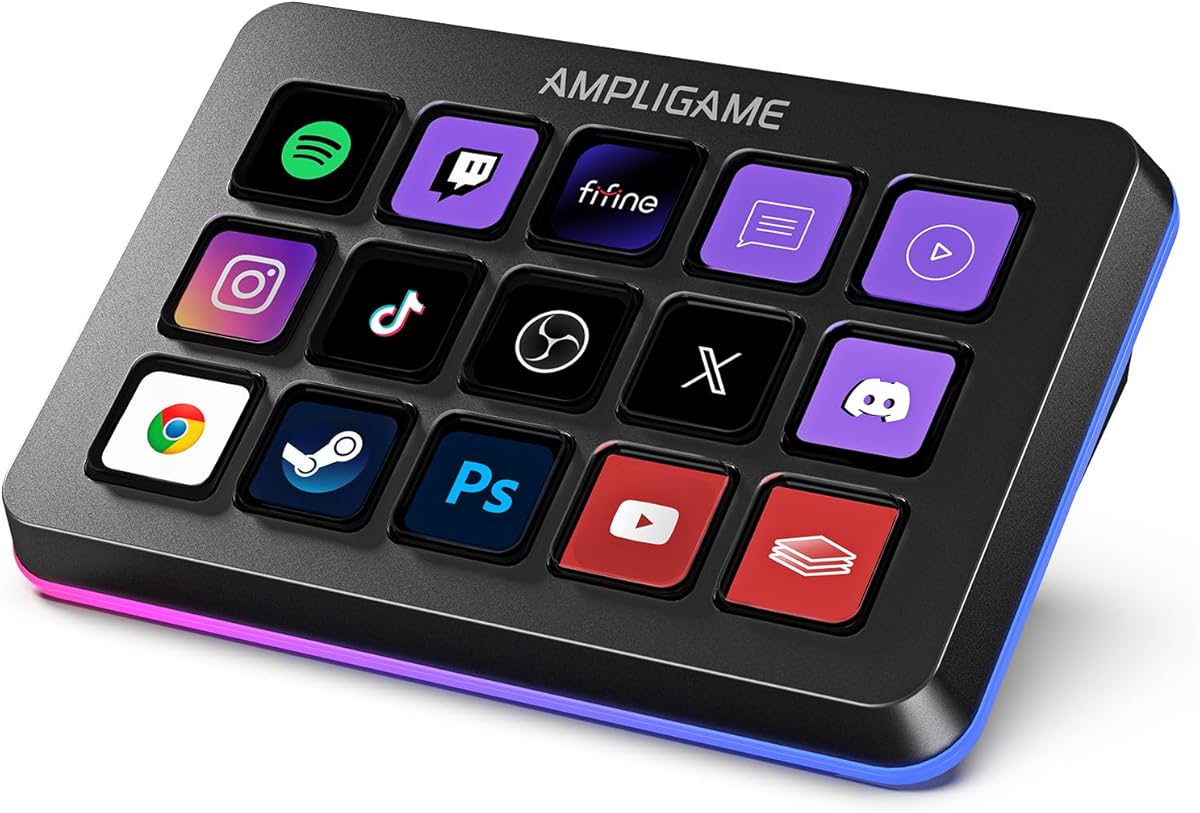
The fifine D6 RGB offers 15 programmable buttons designed for multi-tasking scenarios. Rated 4.6, it integrates well with major streaming software. Its visual keypad interface allows users to see application icons directly on the controller for easy identification.
We may earn a commission when you buy through this link, at no additional cost to you.
Users can drag and drop shortcuts to keys, streamlining complex workflows. The RGB lighting adds a vivid touch to gaming or streaming setups. A wide range of plugins supports integration with Twitch, YouTube, and other popular platforms.
Updates to firmware and software are necessary before initial use, which may add setup time. Some users report dependency on specific software for full functionality. Despite this, the device delivers strong performance for both gaming and productivity tasks.
Creators needing a flexible tool for managing diverse apps will find this deck valuable. The visual feedback reduces errors during live broadcasts. For those prioritizing an intuitive interface, this model offers a reliable balance of features and ease of use.
See application icons directly on the keypad to launch programs or switch scenes without opening multiple windows.
Use the RGB ring to match your personal preferences or gaming theme with various controllable modes.
We may earn a commission when you buy through this link, at no additional cost to you.
The TreasLin VSDinside N1 supports dynamic animated icons, setting it apart from static interfaces. Rated 4.4, it offers 18 keys for detailed control across different modes. This flexibility makes it suitable for creators needing varied workflows like daily or media modes.
We may earn a commission when you buy through this link, at no additional cost to you.
Users can switch between shortcut key, calculator, and numeric keypad modes effortlessly. The extensive plugin marketplace provides options for Discord, Twitch, and other apps. It supports drag and drop customization for quick setup of favorite functions.
Spotify integration requires a premium account, which may limit utility for some users. The reliance on specific software can be a barrier for those wanting plug-and-play simplicity. However, the feature set offers deep customization once configured.
Creators wanting visual flair with animated feedback will enjoy this deck. It transforms the interface into a vibrant workspace rather than a static board. For those seeking a mix of productivity and gaming utility, this model is a strong option.
Use animated icons to indicate active functions or provide dynamic cues during streaming sessions.
Switch modes to tailor the deck to specific needs like gaming, work, or calculation without changing hardware.
We may earn a commission when you buy through this link, at no additional cost to you.
The Streonor S15 includes status display panels for at-a-glance system information. Rated 4.6, it offers a unique blend of control and monitoring. Users can view weather, time, or CPU status directly on the deck during operation.
We may earn a commission when you buy through this link, at no additional cost to you.
This device supports scenario-based pages, allowing layouts for streaming, editing, or gaming. Action flows enable triggering multiple commands with one key press. It integrates well with standard tools like OBS and various editing software.
Linux users are not supported, limiting accessibility for some open-source environments. Users must uninstall conflicting software before setup to avoid issues. These constraints are minor for most but worth noting for Linux-specific setups.
Creators needing constant system monitoring while controlling macros will find this helpful. The display panels reduce the need to switch to system monitors constantly. For professional setups where performance metrics matter, this deck adds significant utility.
View real-time system data like CPU temperature or memory usage without leaving your streaming interface.
Create dedicated pages for different tasks like streaming or office work to keep controls organized and accessible.
We may earn a commission when you buy through this link, at no additional cost to you.
The Streonor S10 combines 10 LCD keys with knobs and a touchscreen for total control. Rated 4.9, it serves as a premium console for demanding workflows. The built-in audio mixer allows precise adjustments without relying on external hardware.
We may earn a commission when you buy through this link, at no additional cost to you.
Users can assign knobs to volume or playback while using keys for macros. The touchscreen offers additional navigation options for complex menus. It supports 100+ plugins for extensive integration with major apps.
Its higher price reflects the advanced hardware and features it offers. Software configuration is necessary to unlock full potential which might require setup time. However, the quality and control justify the investment for professionals.
Creators needing a central console for mixing, streaming, and editing will find this deck unmatched. It consolidates multiple tools into one efficient device. For those seeking top-tier performance and flexibility, this is the ultimate choice.
Manage audio mixing and streaming macros in one unified interface to reduce hardware clutter on your desk.
Use the integrated touchscreen to navigate complex menus or adjust settings quickly during production.
We may earn a commission when you buy through this link, at no additional cost to you.
Choosing the right macro pad depends on your specific workflow needs and technical setup.
Evaluate how many keys you need for your streaming setup. A larger number allows for more complex shortcuts, while a compact layout saves desk space.
Choose a layout that fits your available desk area and ergonomic preferences.
Look for LCD screens that support visual icons or animations. This helps in quickly identifying functions during live broadcasts.
Ensure the software allows easy drag-and-drop customization for quick workflow adjustments.
Check if the device supports plugins for major streaming platforms like OBS and Twitch. Robust software integration enhances utility.
Verify that the software is user-friendly and compatible with your operating system.
Consider if visual aesthetics matter to your setup. Some models offer customizable RGB lighting that enhances desk ambiance.
Visual feedback systems can help confirm actions quickly during critical moments.
Most macro pads use USB for connection. Ensure it is plug-and-play or requires minimal software setup for stability.
Confirm whether the device needs external power or runs directly from the USB port to avoid interruptions.
Determine your budget range and compare features against cost. Higher prices often mean more knobs or advanced visual feedback.
Focus on value by prioritizing features that directly improve your daily workflow rather than extra aesthetics.
Ensure the device works with your operating system. Some models have limitations with Linux or older macOS versions.
Check technical documentation to confirm compatibility before purchasing to avoid software conflicts.
Choose a model that is comfortable to reach during long sessions. Vertical layouts can save space and improve posture.
Consider the device placement relative to your main keyboard and mouse for efficient operation.
Begin by connecting the device via USB and installing the required software. Follow the official setup guide to ensure drivers are correctly installed on your system.
Configure your keys by assigning specific macros or app launches. Use descriptive icons or animations to distinguish different functions clearly.
Keep the device clean by wiping it with a soft, dry cloth regularly. Avoid exposing it to liquids or extreme temperatures to maintain long-term performance.
Most mainstream macro pads are optimized for Windows and macOS. Linux support varies by brand, so check specific compatibility details or SDK documentation before purchasing to ensure full functionality.
Yes, many macro pads are designed for gaming as well as streaming. You can assign key combos or quick actions to keys for faster in-game responses.
Macro pads focus on programmable shortcuts, while streaming decks often feature LCD screens for visual feedback. Both serve similar workflow goals but differ in interface style.
Most macro pads require their own software to configure macros and assign functions. Once set up, they work seamlessly with major applications without constant software monitoring.
Some advanced models include audio knobs or sound board features. Others rely on software integration to control audio through your computer's system mixer.
Some basic models offer plug-and-play functionality, but most require software installation for full customization. Always verify setup requirements in the product description before purchase.
The top picks like the Elgato Stream Deck MK.2 and Streonor S10 offer distinct advantages depending on your needs. The VSD Mini provides a budget-friendly option for essential automation.
Prioritize compatibility and customization features that align with your streaming workflow. Consider whether you need visual feedback or audio control to guide your decision.
Always verify current pricing and availability as models may change. Selecting the right macro pad can significantly improve your production quality and efficiency over time.