
Thermalright AXP90 X36
4.6Editor score
36mm total height
4 heatpipes
AGHP technology
This guide compares the top 10 low profile cpu cooler models for small form factor builds, focusing on height, cooling performance, and noise levels.
Building a compact PC requires careful component selection to ensure everything fits without sacrificing performance. Low profile CPU coolers are essential for small form factor cases where height restrictions are tight. Choosing the right one keeps your processor cool and quiet.
We evaluated ten top models based on cooling efficiency, build quality, noise output, and compatibility. Our analysis includes detailed specs and real-world performance expectations for various CPU types. This list helps you find the ideal match for your specific build constraints.
Each pick highlights key strengths and potential trade-offs to guide your decision-making process. Product availability and pricing can fluctuate so verify current details before purchasing. Use this resource to streamline your search for the perfect compact cooling solution.
4.6Editor score

4.7Editor score

4.6Editor score
Compare all ten models side by side to see their dimensions, heatpipe counts, fan sizes, and socket support for your specific motherboard and case requirements.

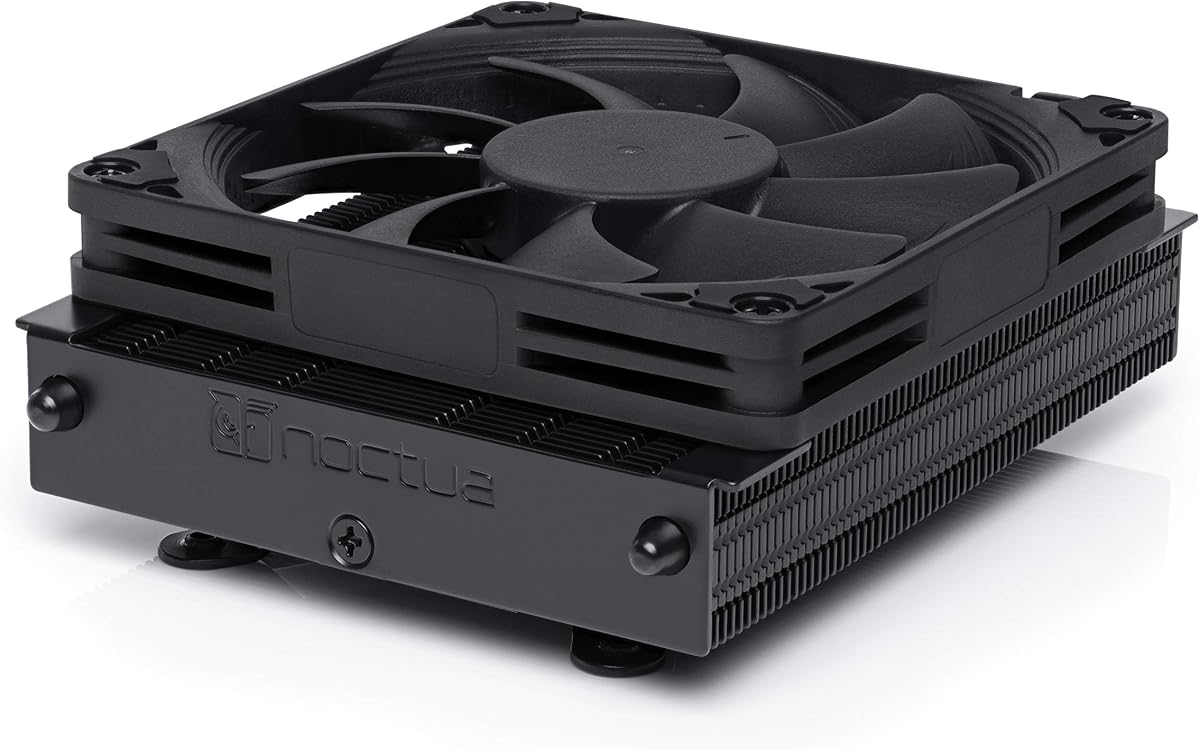


The Noctua NH-L9x65 stands out as a top choice for builders needing reliable cooling in tight spaces. With a 4.7 rating it delivers consistent performance while maintaining whisper-quiet operation. Its compact 65mm height fits well in most ITX cases.
We may earn a commission when you buy through this link, at no additional cost to you.
Its highly optimised NF-A9x14 fan ensures smooth airflow without excessive noise. The SecuFirm2 mounting system simplifies installation across Intel and AMD sockets. Including NT-H1 thermal paste adds value and ensures optimal thermal transfer immediately.
While it costs more than budget options the build quality justifies the investment. The footprint is slightly larger than some competitors but still avoids RAM blocks on most boards. This trade-off is acceptable for the reliability and longevity offered.
Recommend this for users prioritizing silence and ease of use in small form factor builds. It handles low to moderate heat loads efficiently making it suitable for many Ryzen and Intel processors. Check compatibility lists before purchase.
The NF-A9x14 fan uses advanced blade design to minimize turbulence and noise. This allows high airflow at lower RPMs keeping your system serene during operation.
SecuFirm2 provides secure pressure distribution ensuring the cooler stays firmly attached. This prevents vibration issues and maintains consistent thermal contact over years of use.
We may earn a commission when you buy through this link, at no additional cost to you.
This version offers the same award-winning cooling performance with a stylish all-black design. It suits builds where visual cohesion matters without compromising thermal efficiency. The 4.6 rating reflects strong user satisfaction with its look and function.
We may earn a commission when you buy through this link, at no additional cost to you.
The NF-A9x14 fan remains highly optimised for quiet operation. SecuFirm2 mounting ensures secure attachment across supported sockets. Including NT-H1 paste means you can install it ready to perform right out of the box.
The black coating adds a premium touch but also increases cost slightly. It fits well in dark-themed cases but may contrast with lighter interiors. Choose this if aesthetics are a priority alongside reliable cooling.
Ideal for gamers and enthusiasts who want top-tier performance with a modern look. Verify your case height clearance since it sits at 65mm. Always check CPU compatibility for your specific generation.
The chromax.Black finish eliminates white accents matching dark PC components perfectly. This creates a unified visual experience in your small form factor case.
Under the black exterior lies the same proven heatsink and fan setup. You get identical thermal performance to the standard model with added style.
We may earn a commission when you buy through this link, at no additional cost to you.
The Thermalright AXP90 X36 offers incredible value for builders needing the lowest possible profile. At only 36mm it clears almost any case constraint. With a 4.6 rating it proves budget coolers can still perform effectively.
We may earn a commission when you buy through this link, at no additional cost to you.
Its 4 AGHP heatpipes use gravity-independent technology for better heat transfer. The slim PWM fan adjusts speed based on load keeping noise manageable. Nickel plating protects against corrosion and lowers thermal resistance over time.
While affordable the small fan may be noisier at max speed compared to larger options. It handles moderate heat loads well but may struggle with high-performance chips. Use it with efficient processors to avoid thermal throttling.
Perfect for budget-conscious users with severe height limits in their builds. Ensure your CPU does not exceed the cooler's TDP capacity. Install carefully to avoid stressing the thin fins during mounting.
Gravity Heat Pipe technology ensures cooling works regardless of orientation. This is vital for vertical or angled installations in SFF cases.
The 36mm height allows use in cases where standard coolers simply cannot fit. It expands your options for ultra-compact PC designs.
We may earn a commission when you buy through this link, at no additional cost to you.
Designed specifically for AMD AM5 this model fits cases needing extreme height clearance. The 37mm profile is among the lowest available for modern sockets. A 4.4 rating indicates strong user satisfaction with its targeted purpose.
We may earn a commission when you buy through this link, at no additional cost to you.
It includes NT-H1 paste and SecuFirm2 mounting for easy setup. The NF-A9x14 fan balances cooling and noise well for daily use. The 6 year warranty shows confidence in its long-term durability.
Limiting to AM5 reduces versatility for mixed builds but ensures perfect fit. It handles moderate heat loads like Ryzen 7600 or 7700 well. Higher-end chips may require more robust cooling solutions.
Choose this for AM5 builds with strict space constraints. Verify case height compatibility as clearance is often tight. Its warranty provides peace of mind for long-term ownership.
The mounting system matches AM5 specifications precisely for maximum contact. This ensures efficient heat transfer specifically tuned for Ryzen 7000 series.
It leaves room for tall RAM or PCIe cards in ITX builds. The design avoids interference with nearby motherboard components.
We may earn a commission when you buy through this link, at no additional cost to you.
This model offers more height for improved thermal performance in SFF cases. At 53mm it clears most RAM modules while adding surface area for dissipation. A 4.4 rating reflects solid performance for its price range.
We may earn a commission when you buy through this link, at no additional cost to you.
It features 4 heatpipes and black nickel plating for corrosion resistance. The slim PWM fan allows automatic speed control based on CPU load. Trustworthy thermalright quality ensures durability over extended periods.
The extra height provides better cooling than thinner models but may limit case choices. It suits moderately powerful CPUs needing slightly more room than 36mm units. Ensure your case supports at least 55mm height.
Ideal for users needing a balance between clearance and cooling efficiency. Check motherboard compatibility before buying as socket support varies. Its affordability makes it accessible for many budget builds.
The taller fins increase contact with air for better heat dissipation. This helps maintain lower temperatures under sustained loads.
Black nickel plating shields the metal from environmental damage over time. This extends the cooler's lifespan in humid conditions.
We may earn a commission when you buy through this link, at no additional cost to you.
Offering 47mm height this cooler fits well in many mid-size ITX cases. It uses AGHP heatpipes to handle orientation variations effectively. A 4.3 rating shows it meets expectations for typical home users.
We may earn a commission when you buy through this link, at no additional cost to you.
The 92mm fan offers more airflow than 90mm counterparts for better cooling. Black plating resists corrosion and looks sleek inside your system. Back plate fasteners simplify installation without extra tools.
While quiet at idle it may rise slightly under full load. It handles mainstream CPUs efficiently but avoid pairing with high-end chips. Verify case clearance as 47mm is not ultra-low.
Select this for builds needing a balance of clearance and cooling power. It suits users who want AGHP benefits without spending much. Always review CPU compatibility before finalizing your order.
At 47mm it avoids extreme height constraints while keeping case options open. This makes it versatile for various SFF form factors.
Gravity independent heatpipes ensure consistent cooling in any orientation. This prevents performance drops when the case is positioned vertically.
We may earn a commission when you buy through this link, at no additional cost to you.
This model uses six heatpipes to maximize heat dissipation in tight spaces. A 120mm fan moves more air for better cooling at lower RPMs. A 4.5 rating confirms its ability to handle demanding thermal loads.
We may earn a commission when you buy through this link, at no additional cost to you.
The copper base and heatpipes ensure efficient heat transfer from the CPU. It fits HTPCs and ITX builds needing extra cooling capacity. The PWM fan provides automatic control for quiet operation when idle.
At 67mm it requires careful case selection to avoid clearance issues. It may block tall RAM modules depending on the motherboard. Ensure your case supports at least 70mm total height.
Best for users needing higher TDP handling than typical low-profile models. It suits moderate overclocking or power-intensive chips. Check motherboard RAM height before purchasing to avoid conflicts.
The 120mm fan pushes more air with less noise than smaller units. This helps maintain stable CPU temperatures during heavy workloads.
Six heatpipes distribute heat across the fins more evenly. This reduces hotspots and improves overall thermal efficiency.
We may earn a commission when you buy through this link, at no additional cost to you.
This variant matches the standard model with solid performance for the price. It keeps heights low while offering decent thermal performance for mainstream use. A 4.3 rating shows it meets user expectations well.
We may earn a commission when you buy through this link, at no additional cost to you.
Its 4 heatpipes use gravity independent technology for reliable cooling. The 92mm fan adjusts speed based on temperature to manage noise. Mounting hardware includes fasteners for straightforward setup.
The small fan may be audible at full speed in quiet environments. Use it with CPUs that do not generate excessive heat. Verify socket compatibility to ensure proper fit.
Ideal for budget builders prioritizing low height and basic cooling needs. It avoids memory limitations in most ITX cases. Check current reviews for any updates on fitment issues.
AGHP technology maintains cooling consistency regardless of PC orientation. This is useful for cases tilted or mounted vertically.
The narrow design helps fit into tight compartments without obstruction. It allows more flexibility in component placement inside the case.
We may earn a commission when you buy through this link, at no additional cost to you.
This cooler offers compact performance suitable for small form factor systems. Its 45mm height fits nearly any case with minimal clearance issues. A 4.5 rating reflects reliable quiet operation under typical loads.
We may earn a commission when you buy through this link, at no additional cost to you.
It uses a 92mm fan delivering 30.6dB of max noise. The high-quality design ensures consistent cooling without rattling or vibration. It supports major sockets including AM5 and Intel 1700.
While quiet it has a 100W TDP limit that restricts high-performance chips. Ensure your CPU fits within this range to avoid thermal issues. It is best suited for efficiency-focused builds.
Select this if you value silence and brand trust in a small cooler. Verify your CPU power needs match its capacity before buying. It is a reliable choice for standard office or home PCs.
be quiet! optimizes fans for minimal sound during operation. This makes the system pleasant even during daily tasks.
Its design minimizes interference with RAM slots in most boards. This preserves upgradeability in tight PC enclosures.
We may earn a commission when you buy through this link, at no additional cost to you.
This model features four heatpipes and a 92mm fan for solid cooling. Its 47mm height works well in ITX cases without blocking memory. A 4.6 rating shows high user satisfaction for its price.
We may earn a commission when you buy through this link, at no additional cost to you.
The PWM fan adjusts speed to keep noise low during idle. Mounting kits include back plates for straightforward installation. Its black aesthetic fits modern system themes without standing out.
At full speed the fan may generate noticeable noise compared to premium models. Verify your CPU power needs match its thermal limits. Check RAM heights to ensure proper clearance.
Ideal for budget-conscious builds needing dependable low-profile cooling. It avoids memory conflicts in most motherboards. Ensure case support meets the height requirement before purchase.
With 46CFM max air flow it provides consistent cooling for moderate loads. This helps maintain stable performance during extended use.
The improved back plate makes installation faster and more secure. This reduces risks of improper contact during setup.
We may earn a commission when you buy through this link, at no additional cost to you.
Selecting the right cooler requires balancing height limits, thermal output, and fan noise for your specific build needs.
The most critical factor is ensuring the cooler fits your case. Measure your case maximum CPU height allowance and compare it to the cooler specs. Always leave at least 2mm extra for safety.
Choose models under your case limit to avoid installation issues. This ensures you can close the side panel properly.
Verify the cooler supports your CPU socket type and generation. Some models are limited to AMD AM5 or specific Intel sockets. Always check the manufacturer list before buying.
Ensure your motherboard socket matches the cooler brackets. This avoids needing extra parts or modifications during setup.
Match the cooler TDP rating to your CPU thermal output. Exceeding the limit causes overheating and throttling. Check your CPU max power draw to select safely.
Select a cooler with equal or higher TDP rating. This guarantees sufficient cooling capacity for your processor.
Noise ratings indicate sound output during operation. Lower dB values mean quieter systems but may reduce cooling. Compare max noise ratings between models to find the right balance.
Prioritize quiet operation if building a media PC. This ensures the system does not distract during media consumption.
Some coolers overhang tall memory modules or PCIe cards. Check the footprint size relative to your motherboard layout. Ensure your RAM height does not conflict with the heatsink.
Choose slim or offset designs to avoid blocks. This prevents installation frustration and component conflicts.
Secure mounting ensures consistent contact and stability over time. Systems like SecuFirm2 simplify setup without extra tools. Look for kits with back plates and pre-applied paste.
Prefer models with easy install kits for beginners. This reduces risks of improper setup or damage.
Materials affect longevity and heat transfer efficiency. Copper bases and nickel plating resist corrosion better. Heavier fin stacks offer more surface area for cooling.
Opt for metal builds over plastic components. This ensures better thermal performance and durability.
Higher priced models often deliver better noise control and durability. Budget coolers work well for lower power CPUs. Weigh costs against your performance needs.
Balance price with required thermal output. This ensures you do not overspend or under-cool.
Install the cooler after applying thermal paste to the CPU die. Use a pea-sized amount in the center for best results. Avoid spreading it manually as the mounting pressure spreads it evenly.
Secure the mounting screws evenly in a criss-cross pattern to ensure even pressure. Overtightening can damage components while undertightening causes poor contact. Check levels are correct for your socket type.
Clean the fan blades and fins periodically to maintain airflow. Use compressed air to remove dust buildup every few months. Ensure cables do not block the fan during operation.
Yes many are designed for low noise levels especially those with PWM fans. Premium models operate below 30dB under load making them ideal for HTPCs. Check noise ratings to confirm suitability.
They fit cases allowing sufficient clearance typically 40mm to 70mm. Always measure case specs before choosing. Some ultra-tight cases may need extreme low profiles like 36mm.
AGHP stands for Gravity Heat Pipe which maintains cooling in any orientation. Standard pipes rely on gravity which limits placement options. This is vital for vertical PC builds.
TDP indicates maximum heat dissipation the cooler can handle. Your CPU must stay within that limit to avoid overheating. Always check your CPU TDP before selecting.
Most include paste but you may want high-end options later. Noctua usually includes NT-H1 with their coolers. Verify included contents before purchasing to avoid surprises.
Many have TDP limits like 65W to 100W. High-end chips may exceed this causing throttling. Check your CPU power needs and match accordingly.
Color variants like chromax.Black offer same cooling performance. They use identical heatsink and fan internals with cosmetic changes. Choose based on aesthetic preference not function.
Clean dust every three to six months depending on environment. Dust blocks airflow and raises temperatures. Regular maintenance keeps performance stable over time.
The Noctua NH-L9x65 leads as the top choice for most builders needing silence and reliability. Budget seekers find excellent value with the Thermalright AXP90 X36. Premium aesthetics come with the Noctua chromax.Black models.
Prioritize case height and CPU TDP before any other factor. Ensure your selection fits all components without obstruction. These steps prevent frustration and keep your system stable.
Prices fluctuate frequently so review current deals before finalizing. Check availability to ensure the model matches your needs today. Use this guide to simplify your decision process.