
Apevia ITX-AP300W
3.9Editor score
Standard SFF Compatibility
Versatile Connectivity Options
Quiet Cooling And Safety Suite
This guide compares ten low power PSU models for small form factor builds, focusing on efficiency, wattage, connector types, and reliability for compact
Choosing a low power PSU is essential for building reliable small form factor systems that run efficiently without overheating. These units deliver stable voltage to compact motherboards while minimizing energy waste and acoustic noise in tight spaces.
We evaluated ten highly rated power supplies based on efficiency certifications, connector variety, cooling performance, and overall build quality. Each entry was selected for its ability to meet the specific demands of mini ITX, Flex ATX, and other compact chassis configurations.
Every pick highlights key strengths and potential trade-offs to help you match the right unit to your hardware needs. Prices and availability fluctuate frequently, so verify current details before finalizing your purchase decision online.
3.9Editor score

4.6Editor score

5.0Editor score
The following table provides a side-by-side comparison of all ten selected power supplies to help you quickly identify specifications that match your build requirements and budget constraints.




The Thermaltake Smart 500W stands out as a reliable choice for compact builds needing stable power delivery. It carries an 80 Plus White certification and uses a large 120mm fan to keep noise levels low during operation.
We may earn a commission when you buy through this link, at no additional cost to you.
This unit provides 500 watts of continuous output with a robust 12 volt rail capable of supporting mid-range components. The Active PFC design improves power factor correction while reducing electrical waste and heat generation effectively.
Although it lacks modular cables which can limit airflow in tight cases the fixed wiring is durable and well sized. The industrial protection suite guards against overvoltage and short circuits ensuring system safety under load.
Buyers seeking a balanced PSU with proven reliability will appreciate this model. Its combination of efficient power delivery and quiet operation makes it a strong recommendation for standard ATX or SFF chassis builds.
The 80 Plus White certification ensures at least 80 percent efficiency under typical load conditions reducing electricity costs and internal heat.
A large 120mm fan moves air quietly across components maintaining low acoustic levels even when the system is under moderate stress.
We may earn a commission when you buy through this link, at no additional cost to you.
The Apevia ITX-AP300W offers a budget friendly entry into small form factor power solutions. It delivers 300 watts which suits basic office PCs and home theater systems well.
We may earn a commission when you buy through this link, at no additional cost to you.
Its connectors separate into 20 plus 4 and 4 plus 4 configurations allowing compatibility with both legacy and modern motherboards. The 40mm fan uses double ball bearings for longevity and quiet cooling.
Users must manually adjust the voltage switch when traveling to regions with 230V outlets to avoid damage. While wattage is limited it remains sufficient for systems without dedicated high end graphics cards.
This unit is ideal for builders prioritizing low cost and compact footprint. It provides essential power and protection for entry level ITX builds without breaking the bank.
Designed specifically for standard Mini ITX Flex ATX and 1U cases this unit fits seamlessly into tight chassis configurations.
Overvoltage Overcurrent and Short Circuit protections safeguard sensitive components against electrical anomalies and unexpected power surges.
We may earn a commission when you buy through this link, at no additional cost to you.
The 600W Flex ATX PSU represents top tier engineering for small form factor enthusiasts. It combines high efficiency with modern connectivity options like 12VHPWR for high performance graphics cards.
We may earn a commission when you buy through this link, at no additional cost to you.
Fully modular black embossed cables ensure clutter free installations in tight spaces. The silent fan and Japanese capacitors contribute to stable output and long term reliability under continuous load.
Efficiency exceeding 92 percent reduces waste heat and energy costs significantly. The 16 pin connector design prevents sudden power drops during peak GPU demands protecting system stability.
For those seeking premium performance in a compact package this unit is unmatched. Its robust features justify the investment for NAS servers and advanced ITX builds.
Standard 16 pin connector design resists power drops ensuring stable delivery to high end graphics cards requiring 12VHPWR.
Over 92 percent efficiency minimizes energy waste and fan noise making it ideal for 24-7 server and NAS operations.
We may earn a commission when you buy through this link, at no additional cost to you.
The Apevia ITX-PFC500W delivers full modular convenience in a tiny chassis. This feature allows you to connect only needed cables improving airflow inside limited ITX enclosures.
We may earn a commission when you buy through this link, at no additional cost to you.
Active PFC covers a broad voltage range allowing use worldwide without manual switches. It provides 500 watts of power sufficient for entry level gaming rigs and workstations.
The fan provides forced air ventilation but may become audible under heavy load. Protective circuits handle overvoltage and overheating to prevent damage during voltage spikes.
Builders wanting cable flexibility in small cases will find this appealing. Its modular design simplifies routing and maintenance for custom water cooled or dense builds.
Fully modular power supply lets you connect only necessary cables reducing clutter and improving cooling in tight ITX cases.
Full Range Active PFC supports 90 to 264V automatically adjusting to local power standards for international travel.
We may earn a commission when you buy through this link, at no additional cost to you.
The MSI MAG A650BE balances capacity and affordability for standard desktop systems. It offers semi modular cabling and a robust 650 watt output suitable for mid range gaming PCs.
We may earn a commission when you buy through this link, at no additional cost to you.
Bronze certification ensures good efficiency while the 120mm fan operates quietly. Active PFC reduces electrical waste and provides stable power delivery for sensitive components.
It includes industrial level protections like Overvoltage and Short Circuit to protect hardware. The 5 year warranty adds confidence for long term system reliability.
For users needing more power than 500 watt units this model is a solid choice. It provides ample headroom for upgrades without sacrificing acoustic comfort.
Semi modular design lets you detach non essential cables while keeping essential connections for cleaner system builds.
The 120mm Low Noise Fan provides efficient cooling while keeping acoustic levels low during normal daily tasks.
We may earn a commission when you buy through this link, at no additional cost to you.
The NovaMist Misting Fan offers an affordable option for basic systems needing reliable power. It holds an 80 Plus Bronze certification ensuring decent energy efficiency for daily tasks.
We may earn a commission when you buy through this link, at no additional cost to you.
The fan is designed for low noise operation making it suitable for office environments. It comes with a limited warranty for support and service if issues arise.
While it lacks advanced features like modular cabling it meets standard power needs. The simple design reduces potential points of failure during long periods of usage.
This unit is a smart choice for budget focused builds where silence and efficiency matter. It delivers dependable power for entry level office PCs and home media centers.
80 PLUS Bronze certification ensures the power supply operates at a high efficiency level to reduce wasted electricity.
A low noise fan ensures the unit does not disrupt quiet environments like offices or living room media centers.
We may earn a commission when you buy through this link, at no additional cost to you.
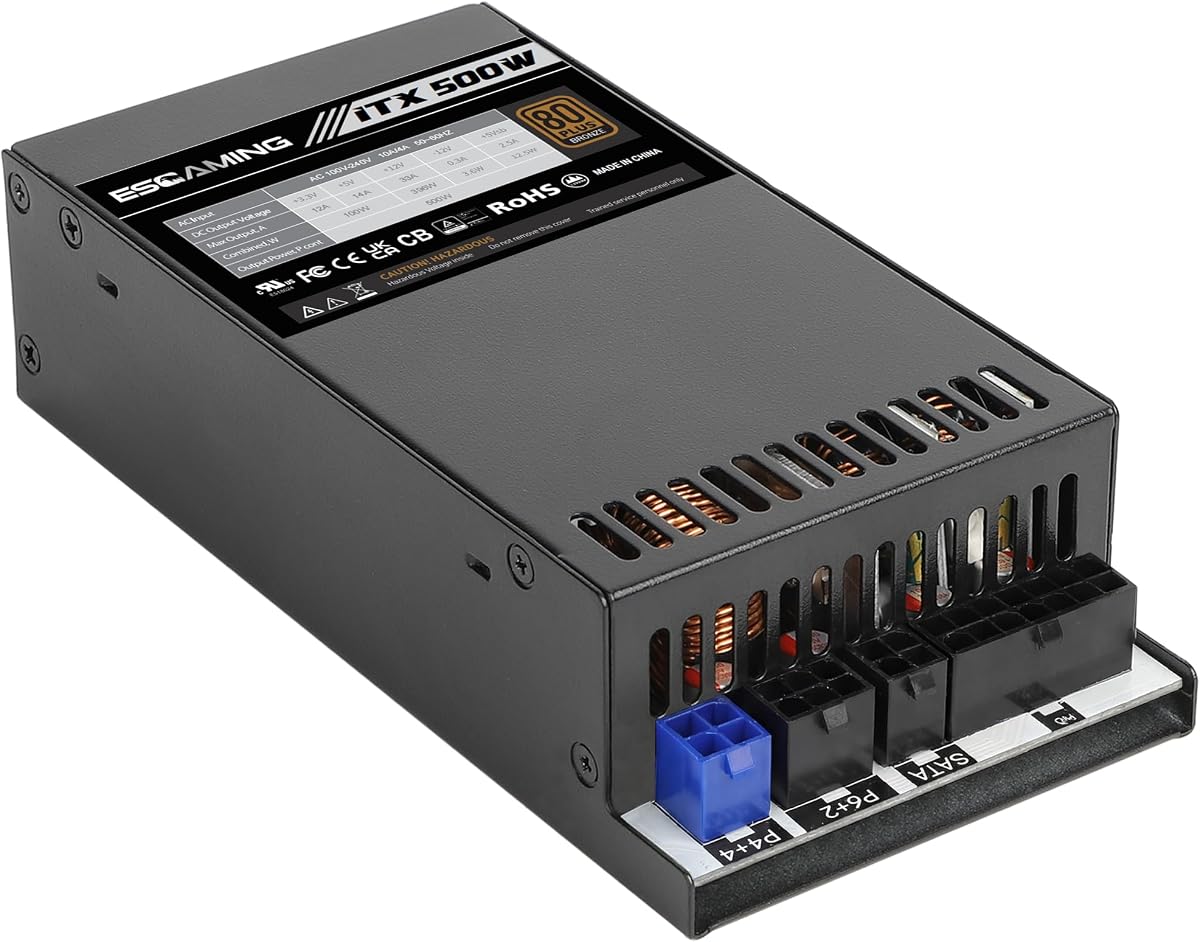
The ESGAMING Fully Modular 80 Plus Gold ITX 500W Power Supply brings high efficiency to compact builds. Its modular system reduces clutter and helps maintain proper airflow inside restricted 1U enclosures.
We may earn a commission when you buy through this link, at no additional cost to you.
Active PFC ensures stable power and efficient energy use. It reaches up to 85 percent efficiency at typical loads reducing wasted electricity and heat output.
The unit connects to a wide range of voltages automatically. It includes essential GPU connectors and protection features for reliable performance under daily loads.
System builders needing efficient power without excess cabling will appreciate this design. It offers a balanced solution for small PCs requiring reliable and efficient power delivery.
Fully modular cable system improves airflow and enables a clutter free setup inside compact and restricted 1U chassis.
Active PFC full range support ensures power stability and cleaner output while reducing electrical interference.
We may earn a commission when you buy through this link, at no additional cost to you.
The Apevia TFX-PFC500W is built specifically for Small Form Factor cases requiring TFX compatibility. It delivers 500 watts of power suitable for compact gaming and workstation configurations.
We may earn a commission when you buy through this link, at no additional cost to you.
Its auto-switching universal power handles 115V and 230V without manual adjustment. The fan uses Silent Start technology engaging only when temperatures rise to stay quiet.
A heavy-duty 12V rail provides stable power for graphics cards and storage. Built-in protections ensure the system remains safe from electrical spikes and short circuits.
Users with TFX cases will find this a perfect fit. Its intelligent cooling and universal voltage support make it versatile for global use.
Auto-Switching Universal Power handles voltages from 90 to 264V without manual switching ensuring safe operation worldwide.
Smart Silent Cooling keeps the fan stationary until needed reducing noise during low load operation.
We may earn a commission when you buy through this link, at no additional cost to you.
The APEVIA VENUS500W provides a versatile power option for standard ATX cases. It features a 120MM fan and a complete protection suite to safeguard connected hardware.
We may earn a commission when you buy through this link, at no additional cost to you.
Voltage regulation maintains stability within 5 percent tolerance for components. Auto-thermally controlled cooling adjusts speed based on internal system temperature for efficiency.
Multiple connectors support various storage drives and peripherals without needing adapters. This flexibility simplifies cable management for users building custom systems.
For those seeking basic reliable power this unit serves well. It offers essential features for desktop systems without unnecessary complexity.
Auto-thermally controlled black 120mm Fan manages efficient temperature regulation without constant manual adjustments.
Precise voltage regulation ensures stable power delivery to all components within a 5 percent tolerance margin.
We may earn a commission when you buy through this link, at no additional cost to you.
The Smart W3 Series supports the latest ATX v3.1 specification ensuring forward compatibility for modern systems. It provides 600 watts of power with high efficiency for daily workloads.
We may earn a commission when you buy through this link, at no additional cost to you.
DC to DC rail design delivers stable power to sensitive components. A low-profile flat black cable setup keeps internal routing neat and efficient.
The 120mm FDB fan ensures quiet and reliable cooling. With a 5 year warranty this unit offers long term protection for system builders.
This PSU is ideal for users planning to upgrade components soon. Its new specification support and solid construction make it a smart investment.
Fully compatible with Intel ATX v3.1 specification ensuring readiness for future hardware standards and efficiency.
The 120mm FDB cooling fan provides reliable thermal management while maintaining quiet operation during system use.
We may earn a commission when you buy through this link, at no additional cost to you.
Selecting the right low power PSU requires balancing form factor efficiency and connectivity to match your build requirements.
The physical dimensions of your PSU must match your case specifications to ensure proper fit and airflow. Common low power options include Mini ITX Flex ATX TFX and 1U designs. Always check the internal measurements of your chassis before purchasing to avoid clearance issues.
Verify that your case supports the shape and size of the power supply you select.
Estimate your system power needs by summing the consumption of your CPU GPU drives and peripherals. For basic office or HTPC builds 300 to 500 watts is usually sufficient. Gaming workstations may require higher wattage like 650 watts to support dedicated graphics cards.
Choose a PSU that offers enough headroom for future component upgrades.
80 Plus certification levels like White Bronze or Gold indicate how efficiently the PSU converts AC power to DC. Higher ratings reduce wasted energy and heat which is critical in compact cases with limited cooling. Efficient units also save on electricity costs over time.
Aim for at least an 80 Plus Bronze rating for balanced performance and cost.
Ensure the PSU provides the correct connectors for your motherboard drives and graphics cards. Check for 24pin main 8pin CPU and PCIe connectors. Modular designs allow you to plug in only what you need to reduce clutter.
Check that the connector count matches your current and planned component needs.
Fans and heatsinks manage heat in power supplies. Larger fans like 120mm generally spin slower and quieter than smaller 40mm fans. Look for ball bearing fans or fluid dynamic bearings for longevity and low acoustic output.
Prioritize units with smart fan control for quiet operation at low loads.
Industrial protections like OVP OCP SCP and OTP safeguard your hardware from electrical faults. These features prevent damage from power surges or short circuits. Ensure the unit lists these protections explicitly in its specifications.
Always select a PSU with a comprehensive safety suite to protect your investment.
A longer warranty period reflects the manufacturer confidence in the product durability. Many quality units offer 5 year coverage. Reliability data from user reviews helps identify units that last longer under continuous usage.
Look for brands that offer at least a 5 year warranty for peace of mind.
Modular or semi modular cables simplify routing in tight spaces and improve airflow. Fixed cables can be bulky but are often cheaper. Consider how much you value airflow and aesthetics when making your choice.
Opt for modular designs in small cases to maintain optimal cooling airflow.
Install the power supply in a well ventilated area of your case ensuring no cables block the intake vents. Secure it tightly with screws to prevent vibration damage over time.
Connect the 24pin and 8pin CPU cables firmly to the motherboard. Verify that PCIe and SATA cables are properly seated to avoid loose connections.
Perform regular dust cleaning using compressed air to keep fans and heatsinks clear. Ensure the unit stays cool by maintaining good overall system airflow.
Yes many low power PSUs provide enough wattage for entry level gaming systems using integrated graphics or budget GPUs. Always calculate your total system power consumption before selecting a unit to ensure stability.
ATX is a standard form factor for large cases while Flex ATX is smaller and designed for compact builds. They differ in physical dimensions and mounting hole placement which affects compatibility with case types.
Modular cables help reduce clutter in small cases improving airflow and aesthetics. While not strictly required they are highly recommended for compact builds where space is limited.
Look for 80 Plus certification levels which indicate efficiency. Higher tiers like Bronze and Gold mean less wasted energy and heat generation which helps maintain lower system temperatures.
Many modern PSUs support full range voltage from 90 to 264V so they work globally. However some budget models may require a manual switch adjustment to match local voltage standards.
Internal PSU protections like OVP SCP and OCP shield your components from voltage spikes and short circuits. These industrial grade safety features prevent damage during electrical anomalies.
Dusting your PSU every three to six months keeps fans working efficiently and prevents overheating. Use compressed air gently to avoid damaging internal components during cleaning.
Many PSUs use smart fan control to spin only when temperatures rise reducing noise during idle. This technology helps keep your system quiet during light usage.
We have reviewed ten top low power PSUs ranging from budget friendly 300W models to efficient modular 600W units. The Thermaltake Smart 500W and Apevia ITX-AP300W stand out as practical choices for most builders.
Prioritize form factor compatibility wattage needs and efficiency ratings when making your decision. Modular options are worth the extra cost for cleaner builds in compact cases.
Prices and stock vary so check current listings before buying. Verify specifications match your case and components to ensure a successful small form factor build.