
Omada Fusion 2.5G
4.7Editor score
Five 2.5G Ports
High-Performance Quad-Core
Touchscreen Quick Troubleshooting
This guide compares the top 10 Load Balancing Router models to help you choose the right solution for bandwidth optimization and failover reliability.
In today’s connected world, businesses and power users demand reliable internet that never drops. A Load Balancing Router ensures continuous uptime by distributing traffic across multiple connections and automatically switching if one fails.
We evaluated ten top-rated models based on port flexibility, security features, VPN support, and ease of management. Our analysis highlights which routers deliver the best performance for small offices, remote teams, and advanced home labs.
Each pick includes detailed specs, pros, cons, and real-world use cases to guide your decision. Prices and availability change frequently, so verify current offers before purchasing to ensure you get the best value for your network needs.
4.7Editor score

4.4Editor score

4.4Editor score
The table below provides a side-by-side comparison of all ten reviewed models. Focus on port types, WAN capacity, and specialized features to match your specific network environment and performance requirements.


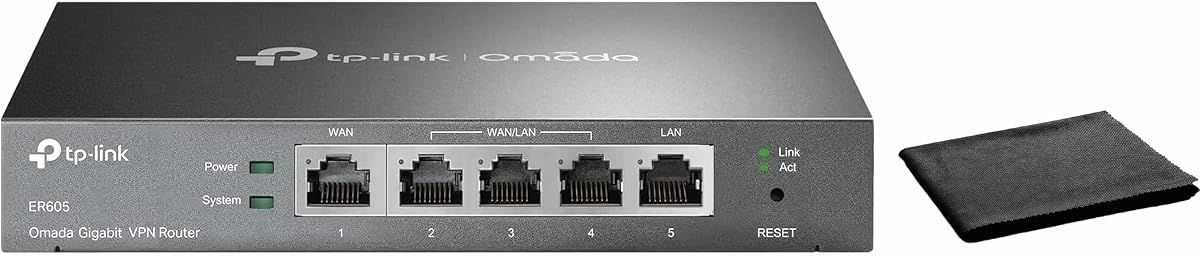

The TP-Link ER605 is our top choice for balancing performance and affordability. It offers five Gigabit ports with flexible WAN configurations and strong security features, making it ideal for small businesses needing reliable redundancy.
We may earn a commission when you buy through this link, at no additional cost to you.
With up to 3 WAN ports, you can aggregate bandwidth or failover seamlessly. The USB WAN Port supports 4G/3G modems, ensuring you stay online even if wired connections fail. Security is robust, featuring SPI firewalls, DoS defense, and IP/MAC filtering to keep threats at bay.
While it lacks some advanced automation found in higher-end Omada models, its simplicity and stability are strengths. It might not scale to enterprise-level networks as well as the ER7206, but for offices under 100 users, it is more than capable.
Buy this if you need a robust, budget-friendly solution that handles multiple ISPs effectively. It balances cost and performance perfectly for offices that need continuous uptime without complex SDN configurations.
The ability to use 2 WAN/LAN ports gives you granular control over which connections handle traffic or serve local clients.
Support for IPsec and OpenVPN ensures that remote workers can access internal resources safely without exposing them to the public internet.
We may earn a commission when you buy through this link, at no additional cost to you.
The ER7206 is designed for growing businesses that need significant network capacity. It supports up to 4 WAN ports and 700 clients, offering robust redundancy and scalability. It integrates tightly with the Omada SDN platform for centralized control.
We may earn a commission when you buy through this link, at no additional cost to you.
Its flexibility stands out with a Gigabit SFP WAN port alongside standard RJ45 options. You can manage the whole network remotely via the Omada app or cloud controller. Security features match the ER605 but are expanded to handle larger threat surfaces.
Setup is straightforward in standalone mode, but unlocking SDN features requires compatible hardware. If you already own Omada switches or access points, this router becomes a powerful hub. However, for a standalone office, it may be overkill compared to simpler models.
Choose this if your network is scaling beyond the capabilities of the ER605 and you need SDN integration. It future-proofs your infrastructure and ensures you can handle increased client loads without performance degradation.
The SFP WAN port allows for fiber connections or specialized ISP hardware, offering more options than standard copper ports.
Managing multiple sites from a single interface saves IT teams significant time when deploying updates or monitoring health across locations.
We may earn a commission when you buy through this link, at no additional cost to you.
The Cudy R700 offers impressive value for tech-savvy users. It supports OpenWRT, giving you full control over VLANs and firewall rules. With five GbE ports and up to five ISP connections, it is perfect for redundancy-heavy setups.
We may earn a commission when you buy through this link, at no additional cost to you.
Its VPN capabilities are robust, including WireGuard, OpenVPN, and IPsec. The device provides complete business continuity by automatically rerouting traffic if one ISP drops. Security tools like SPI firewall and DoS prevention protect your perimeter effectively.
The main drawback is the interface. While the Cudy App exists, enthusiasts who prefer raw OpenWRT control may find the stock UI limiting. It is less polished than Ubiquiti or Omada, but the hardware price compensates for this trade-off.
Pick this router if you want maximum ISP redundancy without spending a fortune. It is an excellent choice for homelabs, remote offices, or small businesses that prioritize raw connectivity over flashy interfaces.
Unlock community-developed packages and custom QoS policies that aren't available on locked-down commercial routers.
WireGuard is faster and lighter than OpenVPN, ensuring your encrypted traffic doesn't slow down your network speed.
We may earn a commission when you buy through this link, at no additional cost to you.
The Alta Labs Route10 is a powerhouse for high-performance wired networks. It handles 10-Gigabit routing with a Qualcomm quad-core processor, ensuring consistent throughput even under heavy VPN or firewall loads. It supports two SFP+ ports for fiber connections.
We may earn a commission when you buy through this link, at no additional cost to you.
With integrated 40W PoE+, it can power access points directly, reducing cable clutter. Real-time stats give administrators instant visibility into traffic flow. Security features include VLAN tagging, QoS, and WireGuard for encrypted remote access.
This device requires pairing with dedicated Wi-Fi access points since it lacks built-in radios. While this adds cost, it ensures cleaner wireless performance. It is not designed for typical home users but for advanced setups demanding multi-gigabit speeds.
Buy this if you have upgraded to 10-Gigabit ISPs or local storage. It is a premium investment that eliminates bottlenecks in demanding environments like media editing studios or enterprise data centers.
The Qualcomm network accelerator keeps latency low even when running multiple heavy-duty rules and VPN tunnels simultaneously.
Powering network devices through Ethernet eliminates the need for external power bricks and simplifies rack installations.
We may earn a commission when you buy through this link, at no additional cost to you.
The ER7412-M2 is tailored for environments needing both multi-gigabit speeds and deep security features. It supports two 2.5G ports and balances load across up to 11 WAN ports, offering exceptional redundancy for large ISPs.
We may earn a commission when you buy through this link, at no additional cost to you.
Deep Packet Inspection (DPI) and IPS/IDS features provide advanced threat detection. VPN options include WireGuard, SSL, and GRE. It integrates seamlessly with Omada switches and access points for unified management.
While it excels in security and speed, setup requires understanding the Omada controller structure. It is less user-friendly for simple home use but ideal for managed services. The hardware is robust, ensuring longevity under constant load.
Choose this if you are building a secure, high-speed network that aligns with Omada SDN principles. It is perfect for offices needing both fast internal transfers and secure external connections.
DPI allows you to inspect traffic packets deeply to block malware before it reaches your endpoints.
Balancing across 11 WAN ports lets you utilize multiple low-cost lines to aggregate bandwidth for better rates.
We may earn a commission when you buy through this link, at no additional cost to you.
The TL-R470T+ is a budget-friendly workhorse for small offices with Gigabit needs. It supports four WAN ports with advanced load balance, ensuring maximum bandwidth and backup capabilities. While it uses 10/100M ports, it suits basic web and email tasks.
We may earn a commission when you buy through this link, at no additional cost to you.
It includes robust security features like DoS attack protection and IP/MAC binding. The PPPoE server allows administrators to manage client accounts easily. Lightning protection safeguards the device against surges, extending its lifespan in harsh environments.
Its main limitation is speed. If your internet plan exceeds 100 Mbps, this router cannot utilize the full capacity. For offices relying on light traffic or as a dedicated gateway for guest networks, it remains a reliable choice.
Buy this if you need a simple, no-fuss router for basic redundancy. It is ideal for internet cafes or small shops where cost matters more than raw throughput.
The built-in PPPoE server helps manage billing or access control for guest users in a business setting.
Lightning protection reduces the risk of hardware failure during storms, which is crucial for exposed installations.
We may earn a commission when you buy through this link, at no additional cost to you.
The TL-R480T+ offers a straightforward solution for those needing basic load balancing. With 2 WAN and 3 LAN ports, it is compact and easy to deploy. It handles standard internet traffic without demanding advanced configuration skills.
We may earn a commission when you buy through this link, at no additional cost to you.
The flexible configuration allows you to switch ports between WAN and LAN as needed. It is a legacy model but still supports standard protocols required for small offices. It focuses purely on routing and failover without extra bloat.
Modern models offer better interfaces and speeds, but this unit works well for tight spaces. Its simplicity is both a pro and a con; while it is easy to use, it lacks modern features like SDN integration or advanced VPN tunnels.
Choose this for a simple backup internet line in a home office or small store. It is effective for its intended purpose but lacks the longevity of newer Gigabit routers.
The ability to convert LAN ports to WAN gives you options to scale up redundancy without buying more ports.
We may earn a commission when you buy through this link, at no additional cost to you.
The ER-605 variant emphasizes cloud monitoring and easy setup. It provides dual WAN ports for seamless load balancing and bandwidth management. The interface is intuitive, making it suitable for IT admins managing multiple sites remotely.
We may earn a commission when you buy through this link, at no additional cost to you.
Robust security includes SPI firewalls and DoS defense. VPN support covers IPsec, PPTP, and L2TP. It is designed for compact spaces like offices and cafes where a wired connection is preferred over Wi-Fi.
While it offers cloud access, it may require a stable internet connection to function fully. Its focus is on stability and ease of use rather than high-speed aggregation. It is a practical choice for small teams needing oversight.
Pick this if you want remote visibility into your network without complex controllers. It is excellent for distributed small offices that need a centralized view of uptime and traffic.
Check network status from anywhere via the Omada app, ensuring issues are resolved before they impact productivity.
QoS settings let you prioritize VoIP or video conferencing traffic to maintain quality during peak usage.
We may earn a commission when you buy through this link, at no additional cost to you.
The EdgeRouter 4 is a favorite among networking enthusiasts for its flexibility. It includes three Gigabit Ethernet ports and an SFP port, plus a serial port for console access. Its fanless design ensures silent operation in quiet environments.
We may earn a commission when you buy through this link, at no additional cost to you.
Ubiquiti’s firmware allows for deep customization and scriptable automation. While it lacks built-in SDN, it supports advanced routing protocols. It is perfect for those who want control over every packet flow without a vendor lock-in.
Setup requires some command-line knowledge compared to plug-and-play routers. With only three ports, it is less scalable than TP-Link’s ER series. However, its reliability and performance make it a top-tier option for dedicated IT staff.
Buy this if you prefer open-source-like control and value silent hardware. It suits homelabs, small businesses, and IT admins who need robust routing capabilities.
The fanless design makes it ideal for quiet offices or home labs where noise can be a distraction.
The SFP port lets you connect via fiber for long-distance links or specialized ISP hardware.
We may earn a commission when you buy through this link, at no additional cost to you.
The Fusion 2.5G is a modern router with a unique touchscreen interface. It offers five 2.5G ports and a high-performance Quad-Core CPU. The built-in controller allows license-free cloud management from day one.
We may earn a commission when you buy through this link, at no additional cost to you.
Touchscreen-based troubleshooting provides instant insights like speed tests and health scores without needing a laptop. Bluetooth simplifies the initial setup process. It ensures rock-solid connectivity for demanding applications requiring high throughput.
While powerful, it is an investment compared to simpler routers. It is best for organizations already using Omada gear or needing 2.5G speeds locally. The design is compact but offers enterprise-level features in a small form factor.
Choose this if you want a sleek, modern device with fast local speeds and visual diagnostics. It bridges the gap between consumer ease-of-use and professional routing capabilities.
View real-time traffic and health scores on the device screen to troubleshoot issues quickly on-site.
Use the Omada App to set up the router via Bluetooth, skipping the need for initial wired configuration.
We may earn a commission when you buy through this link, at no additional cost to you.
Selecting the right router depends on your specific port and traffic patterns. Below are the key factors to evaluate before making a purchase.
The number of WAN ports determines how many internet connections you can balance. For basic failover, two ports are sufficient. For bandwidth aggregation across multiple providers, look for models supporting three or more.
Choose a router with enough physical ports to meet your redundancy needs without requiring additional hardware.
Most offices need Gigabit (1 Gbps) speeds. However, if you have faster ISP plans or require high-speed internal transfers, ensure the router supports 2.5G or 10G ports.
Multi-Gigabit ports future-proof your network against increasing bandwidth demands and expensive hardware upgrades.
If you need remote access, check the VPN protocols supported. WireGuard and IPsec offer modern security. The number of concurrent tunnels matters for connecting multiple remote workers.
Ensure the router supports the specific protocols your team or clients rely on for secure access.
Interfaces vary from simple web GUIs to complex SDN platforms. Cloud monitoring helps remote admins. Local apps simplify initial setup.
Pick a management style that matches your technical expertise and the scale of your network.
Look for SPI firewalls, DoS protection, and intrusion detection. IP/MAC filtering adds a layer of access control.
Advanced security is critical for protecting business data from unauthorized access and external threats.
If you use specific brands like Omada or Ubiquiti, ensure the router integrates seamlessly. This allows for centralized control and simplified updates.
Sticking to one ecosystem reduces complexity and improves long-term stability.
Some routers allow converting LAN ports to WAN for extra failover options. SFP ports provide fiber connectivity for specialized needs.
Flexible ports save money by reducing the need for external switches.
Consider the device’s longevity. Routers with frequent firmware updates and strong community support last longer.
Balance upfront cost with the total cost of ownership over several years.
Connect your ISPs to the dedicated WAN ports using Cat6 cables. Assign static IPs or use DHCP depending on your ISP’s requirements. Ensure each connection is active before configuring load balancing.
Access the router’s admin panel via a web browser. Configure the failover priority or load balancing mode. Test by unplugging one WAN connection to verify traffic reroutes correctly.
Keep the router in a ventilated space to prevent overheating. Regularly check firmware updates to maintain security. Monitor bandwidth usage via the dashboard to detect anomalies early.
A load balancing router distributes network traffic across multiple internet connections. This increases total bandwidth and ensures automatic failover if one line fails, maintaining uptime.
Most routers work with standard modems. Just ensure the modem is in bridge mode so the router handles the connections. Some routers support USB modems directly for mobile backup.
Yes, many models support home use for redundancy. While some are designed for business, they offer benefits for remote workers needing reliable internet for meetings and data.
Failover switches to a backup line when the primary fails. Load balancing uses both lines simultaneously to increase speed. Most routers support both modes depending on your settings.
It depends on the router. Entry-level models support two, while higher-end devices support three to five. Check the WAN port count and supported protocols before buying.
Most dedicated routers do not broadcast Wi-Fi to focus on routing performance. You will need separate access points or a wireless router to handle wireless clients.
Many modern models offer cloud monitoring via apps or web portals. This allows you to check status, reboot, and view stats from anywhere with an internet connection.
Routine maintenance includes updating firmware and rebooting occasionally. Monitor logs for connection drops. Ensure ventilation is clear to prevent hardware overheating over time.
We highlighted ten top-performing routers ranging from affordable options to high-end 10-Gigabit models. The TP-Link ER605 stands out as the overall choice for balancing cost and features, while the Cudy R700 offers open-source flexibility.
Prioritize the number of WAN ports and your required internet speed when selecting. Security features and ecosystem compatibility are also key to ensuring a smooth, long-term deployment without constant troubleshooting.
Always verify current availability before purchasing. These models evolve quickly, and checking for the latest firmware updates ensures you get the best performance and support when it arrives.