
Lenovo USB-C Slim Travel Dock
4.3Editor score
Eight versatile ports for connectivity
Supports 4K 60Hz display output
Includes 65W USB-C power passthrough
This guide compares the top Lenovo docking stations for 2026, analyzing ports, video output, and power delivery to help you choose the right model for your
Finding the right connectivity solution is essential for modern professionals who rely on multiple monitors and peripherals. A quality docking station transforms a single laptop into a full workstation, streamlining your daily workflow significantly.
We evaluated ten real Lenovo models based on port variety, video capabilities, power delivery, and user feedback. Each product was assessed against key criteria to ensure you get reliable performance and value for your specific needs.
Every pick highlights unique strengths like travel convenience, high bandwidth, or universal compatibility. Note that pricing fluctuates frequently, so verify current deals before making your final purchase decision online.
4.3Editor score

4.2Editor score

4.2Editor score
The following table provides a side-by-side comparison of all ten Lenovo docking stations evaluated in this guide. Use it to quickly identify which model offers the specific ports and power delivery you need.




The Lenovo USB-C Dual Display Travel Dock stands out as a versatile solution for professionals needing multiple screens. It achieves a solid 4.2 rating by offering reliable connectivity through seven well-engineered ports.
We may earn a commission when you buy through this link, at no additional cost to you.
Its strongest feature is the ability to drive two 4K displays via HDMI and DisplayPort. This transforms a single laptop into a powerful workstation. The integrated cable adds significant convenience for frequent travelers.
While it supports up to 100W power delivery with an optional adapter, the base model includes a 65W charger. Some users may need to purchase the 135W adapter separately for higher power needs.
This dock is ideal for remote professionals who need a clean workspace. If you require dual screens and reliable power on the go, this model delivers excellent value and performance.
The dual 4K support via HDMI and DP allows for crisp visuals perfect for data analysis or creative work.
With 66 percent post-consumer recycled content in the chassis, this dock reflects Lenovo commitment to environmental sustainability.
We may earn a commission when you buy through this link, at no additional cost to you.
The Lenovo ThinkPad USB4 Smart Dock 5500 represents the cutting edge of connectivity. It delivers up to 40 Gbps bandwidth, ensuring data transfers and video output are lightning fast for demanding users.
We may earn a commission when you buy through this link, at no additional cost to you.
Its ability to support up to four displays makes it perfect for traders or designers. The included 100W power delivery eliminates the need for a separate laptop charger. IT admins will appreciate the cloud-based fleet management features.
The premium price point is justified by the advanced features. However, ensure your laptop supports USB4 to fully utilize the bandwidth capabilities. Older Thunderbolt devices may not reach peak performance.
This dock is best for organizations or power users who need maximum connectivity. If you require four screens and high-speed data transfer, this model offers top-tier performance and management tools.
USB4 technology provides up to 40 Gbps bandwidth, quadrupling standard USB-C 3.2 performance for enhanced productivity.
The Lenovo Accessories Fleet Manager allows IT admins to manage and diagnose dock fleets remotely through a web browser.
We may earn a commission when you buy through this link, at no additional cost to you.
The Lenovo USB-C Slim Travel Dock is an excellent entry-level choice for mobile professionals. It balances portability with performance, offering eight ports in a compact form factor that fits easily in any bag.
We may earn a commission when you buy through this link, at no additional cost to you.
Its key strengths include HDMI 2.1 support for crisp visuals and 65W power pass-through. The included integrated cable ensures you never forget an adapter. The eco-friendly design adds value for sustainability-conscious buyers.
While it lacks an Ethernet port and delivers less power than premium models, it suits most everyday tasks. Users requiring wired networking will need a separate adapter. The price point remains very accessible.
This dock is perfect for students or casual users needing basic connectivity. If you want a reliable, green, and affordable solution for a single monitor setup, this is a top recommendation.
Designed for remote work, this dock supports any USB-C laptop up to 65W via a single cable connection.
The Eclipse Black exterior combines high performance with 66 percent post-consumer recycled content.
We may earn a commission when you buy through this link, at no additional cost to you.
The Lenovo ThinkPad Thunderbolt 3 Dock Gen 2 offers robust connectivity for legacy ThinkPad models. With 135W power included, it handles demanding workloads without needing extra adapters. This is a workhorse for stationary office setups.
We may earn a commission when you buy through this link, at no additional cost to you.
It features two HDMI and two DisplayPort connections, offering great flexibility for multi-monitor setups. The Always-on USB port keeps mobile devices charged even when the dock is disconnected. Security-lock slots add enterprise peace of mind.
Compared to newer USB4 models, this dock relies on Thunderbolt 3 technology which is slower. It is also larger and less suited for frequent travel. However, for fixed desks, it provides excellent stability.
This dock is recommended for ThinkPad T480 or T470 owners. If you need high power and multiple video ports for an office desk, this model delivers reliable performance.
The 135W power adapter ensures stable charging for your ThinkPad and connected peripherals.
With multiple USB 3.1 and Thunderbolt 3 ports, you can connect virtually any peripheral you need.
We may earn a commission when you buy through this link, at no additional cost to you.
The Lenovo ThinkPad USB-C Dock Gen 2 is a classic choice for expanding a ThinkPad workspace. It supports up to three external monitors, making it suitable for productivity-heavy tasks like coding or data entry.
We may earn a commission when you buy through this link, at no additional cost to you.
The 90W AC adapter provides sufficient power for most standard laptops. It includes a combo audio jack for headsets and Gigabit Ethernet for stable internet. The three USB 3.1 ports offer fast transfer speeds for external drives.
One limitation is that video output capabilities depend heavily on your laptop's system output. If you have an older laptop, you may not reach the maximum 4K resolution. However, for standard 1080p setups, it works well.
This dock is a great fit for ThinkPad L480 or P51S users. If you need a reliable base station for multiple monitors without spending a premium, this model offers good value.
Supports up to three external monitors via HDMI and DisplayPort connections for extended productivity.
Gigabit Ethernet ensures a reliable wired network connection for office environments.
We may earn a commission when you buy through this link, at no additional cost to you.
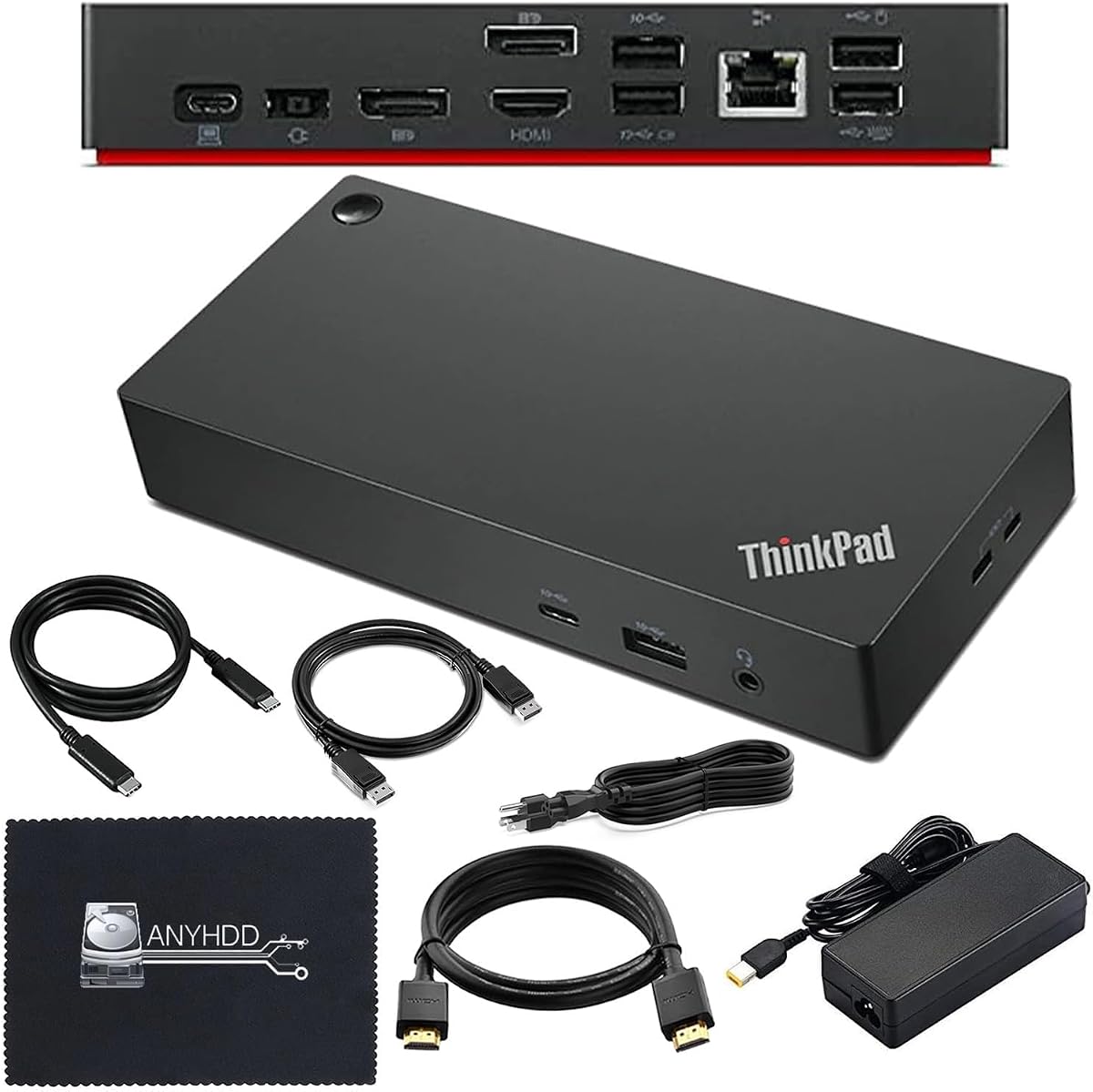
This Lenovo Thinkpad Docking Station stands out with an impressive 4.6 rating. It is designed to support dual 4K displays, offering clear visuals for creative work or financial trading setups.
We may earn a commission when you buy through this link, at no additional cost to you.
The package includes essential HDMI and DisplayPort cables, saving you time and extra cost. The 90W adapter ensures your laptop stays charged while in use. The microfiber cloth is a thoughtful addition for screen maintenance.
However, you must ensure your computer supports USB-C or Thunderbolt protocols before purchasing. Some users report needing firmware updates to resolve compatibility issues. Check your system specs to avoid returns.
This dock is ideal for users needing a ready-to-use dual monitor solution. If you want a high-rated product that comes with necessary cables, this model is a strong contender.
Enjoy crisp and clear visuals on external monitors or projectors with included HDMI and DisplayPort cables.
The package includes cables and a microfiber cloth, offering a complete solution straight out of the box.
We may earn a commission when you buy through this link, at no additional cost to you.
This version of the ThinkPad USB-C Dock Gen 2 focuses on enterprise features like Wake-on-LAN and PXE Boot. It is designed to allow IT departments to manage and diagnose machines remotely.
We may earn a commission when you buy through this link, at no additional cost to you.
While the user rating is lower than other models, it offers solid reliability for business use. The three years worldwide warranty provides long-term peace of mind. It supports 4K 60Hz video output when paired with a capable system.
Performance depends heavily on your laptop model. Users with older devices might experience limited power output. However, for businesses prioritizing network management features, this dock delivers essential tools.
This dock is best for corporate environments needing remote management tools. If Wake-on-LAN is critical for your workflow, this model offers the necessary enterprise-grade connectivity.
Wake-on-LAN and PXE Boot support allow for easy remote management and diagnostics by IT teams.
A three years worldwide warranty ensures that your hardware is protected against manufacturing defects.
We may earn a commission when you buy through this link, at no additional cost to you.
The Lenovo ThinkPad Universal USB-C Dock is designed to make IT admins lives easier. It features automatic firmware updates and remote management tools, reducing the time needed for maintenance in large organizations.
We may earn a commission when you buy through this link, at no additional cost to you.
With One Cable No Clutter functionality, users enjoy a clean workspace. The MAC Address Pass Through ensures your network identity remains consistent regardless of the dock. It is ideal for hot-desking environments where users move desks daily.
While it does not offer Thunderbolt 4 speeds, it provides reliable connectivity for standard office work. If you need basic video and data transfer, it performs well. However, heavy users might prefer USB4 models.
This dock is recommended for corporate offices prioritizing ease of management. If you need a reliable station for shared workspaces, this model simplifies IT support significantly.
IT managers can remotely gather information and update firmware securely through a web browser.
Advanced one-cable solution gives you more desk space to work and play with.
We may earn a commission when you buy through this link, at no additional cost to you.
This Lenovo USB-C Universal Business Dock holds a perfect 5.0 rating, reflecting high user satisfaction. It drives two external monitors at 4K 60Hz, making it ideal for detailed visual work or multitasking.
We may earn a commission when you buy through this link, at no additional cost to you.
The package includes essential HDMI and DisplayPort cables, ensuring immediate setup. The 90W adapter provides up to 65W of power to your laptop. The storm-gray exterior features a premium matte texture for a modern look.
For power-hungry laptops, the standard 65W output might not be enough. You may need to buy an optional 135W adapter. However, for most standard notebooks, this output is sufficient for daily tasks.
This dock is perfect for users needing dual high-res screens. If you value reliability and a clean aesthetic, this highly rated model is a top choice for your office setup.
Supports two external monitors at up to 4K resolution at 60Hz for increased productivity.
Works with notebooks supporting USB-C Alt-Mode or Thunderbolt protocols for broad use.
We may earn a commission when you buy through this link, at no additional cost to you.
The Lenovo 7-in-1 Portable USB-C Mini Dock is designed for ultimate portability. Its slim profile ensures it fits in any laptop bag, making it perfect for frequent travelers and students.
We may earn a commission when you buy through this link, at no additional cost to you.
It offers HDMI and VGA output for connecting to various projectors. The RJ45 network port ensures a stable connection when Wi-Fi is unreliable. It supports up to 45W charging, suitable for smaller laptops.
Due to its compact size, it lacks multiple video outputs. You are limited to one external display at a time. Also, the power delivery is lower than larger docks, so check your laptop requirements.
This dock is best for users needing basic connectivity on the go. If you travel often and need a simple adapter for one screen, this model offers great convenience.
Connect to 4K or 1080p displays using HDMI or VGA, ensuring compatibility with most screens.
The compact design and universal compatibility make it the perfect travel companion for any laptop.
We may earn a commission when you buy through this link, at no additional cost to you.
Choosing the right dock depends on your specific workflow and laptop capabilities. Consider the following factors to narrow down your options effectively.
Check how many monitors your dock supports and at what resolution. Some models handle dual 4K setups, while others only support a single 1080p display. Ensure the HDMI or DisplayPort version matches your screen requirements.
Prioritize models with HDMI 2.1 or DisplayPort 1.4 if you need high refresh rates or 4K resolution.
Your laptop needs specific wattage to charge while in use. Look for docks offering at least 65W. If your laptop requires 100W, ensure the dock supports 100W PD or includes an optional 135W adapter.
Always check your laptop power requirements before buying to avoid slow charging.
Count the USB-A and USB-C ports you need for peripherals like keyboards and mice. Ethernet ports are essential for stable network connections. Also, verify audio jack support for headsets.
Select a dock with at least two USB-A ports and one Ethernet port for a complete setup.
Thunderbolt 3 and USB4 offer faster data transfer than standard USB-C. If you use external drives often, prioritize higher bandwidth. Older laptops may only support standard USB-C speeds.
Match the dock technology to your laptop for maximum data transfer speeds.
Travel docks are slim and lightweight but may have fewer ports. Desktop docks are larger and more stable but less portable. Consider where you will use the dock most often.
Choose slim models for travel and larger models for fixed office desks.
Some docks work best with Windows, while others support macOS. Always verify compatibility with your specific laptop model. Lenovo docks often work best with ThinkPad laptops.
Ensure the product page lists your laptop model to avoid issues.
Check if the dock supports automatic firmware updates. This ensures security patches and performance improvements are applied easily. IT managers should look for fleet management features.
Look for models that update automatically to reduce maintenance work.
Lenovo often provides three-year warranties on docks. This protects against hardware failures. Ensure you know how to contact support if issues arise.
Verify the warranty length and support availability before purchasing.
Connect your laptop to the dock using the provided cable. Ensure the cable is fully seated to avoid connection drops. The dock should recognize peripherals immediately if drivers are installed.
Keep the dock in a well-ventilated area to prevent overheating. Dust accumulation can block airflow, so clean it gently with a dry cloth. Avoid placing it on soft surfaces like beds.
Update your dock firmware regularly using the Lenovo software. This ensures compatibility and security. Check for updates monthly through the official Lenovo Accessories Fleet Manager.
Yes, many Lenovo docks work with any laptop supporting USB-C or Thunderbolt. However, features like MAC address pass-through may not function. Always check the compatibility list before buying.
If the dock supports Power Delivery, it can charge your laptop. Ensure the dock output matches your laptop needs. Some models require optional adapters for higher wattage.
Check if the cable is fully seated and the laptop supports external displays. Update your graphics drivers. Ensure the dock supports the monitor resolution.
Yes, some models like the ThinkPad USB-C Dock Gen 2 support three monitors. Verify the dock specs to confirm multi-monitor support for your laptop.
Use the Lenovo Accessories Fleet Manager or the official Lenovo support website. Connect the dock to your PC and follow the on-screen instructions to apply updates.
No, the dock is not waterproof. Keep it away from water and spills to prevent damage. Store it in a protective case when traveling.
The Lenovo USB-C Dual Display Travel Dock remains our top pick for most users. It offers a great balance of video support and portability. For power users, the ThinkPad USB4 Smart Dock provides unmatched bandwidth.
Prioritize power delivery and port count based on your specific needs. If you travel often, choose a slim model. For office desks, look for multiple video outputs and Ethernet.
Remember that prices fluctuate frequently on major retailers. Always check current pricing and availability before making your final purchase to ensure you get the best deal.