
Canon MegaTank G3270
4.1Editor score
Low upfront cost
Up to 2 years ink included
Simple wireless connectivity
This guide compares the top 10 ink tank printers for home and office use, highlighting cost savings, print quality, and reliability features for buyers.
Ink tank printers have revolutionized the way we think about home and office printing. These devices use refillable ink tanks instead of traditional cartridges, offering significant cost savings over time. They are ideal for households and small businesses that need reliable, high-volume printing without the frequent expense of replacing cartridges. Choosing the right model involves considering features like wireless connectivity, print speed, and the convenience of the ink refill system.
To create this comprehensive roundup, we evaluated ten top-rated ink tank printers currently available on the market. Our analysis focuses on key specifications such as page yield, connectivity options, and user feedback regarding reliability and ease of use. We compared models from major manufacturers like Canon, HP, and Epson to ensure you get a balanced view of the best options available in 2026.
Each selection in this list highlights specific strengths, whether it is exceptional photo quality, robust business features, or unbeatable value for money. We provide detailed reviews and comparisons to help you narrow down the choices based on your unique needs. Please note that prices and availability can change frequently, so check the current listings before making your final purchase decision.
4.1Editor score

4.2Editor score

4.1Editor score
Here is a side-by-side comparison of all ten ink tank printers featured in this guide. This table helps you quickly identify key specifications and features to find the model that best fits your specific printing needs and budget constraints.




The Epson EcoTank ET-2803 stands out as a top contender in the ink tank printer category. With a solid rating of 4.2 stars, it is praised for its innovative cartridge-free design that eliminates the need for expensive small ink cartridges. Users appreciate the ability to print up to 4,500 black pages and 7,500 color pages from a single set of bottles included in the box.
We may earn a commission when you buy through this link, at no additional cost to you.
Key strengths include the Micro Piezo Heat-Free technology which ensures sharp text and vibrant photos across various paper types. The built-in flatbed scanner and color display make document copying and navigation straightforward. Wireless connectivity allows for seamless printing from smart devices using AirPrint or the Epson Smart Panel app, ensuring flexibility for modern households.
Trade-offs include the initial setup process which may take slightly longer than cartridge printers, and the lack of automatic double-sided printing in this specific model. However, these are acceptable compromises given the massive savings on ink costs over the life of the printer. The durable permanent printhead also reduces maintenance worries significantly.
This printer is ideal for home users and small offices that print frequently and want to avoid cartridge hassles. It balances performance, cost efficiency, and ease of use effectively. We highly recommend the ET-2803 for anyone looking for a reliable, high-volume printing solution that saves money in the long run.
Replacing traditional cartridges with refillable bottles drastically reduces the cost per page, saving users significant money over years of use.
The unique EcoFit bottles are designed to fit specific tanks, preventing spills and making the refilling process quick and stress-free.
We may earn a commission when you buy through this link, at no additional cost to you.
The Canon MegaTank G3270 is an excellent choice for budget-conscious buyers who still want the benefits of an ink tank system. Rated 4.1 stars, it offers a great balance of affordability and functionality. It comes with enough ink to last up to two years, allowing users to print thousands of pages without worrying about running out of ink quickly.
We may earn a commission when you buy through this link, at no additional cost to you.
This model supports wireless printing, copying, and scanning, making it a versatile all-in-one device for home use. The single-sided printing limitation is a trade-off for the lower price point, but the savings on ink make up for it for many users. The 1.35-inch LCD display provides basic navigation for common tasks.
While it lacks automatic double-sided printing, the G3270 is perfect for those who print mostly one-sided documents or are willing to manually flip pages. The compact design fits well on smaller desks, and the reliable wireless connectivity ensures easy access from multiple devices. It is a solid entry point into the world of tank printers.
We recommend the G3270 for students, small households, or anyone needing a reliable printer without a high upfront cost. It delivers on its promise of savings and reliability. If you prioritize value and simplicity over advanced features, this is a smart purchase for your home office.
The G3270 provides an accessible price point for users wanting to switch from cartridges without breaking the bank initially.
With up to 6000 black and 7700 color pages per set, the included ink ensures minimal maintenance and frequent purchases.
We may earn a commission when you buy through this link, at no additional cost to you.
The HP Smart Tank 5003 is designed as the last printer you will ever need, offering a premium experience with its mess-free refill system. Rated 4.1 stars, it stands out for its convenience and reliability. It includes up to three years of ink in the box, providing peace of mind for years of uninterrupted printing without needing replacements.
We may earn a commission when you buy through this link, at no additional cost to you.
HP highlights its mess-free refill system where bottles plug directly into the tank and drain automatically. This feature eliminates the hassle of squeezing or spilling ink. The printer delivers sharper text and richer colors compared to cartridge-based options. AI-capable features enhance the smart experience for connected printing.
While the price is higher than budget models, the long-term value and ease of use justify the investment for many buyers. It is a robust choice for homes that demand high-quality prints and minimal downtime. The borderless printing option adds versatility for photos and creative projects.
We suggest the HP Smart Tank 5003 for users who value convenience and premium build quality. Its durable design and long ink life make it a worthy investment. If you want a printer that minimizes maintenance and maximizes print quality, this model is a top contender in the market.
The unique refill design allows users to add ink without spills, ensuring a clean workspace and easier maintenance.
Advanced ink technology produces crisp text and vibrant colors suitable for both documents and professional-looking photos.
We may earn a commission when you buy through this link, at no additional cost to you.
The Canon Megatank G3290 improves on the G3270 by adding automatic double-sided printing and a larger color touchscreen. Rated 4.2 stars, it offers enhanced user interaction and efficiency. This model is ideal for those who print documents frequently and want to save paper without manual flipping.
We may earn a commission when you buy through this link, at no additional cost to you.
The 2.7-inch LCD color touchscreen makes navigation intuitive, allowing easy access to settings and wireless options. It maintains the same high ink capacity as other models in the series, supporting up to 6000 black and 7700 color pages. The auto duplex feature saves paper and is great for long reports or assignments.
While it is larger and more expensive than the G3270, the added features provide significant value for active users. The wireless connectivity ensures seamless integration with smart devices. If you want more control and automation in your printing workflow, this model is a strong choice to consider.
We recommend the G3290 for users who prioritize convenience and paper savings. It balances cost and functionality well for home offices. If you need a reliable printer with modern features like auto duplex and touch control, this Canon model delivers excellent performance and savings.
Automatic double-sided printing reduces paper usage and simplifies workflows for high-volume document needs.
A larger color display simplifies setup and navigation, making it easier to manage tasks without complex menus.
We may earn a commission when you buy through this link, at no additional cost to you.
The Epson EcoTank ET-4800 is designed for users who need a robust workstation printer with high-capacity tanks. It offers the same cartridge-free benefits as other EcoTanks, significantly reducing waste. With a rating of 3.8 stars, it provides reliable performance for those needing consistent document and photo output.
We may earn a commission when you buy through this link, at no additional cost to you.
Its Micro Piezo Heat-Free technology ensures sharp text and vibrant photos on various paper types. The built-in scanner and color display make copying and document management easy. Zero cartridge waste is a key benefit for environmentally conscious users who want to reduce plastic consumption in their homes.
While the rating is slightly lower than other models, it remains a solid choice for heavy printing tasks. The durable design and long-term savings make it worthwhile. If you need a printer that handles a mix of documents and photos reliably, this model is a good fit.
We suggest the ET-4800 for users prioritizing durability and high-volume needs. Its eco-friendly design and efficient ink system offer real value. If you want a printer that combines reliability with environmental benefits, this Epson model is a strong option for your office setup.
Eliminating cartridges reduces plastic waste significantly, contributing to a greener printing environment for everyone.
Micro Piezo technology avoids heat during printing, preserving print head life and maintaining consistent output quality.
We may earn a commission when you buy through this link, at no additional cost to you.
The Epson EcoTank ET-2903 delivers impressive speed with its 11 PPM black print speed and zero warmup time. Rated 4.2 stars, it is a reliable choice for households needing quick turnaround on documents. The high resolution of 5760 x 1440 DPI ensures exceptional photos and text on any media.
We may earn a commission when you buy through this link, at no additional cost to you.
It includes enough ink for up to three years of printing, reducing the frequency of refills. The color display simplifies navigation, and mobile printing support via the Smart Panel app makes printing from devices easy. The permanent printhead is designed to last the life of the printer for added reliability.
While settings can be complex, the performance gains are worth the effort for frequent users. It balances speed and quality effectively. If you want a printer that keeps up with your busy schedule without long waits, this model is a top choice for your home or small office.
We recommend the ET-2903 for those prioritizing speed and print quality. Its durability and ink savings make it a smart long-term investment. If you need fast, high-quality prints and want to minimize downtime, this Epson model delivers exceptional performance and efficiency.
With 11 pages per minute and zero warmup, this printer minimizes wait times for urgent printing tasks.
5760 x 1440 DPI ensures sharp text and detailed photos, perfect for presentations or personal projects.
We may earn a commission when you buy through this link, at no additional cost to you.
The HP Smart Tank 5003 is another excellent option from HP known for its mess-free refill system. With a 3.8 rating, it provides reliable printing for home environments. It includes up to three years of ink, ensuring you are stocked for a long time. This model is perfect for users who want simplicity and convenience.
We may earn a commission when you buy through this link, at no additional cost to you.
Wireless and mobile printing are supported, allowing you to print from anywhere in your home. Borderless prints add a creative touch to photos. The refill system is easy to use without spilling, which is a huge plus for busy households. It delivers sharp text and rich colors for quality documents.
While it has some software dependency, the hardware is solid and easy to maintain. If you want a printer that works out of the box with minimal fuss, this is a good choice. The included ink supply makes it a great value purchase for anyone looking to save on ink costs.
We suggest the HP Smart Tank 5003 for casual users and families. Its reliability and ease of use are major benefits. If you want a printer that saves you money on ink and requires little maintenance, this model is a smart and straightforward choice for your desk.
The mess-free refill system allows users to add ink easily without spills, keeping your workspace clean.
Borderless printing and wireless connectivity offer flexibility for both documents and creative home projects.
We may earn a commission when you buy through this link, at no additional cost to you.
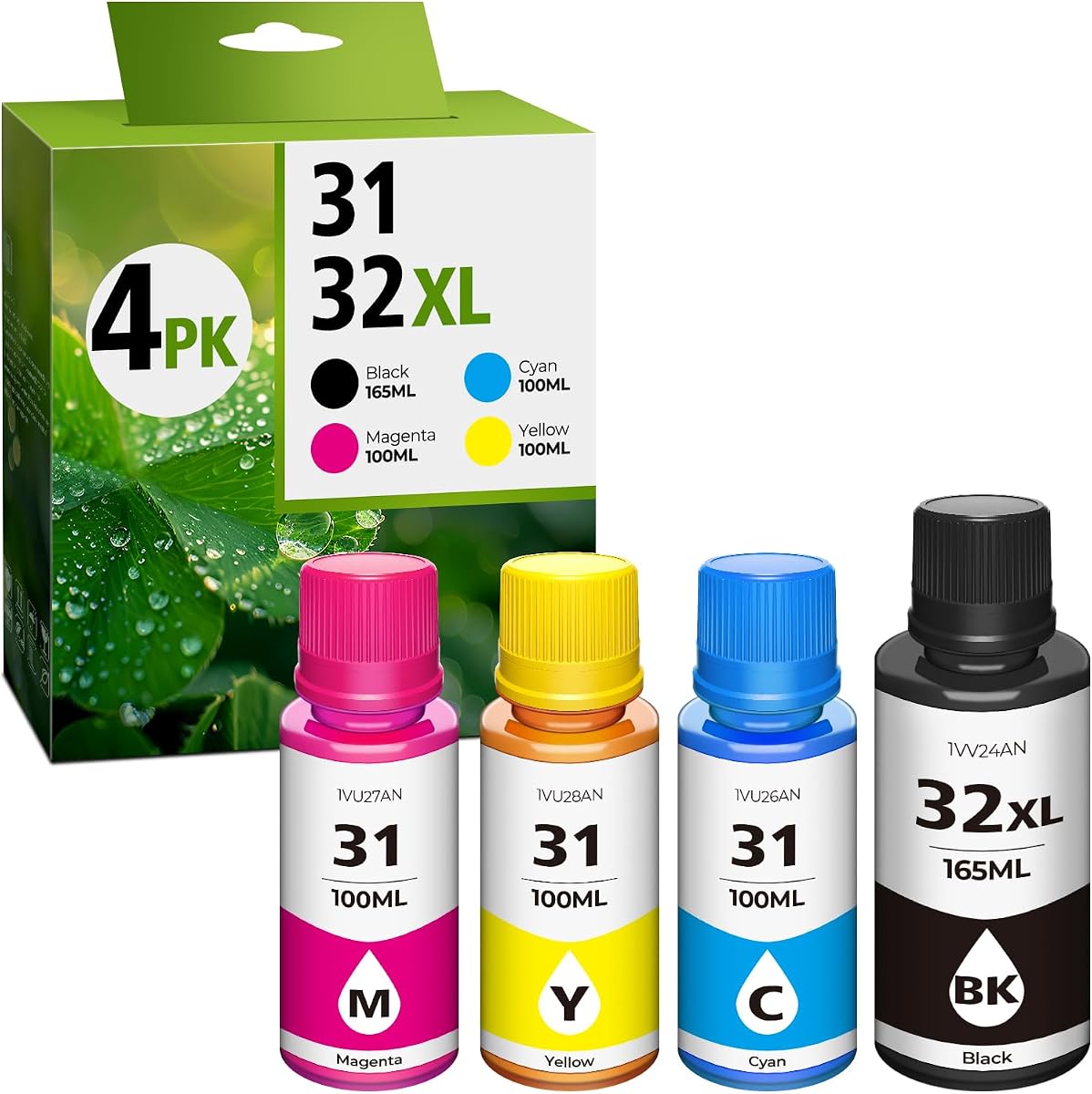
The 31 Ink 32XL Black Ink Bottle Set is a high-yield option compatible with many HP Smart Tank models. With a 4.4 rating, it offers an affordable alternative to OEM ink. Each black bottle provides up to 9500 pages, ensuring you can print extensively without frequent purchases. This is a smart buy for bulk printing needs.
We may earn a commission when you buy through this link, at no additional cost to you.
These bottles are designed for easy refilling with minimal leakage. They fit seamlessly into tanks like the 5101 and 6001. The set also includes other colors for a complete refill experience. It is a cost-effective solution for those looking to stretch their ink budget further.
Users should note that this is dye-based ink and not pigment black, so cleaning heads before switching is recommended. Avoid mixing with OEM pigment ink to prevent issues. Following these tips ensures the best performance. It is a reliable third-party option for extending your printer life.
We recommend these refill bottles for budget-conscious owners of Smart Tank printers. They deliver great value and reliable performance. If you want to reduce ink costs without compromising on print quantity, this set is a smart and practical choice for your refill needs.
With 9500 pages per black bottle, you get substantial coverage for large projects and everyday printing.
Designed for HP Smart Tank models, these bottles fit easily and reduce the hassle of refilling your printer.
We may earn a commission when you buy through this link, at no additional cost to you.
The Epson EcoTank ET-2980 provides a robust solution for color printing with enough ink for up to three years. Rated 4.0 stars, it ensures consistent performance for home and office users. Each replacement bottle set is equivalent to about 90 cartridges, saving significant costs. It is ideal for those who need vivid color prints regularly.
We may earn a commission when you buy through this link, at no additional cost to you.
Wireless features allow easy printing and scanning from your smartphone. The unique EcoFit bottles make refilling simple without drying out issues. However, Epson recommends genuine ink for optimal performance to avoid warranty issues. This focus on quality ensures long-term reliability and print excellence.
While maintenance requirements exist, the convenience of tank refills offsets them. The durable design is built for frequent use. If you prioritize color fidelity and long-term value, this model is a strong contender. It balances quality and cost effectively for regular color printing.
We recommend the ET-2980 for users who need consistent color output. It offers solid features for home and office needs. If you want a printer that minimizes cartridge waste and ensures color vibrancy, this Epson model is a reliable and efficient choice.
The ink system ensures rich colors for photos and documents, enhancing the visual appeal of your prints.
Up to three years of included ink means fewer interruptions for refills and more focus on your work.
We may earn a commission when you buy through this link, at no additional cost to you.
The Epson EcoTank ET-2800 is a solid basic model for home users seeking cartridge-free convenience. Rated 4.0 stars, it uses Micro Piezo Heat-Free technology for vivid, detailed prints. It prints 10 ISO pages per minute, handling standard jobs efficiently. This model is a great entry point for new tank printer users.
We may earn a commission when you buy through this link, at no additional cost to you.
Zero cartridge waste is a major benefit for environmentally friendly homes. The compact design fits easily into small spaces. While it lacks advanced connectivity, it covers essential needs well. It is a reliable choice for those who want simplicity and savings without complex settings.
Maintenance is straightforward, and the included ink provides up to two years of use. Avoid using non-genuine ink to ensure optimal performance and warranty coverage. It is a durable, practical printer that balances cost and functionality for everyday needs.
We recommend the ET-2800 for basic home printing. It is simple, efficient, and eco-friendly. If you want a reliable printer without extra complications, this Epson model is a smart and budget-friendly choice for your home office or desk.
Simple design focused on core printing tasks makes it ideal for users needing reliable everyday performance.
Eliminating cartridges reduces plastic waste significantly, helping to protect the environment for everyone.
We may earn a commission when you buy through this link, at no additional cost to you.
Choosing the right ink tank printer involves balancing features with your specific needs. Here are key factors to consider before making your purchase to ensure you get the best value and performance.
When choosing an ink tank printer, calculate the cost per page based on the bottle price and page yield. High-yield bottles may cost more upfront but save significantly over time compared to cartridges. Look for printers offering 3000 to 6000+ pages per bottle.
Prioritize models with high page yield to reduce the frequency of ink purchases and save money in the long run.
The refill system design varies by manufacturer. Some have bottles that plug directly into the tank, while others may require pouring. A mess-free system reduces the risk of spills and makes maintenance easier for all users.
Choose a printer with an easy-to-use refill system that prevents spills and simplifies maintenance tasks for you.
Print speed is measured in pages per minute (PPM). For high-volume tasks, look for models offering 10+ PPM for black and white. Slower models may take longer for large documents, which can impact productivity in busy households.
Look for models with at least 10 PPM for efficient handling of large documents and high-volume needs.
Modern printers should offer wireless connectivity options like Wi-Fi and Bluetooth. Look for AirPrint or Mopria support to print easily from mobile devices without installing extra apps. Secure connections are also important for safety.
Ensure the printer supports AirPrint or Mopria to enable seamless printing from your mobile devices and smartphones.
If you need to scan or copy, look for an all-in-one model. A flatbed scanner is better for scanning documents and photos while an ADF is useful for multi-page documents. Consider your scanning frequency when choosing.
Look for all-in-one models with a flatbed scanner to handle document and photo scanning effectively.
Print quality is crucial for documents and photos. Check the DPI rating and resolution. 5760 x 1440 DPI is ideal for high-quality photos, while sharp text is essential for documents. Technology like Micro Piezo often provides better results.
Look for high DPI ratings and Micro Piezo technology to ensure sharp text and vibrant, high-quality photos.
Durability is key for long-term value. Look for printers with permanent printheads that last the life of the machine. Check warranty terms and user reviews for reliability. A durable printer minimizes maintenance needs and repair costs over time.
Check warranty terms and look for permanent printheads to ensure long-term durability and reliability for your needs.
Many manufacturers require genuine ink to maintain warranty coverage. Using non-genuine ink may void your warranty. Consider the cost and availability of genuine ink bottles when purchasing. This policy protects the hardware from damage due to poor ink quality.
Ensure you understand the warranty requirements regarding genuine ink to avoid voiding your coverage and hardware protection.
Initial setup involves unpacking the printer and installing the included ink bottles. Ensure you follow the manufacturer's guide for priming the system which may take a few minutes to activate the ink flow properly.
Keep the printer in a cool, dry place away from direct sunlight. Clean the exterior and scanner glass regularly with a soft cloth to prevent dust buildup and maintain print quality and scanner accuracy.
To prevent clogs, run cleaning cycles every few weeks or after a long period of inactivity. Print a test page to check for streaks and ensure the printhead is functioning correctly for optimal performance.
Yes, ink tank printers generally offer lower cost per page and higher capacity than cartridge printers. They include enough ink to last years and reduce waste by eliminating disposable cartridges for the environment.
They can clog if left unused for long periods but using them regularly prevents this. Most modern models have auto-cleaning features to minimize maintenance and ensure consistent print quality over time.
While possible, using non-genuine ink may void your warranty. Always check the manufacturer's policy on third-party ink to avoid issues with coverage or performance on your specific printer model.
Pigment ink is water-resistant and durable for documents while dye ink offers more vibrant colors for photos. Choose based on whether you prioritize text clarity or photo quality in your work.
Refills depend on your print volume. Most tanks last from several months to years depending on usage. Check the ink levels on your display to know when to refill and avoid interruptions.
Yes, most tank printers support mobile printing via AirPrint or proprietary apps. Wireless connectivity allows you to print documents and photos directly from your smartphone or tablet easily.
In this guide, we reviewed ten top ink tank printers ranging from budget-friendly options to premium workstations. Models like the Epson ET-2803 and HP Smart Tank 5003 stood out for their ink capacity and reliability for home use.
When selecting a printer, prioritize your specific needs such as print speed, connectivity, and ink longevity. Investing in a tank printer often pays off in savings and convenience compared to traditional cartridge-based models.
Remember to check current prices and availability before buying. Technology and pricing evolve quickly, so verifying the latest details ensures you make the best choice for your home or office setup.