
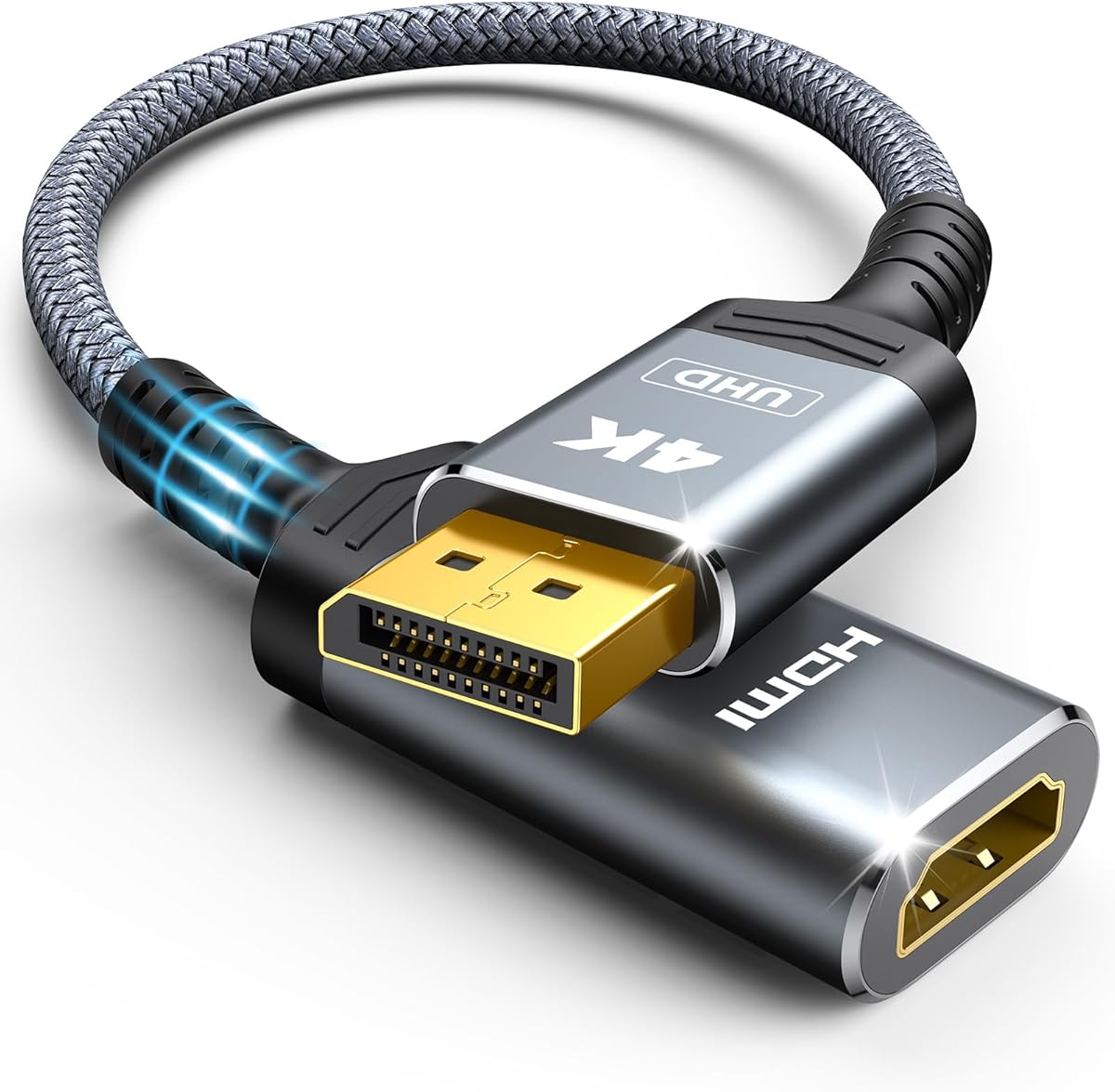
Moread 4K DisplayPort to HDMI Adapter
4.6Editor score
Supports up to 4K at 30Hz
Gold plated connectors for durability
Passive unidirectional design
This guide compares the top HDMI to Displayport converters for 2026. Find the best adapter for high refresh rates, 4K resolution, and reliable signal conversion
Connecting modern computers to legacy monitors often requires the right HDMI to Displayport Converter. These devices bridge the gap between HDMI sources and Displayport displays. Choosing the correct adapter ensures stable video and audio transmission without signal loss or flickering issues.
We evaluated ten leading models based on resolution support, build quality, and compatibility. Our analysis focuses on active versus passive designs and their ability to handle high refresh rates. Each product was assessed for reliability, ease of use, and overall value for different user needs.
Every pick highlights specific strengths like gaming performance or office versatility. Prices and availability change frequently, so always verify details before purchasing. This guide helps you select the perfect converter to extend your display capabilities effectively today.
4.6Editor score

5.0Editor score

4.4Editor score
The following table provides a side by side comparison of all ten top rated converters. It highlights key specifications such as maximum resolution, refresh rates, and directional capabilities to help you make an informed decision quickly.



This active HDMI to Displayport converter stands out as a top choice for gamers. It supports high refresh rates like 144Hz and 165Hz at 1080P. The 4K at 60Hz capability ensures crisp visuals on compatible displays without signal loss.
We may earn a commission when you buy through this link, at no additional cost to you.
The adapter converts HDMI 2.0b signals to Displayport 1.4 signals effectively. It comes with a USB power cable which ensures stable performance even with low power sources. This design minimizes flickering and maintains a consistent connection during intense gaming sessions.
While it is highly capable, it does not support VR headsets or docking stations. Users must ensure their display accepts Displayport input and the source has an HDMI output. These limitations are acceptable given the high performance it delivers for standard monitors.
Gamers using Xbox or PS5 will find this adapter ideal for connecting to high refresh rate monitors. The plug and play nature means no drivers are needed. It offers a lag free experience that superior to wireless casting methods for competitive play.
The adapter supports 2K at 144Hz and 1080P at 165Hz for smooth gaming visuals.
Included USB power cable ensures stable signal transmission during high resolution usage.
We may earn a commission when you buy through this link, at no additional cost to you.
This passive adapter offers excellent value for users connecting Displayport sources to HDMI displays. It supports video resolutions up to 4K at 30Hz and 1080P at 120Hz. The compact design makes it easy to carry in a bag or pocket for presentations.
We may earn a commission when you buy through this link, at no additional cost to you.
The build quality includes gold plated connectors that resist corrosion and improve signal transmission. A locking connector with latches prevents accidental disconnection. The five year warranty provides long term satisfaction and reliable customer service for any issues.
While it is passive and cannot work with all docking stations, it fits most standard graphics cards. It does not support HDMI sources to Displayport monitors. These constraints are minor considering the price and the solid performance it offers for basic use.
Office workers and students needing a reliable connection for secondary monitors will appreciate this adapter. It extends your workspace or mirrors displays efficiently. The affordable cost combined with the strong warranty makes it a top budget pick for many users.
Gold plated connectors and a five year warranty ensure durability and long term use.
Supports 1080P at 120Hz and 4K at 30Hz for various display needs.
We may earn a commission when you buy through this link, at no additional cost to you.
This active adapter is designed for reliable connections from HDMI sources to Displayport monitors. It supports up to 4K at 30Hz and includes a USB power cable for stability. The sturdy housing and gold plated connectors ensure durability for daily office work.
We may earn a commission when you buy through this link, at no additional cost to you.
The active IC chip converts HDMI signals to Displayport effectively. It is ideal for extending desktops on laptops like Dell Inspiron or HP models. The USB power is recommended for stable performance especially if you see flickering at higher resolutions.
It is not designed for high refresh rate gaming or KVM switches. Compatibility issues may arise with switches but it works well for standard monitor connections. These trade-offs are acceptable for a professional setup prioritizing stability over gaming features.
Professionals needing to connect HDMI laptops to Displayport monitors should choose this adapter. It allows you to mirror or extend your display for better productivity. The reliable build and included power cable make it a premium choice for consistent office use.
Built-in IC chip ensures stable signal transmission from HDMI sources to Displayport monitors.
Included USB power cable provides stable performance for low power HDMI sources.
We may earn a commission when you buy through this link, at no additional cost to you.
This adapter connects Displayport computers to HDMI displays with high durability. It features military grade tensile nylon and 24K gold plated ports. The design withstands up to 25000 flex times ensuring accurate signal transmission and extended use life.
We may earn a commission when you buy through this link, at no additional cost to you.
It supports up to 4K at 30Hz and backward compatibility for 1440P at 60Hz. The passive design ensures synchronized audio and video for immersive streaming. Gold plated ports resist corrosion and improve signal transmission performance for vibrant visuals.
Users should note it is passive and not for monitor to monitor connections. It requires a data output source like a desktop or laptop. While it may heat up during high resolution transmission this is normal and does not affect functionality negatively.
Users seeking a durable adapter for daily work or home streaming will find this suitable. The strong build quality offers long term reliability. It delivers realistic 4K resolution and smooth visuals to large screens effectively for general consumption needs.
Military grade nylon and gold plated ports ensure durability and signal integrity.
Supports 4K at 30Hz and 1440P at 60Hz for clear detailed visuals.
We may earn a commission when you buy through this link, at no additional cost to you.
This short cable adapter turns a Displayport port into an HDMI port easily. It features a slim aluminum housing for best heat dissipation. The braided sheath ensures flexibility while 32AWG tinned copper conductors ensure conductivity and ductility.
We may earn a commission when you buy through this link, at no additional cost to you.
It supports video streaming up to 4K at 30Hz and 1080P at 120Hz. Aluminum foil and braided shielding minimize EMI for stable signal transmission. The strain relief on both ends prevents ports from being exposed and damaging the connection.
While it is passive and not for Xbox or Switch it covers PC needs well. It resolves limitations of PCs with only one HDMI port. The compact design does not block other ports of your device for convenient daily use.
Users wanting a reliable extension cable for their PC will appreciate this option. It extends or mirrors displays with ease in just two steps. The durable build and excellent heat dissipation make it a top choice for consistent performance.
Aluminum foil and braided shielding minimize EMI for stable signal transmission.
Slim aluminum housing is resistant to corrosion for best heat dissipation.
We may earn a commission when you buy through this link, at no additional cost to you.
This active adapter delivers 4K at 60Hz video directly to your display. It features a one piece aluminum housing for corrosion resistance. The multi-layer copper shielding minimizes signal loss and provides amazing clarity and smooth sound for media.
We may earn a commission when you buy through this link, at no additional cost to you.
It complies with HDCP 2.2 standard and supports 4K content transfer easily. The adapter works with PC and console devices like PS5 and Xbox One. It allows mirror or extend modes for high quality video and audio viewing experiences.
Note that it does not support 1440P at 144Hz and may not work with VR. Switch and Xbox series may only support 1080P at 60Hz. These limits are acceptable given the strong compatibility with mainstream devices and high resolution support.
Users needing to connect a console to a Displayport monitor should consider this. It offers a plug and play solution without driver installation. The reliable build and broad compatibility make it a solid choice for entertainment and work setups.
Product complies with HDCP 2.2 standard for secure high resolution content transfer.
Works with PC graphics cards and consoles like PS5 and Xbox for flexible use.
We may earn a commission when you buy through this link, at no additional cost to you.
This lightweight gadget connects Displayport devices to HDMI monitors easily. The latch design provides a secure connection that improves stability. Gold plated connectors resist corrosion and abrasion for better signal transmission performance over time.
We may earn a commission when you buy through this link, at no additional cost to you.
It supports up to 4K at 30Hz and 1080P at 60Hz for monitors. The compact design fits in a pocket for presentations or extending desktops. An 18 month warranty ensures long time protection of your purchase and quick service.
The adapter is not bi-directional so it only works one way. It is passive and cannot transmit from HDMI to Displayport. While this limits versatility it remains reliable for standard laptop to monitor connections without issues.
Presenters and office workers needing a simple stable connection will like this. It tucks away easily and works with laptops and desktops. The friendly customer service and warranty offer peace of mind for daily use.
DisplayPort connector with latches provides a secure connection for stable usage.
Exclusive unconditional 18 month warranty ensures long time protection of your purchase.
We may earn a commission when you buy through this link, at no additional cost to you.
This adapter connects HDMI sources to Displayport monitors with high refresh rates. It supports 4K at 60Hz and 2K at 144Hz. The braided nylon cable adds extra durability while the aluminium alloy casing insulates heat effectively.
We may earn a commission when you buy through this link, at no additional cost to you.
It converts HDMI 2.0b to Displayport 1.4 signal easily. The non-slip design makes plug and unplug easy for users. An 18 month warranty ensures satisfaction and friendly service for any problems that might arise during use.
Note that you must connect the USB cord to an external power supply. It is not compatible with VR headsets or KVM switches. These limitations are standard for active adapters ensuring stable high performance when powered correctly.
Gamers and creators needing high refresh rates on Displayport monitors will benefit. The reliable design and broad compatibility with consoles make it versatile. It offers a clear lag free viewing experience for entertainment and work tasks.
Supports 4K at 60Hz and 2K at 144Hz for smooth detailed gaming visuals.
Braided nylon cable and aluminium alloy casing ensure durability and heat insulation.
We may earn a commission when you buy through this link, at no additional cost to you.
This pack includes two adapters for connecting multiple Displayport devices to HDMI. The aluminium case is lightweight and anti-corrosion to extend usage. It supports 4K at 30Hz and uncompressed digital audio for seamless transfers.
We may earn a commission when you buy through this link, at no additional cost to you.
The no buckle design prevents damage and provides a stable connection. With two adapters you get new HDMI ports for multiple screens easily. The slim design does not block any other port of your device for convenience.
It is passive so it works only from DP to HDMI not vice versa. Compatible with DP-enabled laptops and graphics cards like AMD and NVIDIA. The limitations are acceptable for users needing simple reliable connectivity for several setups.
Users with multiple laptops or graphics cards will find this set useful. It allows you to protect ports while maintaining display flexibility. The two pack value and compact design make it a practical solution for tech needs.
Two adapters provide new HDMI ports for multiple screens and devices easily.
Aluminium case is anti-corrosion and improves heat dissipation for safety.
We may earn a commission when you buy through this link, at no additional cost to you.
This portable adapter connects HDMI devices to Displayport monitors effectively. It features a compact design that tucks into a bag easily. The built-in IC chip converts HDMI signals to Displayport digital signals efficiently and reliably.
We may earn a commission when you buy through this link, at no additional cost to you.
It supports up to 4K at 60Hz and high bit rate audio. The 8 channels digital audio supports sampling rate up to 192kHz. It is compatible with a wide range of devices including laptops and gaming consoles.
It is not bidirectional so it cannot convert DP to HDMI. It also cannot improve the native resolution of games. These factors are minor compared to the strong compatibility and resolution support it provides for many users.
Users needing a travel friendly solution for presentations will like this. It extends your desktop screen or mirrors displays on the go. The broad compatibility ensures it works with most devices you might carry with you daily.
Tuck this lightweight gadget into your bag or pocket for easy presentation.
Supports image resolution up to 4K at 60Hz for sharp visuals.
We may earn a commission when you buy through this link, at no additional cost to you.
Selecting the right adapter involves considering directionality, power needs, and resolution support. Understanding these factors ensures you get a converter that meets your specific display requirements without issues.
Most adapters are unidirectional meaning they convert one specific signal type to another. Ensure the adapter matches your source and display ports like HDMI source to Displayport display. Using the wrong direction will result in no signal or image issues.
Always confirm the source port and display port before purchasing to avoid confusion.
Active adapters contain a chip to process signals and often require external power. These are better for HDMI to Displayport conversion. Passive adapters work without extra power but are limited to Displayport to HDMI conversion.
Choose active converters for HDMI to Displayport needs to ensure stable performance.
Check the maximum resolution and refresh rate the adapter supports. Some adapters support 4K at 30Hz while others support higher rates like 60Hz. High refresh rates are essential for gaming to ensure smooth motion.
Match the adapter specs to your monitor's capabilities for the best visual experience.
Active adapters often include a USB power cable to provide sufficient voltage. Without external power some adapters may flicker or fail at high resolutions. Ensure you have access to a USB port for power.
Always connect the USB power cable if provided to avoid stability issues.
Look for adapters with gold plated connectors and sturdy housings like aluminum or nylon. These materials resist corrosion and improve signal transmission. A robust build ensures the adapter lasts longer with frequent use.
Prioritize durable designs to protect your ports and maintain signal integrity.
Not all adapters work with every device. Some do not support VR headsets or KVM switches. Ensure the adapter is compatible with your specific graphics card or gaming console.
Verify compatibility lists provided by the manufacturer before purchasing to avoid issues.
Consider the cable length if it is an integrated adapter. Short cables are compact but may limit positioning. Longer cables offer flexibility but can be cumbersome. Choose what fits your desk setup best.
Select a cable length that allows you to place the monitor comfortably.
Reputable brands offer warranties ranging from one to five years. Good customer support helps resolve technical issues quickly. A longer warranty provides peace of mind for your investment.
Check warranty terms to ensure you are covered for long term use.
Start by connecting the source device to the adapter using the correct port type. If it is an active adapter connect the USB power cable to a power source. Then connect the other end to your display device.
Set your computer to mirror or extend display mode in your system settings. Ensure the resolution and refresh rate match the adapter capabilities. This prevents flickering and ensures stable image output.
Store the adapter in a protective case when not in use. Avoid bending the cable excessively to prevent internal damage. Clean the ports with a dry cloth to remove dust and maintain good contact.
Some active converters support gaming consoles like PS5 but you must ensure the adapter allows HDMI source to Displayport display. Check the product specifications for console compatibility as not all adapters support this flow.
Active converters require extra power to process signals from HDMI to Displayport. The USB cable provides the necessary voltage to prevent flickering or signal loss especially at higher resolutions.
MacBooks with Displayport output can use passive adapters but models without DP may need active ones. Verify if your Mac has the required ports and supports the necessary conversion mode.
Passive adapters simply connect signals without processing and work one way. Active adapters use a chip to convert signals and often need power for more complex connections.
Some adapters support high refresh rates but others are limited to 60Hz. Check the product specs to confirm if it meets your gaming or high performance needs.
Most adapters are not compatible with VR headsets due to specific requirements. It is best to use the direct connection supported by the headset manufacturer for VR.
Flickering often happens if the USB power is not connected or the resolution is too high. Try lowering the resolution or ensuring the power cable is securely connected.
Yes it is safe to leave it plugged in as modern adapters have protection circuits. However unplug it during storms or long periods of non-use to protect your devices.
The top picks highlight options for different needs from high refresh gaming to reliable office use. Active converters are essential for HDMI to Displayport setups while passive ones suit the reverse direction.
Prioritize resolution support and power requirements to ensure your display works smoothly. Build quality and warranty options also play a role in long term satisfaction and reliability.
Always check current availability and verify your device compatibility before buying. Prices and stock change so confirm details on the product page for the best experience.