
HDMI Extender Over Ethernet 1080P 60Hz
4.4Editor score
Supports 1080P at 60Hz
Extends up to 164 feet
Includes Power over Cable adapter
This comprehensive guide compares the top HDMI over Ethernet extenders for home and professional use, evaluating range, resolution support, and installation
Finding the right HDMI over Ethernet solution is essential for extending high-definition video signals across long distances without signal loss. These devices allow you to transmit audio and video over standard network cables, making them ideal for home theaters, offices, and commercial installations where direct HDMI cabling is impractical.
We have carefully analyzed ten top-rated HDMI over Ethernet extenders based on their transmission capabilities, supported resolutions, and ease of installation. Each product was evaluated for its ability to maintain signal integrity over various cable lengths and its compatibility with common consumer electronics like consoles, Blu-ray players, and PCs.
Each pick in this guide highlights specific strengths such as 4K support, Power over Cable technology, and remote control features. Please note that product availability and pricing can change frequently, so we recommend verifying current details before making your final purchase decision for your specific setup needs.
4.4Editor score

4.6Editor score
4.2Editor score
This side-by-side comparison highlights the key specifications and capabilities of each HDMI over Ethernet extender to help you quickly identify the best match for your specific distance and resolution requirements.


This OREI model stands out as a top choice for users needing reliable 4K extension over long distances. It supports HDMI 2.0a and delivers crisp visuals up to 230 feet using a single Cat6 cable.
We may earn a commission when you buy through this link, at no additional cost to you.
Key strengths include its support for HDR10+ and Dolby Digital audio which enhances the viewing experience. The Power over Cable feature simplifies installation by reducing the need for extra power outlets at the remote display.
While the price is moderate, it delivers consistent performance that justifies the investment. The compact metal housing ensures durability without taking up much space in tight AV setups.
Ideal for home theater enthusiasts or professionals needing high-quality video extension. If you prioritize stability and 4K capability, this unit is a strong recommendation for your setup.
The unit supports UHD 4K@60Hz with YUV 4:4:4 for sharp vibrant colors and smooth playback in any viewing environment.
Power over Cable technology means only the transmitter needs external power, keeping the receiver area clean and clutter free.
We may earn a commission when you buy through this link, at no additional cost to you.
This extender offers excellent value for basic Full HD video transmission needs. It delivers stable 1080P at 60Hz over distances up to 164 feet using standard network cables.
We may earn a commission when you buy through this link, at no additional cost to you.
Its main strength lies in the included Power over Cable adapter which simplifies setup significantly. The EDID copy function ensures your source device recognizes the connected display correctly for optimal resolution.
Trade-offs include the lack of 4K support which may limit future proofing. However for many office or classroom applications this performance level is perfectly adequate.
Best for budget conscious users requiring reliable 1080p extension. If you do not need 4K, this provides a cost effective and efficient solution for your cabling needs.
No software or drivers are required as you simply connect source to transmitter and run a single network cable to the receiver.
Built-in EDID copy helps establish the correct resolution between transmitter and receiver for stable video signal across the connection.
We may earn a commission when you buy through this link, at no additional cost to you.
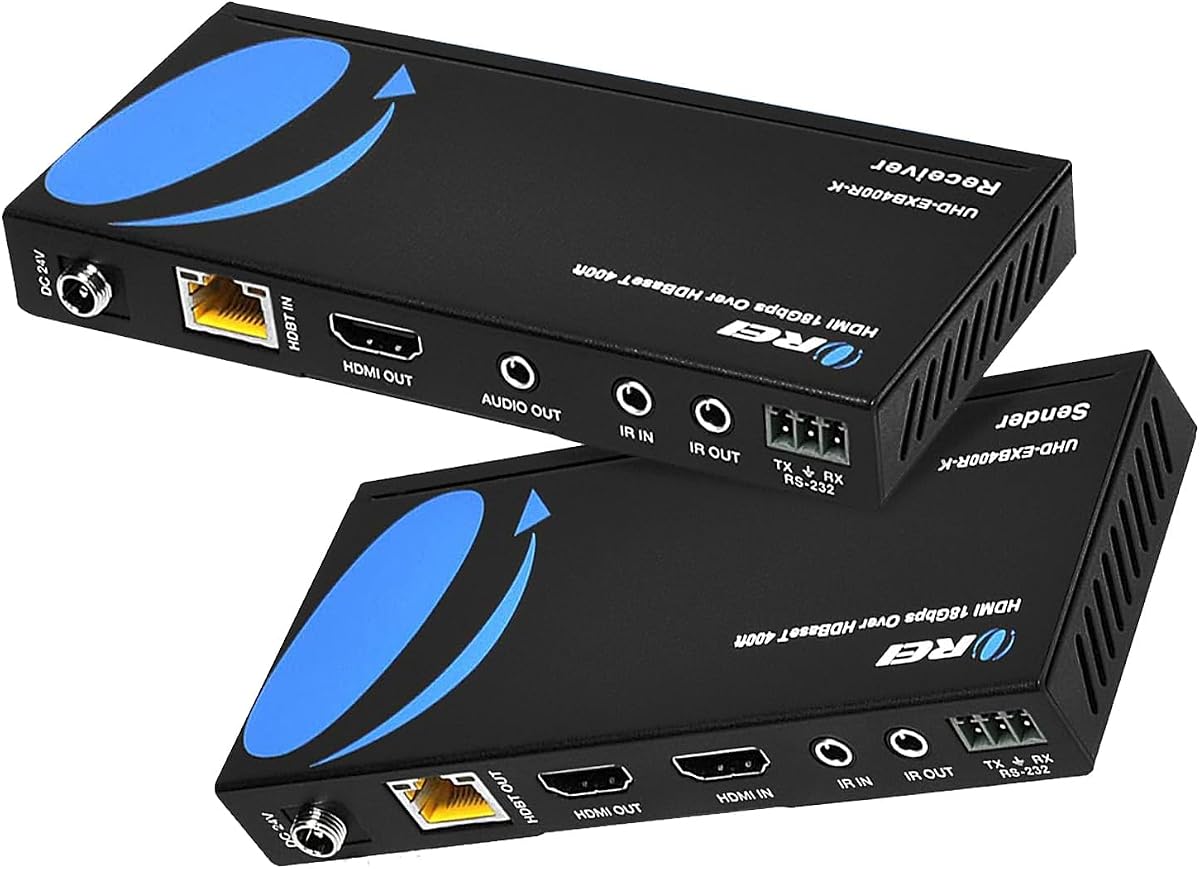
This high end model is designed for professional installations requiring extreme reach and control features. It extends HDMI signals up to 400 feet using advanced HDBaseT technology for lossless transmission.
We may earn a commission when you buy through this link, at no additional cost to you.
The inclusion of an RS-232 command control port allows for integrated automation which is rare at this level. Two-way IR control ensures you can manage source devices from the remote location easily.
Users must ensure they use matching OREI units as they are not interchangeable with other brands due to chipset differences. This guarantees performance integrity but adds to the cost.
Ideal for large commercial venues or complex home automation setups. If you need maximum distance and control integration, this premium unit delivers the highest performance available.
Achieve zero latency video transmission up to 400 feet over standard CAT5e or CAT6 LAN cables for large venue installations.
Bi-directional IR and RS-232 ports allow comprehensive control of source devices and displays from remote locations for automation.
We may earn a commission when you buy through this link, at no additional cost to you.
This solution is perfect for scenarios where you need to display the same content on multiple screens simultaneously. It takes one HDMI source and distributes it to four displays over Cat6 cables.
We may earn a commission when you buy through this link, at no additional cost to you.
Key features include HDMI Loop Out on the transmitter for local monitoring while sending signals to remote displays. The IR pass-back support allows control of the source from the remote locations.
The main trade-off is the cost of multiple receiver units though one power adapter powers the whole system. Performance is stable for 4K at 30Hz or full 1080p at 60Hz.
Best for digital signage bars or conference rooms needing synchronized playback. If you need to mirror one feed to several locations this kit simplifies the wiring significantly.
Transmit a single HDMI signal to four different displays over Cat6 network cables simultaneously for synchronized multi-screen presentations.
Supports IR pass-back allowing you to control DVD players or HDMI video sources from remote locations using included cables.
We may earn a commission when you buy through this link, at no additional cost to you.
This model delivers high fidelity 4K@60Hz video and audio which is essential for gaming and high bitrate streaming. It supports 18Gbps bandwidth for uncompressed transmission over Cat6 cables.
We may earn a commission when you buy through this link, at no additional cost to you.
The HDMI loop out enables local screen viewing while extending content to a remote display which aids in testing and setup. Built-in EDID management optimizes compatibility between source and display devices.
While effective, it relies on a direct connection without network switches which is standard for this type of extender. Ensure you use high quality Cat6 cables for optimal performance.
Ideal for home theater or gaming rooms needing smooth 60Hz playback. If 4K60Hz quality is your priority over extreme distance this unit is a solid performance choice.
This HDMI over Ethernet extender supports 18 Gbps bandwidth and HDR for sharp visuals and smooth playback on high resolution displays.
Supports LPCM and Dolby TrueHD formats for immersive sound performance when connecting to high quality audio systems.
We may earn a commission when you buy through this link, at no additional cost to you.
This extender balances range and cost effectively for medium to long distance installations. It delivers 1080P at 60Hz up to 230 feet or 4K at 30Hz up to 131 feet.
We may earn a commission when you buy through this link, at no additional cost to you.
Power over Cable technology simplifies installation by sending power through the Ethernet cable reducing the need for extra outlets near remote displays. The EDID management ensures stable video resolution selection.
While the 4K refresh rate is lower than premium models the price point makes it attractive for general use. It maintains audio and video synchronization which is vital for presentations.
Best for schools or offices needing reliable extension over long halls. If you need distance without high-end features this offers a reliable and cost-effective solution.
Power over Cable technology sends power from the transmitter to the receiver through the connected Cat6 cable reducing clutter.
Real-time uncompressed signal transmission keeps video and audio synchronized for presentations and gaming applications.
We may earn a commission when you buy through this link, at no additional cost to you.
This unit is designed for users who need to control computers remotely via keyboard and mouse. It extends both HDMI video and USB signals up to 230 feet over Cat7 cables.
We may earn a commission when you buy through this link, at no additional cost to you.
The USB KVM extension allows full remote access to a PC which is useful for server rooms or secure setups. It also supports HDR formats for enhanced visual quality on compatible displays.
You need to ensure proper USB cabling is included and connected for KVM functionality to work. The compact design makes it easy to integrate into existing AV racks.
Ideal for IT professionals needing remote access. If you need to manage a PC from another room this provides essential control capabilities alongside high video quality.
Control your PC remotely through keyboard and mouse at the receiver end for secure and convenient access from another room.
Extract audio to analog speakers or headphones at the receiver end for direct local sound without external adapters.
We may earn a commission when you buy through this link, at no additional cost to you.
This extender emphasizes ease of installation with a patented mounting hole design for secure wall mounting. It transmits 4K@30Hz up to 130 feet or 1080P at 60Hz up to 230 feet.
We may earn a commission when you buy through this link, at no additional cost to you.
Support for both mirroring and extended display modes offers flexibility for dual screen setups. Power over Cable technology simplifies wiring by powering both units via one adapter at the transmitter.
The device uses efficient compression technology to maintain clear images though HDR support is not native due to HDMI 1.4 protocol limitations. This does not affect basic video quality.
Ideal for classrooms or businesses needing secure wall mounted displays. If you prioritize physical installation convenience this unit offers a reliable solution for long distance video.
Patented mounting hole design facilitates easy installation on walls or desks for a tidy and secure setup.
Supports both mirroring and extended display modes for flexible dual-screen setups without delay or signal loss.
We may earn a commission when you buy through this link, at no additional cost to you.
This unit delivers high quality video extension in a compact design suitable for tight spaces. It supports 4K@30Hz up to 130 feet or 1080P at 60Hz up to 230 feet.
We may earn a commission when you buy through this link, at no additional cost to you.
The transmitter includes a loop-out port allowing local preview while sending signals remotely. Power over Cable functionality ensures the receiver is powered directly through the Ethernet cable.
Installation is straightforward with included mounting holes for wall setups. The IR cable allows you to control source devices from the receiver location easily.
Ideal for home theaters needing discrete setups. If you need a compact solution without sacrificing distance this offers a clean and efficient video extension option.
Enjoy crisp visuals with a compact unit that fits easily into tight spaces or wall mounts for clean setups.
Control your source device remotely from the receiver side with the included IR cable for easy access.
We may earn a commission when you buy through this link, at no additional cost to you.
This standard model offers reliable performance for everyday HDMI extension tasks. It extends Full HD and 4K@30Hz signals up to 165 feet over CAT6/7 cables effectively.
We may earn a commission when you buy through this link, at no additional cost to you.
Features like IR pass-back support and loop-out on the transmitter enhance usability for dual-display setups. The package includes all necessary cables and adapters for immediate use.
Power plug may vary by region so international users should check the converter adapter included. Stability depends on using good quality cables for optimal performance.
Ideal for general office or home use where 30Hz is acceptable. If you need a dependable OREI branded solution this provides consistent value and quality.
Uses video transmission technology for stable HDMI extension up to 4K@30Hz over CAT6/CAT7 cables maintaining stable visuals.
Includes HDMI Loop-Out on transmitter for local display monitoring while extending signal to a remote screen.
We may earn a commission when you buy through this link, at no additional cost to you.
Selecting the right HDMI over Ethernet extender depends on your specific distance needs and resolution requirements. This guide outlines the critical factors to consider before purchasing.
The maximum cable run is a primary consideration. Some extenders support up to 100 meters (330ft) while others may limit you to 50 meters (165ft). Always choose a model rated for your specific distance plus a small margin for safety.
Ensure the product specifications match your room or venue size to avoid signal degradation issues.
Not all extenders support 4K at 60Hz. Many budget units limit 4K to 30Hz which can affect gaming or smooth video playback. If you need 4K60Hz ensure the product explicitly states support for 18Gbps bandwidth.
Verify that the extender supports the resolution of your source and display devices for best compatibility.
Most modern extenders require Cat6 or Cat7 cables for reliable high speed data transfer. Older Cat5e cables may work for shorter runs but can limit performance for longer distances or higher resolutions.
Check the product data to confirm minimum cable standards and ensure you have appropriate cabling available.
PoC technology allows the receiver to be powered through the Ethernet cable from the transmitter. This simplifies installation by reducing the need for separate power outlets near the remote display.
Ensure the unit supports PoC to minimize clutter and make wall mounting easier for clean setups.
Some models include IR pass-through capabilities allowing you to control source devices like Blu-ray players from the remote location. This is essential for home theaters where the equipment is hidden away.
Look for included IR cables and clear descriptions of remote support when buying for consumer electronics setups.
Higher end models may support HDR formats like HDR10+ or advanced audio codecs like Dolby TrueHD. These features ensure high fidelity content playback without quality loss over the network connection.
If you are setting up a home theater prioritize models with these audio video enhancements for a better experience.
Most units use proprietary transmission protocols meaning the transmitter and receiver must match. Some professional models like HDBaseT may require specific brand matching to ensure full functionality.
Check that the device is compatible with your source devices and does not require external network switches to function.
A good warranty can protect your investment. Many reputable brands offer at least one year of warranty coverage along with technical support. Check if the manufacturer provides customer assistance for troubleshooting setup issues.
Select a product from a brand with a proven track record to ensure reliability and easy service options if needed.
To begin setup connect the HDMI output of your source device like a computer or console to the transmitter unit. Plug the included HDMI cable into the source and the transmitter input port.
Run a Cat6 or Cat7 Ethernet cable from the transmitter output port to the receiver input port. Keep the cable as straight as possible and avoid sharp bends to maintain signal integrity.
Connect the receiver to your display using an HDMI cable and plug the transmitter into a power outlet. If using Power over Cable the receiver will draw power from the transmitter through the Ethernet cable.
Cat6 or Cat7 cables are generally recommended for reliable performance up to 100 meters. While Cat5e may work for shorter runs higher resolution signals benefit from the better shielding and speed of Cat6 or Cat7 cables.
No, HDMI over Ethernet extenders require a direct wired Ethernet connection. They do not function over Wi-Fi networks and rely on physical network cables to transmit video signals reliably.
Only specific models explicitly support 4K at 60Hz. Many units support 4K at 30Hz which is sufficient for movies but may cause flickering during gaming. Check the product specs carefully for 60Hz support.
Most products listed include Power over Cable technology and the necessary power adapter. However always verify the package contents to ensure the adapter is included before installation begins.
Yes, there are splitter models available that distribute one source to multiple displays. Standard point to point extenders support only one display per transmitter unless you purchase a specific splitter kit.
Use the included IR cables to connect the receiver to your source device. This allows the remote IR remote to pass commands through the extender to the source device effectively.
We have reviewed ten excellent HDMI over Ethernet extenders that cater to a variety of distance and resolution needs. The OREI HDMI Over Ethernet Extender via CAT6 4K stands out as our top choice for its balanced features and performance.
When selecting a unit prioritize the resolution refresh rate you need along with the distance coverage your space requires. Ensure your cable infrastructure matches the device specifications for stable performance.
Always check current product availability before purchasing as prices and stock levels fluctuate. These solutions provide reliable video extension that can transform any room into a high quality media or presentation space.