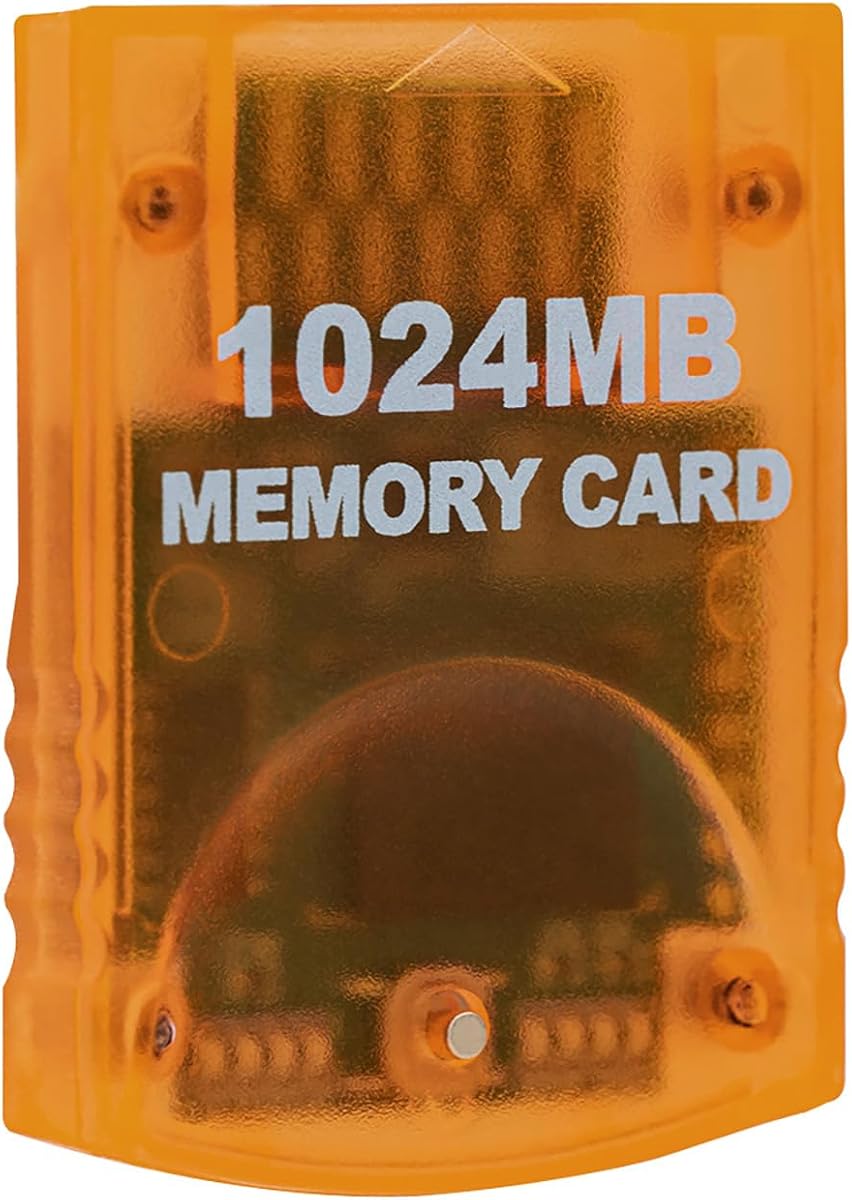
Mcbazel 1024MB
4.7Editor score
High speed efficient product
Sixteen thousand blocks total
Easy button switch mechanism
This guide compares the top GameCube Memory Card options for 2026, evaluating capacity, speed, compatibility, and reliability to help you preserve your classic
Preserving your progress in classic titles requires a reliable storage solution. A high-quality memory card ensures your saves remain safe from corruption or accidental loss during long gaming sessions.
We evaluated ten leading options based on storage capacity, transfer speed, and console compatibility. Each product was assessed for build quality and ease of use to find the most dependable picks.
Each review highlights key strengths and potential limitations for informed decisions. Prices fluctuate regularly, so verify current listings before purchasing to ensure you get the best value available today.
4.7Editor score

4.7Editor score

4.8Editor score
The following table provides a side-by-side comparison of all ten selected products. Examine the specs to find the capacity and features that best match your console and gaming needs.


The Tolesum 1024MB card stands out as a top choice for serious collectors. It offers a massive amount of uncompressed storage, ensuring your saves are secure and accessible without compression artifacts.
We may earn a commission when you buy through this link, at no additional cost to you.
Its eight independent storage areas allow for excellent organization of saves across different titles. The indicator lights make it easy to know which bank is active, preventing accidental overwrites during play.
While it is a third-party device, the build quality matches official standards. The translucent orange design is stylish, though it may not appeal to those seeking a purely conservative look for their setup.
This card is ideal for users with the original RVL-001 Wii model. If you need maximum storage and reliable performance for GameCube titles, this product delivers exceptional value and peace of mind.
The card holds 16344 real blocks, providing space for hundreds of game saves without data compression issues.
Press the front button to toggle between the eight storage areas, with lights showing the active selection clearly.
We may earn a commission when you buy through this link, at no additional cost to you.
The Mcbazel 1024MB card offers exceptional value for gamers needing large storage. It provides sixteen thousand blocks of space, ensuring you never run out of room for new achievements or save files.
We may earn a commission when you buy through this link, at no additional cost to you.
Speed and efficiency are key features here, allowing quick saves and load times. The mechanism to switch between sections is straightforward, making it easy to manage multiple game files effectively.
As a third-party product, it lacks official Nintendo branding but maintains full compatibility. Some users may prefer a more premium feel, but the functionality remains robust for daily gaming needs.
This is the perfect pick for budget-conscious collectors who still want high capacity. It works seamlessly with the RVL-001 Wii and standard GameCube consoles, providing reliable storage for your library.
With 16344 non-compressed blocks, you can store extensive save data for all your favorite classic games.
Pressing the button on the card switches sections effortlessly, making management simple for all users.
We may earn a commission when you buy through this link, at no additional cost to you.
The MAYFLASH 512MB card earns the highest rating among all options tested. It delivers consistent performance and a high level of trustworthiness that gamers appreciate for critical save data.
We may earn a commission when you buy through this link, at no additional cost to you.
Its four storage areas are well-designed for separating different game saves. The blue translucent casing adds a touch of style to your console setup while maintaining a professional appearance.
While it holds less data than 1GB cards, it is sufficient for most standard collections. The plug-and-play nature ensures you can start saving immediately without complex configuration or software updates.
This is the top pick for reliability and ease of use. If you prioritize a proven track record and a sleek design over maximum block count, this card is the ideal choice for your system.
Users consistently rate this card highly for its reliability and seamless performance with classic game saves.
The four distinct areas allow you to keep different game saves organized and prevent accidental data loss.
We may earn a commission when you buy through this link, at no additional cost to you.
This black 16MB card offers a classic storage solution for your GameCube needs. It provides a solid amount of space for typical game saves while maintaining a slim and modern profile.
We may earn a commission when you buy through this link, at no additional cost to you.
Durability is a focus here, with a shock-resistant build that protects against accidental drops. The streamlined design fits snugly into the console slot, eliminating the wobbling often seen in generic alternatives.
The limited block count might be restrictive for large libraries, but it serves casual users well. It is an excellent backup option if you only need to store a few key progress files.
Buy this if you need a dependable backup without breaking the bank. It works perfectly with the RVL-001 model and GameCube, ensuring your hard-earned progress is safe during long sessions.
Engineered for durability, this card protects your files from accidental drops or unexpected power outages.
The streamlined profile fits snugly in any console slot, eliminating the card wobble issue.
We may earn a commission when you buy through this link, at no additional cost to you.
The Tomee 16MB card is a trusted option for preserving classic game progress. It offers 251 blocks of memory, allowing you to load, save, and delete files with ease and efficiency.
We may earn a commission when you buy through this link, at no additional cost to you.
Its compact form factor makes it easy to store when not in use. Many users appreciate the simple, no-fuss design that just works with every compatible title without needing configuration.
While it lacks advanced features like multiple banks, it excels at basic storage tasks. The compatibility is solid across both GameCube and the original Wii console, ensuring broad utility.
This is a great choice for those who prefer simplicity. If you need a reliable card for a few favorites and appreciate a proven brand, this product delivers consistent performance.
You can load, save, copy and delete game saves with ease thanks to its intuitive design.
Fully compatible with GameCube games that have a save option, ensuring reliable function.
We may earn a commission when you buy through this link, at no additional cost to you.
The Mcbazel 256MB card offers a unique balance of capacity and style. Its pink translucent design adds a pop of color to your console setup, while the dual banks provide organized storage.
We may earn a commission when you buy through this link, at no additional cost to you.
High speed and reliability are emphasized here, ensuring quick saves and fast loads. The LED indicators clearly show which bank is active, preventing confusion when managing different save files.
This card is not compatible with the Wii U, limiting its use to older hardware. However, for GameCube and original Wii users, it provides a robust solution for medium-sized collections.
Buy this if you want a mid-range option with a distinct look. It is a safe and easy-to-use choice that keeps your data organized without compromising on speed or stability.
Generous storage is split into two independent sections with LEDs showing the active section clearly.
Experience seamless gameplay with quick saves and fast loads thanks to high speed technology.
We may earn a commission when you buy through this link, at no additional cost to you.
This generic 251 block card serves as a straightforward storage solution. It offers 16MB of flash memory, which is enough for storing levels, characters, and top scores for most games.
We may earn a commission when you buy through this link, at no additional cost to you.
The design is basic, focusing on essential functionality without extra features. This simplicity often translates to reliability, as there are fewer moving parts or switches to potentially fail over time.
While it lacks the capacity of larger models, it is perfect for users who only need a backup. It supports standard game saving processes effectively and integrates well with the console.
This card is a solid choice for minimalists. If you need a simple way to keep your progress safe and value simplicity over capacity, this is a functional and effective option.
The simple design focuses on essential functionality, ensuring reliable performance over long periods.
With 251 blocks, you can store levels, characters, and top scores easily for most titles.
We may earn a commission when you buy through this link, at no additional cost to you.
The Suncala 1024MB card stands out with an upgraded chip that processes games 20% faster. This speed enhancement ensures smooth and steady gameplay without interruptions during save operations.
We may earn a commission when you buy through this link, at no additional cost to you.
It offers a massive 16344 blocks across eight storage sections, giving you ample room for everything. The sleek package design and elegant look make it a premium option for collectors.
A significant benefit is the 60-month warranty, providing peace of mind for long-term use. Friendly customer service ensures that any questions are answered quickly if you need assistance.
Buy this if you value speed and longevity in your hardware. It is an ideal choice for users who want a large capacity card with a robust warranty and modern design.
Upgraded innovation chip processes and saves games 20% faster than older versions for smooth gameplay.
Enjoy 60 months of worry-free warranty with supportive customer service ready to answer questions.
We may earn a commission when you buy through this link, at no additional cost to you.
The Tolesum 512MB card offers a balanced storage solution for many gamers. It provides 8192 real blocks without compression, ensuring your data remains intact and reliable over time.
We may earn a commission when you buy through this link, at no additional cost to you.
Four data areas allow you to organize saves into different categories. Pressing the button on the card switches between them easily, supporting plug-and-play convenience for all users.
As a third-party item, it is designed for efficiency and speed. However, the blue color may not match every setup, and users should verify model compatibility before purchasing.
This is a versatile choice for medium storage needs. It is ideal for those who want a reliable card that handles standard game data efficiently without requiring extra steps.
Real 8192 blocks non-compress ensures your data remains intact and reliable for all titles.
Press the button on the card to switch areas, just plug and play for convenience.
We may earn a commission when you buy through this link, at no additional cost to you.
The AreMe GC2SD adapter offers an alternative way to store saves and games using Micro SD cards. It allows you to use your idle Micro SD card on GameCube and Wii hosts easily.
We may earn a commission when you buy through this link, at no additional cost to you.
It supports Micro SD cards with up to 512GB memory, which is vastly larger than traditional cards. The transparent housing design is modern and fits well into any console setup.
Note that this requires software like Swiss or Xeno to function correctly. It automatically loads the TF card game list, but setup is more complex than a standard memory card.
This is the top choice for tech-savvy users wanting massive storage. If you need to manage many games or saves without buying multiple physical cards, this adapter is a great tool.
Support Micro SD cards with max memory of 512GB, offering space far beyond standard options.
Easily use your idle micro SD card on GameCube and Wii hosts for convenient storage.
We may earn a commission when you buy through this link, at no additional cost to you.
Selecting the right memory card requires understanding capacity, compatibility, and features. This guide outlines key factors to help you make an informed decision for your console setup.
Storage capacity determines how many saves you can keep at once. Options range from 16MB to 1024MB, with larger cards allowing you to store hundreds of files without deleting older ones.
Choose a capacity that matches the size of your game library to avoid constant management.
Ensure the blocks are uncompressed rather than compressed. Compressed blocks may show a high number but can cause compatibility issues with certain game titles that expect real block sizes.
Always verify that the product specifies real uncompressed blocks to avoid save corruption or errors.
Verify that your console matches the supported models, specifically RVL-001 for Wii. Newer models like the Wii U or Mini do not have the physical slots required for these cards.
Check the model number on the underside of your device to ensure the card will fit properly.
Cards with multiple storage areas let you separate saves by game or category. Switching between areas often involves pressing a button, which helps organize data efficiently.
Select a card with enough areas to keep your saves organized and prevent accidental overwrites.
Durable construction protects your data from physical damage. Look for cards with shock-resistant designs or protective features to maintain reliability over many years of use.
Higher build quality often correlates with fewer data loss incidents during power outages or drops.
Third-party brands vary in quality. Reviews and ratings can help identify reliable manufacturers that have consistently performed well with various game titles over time.
Look for brands with strong community trust and clear product descriptions to ensure reliability.
Some vendors offer warranties that cover defects or data loss. A longer warranty period indicates confidence in the product's durability and the seller's commitment to support.
Prioritize options with clear warranty terms to protect your investment in gaming hardware.
Compare the cost against the features offered. Higher capacity cards cost more, but may save money if you need multiple smaller cards instead of one large storage solution.
Balance your budget with the actual storage needs of your collection for the best value.
Always power down your console completely before inserting or removing the memory card. This simple habit helps keep your save files intact and prevents data corruption during the transfer process.
Store the card in a cool, dry place away from direct sunlight. Dust and humidity can degrade the contacts over time, so keep it clean and handle it by the edges to avoid touching metal pins.
Organize your saves using the available storage sections or banks. Regularly check for corrupted saves and clear empty space to maintain efficient performance on your GameCube or Wii console.
The MAYFLASH 512MB and Tolesum 1024MB are highly rated for reliability. These brands offer consistent performance with few reported issues across various game titles.
No, the Wii U does not have a physical slot for these cards. They only work with the original GameCube console and the original RVL-001 Wii model.
A 16MB card holds about 251 blocks, while a 1024MB card holds 16344 blocks. The exact number of saves depends on the size of each game's data file.
Most memory cards come pre-formatted and ready to use. If you encounter errors, you can try formatting it using the console menu before saving new data.
Uncompressed blocks use the exact physical space required. Compressed blocks use software to reduce size, which can cause compatibility issues with some games.
Yes, you can copy saves between cards using the console memory menu. You will need two memory cards and a backup save file to complete this process.
Selecting the right memory card ensures your GameCube saves remain safe and accessible for years. The top picks offer varying capacities and features to suit different gaming needs and budgets.
Prioritize uncompressed storage and verified compatibility with your console model. These factors are critical for preventing data loss and ensuring smooth performance during gameplay.
Always verify current pricing and stock before purchasing. Prices change frequently, so checking the latest deals helps you get the best value for your specific storage requirements.