
8Bitdo M30 Wired Controller
4.2Editor score
6-button arcade layout design
USB-C wired connection
Switch on the fly profiles
This guide compares the top ten fightpads for Xbox Series X and Xbox One, detailing features like layout, switches, and customization for competitive players.
Finding the right fightpad for Xbox can be challenging with so many options available. A good fightpad offers precise inputs, comfortable ergonomics, and reliable connectivity for seamless gaming sessions.
We compared ten leading models based on their layout, switch type, build quality, and compatibility. This list covers wired and wireless options suitable for casual and competitive players alike.
Each pick highlights key strengths and potential drawbacks to help you decide. Please note that prices and availability may change over time, so check current listings before purchasing.
4.2Editor score

4.6Editor score

4.4Editor score
This side-by-side comparison highlights the key specifications and unique selling points of each model to help you identify the best fit for your fighting game setup.
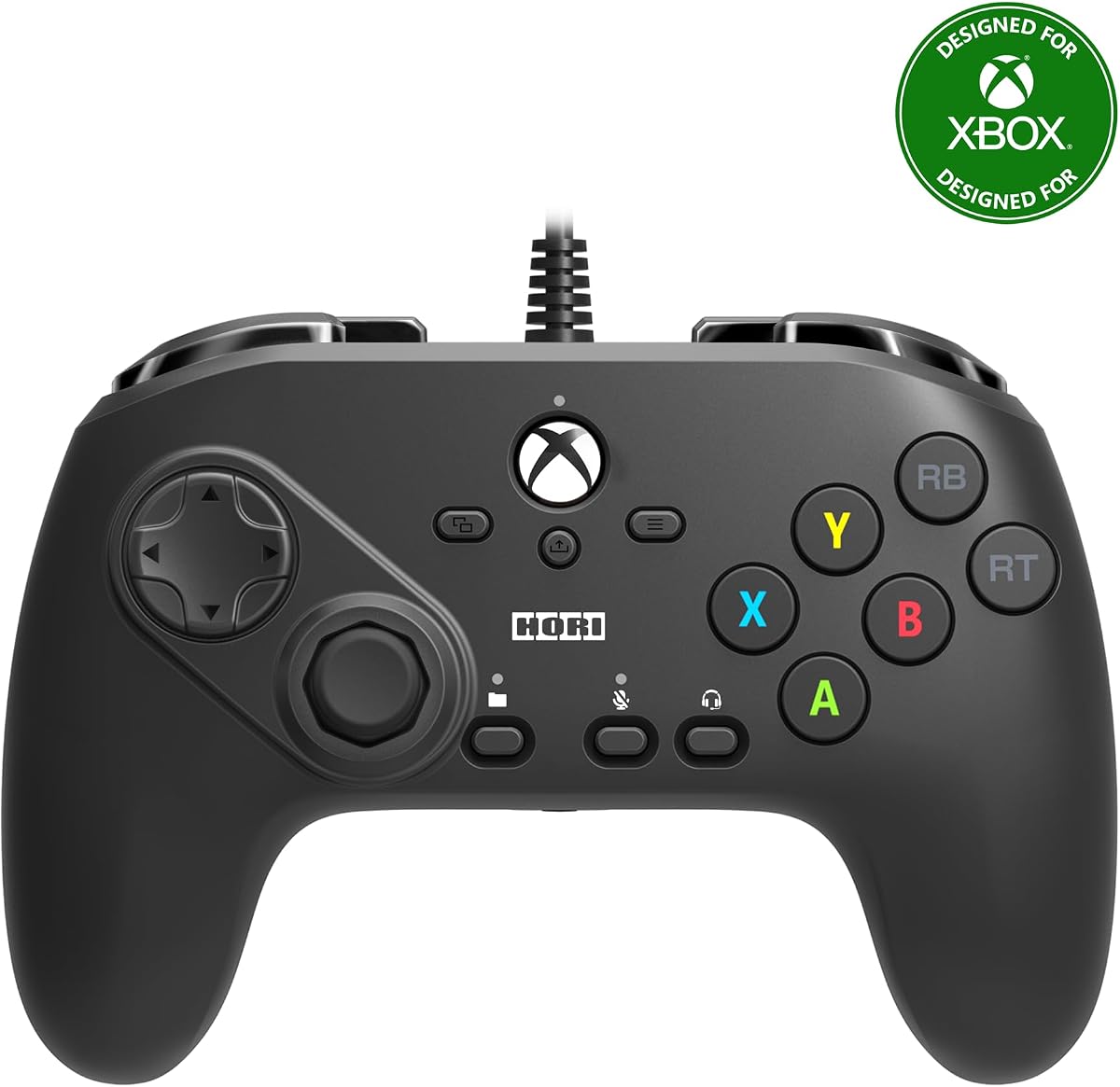


The HORI Fighting Commander Octa is designed specifically for fighting games on Xbox Series X|S. With a rating of 3.5 stars, it offers a specialized layout that caters to competitive players seeking precision.
We may earn a commission when you buy through this link, at no additional cost to you.
Its six-button layout and micro switch buttons provide tactile feedback essential for executing complex combos quickly. The adjustable d-pad and short throw analog stick enhance accuracy during intense matches.
While the wired connection ensures minimal latency, some users may prefer wireless options for flexibility. The higher price point reflects the premium build quality and official licensing by Microsoft.
This controller is ideal for serious fighters who prioritize input accuracy and reliability. If you want a dedicated fightpad experience on Xbox, this model delivers solid performance.
The micro switch buttons and adjustable d-pad allow for fine-tuned control, reducing accidental inputs during critical moments in gameplay.
Save up to four profiles via the companion app and switch between them instantly using the dedicated profile button for different games.
We may earn a commission when you buy through this link, at no additional cost to you.
The Xbox 360 Street Fighter IV FightPad brings a nostalgic design with functional features. It holds a 3.9 rating and features an enlarged circular floating D-Pad for smooth directional inputs.
We may earn a commission when you buy through this link, at no additional cost to you.
Its six-button layout includes multi-speed turbo functionality which helps automate repetitive actions. The 3-way switch allows the D-Pad to function as an analog stick, adding versatility to gameplay.
Though designed for Xbox 360, it connects via USB to modern systems with compatibility caveats. The integrated headset port remains useful for voice chat during online matches.
This fightpad suits retro enthusiasts and players who appreciate classic layouts. Consider compatibility checks before purchase to ensure seamless use on current consoles.
The multi-speed turbo feature allows players to automate rapid button presses, useful for games that benefit from continuous attacks.
An integrated headset port lets you connect a microphone directly to the controller for convenient communication without extra dongles.
We may earn a commission when you buy through this link, at no additional cost to you.
The 8Bitdo M30 Wired Controller is a budget-friendly option officially licensed for Xbox. With a 4.2 rating, it offers a 6-button layout perfect for fighting games and classics.
We may earn a commission when you buy through this link, at no additional cost to you.
It features a USB-C wired connection ensuring virtually lag-free performance. The custom profile switch button allows switching between three profiles instantly, adding convenience for multi-game players.
While it lacks wireless capability, the affordable price point makes it accessible for beginners. The 3.5mm audio jack ensures you can still use your favorite headset seamlessly.
This controller is an excellent entry point for those seeking a dedicated fightpad without a high cost. Its simplicity and reliability make it a strong contender in the budget category.
The USB-C wired connection minimizes input lag, which is crucial for timing-dependent moves in competitive fighting games.
Switching between three custom profiles on the fly helps tailor controls for different titles without needing a companion app.
We may earn a commission when you buy through this link, at no additional cost to you.
The 8Bitdo All-Button Arcade Controller features a leverless design for unmatched accuracy. With a 4.6 rating, it uses an all-button arcade layout to execute combos with greater speed and control.
We may earn a commission when you buy through this link, at no additional cost to you.
Its ultra-thin and compact profile allows for easy portability to tournaments. The hot-swappable PCB supports Kailh Wizard low-profile mechanical switches which can be customized to personal preference.
Players may need time to adapt to the leverless mechanism but the precision is worth it. Two programmable buttons provide extra functionality for complex setups without needing complex software.
This is the top choice for players wanting high-end features in a portable package. The build quality and customization options justify its position among premium fightpads.
Nearly the size of an A4 sheet and only 1.6 cm thin, this controller fits easily in a backpack for travel to LAN events.
Hot-swappable switches allow you to change the tactile feel of buttons without soldering, enabling personalization for different games.
We may earn a commission when you buy through this link, at no additional cost to you.
The HORI PAD Pro is a versatile controller designed for Xbox Series X|S. It holds a 4.2 rating and allows fine-tuning of analog stick sensitivity and LR triggers for better performance.
We may earn a commission when you buy through this link, at no additional cost to you.
Its companion app enables saving up to four profiles which can be switched via a dedicated button. The adjustable vibration feedback lets you reduce noise during intense gaming sessions.
While it lacks the strict layout of a fightpad, the tuning features make it adaptable. The Share button simplifies capturing gameplay clips for social media sharing instantly.
Ideal for casual players who want customization options without a full arcade stick. It balances standard controller comfort with advanced settings for improved gameplay control.
Fine-tuning dead zones and trigger sensitivity helps eliminate unwanted inputs and ensures precise movements during critical game moments.
Saving four distinct profiles lets you optimize controls for different genres or characters without manual reconfiguration each time.
We may earn a commission when you buy through this link, at no additional cost to you.
The Nacon Daija Arcade Fight Stick is developed with professional gamers for top fighting games. It has a 4.4 rating and features SANWA joystick and action buttons for guaranteed premium quality.
We may earn a commission when you buy through this link, at no additional cost to you.
Its full button mapping allows easy profile creation via Nacon software. The textured palm rest ensures comfort during long matches and the lock function prevents accidental button presses.
While expensive, the durability and customization justify the investment. Two interchangeable joystick heads let you choose the grip that suits your play style perfectly.
This stick is best for dedicated players wanting tournament-grade hardware. Its all-in-one package includes cables and tools to ensure you are ready for action immediately.
The textured palm rest provides sturdy support, reducing hand fatigue during extended practice sessions or competitive matches.
The lock function helps avoid accidental presses that could disrupt play, a key feature for serious competitive environments.
We may earn a commission when you buy through this link, at no additional cost to you.
The 8Bitdo Arcade Stick is the first Xbox-licensed wireless arcade stick worldwide. With a 4.6 rating, it offers wireless 2.4G or wired USB connectivity for versatile setups.
We may earn a commission when you buy through this link, at no additional cost to you.
Its fast-mapping buttons allow quick profile setting and button customization. The built-in 3.5mm audio jack and volume control ensure audio routing is convenient during gameplay.
Battery life supports up to 30 play hours per charge. While wireless offers freedom, ensure you manage charging to avoid interruptions during tournaments or sessions.
This stick is perfect for players who value mobility without sacrificing features. Its official licensing and reliable performance make it a top contender in modern fightpads.
Wireless connectivity eliminates cable clutter and allows greater movement around the desk or play area during intense gaming.
Fast-mapping buttons streamline the configuration process so you can adjust controls without navigating complex menus.
We may earn a commission when you buy through this link, at no additional cost to you.
The HORI Fighting Stick alpha is designed for Xbox Series X|S with a focus on customization. A 4.3 rating reflects its quality and versatile features for fighting game enthusiasts.
We may earn a commission when you buy through this link, at no additional cost to you.
Its chassis opens for easy maintenance and customization allowing you to swap top housing artwork. Assignable buttons and Key Lock Mode offer flexibility in how you interact with the stick.
While it requires some effort to modify internally, this openness extends the product life. The Share and Profile buttons integrate well with modern console sharing features.
This stick is ideal for players who want to personalize their gear. Balancing build quality and customization, it remains a solid choice for intermediate to advanced users.
An opening chassis allows simple access for cleaning or swapping components, extending the stick's lifespan and keeping it in top condition.
Swapping top housing artwork lets you match the controller to your setup or favorite character without needing external stickers.
We may earn a commission when you buy through this link, at no additional cost to you.
The Akko FUNBOX Leverless Arcade Controller introduces Hall Effect switches for zero wear. It holds a 4.2 rating and offers rapid trigger adjustments for precise competitive inputs.
We may earn a commission when you buy through this link, at no additional cost to you.
Its built-in LCD serves as a functional control hub for adjusting settings on the fly. Multi-platform compatibility ensures use across Xbox, PC, and Switch seamlessly.
While powerful, the customization requires time to master. Tournament Lock mode ensures compliance with official rules, making it a serious contender for competitive play.
This controller is for tech-forward players seeking cutting-edge features. If you value customization and performance over simplicity, the Akko FUNBOX stands out in the market.
Hall Effect magnetic switches eliminate physical friction meaning buttons never wear out over time unlike traditional mechanical counterparts.
The built-in Tournament Lock mode ensures your settings comply with official rules by restricting simultaneous opposing directional inputs.
We may earn a commission when you buy through this link, at no additional cost to you.
The HyperX Clutch Gladiate is a wired controller officially licensed for Xbox. With a 4.3 rating, it features dual trigger locks allowing fast pulls or longer pulls for finesse.
We may earn a commission when you buy through this link, at no additional cost to you.
Programmable buttons give you faster access to actions like thumb stick clicks. Dual rumble motors provide immersive feedback making every shot feel more vivid and powerful.
The detachable USB-C cable reduces risk of damage from snags. While not an arcade pad, its ergonomic grips and customization options enhance standard controller experience significantly.
This is ideal for versatile gamers needing a reliable daily driver. It bridges the gap between casual comfort and competitive features with solid durability.
Dual trigger locks let you shorten pull distance for faster shooting actions or keep full travel for nuanced control during driving.
Dual rumble motors deliver powerful feedback so you feel every impact and sound effect vividly during gameplay sessions.
We may earn a commission when you buy through this link, at no additional cost to you.
Selecting the right fightpad depends on your play style and needs. This guide covers critical factors to consider before making a purchase.
Fightpads come in layouts ranging from standard controllers to specialized arcade buttons. A six-button layout mimics traditional arcade sticks while full button layouts offer more inputs.
Choose a layout that matches your favorite games and comfort level. Arcade layouts reduce accidental presses but require more space.
Switches determine input speed and feel. Micro switches and Hall Effect sensors offer precise actuation and durability over time.
Prioritize switches with low travel for speed. Check if they are hot-swappable to customize the tactile feel later.
Wired connections minimize latency ensuring every input registers instantly. Wireless offers convenience but may introduce slight lag in competitive scenarios.
For tournament play, wired is the gold standard. Ensure your chosen model supports USB-C or USB-A based on your console ports.
Comfort is key during long gaming sessions. Look for textured grips and palm rests that support your hands naturally.
Test weight and size if possible. A controller that is too heavy may tire your hands over time.
Features like profile switching and button mapping allow you to tailor controls. Companion apps make saving profiles easier across different games.
Prioritize models with profile buttons for quick changes. Software support adds value for multi-game users.
Build quality impacts how long the controller lasts. Metal components and reinforced cables resist wear from heavy use.
Check for detachable cables to prevent damage. Look for reputable brands with warranty coverage for peace of mind.
Ensure the fightpad supports your specific Xbox version and PC systems. Official licensing reduces driver issues and ensures full feature access.
Verify compatibility with your console model. Some pads work better on Series X|S than older One versions.
A 3.5mm audio jack allows headset connection directly to the controller. This simplifies audio routing and chat during online games.
Check for volume controls on the device itself. Built-in audio options reduce reliance on console settings.
Connect your fightpad to the console using the provided cable or USB receiver. For wireless models, ensure the battery is charged and paired via the Xbox pairing mode.
Calibrate your controls if your system supports it to ensure inputs match your expectations. Adjust sensitivity settings via the companion app if available.
Clean the buttons and d-pad with a dry cloth to remove dust. Store in a cool dry place when not in use to extend lifespan.
Most models listed support Xbox One along with Series X|S. Check the specific product details for exact compatibility to ensure full functionality.
Many of these controllers are compatible with Windows 10 and 11. Verify the system requirements in the product description for PC support details.
Leverless designs remove moving parts that can fail, offering higher durability and faster inputs. They provide a different tactile feel that many competitive players prefer.
Use a soft dry cloth to wipe down the buttons and body. Avoid liquids to prevent internal damage. Compressed air can help remove dust from crevices.
Some models offer wireless 2.4G connectivity. Wireless reduces cable clutter but consider latency concerns for competitive gaming scenarios.
Profile buttons let you switch between different control layouts instantly. This is useful for playing multiple games with different button requirements.
This guide highlights ten top fightpads offering unique benefits for different players. From budget options like the 8Bitdo M30 to premium choices like Nacon Daija there is a fit for everyone.
Prioritize ergonomics and switch technology when making your decision. Reliable performance ensures you stay focused on gameplay without hardware distractions.
Always check current prices and availability before purchasing to secure the best deal for your gaming setup today.