
Kinevolve Mouse Pad for Excel/Word/PowerPoint/Windows Shortcuts
4.8Editor score
Compact portable design for travel
Multi-software shortcut guide included
Smooth precise surface for gaming
Excel cheat sheet desk pads are essential tools for professionals who rely on spreadsheets daily. These large mouse pads combine ergonomic comfort with quick access to keyboard shortcuts, helping you stay in the flow without breaking concentration. Choosing the right one means finding a balance of size, durability, and clear reference charts.
We evaluated the leading models based on print quality, material durability, and shortcut organization. Each product was assessed for its ability to reduce screen switching and boost workflow efficiency. Our list covers extended sizes for multi-device setups and compact options for portable workstations.
Each pick shows specific strengths in layout, surface texture, and build quality. You will find options for gamers, accountants, and students alike. Please note that availability and pricing can change frequently, so check current listings before purchasing.
4.8Editor score

4.7Editor score

4.6Editor score
As an Amazon Associate we earn from qualifying purchases.
The following table provides a side-by-side comparison of all ten selected models. We highlight key specifications including size, surface material, and unique features to help you make an informed decision for your workspace.


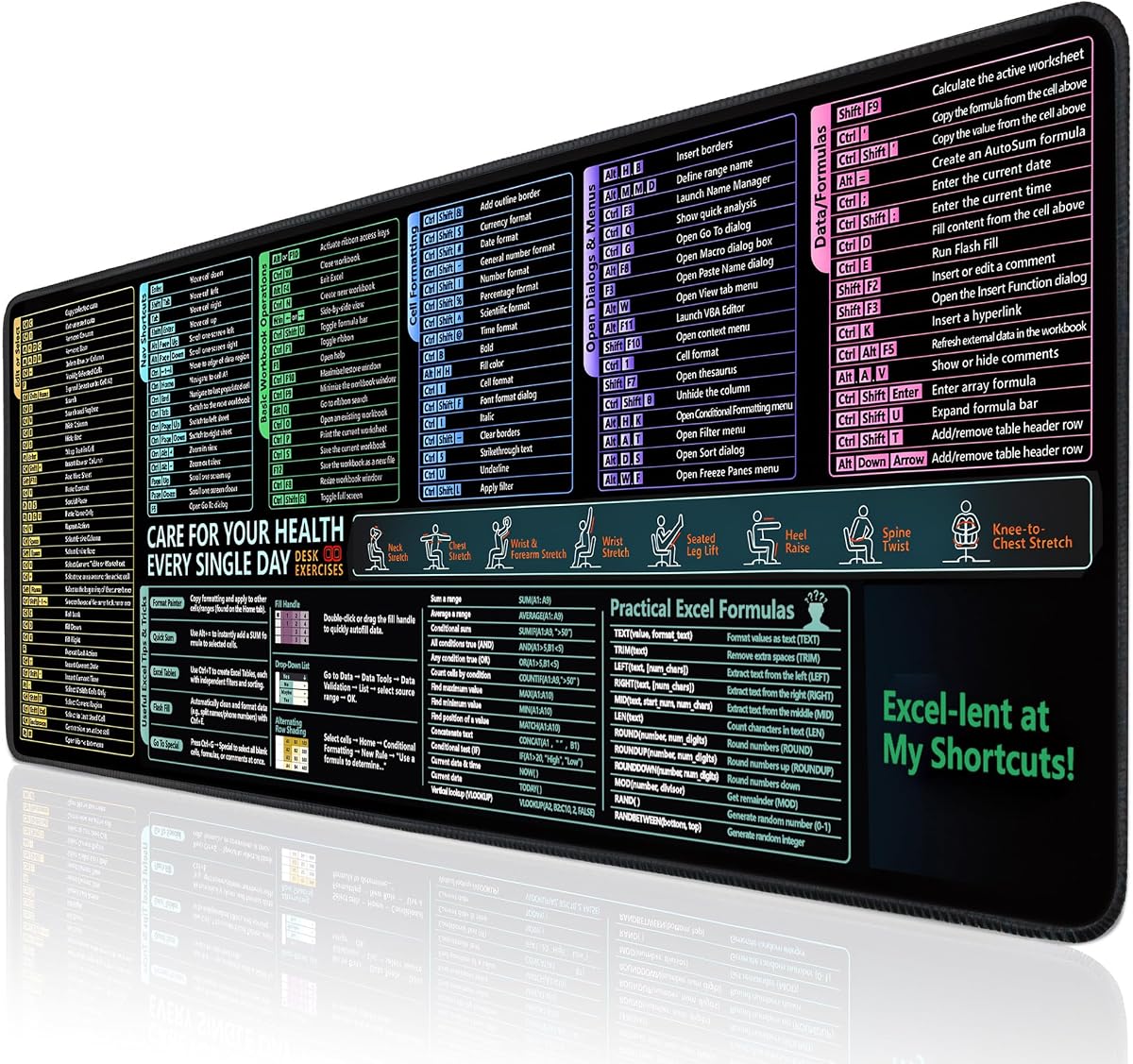


This desk pad stands out as a comprehensive tool for spreadsheet professionals. It combines a large surface area with a detailed reference chart for Excel shortcuts, helping you work faster. The unique addition of desk exercise diagrams adds value by encouraging movement during long work sessions.
We may earn a commission when you buy through this link, at no additional cost to you.
The surface is made of micro-weave fabric that supports accurate mouse tracking. The heavy-duty natural rubber base ensures the mat stays flat and secure. The UV-resistant inks keep the graphics bright even after repeated cleaning, making it a long-lasting investment for your desk.
While the price is higher than some competitors, the added features justify the cost. The desk exercise section is a unique selling point that promotes better ergonomics. Some users might find the graphic design slightly busy, but the clarity of the text remains high.
It is perfect for anyone who spends hours daily on spreadsheets and wants to reduce physical strain. The combination of productivity tools and health features makes it a top recommendation. We suggest this for users seeking a premium desk accessory that goes beyond a standard mouse pad.
The clearly organized sections for navigation and functions allow for instant command lookup.
Built-in desk exercise diagrams provide quick ways to stretch and recharge during work.
We may earn a commission when you buy through this link, at no additional cost to you.
This mouse pad is ideal for users who work across Microsoft Office apps daily. It includes shortcuts for Excel, Word, PowerPoint, and Windows, making it versatile for office workers. The layout is clearly organized, helping you find keys quickly without interruption.
We may earn a commission when you buy through this link, at no additional cost to you.
The waterproof top layer protects against spills and makes cleaning simple. Reinforced stitched edges add durability to prevent fraying over time. The smooth fabric top ensures accurate mouse movements while the non-slip base keeps the mat secure.
While it lacks the unique health features of other models, it focuses on core functionality and value. The size is adequate for most setups but might be small for large monitor configs. It is a reliable choice for those needing broad software coverage at a low cost.
We recommend this for students or office staff who need a versatile reference tool. The multi-software guide is a significant advantage for general productivity. It is a practical, budget-friendly addition to any workstation setup.
Includes practical information for Excel Word PowerPoint and Windows to help daily tasks.
Reinforced stitched edges add durability for extended use without fraying.
We may earn a commission when you buy through this link, at no additional cost to you.
This desk pad focuses on depth over breadth by compiling nine major Excel function modules. It is perfect for users who need to master formulas and functions specifically. The inclusion of computer FN keys adds value for those using laptops or specific keyboard layouts.
We may earn a commission when you buy through this link, at no additional cost to you.
The surface uses high-quality waterproof cloth that provides a silky smooth mouse control feeling. Advanced inkjet technology ensures graphics are bright and clear without the odor common in cheaper pads. The double seam technology helps maintain a long service life.
While it does not cover Word or PowerPoint, the specialized focus makes it excellent for data analysts. The size is generous, accommodating both keyboard and mouse comfortably. However, the basic design may not appeal to those seeking a stylish desktop accessory.
We suggest this for students and professionals focused deeply on Excel capabilities. The function guides are clear and helpful for learning and reference. It is a sturdy, practical tool for anyone looking to streamline spreadsheet work.
Compiles nine categories of commonly used Excel tips and functions for better handling.
Advanced inkjet technology prevents odor caused by traditional printing techniques.
We may earn a commission when you buy through this link, at no additional cost to you.
This model offers an exceptional workspace with a size of 35.4 by 15.7 inches. It is ideal for professionals with large desks who need room for multiple monitors or peripherals. The leather-like surface adds a touch of professionalism to the office environment.
We may earn a commission when you buy through this link, at no additional cost to you.
The spill-repellent surface makes maintenance effortless as spills can be wiped away quickly. Crafted with premium natural rubber and an anti-slip base, it stays firmly in place during use. It protects your desk from scratches and stains while serving as a writing pad.
While the size is a major advantage, it may not fit smaller desks comfortably. The weight and bulk make it less portable but more stable. This is a strong choice for those prioritizing a clean, spacious, and protected workspace.
We recommend this for corporate offices or home setups with ample room. The blend of style, size, and functionality makes it a standout option. It effectively combines utility with aesthetic appeal for a premium feel.
Embrace ample workspace with a size perfect for professionals seeking quality.
The sleek leather surface projects an aura of professionalism and office efficiency.
We may earn a commission when you buy through this link, at no additional cost to you.
This pad compiles 12 types of common skills in Excel and Word, offering broad utility. It also includes the meaning of computer FN keys to help handle spreadsheets effectively. The layout is practical for users who switch between tasks frequently.
We may earn a commission when you buy through this link, at no additional cost to you.
The waterproof cloth surface provides a silky smooth mouse control feeling that is comfortable to use. Advanced inkjet technology ensures graphics are bright and clear without odor. Double seam technology helps ensure a long service life for the product.
While it covers many skills, the depth might be less than specialized models. The design is straightforward, focusing on function over style. It is a reliable option for general office use or study environments where versatility is key.
We suggest this for students who need a mix of Excel and Word tools. The FN key reference is a helpful addition for laptop users. It is a practical, durable mat for daily work and study tasks.
Compiles commonly used Excel and Word tips and operations for better handling.
Waterproof high-quality cloth provides a silky smooth mouse control feeling.
We may earn a commission when you buy through this link, at no additional cost to you.
This model serves as both an Excel reference and a gaming mouse pad. It covers Navigation, Selection, Formatting and Data sections in a 7-zone layout. The thermal transfer printing delivers vivid colors and crisp details that stay legible.
We may earn a commission when you buy through this link, at no additional cost to you.
The precision-stitched edges lock the shape and prevent fraying or lifting over time. The rubber base ensures lag-free accurate tracking for gaming while keeping the mat stable. It avoids the curling issue common with cheaper mats.
While Excel coverage is specific, the gaming focus might appeal to those who balance both. The clear printing ensures you can read shortcuts easily without eye strain. It is a durable choice for active users who need a responsive surface.
We recommend this for users who game after work but still need quick shortcuts. The durability and smooth tracking are standout features. It is a versatile option that bridges the gap between office and entertainment setups.
Acts as a handy mouse pad with excel shortcuts to cut screen switching.
Precision-stitched edges lock shape and prevent fraying for a stable surface.
We may earn a commission when you buy through this link, at no additional cost to you.
This desk pad stands out with a high rating of 4.9 for its quality and utility. It features color-coded hotkeys and practical spreadsheet functions for formatting and table operations. The unique built-in desk stretch exercise diagrams effectively relieve strain from long hours.
We may earn a commission when you buy through this link, at no additional cost to you.
The advanced thermal-transfer printing ensures high-contrast text stays crisp even after cleaning. Coffee spills can be wiped away within seconds leaving no residual marks. The reinforced stitching prevents edges from fraying or peeling over time.
While the price is higher, the build quality and detailed formulas justify the investment. The exercise diagrams add significant ergonomic value for users sitting for long periods. It is designed to be a premium tool for daily spreadsheet work.
We suggest this for finance professionals or students who need precise formula access. The high rating reflects user satisfaction with durability and clarity. It is a top choice for anyone seeking a professional and healthy workspace.
Instantly reference VLOOKUP and common calculation formulas at a glance.
Built-in desk exercise diagrams relieve wrist neck and spine strain effectively.
We may earn a commission when you buy through this link, at no additional cost to you.
This desk pad offers a balanced size of 27.6 by 11.8 inches for standard setups. It keeps frequently used spreadsheet shortcuts directly on your desk to reduce searching. The rubber backing keeps the pad stable during work tasks.
We may earn a commission when you buy through this link, at no additional cost to you.
The surface is water-resistant and designed to be wiped clean when exposed to spills. The printed surface ensures shortcut information stays legible through daily use. Reinforced stitched edges help prevent fraying and surface separation over time.
While it lacks unique features, it delivers reliable core functionality at a standard price. The size fits most office desks well without taking up too much space. It is a practical choice for those who need a simple reference tool.
We recommend this for office workers or accountants needing a reliable mat. The clarity and durability make it a solid everyday option. It is a straightforward solution for maintaining workflow efficiency.
Keep frequently used spreadsheet shortcuts and function keys directly on your desk.
Rubber backing keeps the mouse pad stable while stitched edges prevent fraying.
We may earn a commission when you buy through this link, at no additional cost to you.
This large desk mat measures 35.4 by 15.7 inches to accommodate all your desk items. It features a comfortable Lycra surface that offers optimum speed and accurate control during work. The flexible rubber base keeps the entire surface in place to prevent bunching.
We may earn a commission when you buy through this link, at no additional cost to you.
The stitched edges prevent deformation and degumming for prolonged use. It is flexible enough to be rolled up for transport or machine washed easily. This makes it a versatile choice for those who value hygiene and portability.
While the Lycra surface may feel different from cloth, many users find it comfortable. The size is generous for those with multiple keyboards or large mice. It serves as both a desk protector and an organizer.
We suggest this for those who need a washable and large pad for shared desks. The combination of style and functionality makes it a unique option. It is a great choice for anyone who values cleanliness and space.
Provides comfortable lycra surface to make mice glide effortlessly.
Use a wet cloth or throw it in the washing machine and let it hang dry.
We may earn a commission when you buy through this link, at no additional cost to you.
This small Excel mouse pad measures 11.8 by 9.8 inches making it highly portable. It fits in bags or laptop cases and is suitable for professionals on the go. The finely-textured surface ensures precise mouse control for smooth movement.
We may earn a commission when you buy through this link, at no additional cost to you.
It features high-resolution printing intended to remain legible through regular use. Stitched edges reduce fraying while the non-slip rubber base helps keep it secure. It is a practical gift for students or professionals who need a simple reference.
The compact size is perfect for travel but might be too small for main desk use. It focuses on essentials rather than extensive layouts. However, the quality remains high for such a small device.
We recommend this for travelers or those with limited desk space. The portability and durability make it an excellent value. It is the ideal budget choice for maintaining productivity on the move.
This portable mouse pad fits in bags or laptop cases for professionals.
Provides quick reference for frequently used shortcuts to support workflow efficiency.
We may earn a commission when you buy through this link, at no additional cost to you.
Choosing the right Excel cheat sheet desk pad involves several key factors to ensure it meets your productivity needs. This guide breaks down the most important elements to consider before you buy.
The size of the pad determines how much room you have for both the keyboard and mouse. Larger models around 35 inches provide ample space for multi-monitor setups but require a large desk. Smaller 27-inch models are more compact and fit standard office desks easily.
Measure your workspace before buying to ensure the pad fits comfortably without crowding other items.
Some pads focus solely on Excel while others include Word PowerPoint and general Windows shortcuts. If you work across multiple applications, a multi-software guide will be more useful for daily tasks. Check which keys are included to match your specific workflow needs.
Choose a model that covers the specific functions you use most often to avoid clutter.
Most pads use cloth or micro-weave fabric for a smooth mouse glide while others use leather or lycra for style. The surface texture affects how fast your cursor moves and how comfortable it feels under your hand. Waterproof surfaces are a significant plus for easy cleaning.
Look for a material that balances durability with comfort for your preferred mouse speed.
Reinforced stitched edges prevent fraying and curling which extends the life of the pad. A non-slip rubber base ensures the mat stays flat and secure during vigorous use. Double seam technology is a common feature for higher durability models.
Prioritize pads with stitched edges to prevent wear and tear over months of daily use.
High-resolution or thermal transfer printing ensures that the text remains crisp and legible over time. UV-resistant inks prevent fading even after cleaning. The graphics should be easy to read at a glance to be truly helpful.
Ensure the printing technology used is robust enough to handle regular wiping and cleaning.
Some modern pads include desk exercise diagrams or extra health tips to reduce strain during long sessions. These features promote better posture and movement. While optional they add significant value for heavy desk users.
Consider models with ergonomic additions if you suffer from wrist or neck strain often.
A waterproof or spill-repellent surface allows you to wipe away coffee or dust easily. Some models are even machine washable which is ideal for shared workspaces. Hygiene and maintenance ease are critical for long-term usability.
Check if the surface allows for simple cleaning with a cloth or if it needs special care.
To get the most out of your new desk pad, place it on a flat clean surface. Align it so that the reference charts are within easy view of your hands while you type. This ensures you can glance at them without moving your mouse much.
Clean the surface regularly with a damp cloth to remove dust and spills. Avoid using harsh chemicals that might fade the printed text. If your pad is machine washable, follow the manufacturer's instructions for best results.
Take advantage of any built-in exercise diagrams by using them as reminders to stretch. Regular movement helps prevent wrist strain and improves overall comfort. Treat the pad as a health tool as well as a productivity aid.
Yes many of the larger XL models are designed to double as gaming mouse pads. They feature smooth surfaces and accurate tracking which are essential for gaming. Some even highlight their gaming capabilities in their descriptions.
Absolutely most of these mats are large enough to accommodate full-size mechanical keyboards. The extra space allows for comfortable typing and mouse movement simultaneously. The surface protects your desk from keybed scratches and sound.
High-quality pads use UV-resistant or thermal transfer inks that resist fading. With normal use and careful cleaning the text should remain legible for a long time. Avoid abrasive scrubbing to maintain clarity.
Yes these pads work with both wired and wireless mice. The surface is optimized for optical and laser sensors ensuring smooth tracking. Just ensure the mouse has enough space to glide across the surface.
While specific medical claims vary the stretches are designed to help with posture and movement. They serve as visual reminders to stand up and stretch regularly. These simple exercises are beneficial for reducing desk fatigue.
No the entire purpose of these mats is to replace a standard mouse pad. They offer both the surface for the mouse and the reference guide for shortcuts. One purchase covers both needs efficiently.
We have reviewed ten top Excel cheat sheet desk pads ranging from large XL mats to compact portable options. The Pixiecube model stands out for its unique health features while the Kinevolve option is great for budget travelers.
When choosing prioritize the size that fits your desk and the coverage that matches your software needs. Durability features like stitched edges and waterproof surfaces are critical for longevity in an active workspace.
Remember that prices and availability change so check the latest listings before buying. Investing in the right mat can significantly improve your daily workflow and comfort. Happy working.