
GE BigEZ OneTouch Big Button Universal TV Remote for Seniors, Easy to Use
4.3Editor score
Backlit buttons for visibility
One touch setup process
Support for five brands
This guide compares the ten best easy to use TV remote for seniors options to help you find a simplified device that improves independence and viewing comfort.
Finding a remote that is truly easy to use can transform daily entertainment for older adults. We looked for devices with large buttons, clear labels, and simple setups that reduce frustration during everyday use.
Our team analyzed ten top-rated remotes based on user feedback and design features. We prioritized models that offer tactile feedback, visual clarity, and broad compatibility with common television brands.
Each selection highlights unique strengths like backlighting or customizable favorites. Please note that prices and availability change frequently, so check current listings before making your final choice.
4.3Editor score
4.2Editor score

4.4Editor score
The following comparison lists all ten selected remotes side by side. This overview helps you quickly identify key specifications like button layout and compatibility features.


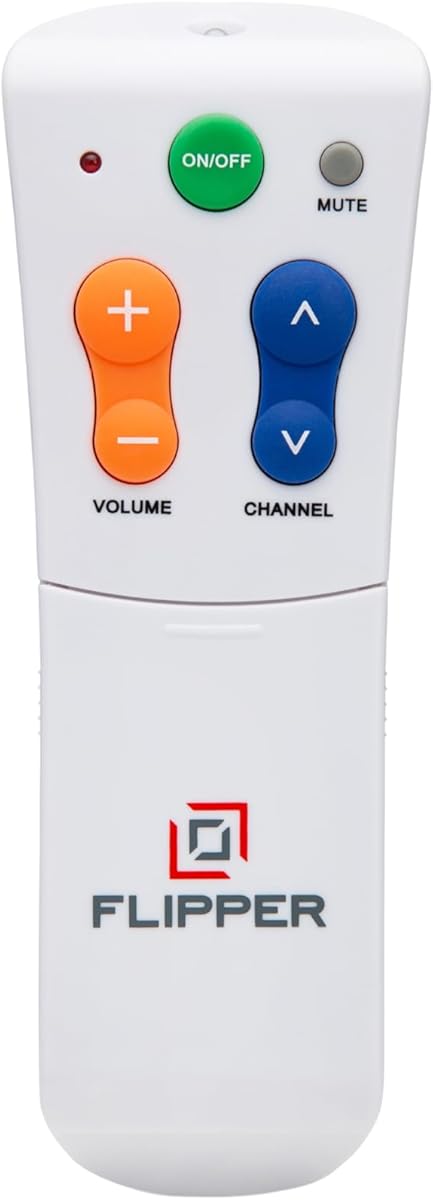
The Flipper remote stands out as a top choice for seniors needing simplicity. It features a clean design with just four main buttons for everyday control.
We may earn a commission when you buy through this link, at no additional cost to you.
Its standout feature is the ability to program up to twenty five favorite channels. This removes the need to scroll through hundreds of unwanted options.
While it cannot navigate streaming apps like Netflix, it excels at traditional cable and satellite viewing. This limitation ensures the interface remains uncluttered and stress free.
This remote is ideal for seniors with vision or memory challenges. It provides independence without overwhelming complexity for the user.
The four button layout ensures users never get lost in menus. Each button is large and clearly marked with color for quick identification.
Caregivers can pre load favorite shows to avoid confusion. Users simply press channel buttons to cycle through their preferred options quickly.
We may earn a commission when you buy through this link, at no additional cost to you.
The GE BigEZ remote offers an affordable solution for basic TV control. It features fully backlit buttons that are easy to see in dark rooms.
We may earn a commission when you buy through this link, at no additional cost to you.
One touch setup simplifies the initial configuration process. Users can activate the remote quickly without navigating complex programming menus.
While it supports only five brands, these cover most common household TVs. The blue and orange buttons help colorblind users distinguish functions easily.
This remote is a solid budget choice for seniors needing clear visibility and simple setup.
The fully backlit keypad ensures buttons remain visible at night. This reduces frustration when trying to find controls in a dim room.
Blue volume and orange channel buttons assist those with color vision issues. These distinct colors provide clear cues for essential functions.
We may earn a commission when you buy through this link, at no additional cost to you.
This remote is a premium option for Samsung TV owners needing accessibility features. The backlit buttons stay illuminated for thirty seconds after pressing.
We may earn a commission when you buy through this link, at no additional cost to you.
It comes with a protective silicone cover and wall hook to prevent loss or damage. This bundle adds value and convenience for household use.
No setup is required, allowing users to start watching immediately. The ergonomic shape fits well in hands with limited dexterity.
Ideal for Samsung users with poor vision or Parkinson's. The high quality build and convenience features justify its premium positioning.
Buttons remain lit for thirty seconds after activation. This gives users ample time to find the next button without needing to press again.
The silicone cover protects against spills and cracks. The hook keeps the remote visible and within reach on furniture edges.
We may earn a commission when you buy through this link, at no additional cost to you.
The EZclicker remote focuses on simplicity with large tactile buttons. It works with top brand TVs to reduce confusion for older users.
We may earn a commission when you buy through this link, at no additional cost to you.
Programming is straightforward using a simple hold button method. Users can get started quickly without needing technical assistance.
This model does not support cable boxes or streaming sticks. It is designed purely for television power and volume control.
It is a reliable choice for seniors needing a basic TV replacement remote.
Buttons offer clear tactile feedback for better feel. This helps users confirm presses without needing to look directly at the remote.
The remote measures seven by two inches for easy handling. Its light weight reduces strain on arthritic hands during use.
We may earn a commission when you buy through this link, at no additional cost to you.
This version of the EZclicker is designed for extra simplicity. It features big buttons that are easy to see and press accurately.
We may earn a commission when you buy through this link, at no additional cost to you.
The layout removes unnecessary keys to avoid confusion. Programming involves holding mute and volume together for quick setup.
It works on major TV brands but excludes streaming devices. This keeps the focus on essential functions for daily viewing.
A solid option for seniors prioritizing simplicity over advanced features.
By removing extra buttons the remote reduces cognitive load. Users find the power and volume keys more quickly.
The setup process uses a simple button hold method. This makes initial configuration accessible without technical knowledge.
We may earn a commission when you buy through this link, at no additional cost to you.
This remote offers broad compatibility without needing programming. Users insert batteries and start using it immediately with supported TVs.
We may earn a commission when you buy through this link, at no additional cost to you.
It features an extra large enter button for easy navigation. The design caters specifically to those with limited dexterity or vision.
The wide brand support includes Samsung LG Vizio Sony and more. This ensures compatibility with most modern television sets.
It is a convenient choice for quick setup and reliable control.
Setup is immediate as no coding is needed. This eliminates a common hurdle for seniors buying new remotes.
Support for multiple major brands increases usability. Users can switch TVs without buying a new remote every time.
We may earn a commission when you buy through this link, at no additional cost to you.
This remote prioritizes clarity with large clearly marked buttons. The simple layout ensures users do not get overwhelmed by options.
We may earn a commission when you buy through this link, at no additional cost to you.
It is designed for traditional TV compatibility without streaming features. This simplicity reduces the risk of accidental presses.
The ergonomic body provides a comfortable grip for daily use. Construction is sturdy enough to withstand regular handling.
It is an ideal choice for elderly users with low vision needs.
A clean layout prevents confusion during use. Essential functions are grouped logically for quick access.
The body is built to last with ergonomic shaping. This ensures long term comfort for frequent daily usage.
We may earn a commission when you buy through this link, at no additional cost to you.
The Philips BigEZ remote offers a one touch setup for ease of use. It features a fully backlit keypad for visibility in dark rooms.
We may earn a commission when you buy through this link, at no additional cost to you.
It supports five major TV brands and a second device like a soundbar. The large blue and orange buttons aid navigation.
Technical support is available to help with any setup issues. This provides peace of mind for caregivers assisting with setup.
It is a solid option for those needing multi-device control with simplicity.
This remote controls both TV and external devices. This reduces clutter by replacing multiple remotes with one unit.
The fully backlit keys are easy to see at night. This ensures users can find buttons without needing extra light.
We may earn a commission when you buy through this link, at no additional cost to you.
This remote offers an affordable solution for basic TV control. It features large buttons that provide clear visibility for older users.
We may earn a commission when you buy through this link, at no additional cost to you.
It is compatible with most traditional TV brands. The layout is simple to minimize confusion during daily use.
While ratings are lower it remains a functional replacement option. It covers essential needs without extra cost.
It is a budget friendly choice for basic elderly needs.
This model provides accessibility features at a lower price. It helps those on a budget gain better control.
It focuses on core functions like power and volume. This simplicity ensures ease of use without complex menus.
We may earn a commission when you buy through this link, at no additional cost to you.
The Anderic RR1004 features glow in the dark keys for low light use. It has a minimalist design to reduce clutter and confusion.
We may earn a commission when you buy through this link, at no additional cost to you.
A learning function allows copying signals from existing remotes. This helps customize essential buttons for specific user needs.
It is suitable for IR TVs but not RF systems. This makes it ideal for assisted living or home environments.
It offers a practical solution for care facilities and elderly homes.
Keys are visible in low light conditions. This allows users to find controls without needing a lamp.
Users can copy specific commands from their old remote. This allows customization without needing a tech expert.
We may earn a commission when you buy through this link, at no additional cost to you.
Selecting the right remote requires attention to design features that match the user's physical needs. Below are key factors to evaluate when making your choice.
Large buttons with clear spacing prevent accidental presses. Look for remotes where essential keys like power and volume are prominent.
A simple layout reduces cognitive load for those with memory issues.
Backlit or glow in the dark keys help users find controls in dark rooms. High contrast labels also assist those with low vision.
Color coding can further distinguish functions without requiring detailed reading.
Remotes with no setup or one touch programming save time and frustration. Avoid models requiring code entry if assistance is not available.
Simple pairing ensures the device can be used immediately out of the box.
Check whether the remote works with your TV and cable box. Some units support both while others are TV only.
Ensure compatibility with your brand to avoid functional limitations.
A lightweight remote with a comfortable grip reduces hand strain. Consider weight and shape for users with arthritis or limited mobility.
Smooth edges prevent irritation during extended handling.
Remotes with covers or hooks can protect the device and prevent loss. These extras add value and convenience for daily use.
A protective sleeve helps guard against accidental drops or spills.
Consider battery life and replacement frequency. Standard sizes like AAA or AA are easier to find than proprietary ones.
Long lasting batteries reduce the frequency of maintenance tasks.
Access to customer support can help resolve setup issues quickly. A warranty provides peace of mind against defects.
Check the manufacturer policy for technical assistance availability.
To start using the remote insert the recommended batteries with correct polarity. Ensure they are aligned as shown in the battery compartment.
Point the remote directly at the TV to ensure signal reception. Avoid obstacles between the remote and the TV sensor.
Keep the remote in a consistent place to prevent loss. Regularly clean the buttons with a dry cloth to maintain responsiveness.
Most basic remotes control power volume and channels but cannot navigate smart app menus. If app navigation is needed you may need a specialized model or the original remote.
Some models support cable box programming while others are TV only. Check the product specs to confirm if your box brand is supported.
Open the back cover with a thumb or coin and insert new batteries. Ensure positive and negative terminals match the compartment markings.
Replace batteries and try reprogramming the remote. Ensure there are no obstructions between the remote and TV sensor.
Yes many models feature large buttons and simple layouts that benefit dexterity challenges. However those with severe conditions may need additional assistance.
Most use standard AAA or AA batteries. Avoid proprietary types that are harder to replace frequently.
The ten remotes reviewed offer diverse options tailored to different needs. From the customizable Flipper to the budget GE BigEZ there is a solution for many situations.
Prioritize features like backlighting simple setup and compatibility with your home devices. These factors will significantly improve usability for elderly users.
Remember to check current listings and reviews before purchasing. Prices and stock change so verify details before making your final decision.