
TP-Link ER605
4.4Editor score
Five Gigabit Ports
USB WAN Support
Advanced Security Features
This guide compares the top ten dual wan router models for reliable internet failover load balancing and secure network performance across small and enterprise
A dual wan router ensures your network stays online by using two internet connections simultaneously. This setup provides failover protection and load balancing to keep your business running smoothly even if one line fails.
We compared ten top rated models based on port flexibility, security features, and VPN support. Each pick offers distinct advantages for different network sizes and connectivity needs in modern office settings.
Each review highlights key specs and real world performance insights to help you choose wisely. Prices and availability change frequently so verify details on the product pages before finalizing your purchase decision.
4.4Editor score

4.2Editor score

4.3Editor score
The following comparison table outlines the key specifications and capabilities of each router to help you evaluate them side by side based on port counts, security tools, and management options.



The TP-Link ER605 stands out as a top choice for businesses needing solid dual wan capabilities without breaking the budget. It earns a strong rating for its robust port selection and security features that protect data effectively.
We may earn a commission when you buy through this link, at no additional cost to you.
This router supports up to three WAN ports plus a USB option for mobile broadband backup. Its advanced firewall policies and VPN tunnels ensure secure remote access for teams working from various locations.
While it lacks wireless radios, this device focuses on wired stability which is ideal for core network connections. The interface is straightforward for technicians but may lack advanced customization for power users.
Small offices seeking a reliable backbone router will find this model delivers consistent uptime. We recommend pairing it with separate access points if wireless coverage is also required for the workspace.
Its support for multiple VPN protocols ensures remote workers can access resources safely from anywhere.
Automatic failover means your business keeps running if the primary internet connection goes down unexpectedly.
We may earn a commission when you buy through this link, at no additional cost to you.
The Peplink B-One delivers resilient dual-wan architecture designed specifically for enterprise branch offices requiring uninterrupted connectivity. It features SpeedFusion technology to smooth out video calls and data transfer across multiple links.
We may earn a commission when you buy through this link, at no additional cost to you.
Users appreciate its ability to integrate with Starlink alongside traditional cable or fiber sources. The built-in Wi-Fi 6 radio adds convenience for deploying a complete solution in a single device.
Reliability is a key strength here with automatic updates keeping the system secure. However the advanced features may require a learning curve for administrators new to networking concepts.
Branch managers needing a robust all-in-one gateway should consider this model for its uptime guarantees. It excels in locations where internet stability is critical for daily operations and client interactions.
SpeedFusion combines multiple connections to ensure consistent speeds even when individual lines fluctuate.
Whether using satellite or wired broadband the router adapts easily to diverse network configurations.
We may earn a commission when you buy through this link, at no additional cost to you.
The NETGEAR PR60X offers high performance hardware suitable for demanding environments needing multi-gigabit speeds. It combines a 10G port with flexible WAN options to future-proof network infrastructure for growing businesses.
We may earn a commission when you buy through this link, at no additional cost to you.
Remote management via NETGEAR Insight allows IT teams to monitor status from anywhere. This centralization simplifies maintenance across multiple sites without needing physical access to each router.
Security is enhanced through multiple tunnel support and encryption standards protecting sensitive traffic. The main trade-off is the cost and reliance on cloud services for full functionality.
IT departments managing high-speed networks will find this router scales well with their needs. We suggest it for companies prioritizing speed and remote oversight over budget constraints.
Ten gigabit ports ensure your internal network can handle large file transfers without bottlenecks.
Cloud-based tools enable IT pros to troubleshoot issues quickly from a central dashboard.
We may earn a commission when you buy through this link, at no additional cost to you.
The Cudy R700 brings enterprise-level control to budget-conscious users through full OpenWRT support. This flexibility allows deep customization of VLANs and policies to tailor the network exactly to business requirements.
We may earn a commission when you buy through this link, at no additional cost to you.
It handles up to five ISP connections with automatic failover ensuring continuous operation. Built-in tools like ping and traceroute help troubleshoot issues rapidly without needing external apps.
While the interface leans towards technical users, the security stack is robust against attacks. The affordability makes it a strong contender for labs or small businesses needing multi-line redundancy.
Network enthusiasts will enjoy the customization potential while businesses benefit from the redundancy. It serves well as a primary router where control and cost efficiency are prioritized over brand name recognition.
OpenWRT allows you to install custom packages and scripts for specialized network tasks.
Instant rerouting keeps your systems online if one internet provider experiences an outage.
We may earn a commission when you buy through this link, at no additional cost to you.
The Omada ER707-M2 provides multi-gigabit aggregation to maximize bandwidth for modern office needs. Its high session capacity ensures many devices can connect simultaneously without performance degradation.
We may earn a commission when you buy through this link, at no additional cost to you.
Integration with the Omada ecosystem allows centralized management across multiple sites seamlessly. The included USB port supports LTE dongles for quick backup internet setup during emergencies.
Security features include extensive VPN tunnel support for secure remote branches. The five-year warranty adds significant value compared to competitors with shorter coverage periods.
Organizations already using Omada gear will find this router integrates perfectly into their stack. It is an excellent choice for scalable networks needing future-proof speed capabilities.
Supporting half a million sessions means no slowdowns even with heavy device usage.
Centralized control simplifies expanding your network as your business grows over time.
We may earn a commission when you buy through this link, at no additional cost to you.
The ASUS RT-BE88U delivers blazing fast performance with WiFi 7 tech and wired 10G options. Its powerful quad-core CPU ensures demanding network applications run smoothly without lag or latency spikes.
We may earn a commission when you buy through this link, at no additional cost to you.
Always-on internet is maintained through AI WAN detection and versatile configuration choices. You can connect mobile hotspots via USB for instant redundancy when wired lines fail unexpectedly.
Commercial-grade security adds peace of mind with proactive threat scanning. The large form factor and high cost make it best for high-end setups needing maximum performance.
Tech enthusiasts and heavy users will love the raw speed this router provides. It is a top pick for those who want cutting-edge features today rather than waiting for updates.
WiFi 7 ensures your wireless clients get the fastest possible throughput available.
AiProtection Pro scans for threats automatically to keep your network safe.
We may earn a commission when you buy through this link, at no additional cost to you.
The ASUS ExpertWiFi EBG15 focuses heavily on security with intrusion prevention and layer 7 filtering. It ensures public connections are protected against malicious traffic and vulnerabilities effectively.
We may earn a commission when you buy through this link, at no additional cost to you.
Three WAN ports allow flexible load balancing to optimize broadband usage across multiple lines. VLAN configuration on each port helps segment traffic for better control and privacy within offices.
Mobile app management simplifies setup and monitoring for non-technical users. The lack of additional physical ports limits expansion compared to other models on this list.
Security-focused teams looking for an easy-to-manage option will appreciate this model. It serves well as a dedicated gateway where safety is the primary requirement for daily use.
IPS features stop attacks before they reach your internal systems and devices.
Bluetooth setup and app control make it easy to configure without complex menus.
We may earn a commission when you buy through this link, at no additional cost to you.
The D-Link DSR-250V2 meets government standards like NDAA and TAA for trusted use in restricted sectors. This compliance makes it ideal for agencies and enterprises needing verified supply chain security.
We may earn a commission when you buy through this link, at no additional cost to you.
It extends corporate networks to remote offices easily with strong encryption protocols protecting sensitive data. Failover capabilities ensure minimal disruption if the primary internet line drops unexpectedly.
A lifetime warranty shows confidence in the product quality though user feedback is mixed. The hardware design feels older but functions reliably for basic dual-wan needs without extra features.
Government contractors or highly regulated businesses will value the compliance aspect highly. It is a solid niche choice for those prioritizing standards over cutting-edge features or performance.
NDAA standards ensure the hardware meets strict requirements for security sensitive environments.
A lifetime warranty provides long-term peace of mind for critical infrastructure investments.
We may earn a commission when you buy through this link, at no additional cost to you.
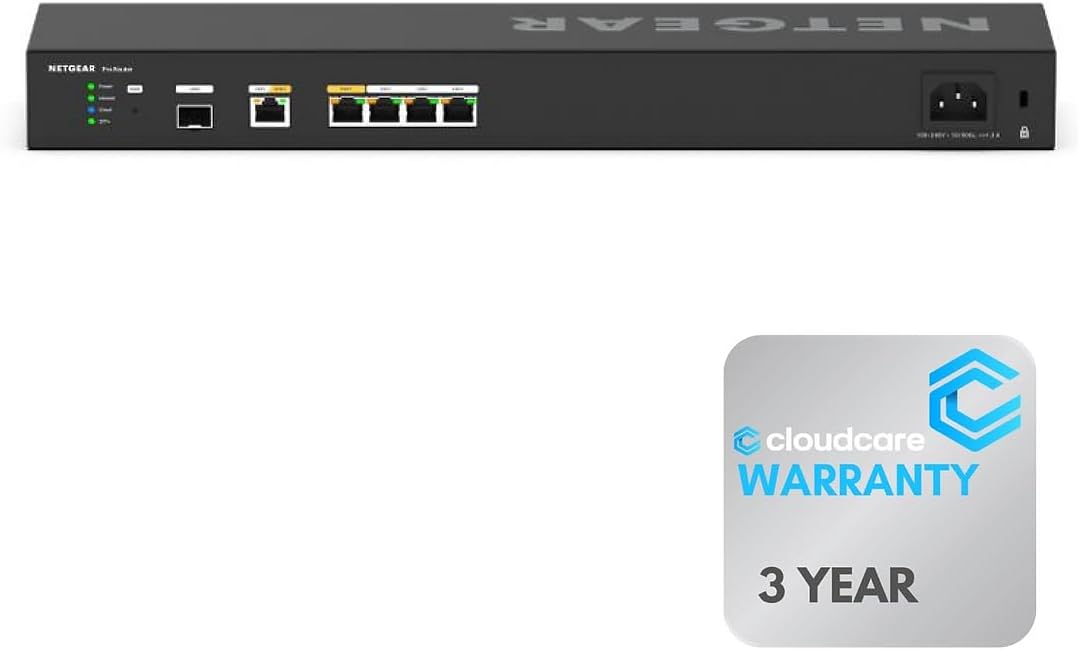
This variant of the NETGEAR PR60X includes six high-speed ports to maximize wired connectivity options. The wall-mount design helps save valuable desk space in professional office environments efficiently.
We may earn a commission when you buy through this link, at no additional cost to you.
It offers the same robust performance and cloud management features as the standard model. The inclusion of Cloud Care warranty support adds extra value for business customers needing reliable coverage.
High ratings indicate strong satisfaction with its reliability and speed capabilities. The cost is premium but justified for environments needing multiple fast wired connections simultaneously.
Network administrators with dense office setups will benefit from the port density and flexibility. It serves as a powerful desktop unit for centralized network control and monitoring tasks.
Wall-mounting keeps the router secure and out of the way in busy offices.
Six 10G ports allow extensive wired device connections without speed compromises.
We may earn a commission when you buy through this link, at no additional cost to you.
The Linksys LRT224 is designed to meet essential business network requirements without unnecessary complexity. It supports multiple VPN tunnels and failover options to keep essential operations running smoothly.
We may earn a commission when you buy through this link, at no additional cost to you.
Throughput rates are decent for standard office tasks though not designed for heavy multi-gigabit loads. The interface is feature-rich enough for small teams needing secure remote access reliably.
Users appreciate the straightforward setup and reliable failover mechanics for basic connectivity. While older technology limits peak speeds, it remains a functional choice for small offices.
Small business owners seeking a cost-effective workhorse will find this router meets their needs. It is a practical choice for environments where cost and simplicity matter most over raw performance.
Support for IPsec tunnels enables secure links to remote branches or cloud services.
The interface guides you through configuration quickly so you can start using it fast.
We may earn a commission when you buy through this link, at no additional cost to you.
Selecting the right dual wan router involves evaluating several critical factors to match your business needs and technical requirements effectively.
Look at the number and type of WAN and LAN ports available. Some models offer multiple Gigabit or 10G ports while others rely on USB connections for backup which affects your expansion options.
Choose a router with enough ports to connect your main devices and future needs without requiring extra switches.
Ensure the router supports automatic failover to switch connections seamlessly when the primary line fails. This feature is vital for businesses where downtime means lost revenue or productivity.
Test the failover response time during setup to confirm it meets your uptime expectations.
Load balancing distributes traffic across multiple internet lines to maximize total bandwidth. This can improve speeds for large file transfers and reduce congestion during peak usage times.
Check if the router allows you to configure balancing rules based on source or destination.
Remote teams need secure access to internal resources so verify the router supports standard protocols like OpenVPN and IPSec. Tunnel capacity matters if you have many users connecting simultaneously.
Select a model that supports both client and site-to-site VPN for flexible security options.
Built-in firewalls and intrusion prevention systems protect your network from external threats. Advanced models offer deep packet inspection and VLANs to segregate sensitive data effectively.
Opt for routers with regular firmware updates to stay protected against new vulnerabilities over time.
Remote monitoring via cloud portals simplifies maintenance across multiple sites or remote offices. Look for intuitive interfaces that allow you to check status and reboot without physical access.
Ensure the cloud service is reliable and includes a subscription that fits your budget comfortably.
Review throughput numbers and session limits to ensure the router can handle your expected traffic volume. Underpowered routers may become bottlenecks when many devices connect at once.
Prioritize units with powerful CPUs if your business relies on heavy network applications daily.
A longer warranty period indicates manufacturer confidence in build quality and reliability. Technical support channels should be accessible to resolve issues quickly during business hours.
Consider brands offering lifetime warranties or premium support packages for critical operations.
Start by connecting your primary and secondary internet modems to the designated WAN ports. Ensure each connection shows link lights on the device before configuring settings in the web interface.
Log into the admin panel to set up failover rules and load balancing preferences. Test each internet line individually to confirm the router recognizes both correctly before relying on them.
Regularly update the firmware to maintain security and performance levels. Keep the router in a cool dry location with enough ventilation to prevent overheating during continuous operation.
A dual wan router connects two internet services simultaneously to provide backup if one fails. It also allows load balancing to increase total bandwidth and improve overall network performance.
Yes you typically need separate modems for each internet connection unless using a USB backup solution. The router manages these distinct lines to keep your network running without interruption.
Failover automatically switches traffic to the backup line when the primary connection goes offline. This process happens quickly to minimize disruption to your devices and users.
Yes load balancing can combine speeds from both connections for larger downloads. Individual speeds may not increase per session but total bandwidth capacity does improve significantly.
Yes many models are great for home offices needing reliability for calls and uploads. Home users may prefer cheaper options without enterprise security features if not needed.
Look for SPI firewalls, VPN tunnel support, and intrusion prevention systems. These tools protect your data and network from external threats effectively.
Many business models include cloud management portals for centralized control. This allows you to monitor status and settings from anywhere without physical access.
Most routers offer one to three years of warranty coverage. Some premium models provide longer terms or lifetime warranties for added peace of mind.
Choosing the right dual wan router depends on your specific needs for speed, security, and redundancy. Our top picks cover budget-friendly options and high-performance models to suit various business sizes.
Prioritize reliability and failover capabilities to keep your operations running smoothly. Consider how many users and devices will connect to ensure the hardware scales with your growth.
Prices and availability fluctuate so verify current details before purchasing. Always check for any recent firmware updates to ensure you get the latest features and security patches.