
WALI Computer Monitor Stand
4.7Editor score
Adjustable height settings
Ventilated metal shelf
Up to 44 lbs support
This guide compares the top desktop monitor riser models for ergonomic support, storage, and build quality to help you choose the best stand for your office
A desktop monitor riser elevates your screen to eye level, reducing neck strain during long work sessions. The best models combine sturdy construction with smart storage solutions to keep your workspace tidy and efficient.
We evaluated ten top-rated stands based on weight capacity, adjustability, material quality, and overall stability. Each option was assessed for its ability to support modern monitors while maximizing valuable desk space underneath.
Each pick highlights unique features like adjustable heights, built-in drawers, or dual-monitor support. Prices and availability change frequently, so verify current details before purchasing to ensure you get the best value.
4.7Editor score
4.7Editor score

4.6Editor score
The following table provides a side-by-side comparison of all ten models, highlighting their key specifications and primary use cases to help you decide quickly.


The WALI Computer Monitor Stand offers an affordable entry point into ergonomic workspace improvements. With a 4.7 rating, it supports up to 44 lbs while providing three height settings for better posture.
We may earn a commission when you buy through this link, at no additional cost to you.
Its metal shelf features vented holes to prevent device overheating, ensuring your laptop or monitor runs cool during intensive tasks. The rubber pads protect both the device and your desk surface from scratches.
The lack of fine-tuned height adjustments might limit precision for some users, but the three preset options cover most standard ergonomic needs. Assembly is straightforward and requires minimal effort.
This stand is ideal for budget-conscious buyers seeking reliable support for single monitors or laptops. It delivers excellent value without compromising on essential stability or safety features.
Achieve better posture without breaking the bank. The stand raises your screen to eye level, reducing neck strain during long work hours.
Vented holes allow air to circulate under devices. This prevents heat buildup that could otherwise shorten the lifespan of your electronics.
We may earn a commission when you buy through this link, at no additional cost to you.
The TEAMIX stand brings a premium wood aesthetic to any desk setup. Rated at 4.6, it supports up to 80 lbs, making it suitable for larger monitors or dual setups without wobbling.
We may earn a commission when you buy through this link, at no additional cost to you.
Its MDF board construction feels solid and resists bending under heavy loads. The black finish blends seamlessly with modern home or office decor, enhancing the visual appeal of your workspace.
Unlike adjustable models, this stand offers a fixed height of 4 inches. While stable, it may not suit users requiring specific viewing angles. The fixed design simplifies assembly and improves stability.
Choose this if you prioritize durability and style over adjustability. It works well for printers, monitors, or as a dedicated laptop shelf where height needs are consistent.
The MDF wood finish elevates your desk aesthetics. It looks more like furniture than a utilitarian stand, adding warmth to your workspace.
Supporting up to 80 lbs provides peace of mind for larger devices. Heavy monitors stay secure without risk of sagging or tipping.
We may earn a commission when you buy through this link, at no additional cost to you.
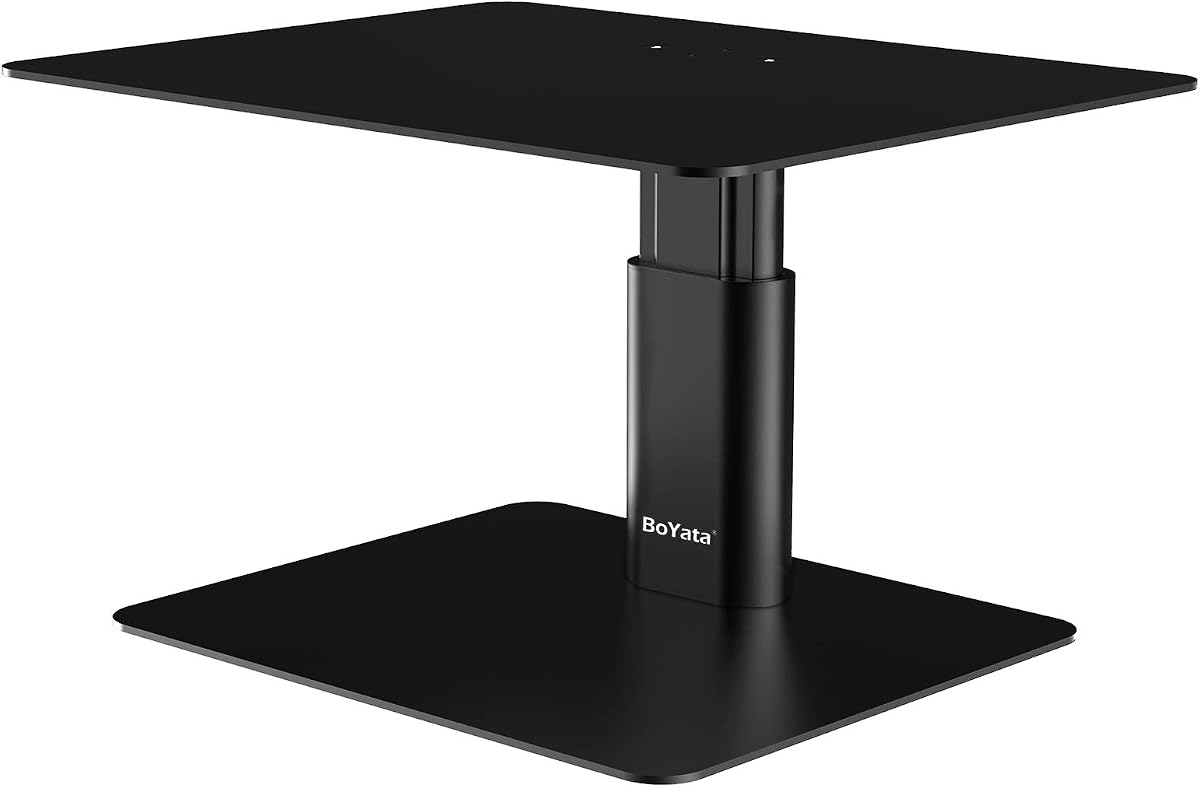
The BoYata stand stands out with its twist knob adjustment mechanism, allowing precise height customization. Its 4.7 rating reflects high user satisfaction with its sturdy metal construction and ergonomic benefits.
We may earn a commission when you buy through this link, at no additional cost to you.
Made from durable metal, it resists bending and denting better than plastic alternatives. The skidproof pads ensure it stays firmly in place, even when typing vigorously on a mechanical keyboard underneath.
Assembly requires a screwdriver, which is included, but it takes slightly longer than snap-together designs. The fixed range of adjustment might not suit very tall users without additional risers.
Ideal for those needing reliable adjustability without complex hydraulic lifts. It balances ease of use with long-term durability, making it a top pick for daily office use.
The twist knob lets you set the exact height you need. This flexibility helps align your screen perfectly with your eye line.
Constructed from high-strength metal, the stand withstands daily wear. It remains stable and scratch-free even after years of heavy usage.
We may earn a commission when you buy through this link, at no additional cost to you.
Amazon Basics delivers a practical solution with its stackable leg design. Users appreciate the ability to customize height by adding or removing legs, though the 22 lb limit suits lighter devices only.
We may earn a commission when you buy through this link, at no additional cost to you.
The ABS plastic material keeps the unit lightweight and easy to move. This is beneficial for temporary setups or shared workspaces where portability matters more than permanent installation.
The tapered top design means careful device placement is needed to ensure stability. While functional, the plastic feel may not meet expectations for heavy-duty or professional use.
Best for lightweight monitors, notebooks, or temporary desk setups. It offers solid value for those prioritizing flexibility and minimalism over premium materials.
Three height levels give you control over elevation. Detach or add legs to match your preferred viewing angle easily.
The plastic construction makes it easy to relocate. This is perfect for users who frequently change desks or work locations.
We may earn a commission when you buy through this link, at no additional cost to you.
The YAOHUOO stand is engineered for dual-monitor setups, offering an impressive 39-inch width. Its 4.6 rating highlights exceptional stability, thanks to heavy-duty steel legs that prevent any shaking.
We may earn a commission when you buy through this link, at no additional cost to you.
Supporting up to 100 lbs means it can handle multiple large screens, printers, or even TVs. The wooden surface adds a touch of elegance while maintaining industrial-grade strength.
Setup requires about 10 minutes with included tools. While the size is large, the benefits of having a unified platform for all your equipment outweigh the space requirements.
This is the go-to choice for power users with multiple displays. It transforms a cluttered desk into a streamlined workspace, providing room for accessories under the screens.
Designed specifically for two screens side-by-side. This eliminates the need for separate stands and ensures both monitors stay perfectly level.
Steel legs distribute weight evenly across the desk. This prevents wobbling even when typing vigorously on a full keyboard underneath.
We may earn a commission when you buy through this link, at no additional cost to you.
Getting two stands in one package offers excellent value for dual desks or backup units. Each unit supports up to 44 lbs and features cold-rolled steel with a waterproof, anti-rust coating.
We may earn a commission when you buy through this link, at no additional cost to you.
The three adjustable height settings allow customization without tools. The inclusion of heat dissipation holes ensures your devices stay cool, preventing overheating during extended use sessions.
The phone holder slot is handy for streaming or notifications, though it may not fit all phone sizes. Assembly is reported as taking under 30 seconds per unit.
Perfect for offices with multiple workstations or shared living spaces. You can stack them to double storage or use them independently for different devices.
Buying two at once saves time and money. This is ideal for home offices or small businesses needing multiple consistent setups.
The integrated slot keeps your phone visible. This allows you to view messages without constantly reaching for your pocket.
We may earn a commission when you buy through this link, at no additional cost to you.
The Klearlook stand simplifies setup with its no-assembly design. Users rate it highly for the convenience of a built-in drawer and phone holder, adding storage without needing extra organizers.
We may earn a commission when you buy through this link, at no additional cost to you.
Its foldable feature allows it to fit narrow workstations when needed. The rubberized legs provide a wobble-free surface, making it safe for ultrawide monitors or heavy laptops.
While it offers three widths, the height is fixed. The drawer is handy for small items but may not hold larger accessories. The white finish looks clean and modern.
Choose this for a tidy desk that requires zero effort to set up. It combines function and form, giving you a clutter-free surface right out of the box.
Keep small essentials like USB drives hidden. This keeps your desk clean while ensuring you can find what you need quickly.
Adjust the width to match your space constraints. This adaptability makes it suitable for both wide desks and compact corners.
We may earn a commission when you buy through this link, at no additional cost to you.
The OPNICE organizer transforms your desk into a streamlined workspace. With dual support, a drawer, and pen holders, it centralizes tools for better focus and efficiency.
We may earn a commission when you buy through this link, at no additional cost to you.
Metal construction ensures stability even with heavy daily use. The sleek black design blends with modern office decor, turning clutter into calm without sacrificing functionality.
While it lacks height adjustments, the fixed ergonomic height suits most standard users. Setup is immediate as no installation is required, saving valuable time.
Ideal for professionals who want an organized desk instantly. It maximizes vertical space and keeps essential tools within arm's reach at all times.
Two hanging slots keep pens visible and accessible. This prevents lost supplies and keeps your desk looking professional and neat.
Use the drawer for notes or small items. This feature reduces surface clutter, ensuring you stay focused on the task at hand.
We may earn a commission when you buy through this link, at no additional cost to you.
The WESTREE stand features a rustic brown wood finish paired with sturdy black steel legs. Its 4.6 rating reflects its ability to handle heavy loads while looking distinct in any room.
We may earn a commission when you buy through this link, at no additional cost to you.
Pre-drilled holes make assembly straightforward with the included tools. The design is patented, meaning you get a unique look that stands out from generic office furniture.
It serves multiple purposes beyond monitors, including as a TV or printer stand. The extra storage underneath allows for neatly organizing files and accessories.
Choose this if you value industrial aesthetics and durability. It offers a blend of form and function, perfect for creative professionals or gaming setups.
The wood adds warmth to your office. This design choice elevates your workspace from utilitarian to stylish and professional.
Pre-drilled holes simplify the setup process. You can have your new monitor setup ready in just a few minutes.
We may earn a commission when you buy through this link, at no additional cost to you.
The gianotter stand arrives ready to use right out of the box. Its patented design ensures unique functionality, including magnetic holders that keep pens and tools secure without extra clips.
We may earn a commission when you buy through this link, at no additional cost to you.
Built with high-strength metal, it ensures exceptional support performance. The dual monitor capability helps maximize desktop space, making it a smart choice for productivity.
While assembly is skipped, the fixed height means it may not suit every user's ergonomic needs. However, the magnetic features add a convenient modern touch.
Ideal for those who want immediate setup without tools. The magnetic holders are a standout feature that adds utility and elegance to any desk.
Magnetic holders keep pens accessible. This innovative approach reduces clutter and ensures you always know where your tools are.
No tools or assembly are required. You simply unbox and place it on your desk to transform your workspace instantly.
We may earn a commission when you buy through this link, at no additional cost to you.
Selecting the right stand involves balancing dimensions, materials, and specific features to match your workspace needs and device types.
Ensure the stand supports the combined weight of your monitor(s) and any accessories you place on top. Higher weight capacities often indicate stronger materials like steel or thick wood.
Check the maximum weight limit in the product specs to avoid structural risks. Always leave a safety margin below the stated limit for longevity.
Look for stands with adjustable heights or angles to achieve proper eye-level positioning. Some models offer twist knobs or stackable legs for fine-tuned control.
Adjustability improves ergonomics significantly. Fixed stands are easier to assemble but offer less flexibility for different body types.
Metal and wood stands generally offer better longevity compared to plastic. Cold-rolled steel with rust coatings ensures resistance to daily wear and tear.
Heavier materials add stability but make the unit harder to move. Consider if you plan to keep the stand in one location permanently.
Vented shelves prevent overheating for devices like laptops or small PCs. This is crucial for maintaining performance and hardware lifespan.
Closed wooden shelves might trap heat. Choose ventilated designs if you plan to run heavy applications on devices sitting on the stand.
Many models offer drawers, pen holders, or open space underneath for keyboards. These features help reduce desktop clutter significantly.
Evaluate your need for storage. Some users prioritize drawers for pens, while others prefer open space for large mechanical keyboards.
Some stands require simple screwdriver assembly, while others are tool-free. Check the included tools and estimated assembly time to plan accordingly.
Tool-free options save time and are great for quick setups. Assembly required stands often offer more structural integrity and customization.
Ensure the top platform is wide and deep enough to support your monitor safely without overhang. Larger screens require wider platforms for stability.
Check dimensions carefully. A stand that is too small may lead to tipping or wobble during use.
The finish and color should blend with your existing office furniture. Options range from industrial black steel to rustic wood finishes.
A visually pleasing stand can elevate the entire room design. Choose materials that match your desk or shelving for a cohesive look.
Place the stand on a flat, stable surface to ensure maximum balance. Avoid uneven carpets or tilted desk edges that could cause wobbling or tipping.
Clean the platform regularly with a soft, dry cloth to remove dust and debris. If using a wood or metal surface, avoid harsh chemicals that might scratch the finish.
Periodically check screws or adjustable parts for tightness. Re-tighten any loose components to maintain stability and prevent accidental shifts during use.
Yes, many risers support ultrawide monitors as long as the platform is wide enough. Check the width specifications and weight capacity to ensure safe placement.
Some models are designed to stack, but not all. Look for stackable designs explicitly mentioned in the product details to avoid structural instability.
The top of your screen should be at or slightly below eye level. Adjust the riser so you can view the center of the screen without tilting your head down.
Standard risers hold monitors with stands; VESA mounts are different. Most desk risers are designed for flat bases rather than VESA wall mounting systems.
Wooden stands generally offer better aesthetics and durability. Plastic options are lighter and often cheaper but may be less robust for heavy loads.
Typically, there is enough space to fit a keyboard and mouse. Measure the clearance height to ensure your devices fit comfortably without obstruction.
Yes, many stands support printers. Just ensure the total weight including cables does not exceed the maximum weight limit specified by the manufacturer.
Most metal stands require some assembly. However, some modern designs offer tool-free or pre-assembled options for immediate use out of the box.
We reviewed ten top desktop monitor risers ranging from budget-friendly options to premium dual-monitor platforms. Each was evaluated on stability, storage, and ergonomic value.
Prioritize weight capacity and ventilation if you use heavy or heat-generating devices. Adjustable height models offer better long-term comfort for daily use.
Check current prices and availability before purchasing to ensure you get the best deal. Small features like drawers or phone holders can greatly improve your workflow.