
Zobirez 420W 10-Port
4.5Editor score
10-Port Fast USB Charging
Dual 65W GaN Ports
Sturdy One-Piece Slots
Explore our expert guide comparing the top charging stations for multiple devices. We evaluate power, port types, safety, and organization to help you choose
Managing a growing collection of smartphones, tablets, and laptops often leads to a tangled mess of cables and adapters. A dedicated charging station for multiple devices consolidates power needs into one organized hub, keeping your space tidy and your gadgets ready to go whenever you need them most.
We have carefully reviewed and compared the leading options available on the market today. Our analysis focuses on output power, port variety, build quality, and safety features to ensure you receive a reliable solution that meets both personal and professional power demands effectively.
Each pick in this list highlights specific strengths such as fast charging capabilities, compact designs, or extensive cable inclusion. Keep in mind that product availability and pricing can fluctuate over time, so verify the latest details before making your final purchase decision online.
4.5Editor score

4.6Editor score

4.6Editor score
This side-by-side comparison highlights the key specifications and capabilities of the top charging stations to help you find the right fit for your specific device ecosystem and charging needs.




The Zobirez 420W 10-Port Charging Station stands out as a robust solution for families or power users needing to charge many devices at once. It holds a solid rating for its ability to deliver significant power while keeping cables managed within a single organizer unit.
We may earn a commission when you buy through this link, at no additional cost to you.
This station features five USB-C ports and five USB-A ports, enabling simultaneous charging of up to ten devices including laptops, tablets, and phones. The top two ports offer 65W fast charging suitable for MacBooks, while the remaining ports handle smaller gadgets efficiently.
While the included cables are convenient, they are short which might limit positioning flexibility on larger desks. The design is sturdy with flame-retardant material but it occupies more space than single-port blocks so ensure you have adequate surface area.
If you need a reliable central hub for all your family or office electronics, this station provides excellent versatility and protection. Its balance of power, safety, and organization makes it a top choice for high-volume charging needs.
The dual 65W GaN ports allow you to charge laptops like MacBooks quickly without needing separate adapters.
With eight included cables and slots to store them, this dock reduces clutter and keeps your desk looking tidy.
We may earn a commission when you buy through this link, at no additional cost to you.
The Zobirez 750W model offers the highest total output among the contenders, making it ideal for power users with multiple high-demand laptops. It maintains a high rating for its ability to distribute power efficiently across ten ports without significant throttling.
We may earn a commission when you buy through this link, at no additional cost to you.
All five USB-C ports can deliver up to 120W each, supporting fast charging for powerful laptops like MacBook Pro and Dell XPS. The five USB-A ports add versatility for older accessories ensuring everything gets a charge at once.
The sheer power capacity means this unit is larger and heavier than typical desk chargers so placement is key. The included cable variety is generous but users should verify lengths fit their specific layout before purchasing.
For offices or heavy households where charging speed and capacity are critical this station removes the need for multiple adapters. Its performance justifies the space it takes up for those needing maximum electrical throughput.
With 120W per USB-C port this station can handle demanding laptops that usually require their own bricks.
Ten included cables cover various device types so you do not need to hunt for extra adapters immediately.
We may earn a commission when you buy through this link, at no additional cost to you.
The Anker Prime Charging Station is recognized for its efficient use of space and power delivering up to 200W across six ports. It earns the Editor's Choice badge for blending high-performance GaN technology with a sleek design that fits modern workspaces.
We may earn a commission when you buy through this link, at no additional cost to you.
Each USB-C port can deliver up to 100W allowing you to charge two laptops simultaneously at high speeds. Ankers proprietary safety system continuously monitors temperature protecting your devices from heat or electrical surges.
It is not as portable as smaller blocks so it is best suited for stationary desk setups. The weight helps it stay stable during use but you will want a dedicated spot for it on your surface.
If you value reliability and brand trust alongside strong performance this charger is a solid investment. It is perfect for professionals who need their devices ready quickly without cluttering their desk with multiple bricks.
The built-in system actively tracks temperature to prevent overheating and ensure long-term safety for your gadgets.
Its width matches a typical smartphone making it compact enough to sit unobtrusively next to your keyboard.
We may earn a commission when you buy through this link, at no additional cost to you.
This 6-port charging block is designed for portability and small spaces offering a compact solution for travelers or students. It receives positive feedback for its reduced size while still providing multiple ports for essential daily electronics.
We may earn a commission when you buy through this link, at no additional cost to you.
The output is tailored for mobile devices with three USB-C and three USB-A ports handling phones and earbuds efficiently. It includes a detachable cord that adds flexibility when reaching outlets in tight spaces like hotel rooms.
It is not suitable for charging high-power laptops which may require dedicated adapters. The build is lightweight which aids portability but may feel less premium than heavier models designed for desktop use.
For those who prioritize saving space and travel convenience this charger delivers reliable power for phones and tablets. Its simplicity and low footprint make it a practical choice for secondary charging needs.
Measuring under 3.5 inches this block fits easily in bags and does not take up much luggage space.
The detachable extension cord lets you plug in from a distance making it useful for hard to reach outlets.
We may earn a commission when you buy through this link, at no additional cost to you.
The Anker MagGo 3-in-1 Station offers a premium wireless experience for iPhone and Apple Watch users. It is highly rated for its ability to charge devices efficiently without cables while supporting the latest Apple charging protocols.
We may earn a commission when you buy through this link, at no additional cost to you.
It delivers full 15W wireless power to iPhones and includes official certification for fast Apple Watch charging. The stand allows for adjustable angles so you can use your phone in StandBy mode while it charges.
Wireless charging is generally slower than wired options which may matter if you need top-ups in minutes. The price is higher than standard docks but the convenience and design quality appeal to premium device owners.
If you use iPhone and Apple Watch and want a sleek bedside or desk setup this station is an excellent choice. Its focus on user experience and style makes it stand out among functional-only chargers.
Certification ensures your Apple Watch charges safely and quickly without risking battery health over time.
The adjustable angle lets you position your phone perfectly for viewing clocks or photos while it charges.
We may earn a commission when you buy through this link, at no additional cost to you.
The Anker Desktop 9-in-1 Charger blends traditional power strip functions with modern USB charging capabilities. It earns high marks for protecting devices against surges while offering ample ports for both plugged-in and USB-powered gadgets.
We may earn a commission when you buy through this link, at no additional cost to you.
It features three AC outlets alongside USB ports allowing you to plug in monitors or speakers without extra strips. The 300J surge protection provides a layer of security for valuable electronics on your desk.
The unit is heavier and larger than typical chargers so it is best for permanent desk locations. You should ensure you have enough space to accommodate the physical size before placing it.
For setups needing both USB charging and AC outlet access this unit simplifies your power infrastructure significantly. Its safety features and versatility make it a strong contender for home office environments.
Three AC outlets let you plug in larger accessories without needing a separate power strip.
The 300J rating guards against power spikes ensuring your connected devices stay safe from electrical issues.
We may earn a commission when you buy through this link, at no additional cost to you.
The MSTJRY 5-Port Charging Station is a practical choice for families who need a central spot for phones and tablets. It holds a solid rating for its inclusion of multiple cables which reduces the immediate need for extra purchases.
We may earn a commission when you buy through this link, at no additional cost to you.
It uses USB-A ports which are still widely compatible with many devices though newer gadgets prefer USB-C. The dividers can be moved or removed to adjust slot sizes for different device widths or thicker cases.
Since it lacks USB-C ports you may need adapters for newer laptops or phones. However for basic phone and tablet charging it provides a convenient and affordable solution for everyday needs.
If you need a simple solution to organize cables and charge basic devices this dock is worth considering. Its ease of use and cable inclusion make it a helpful tool for clutter reduction.
Seven cables cover most common device types so everyone in the family can start charging immediately.
You can modify the slots to fit larger tablets or remove them for different layout needs.
We may earn a commission when you buy through this link, at no additional cost to you.
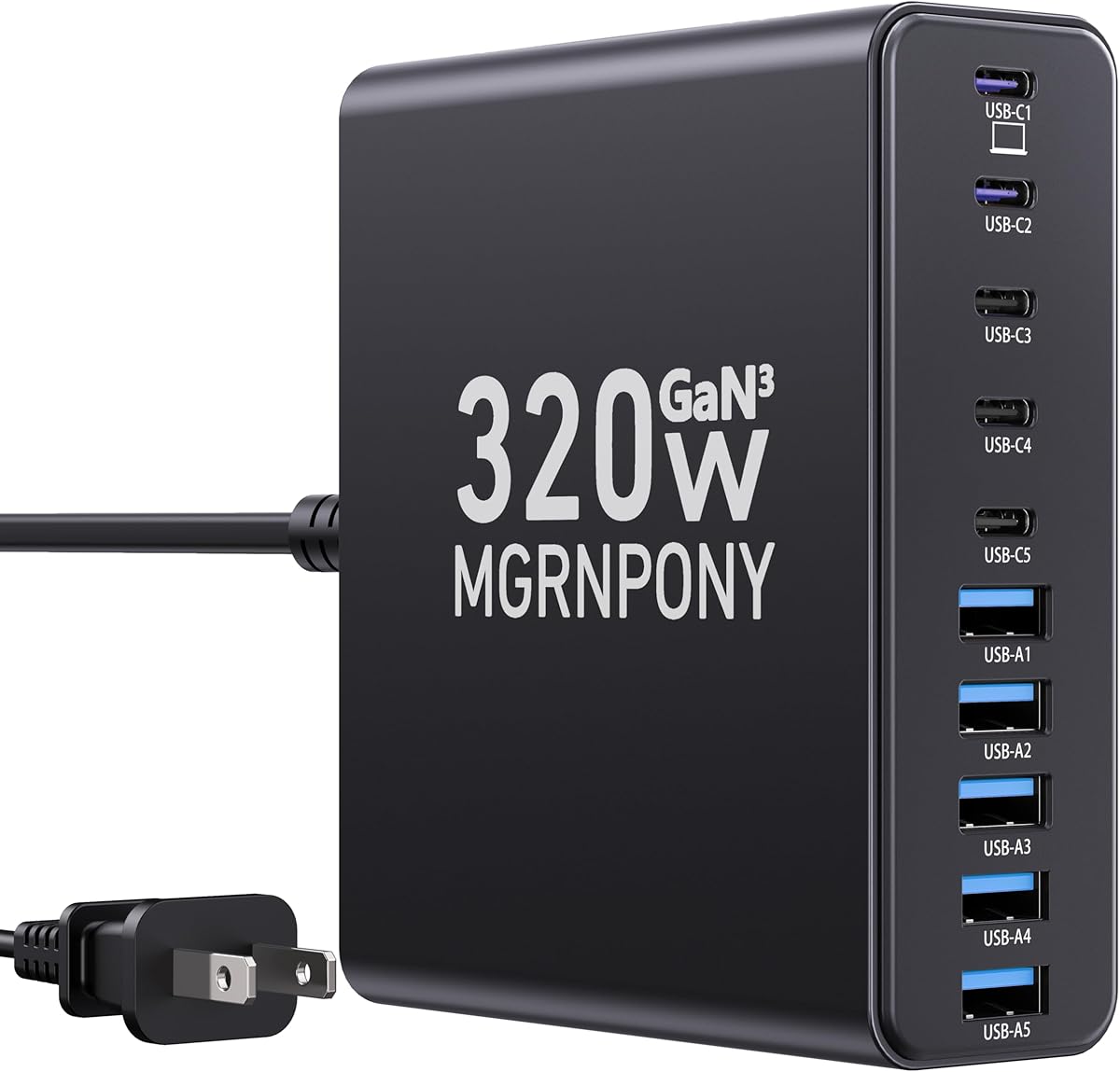
The MGRNPONY 320W station leverages advanced GaN III technology to provide safe and efficient charging across ten ports. It is well-reviewed for its robust safety monitoring system which protects devices from overheating and electrical issues.
We may earn a commission when you buy through this link, at no additional cost to you.
It offers a dedicated 65W port for laptops alongside multiple lower wattage ports for phones and accessories. The compact design allows for vertical or horizontal placement giving you flexibility on crowded desks.
Unlike some competitors this model does not include cables so you must provide your own. This allows you to choose preferred lengths and quality but adds to the initial setup cost.
For users prioritizing safety and efficiency in a compact form factor this charger is a reliable option. Its advanced technology ensures stable power delivery for a wide variety of connected electronics.
The GaN III system allows for smaller size and better heat management than traditional silicon chargers.
Continuous temperature monitoring ensures your devices stay cool and safe during extended charging sessions.
We may earn a commission when you buy through this link, at no additional cost to you.
This retractable charging station is designed to eliminate cable clutter by housing cords inside the device itself. It receives good feedback for its space-saving approach which keeps surfaces clean and organized without external tangles.
We may earn a commission when you buy through this link, at no additional cost to you.
It supports up to eight devices with a mix of fixed and retractable cords ensuring you have enough reach for bedside or desk use. The internal mechanism allows cables to extend to 80cm and retract when not in use.
The fixed cable length means you must position devices within the reach of the cord. If the cords wear out over time the repair might be more complex than with replaceable cables.
For environments where cable management is a priority this station offers a clean and practical solution. Its ability to charge multiple devices without visible wires makes it ideal for modern minimalist spaces.
Retractable cables keep your workspace neat and prevent tripping over wires on nightstands or desks.
With support for eight devices this unit ensures everyone has a spot to charge their electronics simultaneously.
We may earn a commission when you buy through this link, at no additional cost to you.
The Lcssio 300W Charging Station features a sturdy one-piece design that enhances durability and stability. It is well-regarded for its solid construction which prevents the wear and tear often seen with removable dividers.
We may earn a commission when you buy through this link, at no additional cost to you.
It provides dual 65W ports for laptops and several lower wattage options for phones and tablets. The wide slots are designed to accommodate thicker devices with cases making it practical for everyday family use.
The body cannot be disassembled which limits modularity but ensures longevity and reduces parts that might break. It includes six cables so you have immediate access to charging options for most common devices.
If you need a robust and reliable charging hub that lasts L this station is a strong candidate. Its focus on build quality and safety makes it a dependable choice for high-traffic areas.
The solid housing ensures the unit stays sturdy over years of daily use without loose parts.
Extra wide and tall bays allow for charging devices even with bulky protective cases attached.
We may earn a commission when you buy through this link, at no additional cost to you.
Selecting the right charging station involves considering power output, port types, and physical design to ensure it meets your device needs.
The total wattage determines how many devices you can charge simultaneously without slowing down. Look for stations that offer enough power to handle laptops (65W+) and phones at the same time.
Aim for at least 200W total if you have laptops and multiple phones to keep charging speeds high.
Modern devices use USB-C but many accessories still use USB-A. A balanced mix ensures compatibility with all your gadgets without needing extra adapters.
Prioritize stations with at least three USB-C ports to support fast charging for newer phones and tablets.
Charging stations generate heat during operation so materials like flame-retardant ABS and GaN technology are critical for safety and longevity.
Check for protections like over-voltage and overheat safeguards to protect your expensive electronics from damage.
Some stations include cables and dividers to keep your desk tidy while others require you to bring your own.
Decide if you want a complete solution or if you prefer to use your own longer cables for flexibility.
Larger units with multiple ports take up desk space so ensure you have enough room. Non-slip pads help keep the unit stable during use.
If space is limited look for compact models that still offer sufficient power for your needs.
If you plan to take the station on trips consider weight and the length of the included power cord for travel.
Lighter models with detachable cords are easier to pack and more versatile for different environments.
Choosing well-known brands often ensures better customer service and reliability for safety standards.
Look for warranties that cover defects to give you peace of mind with your purchase.
Place the charging station on a flat stable surface and plug the power cord firmly into a wall outlet. Ensure the unit has space around it for air circulation to prevent overheating during extended charging sessions.
Connect your devices using the provided cables or your own compatible ones. Organize the cables in the slots to keep them tidy and prevent tangling. Avoid pulling on cables which can damage the connectors or the station ports.
Regularly inspect the unit for dust buildup and use a soft dry cloth to clean the exterior. If you notice slower charging speeds check the cables for damage or reseat the plugs to ensure a secure connection.
Yes many modern stations offer 65W or higher USB-C ports that can fast charge laptops like MacBook or Dell XPS. Check the total power output to ensure it supports your laptop's requirements alongside other devices.
Most include short cables for immediate use but you may need to buy longer ones for flexible placement. Verify the cable types included before purchasing to match your device needs.
Use stations with built-in safety features like temperature monitoring and overheat protection. Also ensure the unit is placed in a well-ventilated area not covered by other items.
Modern units include smart chips that stop sending power once devices are full preventing overcharging. Look for safety certifications to ensure the unit meets electrical safety standards.
The charging stations come with specific plug types but you can use a travel adapter if the physical plug does not match your region. The internal components usually support standard global voltages.
Heat is normal when powering multiple devices due to the electrical resistance. If it feels excessively hot ensure the vents are not blocked and check that you are not exceeding the station's power capacity.
Our review shows that the Zobirez and Anker models offer the best balance of power and reliability for most users. Whether you prioritize raw wattage or compact design there is a station here to suit your needs.
Consider the number and type of ports you need to avoid buying a unit that is too small or too large for your desk. Safety features and build quality should also guide your decision to protect your valuable electronics.
Prices and availability change frequently so be sure to check current listings before buying. Investing in a quality charging station will streamline your daily routine and keep your devices ready whenever you need them.