
The Braille Store Full-Page Slate
4.0Editor score
25-line full page writing area
Made of durable lightweight plastic
Includes Braille line number guides
Discover the best Braille displays for blind users with our expert guide comparing top models, features, and usability for accessibility needs in 2026.
Choosing the right Braille display is crucial for blind users seeking independence and efficient access to digital content. These devices convert text into tactile dots, allowing seamless interaction with computers, phones, and tablets while enhancing literacy and productivity across various environments.
We compared ten top-rated Braille displays and tools based on durability, connectivity, portability, and specialized features. Our analysis covers refreshable electronic models, traditional slates, label makers, and learning aids to ensure you find the perfect match for your daily workflow and accessibility goals.
Each product in our list highlights key strengths, ideal user profiles, and practical considerations like battery life and device compatibility. Prices and availability fluctuate frequently, so verify the latest details before purchasing to ensure you secure the best value for your specific accessibility requirements today.
4.0Editor score

5.0Editor score

5.0Editor score
Compare key specifications across all ten products to see which Braille display or writing tool best fits your specific accessibility needs and technical requirements.




The Brailliant BI 20X offers a perfect balance of portability and functionality for blind users needing a reliable daily companion. It delivers crisp 20-cell braille output with essential cursor routing keys and robust device connectivity options for seamless integration.
We may earn a commission when you buy through this link, at no additional cost to you.
Its standout strength lies in its multi-device connection capability, allowing simultaneous pairing with up to five Bluetooth devices and one USB device. This ensures users can switch effortlessly between phones, tablets, and computers without constant re-pairing or connection interruptions.
While the 20-cell display is compact and lightweight, it may feel restrictive for users accustomed to wider lines of text. Additionally, the reliance on specific online library integrations may limit access for those preferring alternative non-supported platforms directly.
This display is ideal for students and professionals who prioritize mobility and battery efficiency. Its comprehensive app suite and stable connectivity make it a top choice for anyone seeking an all-in-one braille solution for daily tasks.
Weighing less than larger models, this device fits easily into pockets or small bags for unrestricted movement throughout the day.
Onboard KeySoft Lite apps provide essential tools like calculators, editors, and terminal access without needing external devices.
We may earn a commission when you buy through this link, at no additional cost to you.
The Brailliant BI 40X stands out as the premier choice for users requiring extensive text visibility and advanced connectivity features. It combines a generous 40-cell display with modern Bluetooth 5 technology for superior performance and reliability during long usage sessions.
We may earn a commission when you buy through this link, at no additional cost to you.
Its large internal storage of 32GB allows users to store vast libraries of documents directly on the device, reducing dependency on constant internet access. The Bluetooth 5 upgrade ensures faster, more stable wireless connections across all paired smartphones and computers.
The main trade-off is the higher cost compared to smaller displays, which might not fit every budget. However, the increased productivity gained from the wider braille line and enhanced stability justifies the investment for serious daily users.
This model is best suited for power users and professionals who handle complex documents or require maximum line width for efficient reading. Its robust specs make it a long-term investment for those prioritizing top-tier accessibility performance.
Bluetooth 5 technology provides faster data transfer and lower latency for smoother screen reader synchronization and interaction.
With 32GB internal storage, users can save extensive books and documents locally for offline access without cloud limits.
We may earn a commission when you buy through this link, at no additional cost to you.
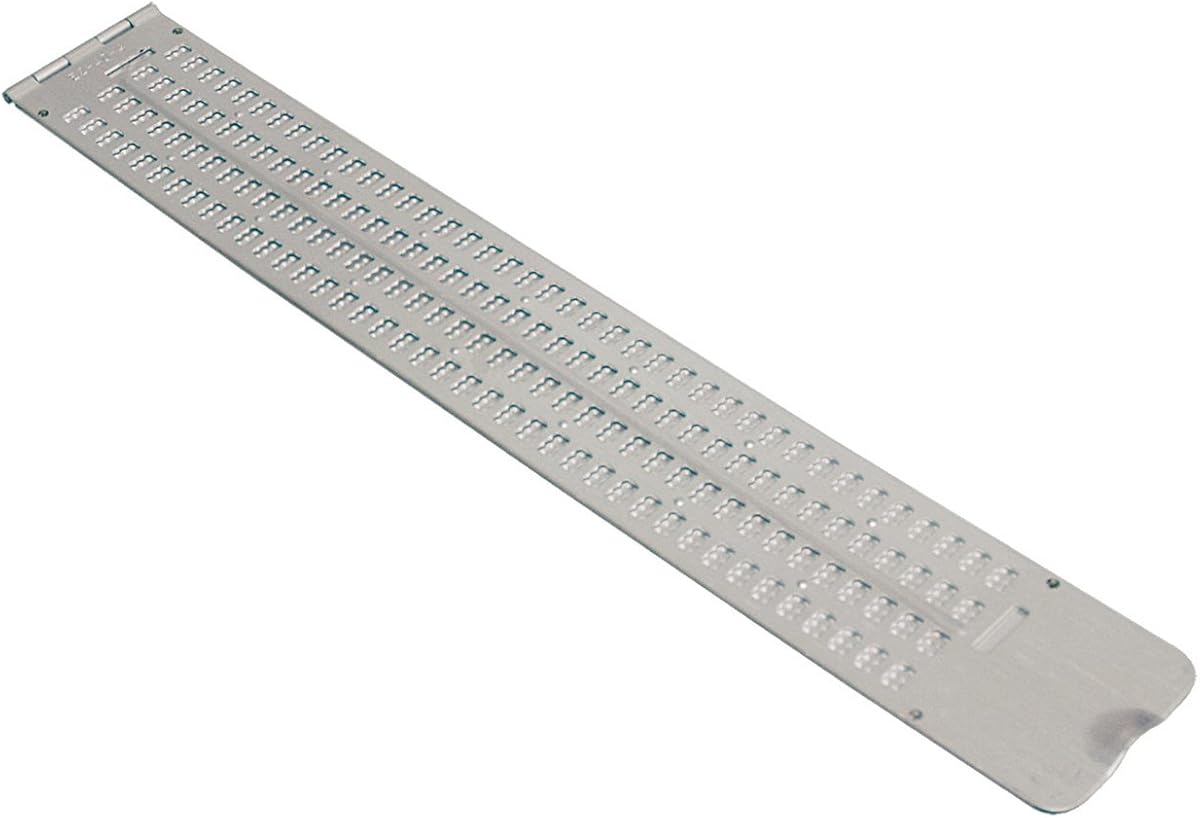
This Full-Page Slate offers an economical solution for users needing large-scale braille writing without electronic components. It fits standard letter-size paper securely while providing extensive writing space for assignments, notes, or creative projects at home or school.
We may earn a commission when you buy through this link, at no additional cost to you.
Its quiet plastic construction ensures discreet use in classrooms or libraries where metal slates might create disturbing noise. The included braille line numbers help users maintain alignment across multiple pages for consistent and professional-looking documentation.
Unlike electronic displays, this tool relies on physical paper and stylus, which requires manual effort to produce and read. However, its simplicity ensures reliability without batteries, charging, or connectivity issues for long-term consistent utility.
Ideal for students and educators focused on literacy practice and basic note-taking, this slate is an essential budget-friendly tool. It bridges the gap for those seeking accessible writing aids without complex technical requirements or high costs.
The thick durable plastic significantly reduces noise during writing, making it suitable for quiet study environments or shared spaces.
Designed to hold full letter-size sheets, it eliminates edge gaps and allows seamless continuation across multiple pages easily.
We may earn a commission when you buy through this link, at no additional cost to you.
The Brailliant BI 20X continues to be a favorite among travelers due to its compact size and robust daily utility. Its 20-cell display is perfectly sized for mobile reading while offering extensive app support for various accessibility tasks and library access.
We may earn a commission when you buy through this link, at no additional cost to you.
Users appreciate the onboard KeySoft Lite suite which includes tools like calculators and terminals directly on the device. The HumanWare thumb keys provide intuitive navigation for quick access to essential functions without extensive screen reader dependency.
While the app ecosystem offers significant versatility, new users may require time to master the specific navigation gestures. Additionally, the 20-cell width limits line length compared to larger desktop models for advanced text analysis.
This device is perfect for active users needing a reliable handheld companion that balances size and function. Its long battery life and seamless connectivity make it an ideal choice for daily commuting and professional settings alike.
Built-in tools like Editor and Calculator enhance productivity without needing separate devices for basic tasks.
Direct integration with Bookshare and NLS BARD ensures instant access to thousands of braille and audio books.
We may earn a commission when you buy through this link, at no additional cost to you.
The Brailliant BI 40X delivers exceptional performance for users needing more line width and faster connectivity. With its 40-cell display and Bluetooth 5 support, it offers a smoother and more immersive reading and writing experience than previous generations.
We may earn a commission when you buy through this link, at no additional cost to you.
Its reliable multi-device connection ensures that users can switch between devices without losing sync or requiring manual reconfiguration. This makes it particularly useful for professionals who frequently toggle between laptops, phones, and tablets throughout their workflow.
The primary limitation is the higher initial investment required compared to other models. However, the increased productivity and enhanced stability for power users justify the premium for those demanding top-tier accessibility features.
Ideal for professionals and power users who need maximum output without compromising on connectivity, this model excels. Its durable construction and reliable performance make it a standout choice for heavy daily reliance.
Bluetooth 5 provides faster data transfer and reduced latency for smoother screen reader interaction and navigation.
40 cells allow more text visibility per line, reducing navigation clicks and increasing reading speed significantly.
We may earn a commission when you buy through this link, at no additional cost to you.
This traditional braille slate provides a robust manual option for those who prefer physical writing tools. It features a large 13-line x 36-cell capacity and durable aluminum construction designed for long-term use and heavy-duty applications.
We may earn a commission when you buy through this link, at no additional cost to you.
The hinge on the 6.5-inch side with a thumb notch allows for quick and easy opening and closing for efficient use. Its pin-down design ensures the slate remains secure during writing, preventing accidental movement or paper slips.
While highly durable, the aluminum construction makes it heavier than plastic alternatives which may be uncomfortable for extended lap use. However, for stationary or short writing tasks, its sturdiness is a significant benefit over lighter options.
This slate is best suited for users needing a reliable, non-electronic writing companion for notes or assignments. Its robust build and generous space make it a classic choice for consistent manual braille production.
13 lines of 36 cells provide significant room for detailed notes or creative writing without frequent page turns.
The hinge and thumb notch ensure easy handling while keeping the slate stable during rigorous writing sessions.
We may earn a commission when you buy through this link, at no additional cost to you.
This Business Card Slate is an ultra-thin aluminum tool designed for quick labeling and small note taking. Its built-in signature guide ensures perfectly straight braille lines, making it ideal for business cards or container labels on the go.
We may earn a commission when you buy through this link, at no additional cost to you.
The compact size allows it to fit easily in wallets or small pockets for constant accessibility. It is a practical addition to any braille toolkit for users who need a portable, low-maintenance labeling solution.
While perfect for small projects, its limited size restricts its utility for larger documents or long writing sessions. It is best used as a supplementary tool rather than a primary writing device for extended needs.
Ideal for professionals or students needing quick access to braille labeling, this slate offers simplicity and portability. Its durable construction and signature guide make it a reliable choice for small-scale tasks.
The built-in guide ensures perfectly straight embossing for professional-looking signatures or name cards.
Ultra-thin design allows for easy carrying in wallets or small bags without adding bulk.
We may earn a commission when you buy through this link, at no additional cost to you.
This Pocket Slate offers a convenient manual option for on-the-go writing needs. With four lines of 40 cells each and pins up design, it provides a balanced writing experience suitable for brief notes or quick messages.
We may earn a commission when you buy through this link, at no additional cost to you.
Its lightweight aluminum construction ensures durability without added bulk, making it easy to slip into a briefcase or backpack. Users benefit from a reliable writing tool that requires no batteries or charging to function effectively.
While compact and portable, the limited line count may require frequent page changes for longer documents. It serves best as an auxiliary tool for quick tasks rather than comprehensive long-form writing projects.
Ideal for travelers and students needing a quick, accessible writing tool, this slate is a reliable choice. Its simple design and portability make it a useful accessory for daily braille practice.
Designed to fit seamlessly into briefcases and backpacks for effortless transport to work or school.
Four lines of standard cells provide a familiar writing format for consistent and efficient note taking.
We may earn a commission when you buy through this link, at no additional cost to you.
The Hable One is a specialized braille keyboard designed to enhance smartphone usability for blind users. It features eight tactile buttons that work with any smartphone, offering a discreet and efficient way to type without relying solely on voice commands.
We may earn a commission when you buy through this link, at no additional cost to you.
Its intuitive design requires no prior braille knowledge, making it accessible to beginners. Users can leverage free onboarding tutorials to master the device quickly for accurate navigation and input on various apps and platforms.
While the need to pair devices might be a minor hurdle, the privacy and efficiency gains are significant. The month-long battery life ensures consistent use throughout daily activities without frequent recharging interruptions.
Ideal for mobile-first users seeking privacy and accuracy in their digital interactions, this keyboard is a strong addition. Its universal compatibility and ease of learning make it a practical tool for modern accessibility.
Free onboarding calls help new users master the keyboard quickly without needing prior braille literacy.
Features over one month of usage on a single charge ensuring reliable performance without frequent recharges.
We may earn a commission when you buy through this link, at no additional cost to you.
These transparent keyboard overlays offer a simple and affordable way to adapt standard PCs for braille users. Made from durable Lexan material with clear design, they allow users to add braille labels without hiding the original key legends.
We may earn a commission when you buy through this link, at no additional cost to you.
The peel-and-stick installation ensures easy application without needing permanent modifications to existing keyboards. This solution is perfect for shared workspaces or offices where multiple users require different accessibility configurations.
While effective, these stickers only assist with typing and do not provide braille reading capabilities. Users relying on screen readers may still need additional assistive hardware for full accessibility across all tasks.
Ideal for budget-conscious users seeking a quick adaptation for typing tasks, these overlays are practical. They provide essential tactile feedback for key identification without requiring specialized hardware purchases or setup.
Transparent Lexan material preserves original key legends while adding necessary braille tactile cues.
Easy peel-and-stick method allows users to customize keyboards quickly without tools or permanent changes.
We may earn a commission when you buy through this link, at no additional cost to you.
Selecting the right device depends on your specific needs, budget, and technical requirements for daily accessibility.
The number of cells determines how much text you can read at once. Smaller 20-cell models are more portable while 40-cell options offer wider reading lines for faster navigation and comfort.
Prioritize larger displays if you frequently read long documents or prefer fewer navigation steps.
Ensure the device supports your primary devices like smartphones, tablets, or computers. Look for stable Bluetooth connections and USB options for seamless integration without frequent disconnections.
Choose models with multi-device pairing if you switch between gadgets often.
Long battery life is essential for users who travel or work away from outlets. Devices offering 20 hours or more provide peace of mind during daily use without frequent recharging interruptions.
Opt for models with USB-C charging for faster top-ups and modern compatibility.
Weight and size matter for users carrying devices in bags or pockets. Compact designs reduce physical strain while still offering sufficient display functionality for reading and writing tasks.
Consider lightweight options if you commute frequently or need a travel companion.
Some models include braille keyboards while others rely on screen readers. Decide if you need to write braille directly or if touch typing with a keyboard suffices for your needs.
Select devices with onboard keyboards if direct braille input is a priority for you.
Check compatibility with your preferred screen readers and apps. Integrated libraries and productivity tools can enhance the device value by reducing reliance on external software.
Choose devices with built-in apps for better self-sufficiency and productivity.
Build quality affects lifespan and reliability. Look for sturdy materials that withstand daily wear and tear without compromising performance or tactile feedback.
Prioritize reinforced designs if you use the device extensively on the go.
Budget varies significantly between electronic displays and manual tools. Determine if you need a full electronic solution or if manual slates and overlays meet your needs cost-effectively.
Set a clear budget range before shopping to compare features realistically.
Always clean your braille display screen and keys regularly using a soft dry cloth to maintain tactile clarity and prevent debris buildup.
Store your device in a cool dry place away from extreme temperatures to prolong battery life and protect internal components from damage.
Update firmware regularly and follow manufacturer guidelines for charging cycles to ensure optimal performance and device longevity over time.
A refreshable braille display is an electronic device that converts digital text into tactile braille characters dynamically. It uses pins that rise and fall to form letters and numbers allowing users to read content from computers or smartphones.
Most modern braille displays support both iOS and Android smartphones via Bluetooth. However you should verify compatibility with your specific phone model and screen reader software before purchasing.
Battery life varies by model but many electronic braille displays offer between 15 to 20 hours of continuous use. This ensures reliability for full days of reading or work without needing to recharge frequently.
Yes traditional braille slates are manual tools that require no electricity to operate. They use a stylus to emboss dots onto paper providing a durable and always-available writing solution.
Many premium braille displays allow pairing with multiple devices simultaneously via Bluetooth. This feature enables seamless switching between a laptop and phone without disconnecting and reconnecting.
Metal slates are more durable but heavier and noisier when writing. Plastic slates are lighter and quieter but may feel less sturdy for heavy daily use.
Our top picks include the Brailliant BI 20X for overall value the BI 40X for premium performance and the Full-Page Slate for budget manual writing.
Prioritize features that match your daily workflow such as battery life portability and connectivity to ensure the device supports your productivity needs.
Verify current pricing and stock levels before purchasing as availability and costs may change based on demand and seasonal discounts.