As an Amazon Associate we earn from qualifying purchases. We may earn a commission when you buy through links on this page, at no additional cost to you. Read our affiliate disclosure.As an Amazon Associate we earn from qualifying purchases.Purchases through our links may earn us a commission, at no extra cost to you. Read our affiliate disclosure.
Finding the right cooling solution is crucial for any PC build. Be Quiet case fans are known for balancing performance with silence. They offer reliable airflow and long lifespans for desktop computers.
We compared ten top models based on specs, user feedback, and features. This list includes options with RGB lighting, high static pressure, and premium bearings for various needs and budgets.
Each pick shows key strengths and ideal use cases. Prices may vary, so check current listings before buying. These fans help keep your system cool and quiet during heavy workloads.
Top 3 Picks for Best Be Quiet Case Fans
Best Budget
be quiet! Light Wings 120mm PWM High Speed Low Noise Premium ARGB Cooling Fan | 4-Pin | Ideal for Radiators and Heat Syncs | 3-Pack | Black | BL077
be quiet! Light Wings LX 120mm PWM Reverse Black Fan, Optimized and Reversed Blades, ARGB LEDs, Extraordinary air Pressure, Ideal as Side or Bottom Intake, Illuminated hub, Frosted Fan Blades
be quiet! Pure Wings 3 120mm PWM High-Speed Case Fan, Maximum Airflow
Rifle Bearing
Airflow Optimized Blades
German Engineering
Low Minimum RPM
This model ranks first for its balance of speed and silence. With a 4.7 rating, it delivers peak performance on radiators. The frame is optimized to minimize leaks and boost efficiency.
Pros
Optimized frame for radiators
Long life rifle bearing
Quiet low minimum rpm operation
German design and quality
High performance configuration
Cons
Not ARGB enabled
Higher RPM may increase noise
We may earn a commission when you buy through this link, at no additional cost to you.
Its seven airflow optimized blades reduce noise while ensuring performance. You can operate it at very low minimum rpm for quiet use. The long life rifle bearing offers an operating lifetime of 80,000 hours.
While it lacks RGB, the focus is on pure cooling efficiency. German engineering ensures consistent quality across units. It suits builds prioritizing reliability over flashy lighting effects.
Buy this if you need reliable cooling for demanding setups. It works well for radiators and standard intake exhaust. The quiet operation makes it ideal for office or home PC builds.
Peak Performance on Radiators
The optimized frame outlet design targets maximum pressure to cool components effectively without excessive sound.
Long Lifespan
The rifle bearing ensures the fan runs reliably for up to 80,000 hours, reducing maintenance needs.
be quiet! Light Wings 120mm PWM High Speed Low Noise Premium ARGB Cooling Fan | 4-Pin | Ideal for Radiators and Heat Syncs | 3-Pack | Black | BL077
3 Pack With Hub
18 LEDs
ARGB Hub Sync
31dB(A) Noise
This 3-pack offers excellent value with included lighting control. The 4.7 rating confirms its reliability. It brings vibrant ARGB effects to builds while keeping noise low.
Pros
Three fans and one HUB
Multiple colors and modes
Synchronization up to six ARGB
Remarkable performance to noise ratio
Ideal for radiators and heat syncs
Cons
Hub required for full sync
Limited to 31dB(A) at 2500rpm
We may earn a commission when you buy through this link, at no additional cost to you.
Nine silence optimized blades reduce turbulences for high pressure. The ARGB Hub synchronizes up to six components. You get three fans and one hub in the box.
It shines on radiators and heat syncs. The 31dB(A) noise level at 2500rpm ensures quiet operation. This set helps create a cohesive look across your system.
Buy this to upgrade your case aesthetics and cooling. It suits budget conscious builders wanting RGB without extra costs. The hub simplifies cabling for multiple fans.
RGB Synchronization
The ARGB Hub allows synchronization of up to six ARGB components, creating a unified lighting effect.
Noise Optimization
Nine silence optimized blades help minimize noise while maintaining high airflow pressure for radiators.
be quiet! Light Wings LX 120mm PWM Reverse Black Fan, Optimized and Reversed Blades, ARGB LEDs, Extraordinary air Pressure, Ideal as Side or Bottom Intake, Illuminated hub, Frosted Fan Blades
Reverse Black Design
16 LEDs in Hub
Frosted Blades
60,000 Hours Lifespan
This fan brings premium looks with reversed blades and frosted finishes. It has a 4.6 rating for its performance. The illuminated hub adds depth to any case setup.
Pros
Spectacular lighting for show cases
Minimizes air leaks
Daisy-chain connection cable
Optimized for maximum airflow
Illuminated hub
Cons
Higher price point
Requires ARGB controller
We may earn a commission when you buy through this link, at no additional cost to you.
Sixteen LEDs shine onto frosted blades for a stunning look. The frame minimizes air leaks for better pressure. Daisy-chain cables make wiring multiple fans simpler.
It offers extraordinary air pressure for side or bottom intake. The design upgrades show cases with emphasis on ARGB. Expect a lifespan of 60,000 hours from the rifle bearing.
Buy this for show builds needing top tier lighting and cooling. It fits well in cases like the Light Base series. The premium build justifies the cost for enthusiasts.
Illuminated Hub Design
Sixteen LEDs inside the hub shine onto frosted blades, creating an unmistakable look for your PC.
Airflow Efficiency
The frame outlet minimizes air leaks, ensuring better cooling for virtually any case configuration.
be quiet! Light Wings 140mm PWM Premium Low Noise ARGB Cooling Fan | 4-Pin | Black | BL074
140mm Size
20 LEDs
23.3dB(A) Max
60,000 Hours
This 140mm fan offers larger airflow with minimal noise. Its 4.7 rating reflects solid performance. The design balances high air movement with quiet operation.
Pros
ARGB lighting on front and rear
Multiple colors and modes
Silence optimized blades
Very quiet operation
Long life rifle bearing
Cons
Limited to 140mm size
Single fan purchase
We may earn a commission when you buy through this link, at no additional cost to you.
Seven blades minimize noise generating turbulences. You get up to 23.3dB(A) noise levels. The rifle bearing provides 60,000 hours of life. ARGB on both sides adds visual flair.
It suits cases needing more air without added sound. The ARGB modes let you customize your look. It pairs well with other Light Wings units.
Buy this if your case supports 140mm mounts. It fits well for rear exhaust or top intake. The quiet profile helps keep your system peaceful.
Large Size Benefits
The 140mm design moves more air at lower speeds, keeping noise down while improving cooling.
Quiet Operation
Maximum noise levels of 23.3dB(A) ensure the fan remains nearly silent during daily use.
This Noctua fan brings a 4.8 rating to the list. It excels in static pressure for heat sinks and radiators. The redux edition offers quality at a competitive point.
Pros
High performance cooling fan
Pressure optimised blade design
Excellent balance of performance and quietness
Streamlined redux edition
Supports automatic motherboard speed control
Cons
No RGB lighting
Single fan pack
We may earn a commission when you buy through this link, at no additional cost to you.
Its blades optimize pressure and quietness. It supports automatic speed control via PWM. The MTTF exceeds 150,000 hours. Many awards confirm its reliability.
While not Be Quiet, it rivals their performance. It suits those needing pressure over airflow. The PWM 4-pin connector simplifies integration.
Buy this for CPU coolers or tight radiator setups. It handles high resistance well. Expect quiet operation and long life from this trusted brand.
Pressure Optimised Design
The blades are optimized for high static pressure, making it ideal for radiators and heat sinks.
Long Term Reliability
With over 150,000 hours MTTF, this fan provides years of reliable service without replacement.
Thermalright TL-C12C-S X3 CPU Fan 120mm ARGB Case Cooler Fan, 4pin PWM Silent Computer with S-FDB Bearing Included, up to 1550RPM Cooling Fan(3 Quantities) (TL-C12C X3)
S-FDB Bearings
1550RPM
66.17CFM
3 Pack
This 3 pack delivers strong cooling for the price. The 4.7 rating supports its quality. S-FDB bearings reduce blade shake and noise.
Pros
Automatic speed control of motherboard
Quality S-FDB bearings
High-brightness LED atomizing arGB fan blade
Silent fan size
Higher air flow
Cons
Brand less known than others
Single cable per fan
We may earn a commission when you buy through this link, at no additional cost to you.
It manages speeds via motherboard PWM. LED blades reflect light softly for better effects. Airflow reaches 66.17CFM. This helps improve cooling performance.
While less known, it matches rivals on specs. The cables allow PWM series control. It is suitable for CPU coolers and cases.
Buy this if you need multiple fans cheaply. It suits cases needing RGB without high costs. The S-FDB bearings help ensure quiet operation.
S-FDB Bearings
These bearings solve blade shaking, keeping noise low while providing maximum cooling performance when needed.
PWM Speed Control
Automatic speed control of the motherboard ensures the fan adjusts speed based on temperature.
be quiet! Light Wings LX 120mm PWM White Triple Pack, 3 Fans Included, Illuminated hub, Multiple Colors and Modes, Optimized Fan Blades for Extraordinary air Pressure, Daisy Chain Option
White Color
16 LEDs
Daisy Chain
3 Pack
This white triple pack brightens builds with clean visuals. It scores a 4.7 rating for quality. The frosted blades add a soft light effect.
Pros
Spectacular lighting for show cases
Minimizes air leaks
Optimized for maximum airflow
Illuminated hub
Daisy chain option
Cons
Higher cost
Requires ARGB controller
We may earn a commission when you buy through this link, at no additional cost to you.
Sixteen LEDs shine on frosted blades. The frame reduces air leaks for pressure. You get three fans to daisy chain easily. It suits show cases needing white lighting.
The design matches Light Base series cases. Expect 60,000 hours of life. The ARGB cable allows chaining fans.
Buy this for white themed builds. It fits as side or bottom intake. The RGB effects enhance case aesthetics nicely.
White Aesthetic
The white finish complements lighter builds, providing a clean and cohesive look for your system.
Daisy Chain Connectivity
Input and output connectors make it easy to link fans without extra motherboard headers.
This slim pack solves tight space issues. It has a 4.6 rating for performance. The 15 mm height fits small form factor cases.
Pros
Optimised for static pressure
Strong cooling performance
Low installation height
Up to 2100 RPM
3 Pack
Cons
Slim profile limits airflow
Single cable per fan
We may earn a commission when you buy through this link, at no additional cost to you.
High static pressure ensures cooling with resistance. It supports PWM PST control. The engine upgrade improves performance. It works on heat sinks and radiators.
It suits cases where 25 mm fans fail. The 3 pack gives you multiple units. RPM range runs from 300 to 2100.
Buy this for compact PCs needing cooling. It fits well for radiators in tight spots. The slim design keeps airflow efficient.
Slim Profile
With only 15 mm height, these fans fit in small form factor cases where 25 mm fans do not fit.
Static Pressure Focus
High static pressure guarantees efficient cooling, even with increased air resistance from radiators.
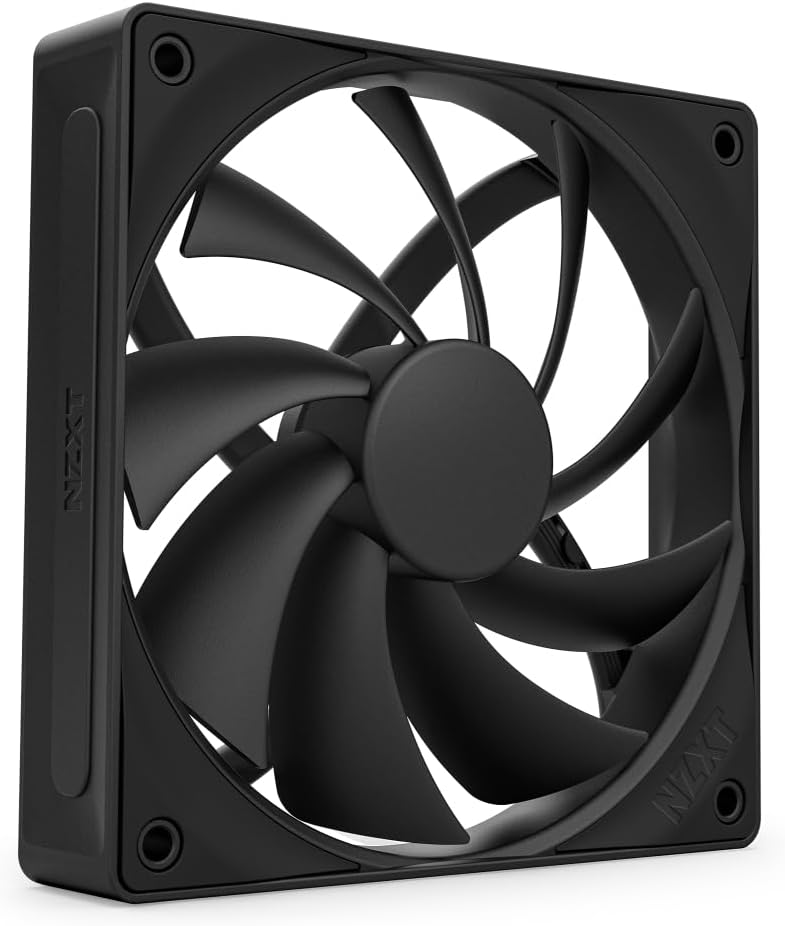
NZXT F120Q – 120mm Quiet Airflow PC Case Fan – Black
Sickle Blades
Fluid Dynamic Bearings
60,000 Hour Lifespan
PWM Control
This fan prioritizes airflow and silence. It holds a 4.6 rating. The chamfered frame directs air effectively.
Pros
High airflow
Efficient design
Powerful cooling
Low noise
PWM control
Cons
Single fan pack
Less premium features
We may earn a commission when you buy through this link, at no additional cost to you.
Nine sickle style blades move large air amounts. Fluid dynamic bearings ensure stability and low noise. PWM control adjusts speeds based on temperatures. It suits intake or exhaust needs.
It minimizes turbulence for higher airflow. The design is efficient for the price. It keeps components cool during use.
Buy this for general case airflow needs. It works well as front intake. The quiet profile helps keep the PC noise free.
High Airflow Design
Nine sickle style blades optimize air movement, ensuring versatile use for intake or exhaust.
Durability
Fluid dynamic bearings provide unwavering stability and a 60,000 hour lifespan for long term use.
ASUS ROG Strix XF120 Whisper-Quiet, High Air Flow, 4-pin PWM Fan for PC Cases, Radiators or CPU Cooling (120mm, up to 400,000 Hours lifespan, Magnetic-Levitation, 1800RPM), 5 Year Warranty
MagLev Bearing
400,000 Hours
22.5 dB(A)
5 Year Warranty
This fan offers a 5 year warranty. It has a 4.8 rating. The MagLev bearing reduces friction and noise.
Pros
Optimal blend of airflow and static pressure
MagLev bearing
Minimized acoustic profile
Anti-vibration pads and mounts
5 Year Warranty
Cons
Higher cost
Single fan
We may earn a commission when you buy through this link, at no additional cost to you.
Airflow and pressure balance works well. It runs up to 1800 RPM. The anti vibration pads prevent rattling. The sound is tuned to be smooth.
It suits those needing long term reliability. The lifespan reaches 400,000 hours. It fits cases, radiators, or CPU cooling.
Buy this for builds requiring long life. The warranty offers peace of mind. It keeps your system whisper quiet.
MagLev Bearing
This bearing stabilizes the rotor, reducing friction and noise while offering a 400,000 hour life span.
5 Year Warranty
ASUS backs this fan with a 5 year warranty, providing extra confidence in its durability and reliability.
We may earn a commission when you buy through this link, at no additional cost to you.
Buying Guide – How to Choose the Best Be Quiet Case Fans
Choosing the right fan depends on your case size, cooling needs, and budget. Consider these factors to pick the best option.
Fan Size
Cases support different sizes like 120mm or 140mm. Measure your mounts before buying to ensure fit.
Choose sizes your case allows. 120mm is common while 140mm offers more airflow.
Noise Levels
Noise is measured in dB(A). Lower numbers mean quieter fans. Check specs for max and min noise.
Look for fans below 25dB(A) for quiet builds. Silent fans help keep your workspace peaceful.
Airflow vs Static Pressure
Airflow moves air through open space. Static pressure pushes air through resistance like radiators.
Use high airflow for general fans. Use high pressure for radiators or filters.
RGB Lighting
RGB fans add color to builds. ARGB lets you control individual LED colors. Some come with hubs.
Decide if you want lighting. RGB fans can match other components like RAM or coolers.
Bearing Type
Bearings affect lifespan and noise. Rifle or S-FDB bearings reduce wear. MagLev bearings are premium.
Check bearing type for longevity. Better bearings ensure quieter operation over time.
PWM Control
PWM fans adjust speed based on temperature. This saves noise when cooling is not needed.
Look for 4-pin PWM for automatic control. It helps keep the system quiet at idle.
Cable Management
Daisy-chain options reduce cables. Hubs connect multiple fans. Check connector types for your motherboard.
Opt for fans with daisy chains or hubs. This keeps your build tidy and easier to install.
Price
Prices vary by features and brand. More RGB or better bearings cost more. Compare specs against your budget.
Balance features with cost. A 3 pack often gives better value than single fans.
How to Use and Care for Your Be Quiet Case Fans
Install fans facing the right way. Intake fans pull air in while exhaust fans push air out. Check arrow on the frame.
Connect to motherboard PWM headers for control. Use hubs if you have many fans. Ensure cables are secure.
Keep fans clean from dust. Clean blades every few months with air duster. Dust reduces airflow and increases noise.
Frequently Asked Questions
Are Be Quiet fans loud?
Be Quiet fans are designed to be quiet. They often use optimized blades and bearings to reduce noise. Some models can run up to 30dB(A) but many are below 25dB(A) for silent operation.
Do I need an ARGB hub?
If you use ARGB fans, a hub helps synchronize them. Some kits include a hub. Without one, you might need extra motherboard headers.
What size fan do I need?
Check your case specs. Most cases take 120mm. Some support 140mm for rear or top mounts. Measure before buying to ensure fit.
How long do these fans last?
Many fans have lifespans over 60,000 hours. Some exceed 100,000. Bearing types like rifle or MagLev help extend life.
Can I mix different fans?
Yes, you can mix brands and sizes. Just ensure the case fits all mounts. RGB colors might not sync without a hub.
Do I need to adjust PWM settings?
Most motherboards auto manage PWM via BIOS. This adjusts speed based on temp. You can also set curves manually in software.
What is better 120mm or 140mm?
140mm moves more air at lower RPM for quieter airflow. 120mm is more common. If space allows, 140mm is often better.
Do these fans come with screws?
Most Be Quiet fans include standard screws. Some packs may have anti-vibration mounts. Check the box contents for details.
Final Thoughts on Choosing the Best Be Quiet Case Fans
The top picks cover a range of needs. The Pure Wings 3 leads in balance. The Light Wings packs offer great RGB value.
Choose based on your case size and cooling goals. RGB fans suit builds needing color. Silent fans help keep workspaces peaceful.
Prices change so check current listings. These fans help keep your PC cool and quiet. Select the right one to improve your system.
Compare the best Esim Card for Japan options for travelers seeking reliable connectivity, fast speeds, and seamless activation across Tokyo, Kyoto, and Osaka