
JADENS Portable US Letter
4.6Editor score
Inkless thermal technology
Built-in rechargeable battery
Compact ultra-compact body
Battery powered portable printers have revolutionized how professionals handle documentation while traveling. These compact devices eliminate the need for traditional power sources, ensuring you can print contracts, receipts, or photos anywhere without interruption.
We evaluated ten top models based on connectivity options, battery performance, and print quality. Our analysis covers thermal and inkjet technologies, helping you choose the right device for your specific mobile workflow needs and constraints.
Each review highlights key features, pros, cons, and ideal use cases. Please note that prices and availability change frequently, so verify current details before purchasing to ensure you get the best value for your needs.
4.6Editor score

4.2Editor score
4.5Editor score
As an Amazon Associate we earn from qualifying purchases.
This side-by-side comparison table outlines the key specifications and capabilities of each model to help you quickly identify the best fit for your mobility and printing requirements.


The Canon PIXMA TR160 stands out as a top choice for users needing reliable color printing on the go. With a 4.2 rating from verified buyers, it balances portability with professional-quality output for documents and photos.
We may earn a commission when you buy through this link, at no additional cost to you.
Its 5-Color Hybrid Ink System ensures sharp black text and vibrant details, making it ideal for business presentations or creative projects. The 1.44 OLED display helps you monitor ink levels and settings without checking your phone.
While it excels in quality, it requires standard ink cartridges which may be less cost-effective than thermal options. However, the convenience of wireless direct connectivity and compact design outweighs this for most professionals.
If you need color prints anywhere without compromising on quality, this model is a strong recommendation. Its balance of features makes it suitable for students, freelancers, and mobile business users.
The 5-Color Hybrid Ink System delivers vibrant and accurate colors, perfect for marketing materials or personal photos.
Wireless Direct Mode allows printing without a router, ensuring you can print even in remote locations.
We may earn a commission when you buy through this link, at no additional cost to you.
The HP OfficeJet 250 offers a comprehensive all-in-one solution for mobile professionals who need more than just printing. It includes scanning and copying capabilities with a built-in battery for uninterrupted work.
We may earn a commission when you buy through this link, at no additional cost to you.
Its HP Fast Charge feature allows quick power-ups in about 90 minutes, minimizing downtime. The printer supports a wide range of paper sizes, from letter to envelopes, making it versatile for office documents.
While it is heavier than dedicated thermal printers, its multifunctionality justifies the weight for users who need scanning and copying without carrying separate devices. It remains a solid investment for business travelers.
If you need a portable workstation that handles multiple tasks, this model delivers reliable performance. Its robust design and broad feature set make it ideal for complex mobile office needs.
Print, scan, and copy directly from your mobile device without needing to visit a traditional office setup.
Support for multiple paper sizes ensures you can handle everything from standard documents to special cards and envelopes.
We may earn a commission when you buy through this link, at no additional cost to you.
The HP OfficeJet 200 simplifies mobile printing for those who primarily need to print documents. It delivers consistent results with a focus on ease of use and reliable connectivity options.
We may earn a commission when you buy through this link, at no additional cost to you.
HP Auto Wireless Connect ensures you can set up the printer quickly without complex configurations. The battery is included, providing mobility, and it supports a wide range of document formats and sizes.
Although it lacks scanning features, it excels in speed and reliability for standard printing tasks. The high page yields mean fewer cartridge changes, saving time during busy workdays.
For straightforward business printing needs, this model offers dependable performance. Its user-friendly interface and connectivity make it a favorite for users who value simplicity.
Auto Wireless Connect streamlines the setup process, allowing you to start printing right out of the box.
Designed for business documents, it ensures consistent quality for contracts, invoices, and reports on the go.
We may earn a commission when you buy through this link, at no additional cost to you.
The Epson Workforce WF-110 is designed for users who need color printing in a mobile form factor. It features a rechargeable lithium-ion battery and Wi-Fi Direct for flexible connectivity anywhere.
We may earn a commission when you buy through this link, at no additional cost to you.
Its compact design allows it to fit easily into backpacks, making it ideal for travelers who need occasional color prints. The external accessory battery option extends usage for longer trips.
While it is reliable, ink costs can add up over time compared to thermal alternatives. However, for those who need genuine color output on the go, it remains a top choice.
This printer is best suited for creatives or business users who require color portability. Its balance of features and size makes it a practical choice for diverse mobile workflows.
Choose from USB, AC adapter, or external battery options to ensure you never run out of power during a trip.
Wi-Fi Direct allows easy connection from smartphones and laptops without needing a separate wireless router.
We may earn a commission when you buy through this link, at no additional cost to you.
The Gloryang Inkless Portable Printer offers a cost-effective solution for basic mobile printing needs. Using thermal technology, it eliminates the need for ink, toner, or ribbons entirely.
We may earn a commission when you buy through this link, at no additional cost to you.
Its lightweight design allows it to fit easily into backpacks, making it perfect for students or travelers. The built-in paper bin keeps your workspace tidy while you work on the go.
Since it requires special thermal paper, it is not suitable for printing on standard documents. However, for receipts, notes, and emergency documents, it provides a convenient and mess-free experience.
If you are looking for an affordable way to print without ink costs, this model is a strong contender. Its simplicity and portability make it an ideal choice for casual users.
By eliminating ink, you save on recurring costs while maintaining reliable output for essential documents and notes.
The built-in paper bin saves space and helps keep your travel bag or desk organized and clutter-free.
We may earn a commission when you buy through this link, at no additional cost to you.
The Portable Printers A285M is designed for users who need a small, affordable thermal printer for various tasks. It supports a range of thermal paper sizes, making it versatile for receipts and documents.
We may earn a commission when you buy through this link, at no additional cost to you.
Its USB-C connection allows easy integration with laptops, while Bluetooth supports mobile devices. This dual connectivity ensures you can print from almost any device you have with you.
While the build is basic, it gets the job done for occasional use. The need for drivers on laptops may be a slight hurdle for less tech-savvy users, but it is straightforward to set up.
This model is best for those who need a budget-friendly option with some flexibility in paper sizes. It serves well for quick prints during travel or business meetings.
Seamlessly switch between Bluetooth for phones and USB-C for laptops to ensure you can print from any device.
Support for multiple paper widths allows you to print receipts, labels, or full-page documents as needed.
We may earn a commission when you buy through this link, at no additional cost to you.
The D90E Inkless Portable Printer is designed for users who need full-page printing without ink. It supports 8.5×11 thermal paper, allowing you to print contracts and standard documents on the go.
We may earn a commission when you buy through this link, at no additional cost to you.
Its lightweight build and included travel case make it easy to transport. The auto ejection feature for paper jams ensures you don't waste time troubleshooting during critical work hours.
While it works well with PC and mobile, the reliance on the Labelnize app is a consideration. However, for those who want full-page portability, it is a practical and reliable solution.
This printer is ideal for teachers, notaries, or travelers needing full-page output. Its design focuses on functionality and ease of use for everyday mobile printing tasks.
Print standard 8.5×11 documents without needing to resize or crop, ensuring your reports look professional.
The included travel case protects your printer and keeps your workspace tidy while you are away from the office.
We may earn a commission when you buy through this link, at no additional cost to you.
The JADENS Portable US Letter Printer offers exceptional value with its high battery capacity and advanced app features. It supports US letter thermal paper, making it perfect for standard documents and homework.
We may earn a commission when you buy through this link, at no additional cost to you.
Its 1800mAh battery allows up to 360 sheets per charge, ensuring you rarely need to recharge. The app includes AI tools like erasing and translation, adding value for students and professionals.
While it prints only in black and white, the clarity is impressive for text and simple graphics. It is a reliable tool for those who prioritize battery life and cost efficiency over color.
If you need a reliable and efficient printer for daily tasks, this model is a top choice. Its focus on utility and battery life makes it stand out in the budget category.
With up to 360 sheets per charge, you can work all day without worrying about finding a power outlet.
Local printing ensures your sensitive documents are never uploaded to the cloud, keeping your data private.
We may earn a commission when you buy through this link, at no additional cost to you.
The Portable Printers N80 is unique for its support of tattoo transfer paper, making it ideal for artists and designers. It delivers clear prints at 203 DPI, ensuring detailed designs transfer well.
We may earn a commission when you buy through this link, at no additional cost to you.
Its lightweight design and built-in battery allow for easy transport to studios or events. The Bluetooth connectivity ensures you can print from your phone or tablet without cables.
While the battery is slightly smaller than some competitors, it still provides plenty of prints for a session. The requirement for drivers on PCs is minor compared to its creative capabilities.
For tattoo artists or creatives needing mobile output, this model is unmatched. It balances functionality with portability, making it a specialized tool for artistic applications.
Compatible with tattoo transfer paper, allowing artists to print detailed designs for clients on the go.
The 203 DPI resolution ensures your prints are crisp and clear, whether for documents or artistic transfers.
We may earn a commission when you buy through this link, at no additional cost to you.
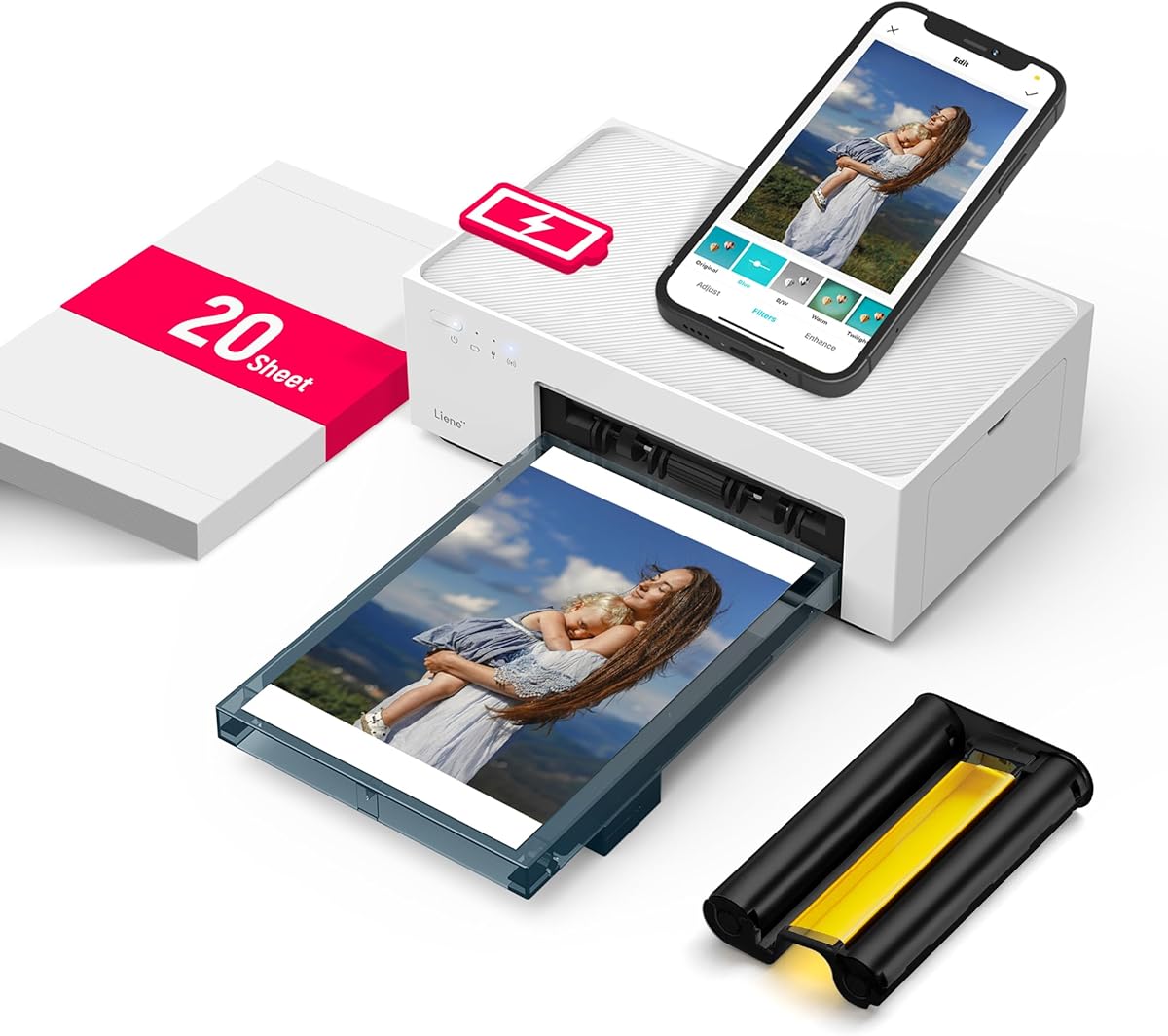
The Liene White M200 delivers professional-quality photos with its dye sublimation technology. It creates vibrant and durable prints that are resistant to water and fading, perfect for preserving memories.
We may earn a commission when you buy through this link, at no additional cost to you.
Its built-in battery and WiFi hotspot ensure you can print directly from your phone without needing a router. This makes it ideal for events, travel, or sharing photos instantly with friends.
While it is limited to 4×6 photos, the output quality is superior to most portable printers. The app also allows for editing, giving you full control before printing.
For photography enthusiasts who want to print physical copies on the go, this is the best option. Its blend of quality and portability justifies its place as a premium choice.
The dye sublimation process includes a protective laminate layer, ensuring your photos last longer without fading.
Connect up to five users simultaneously to share and print photos instantly during gatherings or travel.
We may earn a commission when you buy through this link, at no additional cost to you.
Choosing the right battery powered portable printer depends on your specific printing needs, budget, and lifestyle. Here are the key factors to consider.
Decide between thermal and inkjet. Thermal printers are ink-free and cheaper to run but produce black and white prints. Inkjet printers offer color but require cartridges.
Choose thermal for receipts and notes, or inkjet for photos and color documents.
Check the battery capacity and expected prints per charge. Longer battery life is essential for extended travel or workdays without power.
Prioritize models with high mAh ratings and efficient power management.
Ensure the printer supports your devices. Most offer Bluetooth for phones and USB-C for laptops. Some also support Wi-Fi Direct for router-less printing.
Verify compatibility with your specific OS and apps before buying.
Consider the paper sizes the printer supports. Some handle standard 8.5×11 pages while others are limited to receipts or 4×6 photos.
Select a size that matches your document or photo needs.
Weight and dimensions matter for travel. Look for lightweight models that fit in a backpack or briefcase easily.
A compact design ensures you can take the printer anywhere without hassle.
Look beyond the initial price. Thermal printers save on ink but require specific paper. Inkjet printers have ongoing cartridge costs.
Calculate long-term costs based on your usage frequency.
A good app enhances usability. Look for features like editing, templates, and easy file sharing within the app.
Apps that support AI tools or custom designs add extra value.
Check the warranty period and customer support options. A one-year warranty is standard and provides peace of mind.
Reliable support ensures you can resolve issues quickly when traveling.
Start by charging the battery fully before first use. Most printers indicate charge status via lights or an app. This ensures maximum initial performance and battery health.
Install the required app and drivers as per the manual. For Bluetooth, pair the device in your phone settings before printing. For USB, connect and install drivers to ensure recognition.
Store the printer in a cool, dry place. Avoid exposing it to extreme temperatures which can damage the battery or paper. Keep the printer clean and free from dust to maintain print quality.
No, thermal printers require special thermal paper that reacts to heat. Regular paper will not produce an image. Always use the manufacturer-recommended paper for best results.
Battery life varies by model and usage. Most offer between 100 to 360 prints per charge. It is best to check the specific specs of the model you are considering.
Most modern portable printers support both iOS and Android via dedicated apps. Always verify compatibility on the product page before purchasing to ensure your device works.
Thermal prints can fade when exposed to heat or sunlight over time. For long-term preservation, consider using archival paper or storing prints in a cool, dark place.
Yes, inkjet portable printers like the Canon PIXMA TR160 or Liene M200 can print photos. However, thermal printers are generally limited to black and white documents.
You can usually connect the printer to a power source via USB or AC adapter to continue printing. Some models allow you to print while charging if supported.
No, most support Wi-Fi Direct or Bluetooth. This allows you to connect devices directly to the printer without needing an external wireless router.
Turn off the printer and gently open the cover as per the manual. Avoid pulling paper forcefully. Some models have auto-eject buttons to help resolve jams easily.
We have reviewed ten top battery powered portable printers to help you find the right fit. The Canon PIXMA TR160, JADENS Portable US Letter, and Liene White M200 stand out for their unique strengths.
Prioritize your specific needs like color printing, paper size, or budget. Each model has its own advantages depending on whether you are a student, professional, or creative.
Remember to check current availability and prices before purchasing. Technology evolves quickly, so staying updated ensures you get the best performance and value for your investment.