
CyberPower AVRG900LCD
4.6Editor score
900VA Capacity
Data Line Protection
Automatic AVR
This guide compares the top battery backup options for gaming laptops to help you find reliable power protection during outages and surges.
Gaming laptops demand stable power to prevent data loss and hardware damage during unexpected outages. A quality battery backup ensures uninterrupted gameplay and protects sensitive components from voltage spikes.
We evaluated ten leading models based on output capacity, wave type, outlet count, and user feedback. Our comparison highlights units suitable for high-wattage gaming rigs and peripheral setups.
Each pick details key specifications, pros, and cons to help you choose wisely. Prices and availability change frequently, so verify current terms before purchasing to ensure compatibility.
4.6Editor score

4.5Editor score

4.7Editor score
Below is a side-by-side comparison of all ten models to highlight key differences in capacity, outlets, and specific features for your setup.




This unit delivers reliable pure sine wave power essential for modern gaming laptops with active power factor correction. It ranks highly due to its robust 1000W capacity and comprehensive surge protection features.
We may earn a commission when you buy through this link, at no additional cost to you.
The 12 outlets allow connection of the laptop, monitor, and peripherals. Automatic Voltage Regulation ensures stability during minor fluctuations without draining the battery.
Its large physical footprint and weight may be challenging for small desk setups. However, the protection it offers justifies the space required for home offices.
Ideal for serious gamers needing seamless power transitions and equipment safety. The included software enables detailed monitoring of power quality and battery status over time.
Active PFC power supplies require pure sine wave to avoid shutdowns or hardware stress during transitions.
With twelve outlets and USB ports, you can protect all essential peripherals beyond just the laptop.
We may earn a commission when you buy through this link, at no additional cost to you.
The EC850LCD focuses on reducing power waste through its ECO controlled outlets. It suits setups where peripherals like printers or speakers do not need constant backup power.
We may earn a commission when you buy through this link, at no additional cost to you.
You get twelve outlets split into backup and surge only zones. This flexibility helps manage power consumption while keeping critical devices safe during surges.
The simulated sine wave may not support some sensitive power supplies. Users with high-end laptops should verify compatibility before purchasing this specific model.
Best for users prioritizing efficiency and budget over maximum wattage. The included software provides management features to track usage and battery health effectively.
When a connected PC sleeps, peripherals plugged into ECO outlets power off automatically to save energy.
Dedicated surge outlets handle non-essential gear while backup outlets keep your main workstation running longer.
We may earn a commission when you buy through this link, at no additional cost to you.
This model offers a high 1500VA rating suitable for multi-monitor setups and desktop gaming rigs. Its color LCD panel provides immediate visual feedback on power conditions.
We may earn a commission when you buy through this link, at no additional cost to you.
Voltage regulation corrects minor fluctuations without using battery power. This extends the cycle life and ensures your equipment receives steady input consistently.
Simulated sine wave output limits use with active PFC supplies. Ensure your laptop power brick specifies compatibility with modified sine wave sources before setup.
Recommended for users needing ample capacity and clear status indicators. The combination of outlets and USB ports makes it a versatile hub for various devices.
The screen tilts and highlights potential issues like overload or low battery before they cause shutdowns.
Type-A and Type-C ports allow you to charge phones and tablets directly during an outage.
We may earn a commission when you buy through this link, at no additional cost to you.
The AVRG900LCD balances affordability with essential features like data line protection and automatic voltage regulation. It suits light gaming setups with modest power demands.
We may earn a commission when you buy through this link, at no additional cost to you.
Beyond protecting the PC, it shields modems and routers from surges traveling through phone lines. This is crucial for maintaining internet connectivity during storms.
Its 480W capacity limits use for high performance rigs. Users must ensure their total load stays within limits to avoid triggering the overload alarm quickly.
Best for entry-level gamers or home office workers on a tight budget. The included management software adds value by enabling shutdown scripts for safe saving.
Surges often arrive via phone or coaxial cables. This model blocks them to prevent damage to network hardware.
Automatic Voltage Regulation fixes under and over voltages without switching to battery, extending battery life.
We may earn a commission when you buy through this link, at no additional cost to you.
The CP1500AVRT offers a robust 1500VA capacity at a competitive price. While it lacks USB charging, its outlet count supports extensive peripheral setups well.
We may earn a commission when you buy through this link, at no additional cost to you.
It uses simulated sine wave technology which works with most standard power supplies. For gaming laptops with active PFC, this may not be compatible.
Status lights provide clear indications of power and wiring faults. This simplicity is helpful for quick diagnostics without navigating complex menu interfaces.
Suitable for users needing backup for routers and PCs without mobile device charging needs. Ensure the total wattage matches your device requirements before buying.
Five outlets are backed up while five are surge only, allowing flexible management of power needs.
LED lights replace screens to keep costs down and focus on essential power status monitoring.
We may earn a commission when you buy through this link, at no additional cost to you.
APC is a well known leader in power protection. This set offers two units totaling ten outlets and USB-C charging to keep devices powered during outages.
We may earn a commission when you buy through this link, at no additional cost to you.
The batteries are user replaceable which extends the lifespan of the hardware. This reduces waste and long term costs compared to sealed units.
Splitting outlets across two units offers flexibility for different locations. However, it means you manage two separate power sources instead of one single tower.
Ideal for users preferring a trusted manufacturer with easy maintenance features. The equipment protection policy adds an extra layer of financial security for gear.
When the battery ages, you can swap it yourself rather than buying a whole new UPS system.
Included policies cover connected equipment against surge damage providing peace of mind for valuable electronics.
We may earn a commission when you buy through this link, at no additional cost to you.
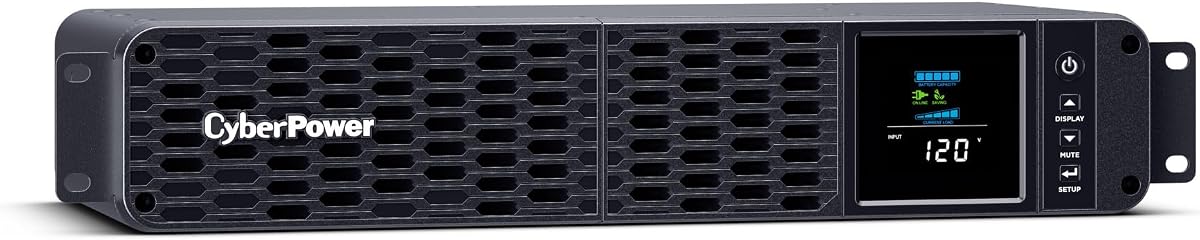
Designed for server racks or tight installations, this unit features a short depth chassis and pure sine wave output. It ensures compatibility with sensitive server grade power supplies.
We may earn a commission when you buy through this link, at no additional cost to you.
The pure sine wave technology prevents compatibility issues with active PFC systems. This is vital for high performance laptops that require clean power to function properly.
Its depth is optimized for shallow racks, saving space in professional environments. However, the eight outlets are fewer than some tower models offering similar capacity.
Best for professionals needing rackmount solutions with high power fidelity. The build quality and included software support justify the higher investment for critical setups.
This unit fits into standard 19 inch racks without needing extra mounting rails or deep enclosures.
Pure sine wave matches grid power quality, reducing stress on active PFC adapters and components.
We may earn a commission when you buy through this link, at no additional cost to you.
This inverter provides pure sine wave AC from a DC source making it useful for RV or boat setups. It offers 3500W continuous power which exceeds most gaming laptop needs.
We may earn a commission when you buy through this link, at no additional cost to you.
Unlike UPS units it does not switch automatically during outages. You must manually connect it to a battery bank and AC loads during an emergency situation.
The digital display shows output status clearly. Cooling fans ensure stable performance under heavy load without overheating the internal components quickly.
Best for mobile users or campers with solar or battery banks. It provides clean power for laptops and TVs but requires manual intervention to work.
With 3500W you can run multiple devices simultaneously including high performance laptops and large monitors.
Pure sine wave ensures sensitive electronics receive clean power similar to what they expect from a wall outlet.
We may earn a commission when you buy through this link, at no additional cost to you.
This unit stands out with a five year warranty covering the battery and equipment. It provides excellent peace of mind for long term investment in home setups.
We may earn a commission when you buy through this link, at no additional cost to you.
It features USB-C ports for fast charging modern mobile devices. The color LCD keeps you informed about battery and power conditions at a glance.
Simulated sine wave output limits compatibility with some high end power supplies. Users should verify their hardware specs to ensure safe operation during switching events.
Ideal for users wanting extended coverage and modern charging options. The high user rating indicates strong reliability and satisfaction among current owners.
The five year term covers both the UPS and battery unlike many competitors offering only three year terms.
Type-C ports support modern charging standards ensuring fast power delivery for phones and tablets.
We may earn a commission when you buy through this link, at no additional cost to you.
This inverter model features a smart screen and similar high wattage capacity to the previous option. It offers pure sine wave output suitable for sensitive gaming electronics.
We may earn a commission when you buy through this link, at no additional cost to you.
It includes automatic protection features like thermal and overload safeguards. These ensure the device shuts down safely if limits are exceeded during use.
Like other inverters it lacks automatic switching during blackouts. It serves as a secondary power source when paired with a compatible battery system manually.
Best for travelers or outdoor enthusiasts with existing DC power. It provides clean AC power for laptops and gear without relying on grid electricity.
The smart screen shows current voltage and power levels for real time monitoring of output status.
Built in safeguards prevent damage from overheating or overload extending the device life and safety.
We may earn a commission when you buy through this link, at no additional cost to you.
Selecting the right battery backup involves evaluating several technical and practical factors specific to gaming hardware.
VA (Volt-Ampere) and Watts determine how much load the unit can support. Gaming laptops often require high wattage especially with external monitors. Ensure the total load stays within the UPS rated capacity to avoid overloading.
Choose a unit with at least 20 percent headroom above your estimated total load for safety.
Pure sine wave output mimics grid power and is required for Active PFC power supplies common in modern laptops. Simulated sine wave is cheaper but may cause shutdowns or damage with sensitive electronics.
Always match the waveform to your laptop power brick specifications before buying.
Count the outlets needed for your laptop, monitors, and peripherals. Some units separate battery backed outlets from surge only ones helping you prioritize essential devices.
Ensure there are enough slots for all critical gear without overcrowding the faceplate.
AVR corrects minor voltage fluctuations without using battery power. This extends battery life and protects equipment from brownouts or over voltages.
Look for UPS units with AVR to ensure stable power delivery during grid instability.
USB ports allow you to charge mobile devices during outages. Some models include Type-C for faster charging. This adds convenience beyond just powering the computer.
Verify the USB types match your phones or tablets for quick charging needs.
A longer warranty indicates confidence in product durability. Connected Equipment Guarantee policies offer financial coverage for devices plugged in during surge events.
Prioritize models with at least three year coverage for battery and unit defects.
Management software allows safe shutdown scripts and status monitoring. This prevents file corruption if power fails completely without intervention.
Check if the manufacturer provides free software compatible with your operating system.
Tower units take up desk space. Rackmount models save space but cost more. Measure your available area to ensure the unit fits comfortably.
Consider weight as well since these units are heavy due to internal batteries.
Connect your laptop and peripherals to the battery backed outlets. Plug the UPS itself into a wall outlet and allow the battery to charge fully before first use.
Test the system by unplugging the unit from the wall to ensure devices switch to battery power seamlessly. Replace batteries every three to five years depending on usage frequency.
Keep the unit in a cool dry place to prevent overheating. Avoid blocking ventilation holes and update firmware using provided software for optimal performance.
Yes if the UPS wattage matches the laptop and peripherals demand. Ensure you select a model with enough VA and pure sine wave if needed. Check the load limits carefully.
Runtime depends on the load. A gaming laptop might run for fifteen to thirty minutes on a 1000W unit. Reducing screen brightness extends this time.
If your laptop has an Active PFC power supply then yes. Many modern laptops use this so pure sine wave is safer to prevent shutdowns or hardware stress.
Yes monitors count toward the total load. Ensure the combined wattage of laptop and monitor fits within the UPS rated capacity without exceeding it.
The unit will not switch to battery power during an outage. Replace the battery every few years to maintain protection. Some models show low battery warnings.
It provides surge protection against spikes but not direct strikes. For maximum safety use it alongside proper grounding and a dedicated circuit breaker system.
The CyberPower CP1500PFCLCD remains our top pick for its pure sine wave output and ample capacity. It balances performance and protection well for demanding gaming setups.
Prioritize matching wattage and waveform to your specific laptop needs. Also consider the number of outlets required to protect your entire workstation effectively.
Prices vary widely so check current deals before finalizing your purchase. Verify compatibility and warranty terms to ensure long term reliability for your gear.