Discover the top barcode scanner for iPad models compared by compatibility, battery life, scanning speed, and durability for retail, inventory, and mobile
As an Amazon Associate we earn from qualifying purchases. We may earn a commission when you buy through links on this page, at no additional cost to you. Read our affiliate disclosure.As an Amazon Associate we earn from qualifying purchases.Purchases through our links may earn us a commission, at no extra cost to you. Read our affiliate disclosure.
Finding the right barcode scanner for iPad can transform how you manage inventory or process sales. Modern devices offer wireless freedom and seamless app integration for efficient mobile work.
We compared ten top-rated scanners based on connectivity options, scanning accuracy, battery endurance, and build quality. This list helps you choose the best tool for your specific workflow needs.
Each pick highlights key features and trade-offs to guide your decision. Remember that availability and pricing may change, so verify details before purchasing to ensure the best fit.
Top 3 Picks for Best Barcode Scanner for iPad
Best Budget
Bluetooth 1D&2D Barcode Scanner, 3-in-1 Bluetooth & USB Wired & 2.4G Wireless QR Barcode Reader, PDF417 Data Matrix Handheld Bar Code Scanner Work with Windows, Android, iOS (TM-10B)
Top 10 Best Barcode Scanner for iPad in 2026 Compared
This table compares all ten top barcode scanners for iPad side by side to highlight key differences in compatibility, connection modes, and durability.
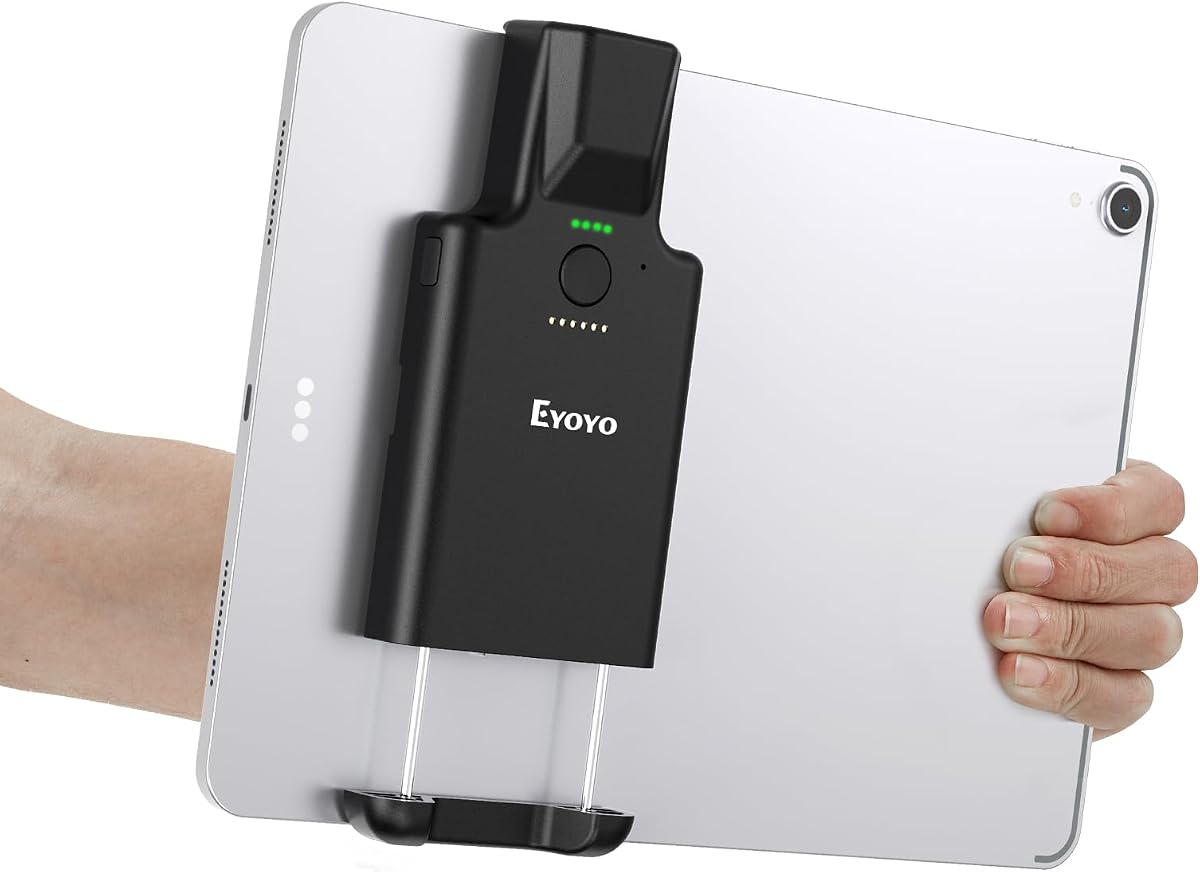
This Eyoyo model stands out as the top choice for iPad users thanks to its dedicated clip design and powerful 2D scanning capabilities. It earns its top spot with a rare 4.9 rating from users who value reliability and convenience.
Pros
Secure clip for tablets
Scans paper and screen
Very long battery life
Clear LED indicators
Cons
No 2.4G wireless
Slightly heavier than mini
We may earn a commission when you buy through this link, at no additional cost to you.
The advanced CMOS imaging technology handles 1D and 2D codes including QR and PDF417 on both paper and digital screens. The 3000mAh battery ensures up to thirty hours of continuous use, while the LED indicators keep you informed of power levels.
Trade-offs include the lack of 2.4G wireless which some might prefer for longer range. Also, its size is slightly larger than pocket models. These are acceptable given the enhanced stability and scanning versatility.
Ideal for mobile retailers, library staff, or inventory managers who scan directly on an iPad. Its secure grip and long endurance make it the best overall Bluetooth scanner for iPad workflows today.
Secure Grip Design
The retractable clip fits various iPad sizes and holds devices steady during scanning.
Long Endurance
High capacity battery delivers up to thirty hours of continuous scanning on one charge.
The PecuMecu TM-10B offers exceptional value for budget-conscious buyers needing 1D and 2D scanning for iPad. It delivers strong performance with versatile connectivity and decent battery life at a low price point.
Pros
Affordable pricing
1D and 2D support
Three connection modes
Large offline storage
Cons
No screen scanning
Plastic build quality
We may earn a commission when you buy through this link, at no additional cost to you.
Its 2.4G wireless, Bluetooth, and USB modes provide flexibility for different environments. The 2600mAh battery supports over nine hours of scanning and the storage mode saves up to 130,000 codes offline.
It lacks the ability to scan codes from device screens which limits some use cases. Build quality is functional but not rugged. These limits are reasonable given its attractive price.
Best suited for small businesses or light retail use where cost matters most. It balances features and affordability better than many competitors in the same range.
Flexible Connectivity
Switch between Bluetooth 2.4G wireless and USB to match your setup needs.
Offline Capability
Store up to 130,000 barcodes locally if you are out of range temporarily.
The Inateck BCST-70 is a premium option built for users who need reliability and long range for iPad. It is designed for heavy duty use with standout battery and drop resistance features.
Pros
Very long range
Exceptional battery life
Rugged durable build
Easy setup process
Cons
1D only scanner
Higher price point
We may earn a commission when you buy through this link, at no additional cost to you.
Its 115ft wireless range allows scanning from far away while the 2600mAh battery offers up to 180 days standby. The TPU case protects against 6ft drops and ensures longevity.
It only reads 1D codes so it cannot scan QR or PDF417 which limits versatility. The price is higher but justified by its durability and endurance. These limits fit specific industrial needs.
Perfect for warehouse staff or field agents using iPad in large areas. Its robust design and long standby make it a top choice for demanding environments.
Extended Range
Bluetooth connection reaches up to 115 feet without barriers for remote scanning.
Durability
Thick TPU case and triple consolidation protect against 6ft drops onto concrete.
NETUM Bluetooth Scanner is a solid choice for 1D and stacked barcode needs on iPad. It provides strong decoding and flexible modes for various retail or library tasks.
Pros
Scans stacked codes
Three scanning modes
100k storage mode
Wired Bluetooth option
Cons
No 2D QR support
Setup requires barcode scan
We may earn a commission when you buy through this link, at no additional cost to you.
It reads 1D and stacked codes like ISBN from paper or screens and offers manual continuous and auto-sensing modes. The 2600mAh battery supports extensive use and it stores 100,000 codes offline.
It lacks 2D QR which limits modern app integration and setup requires scanning a setting barcode. These are minor issues for users focused on traditional codes. The battery life compensates well.
Best for libraries or bookstores needing ISBN scanning. Its reliability and storage make it a dependable tool for structured inventory work.
Stacked Code Support
Decodes complex stacked barcodes like ISBN and other damaged codes reliably.
Storage Capability
Stores 100,000 barcodes locally to sync later when connectivity returns.
Eyoyo Mini Scanner wins for portability thanks to its tiny size and light weight ideal for frequent pocket use. It is great for short shifts or mobile checks with simple 1D needs.
Pros
Extremely lightweight
Fits in pocket
Multiple modes
Adjustable volume
Cons
Limited battery life
No screen codes
We may earn a commission when you buy through this link, at no additional cost to you.
Weighing only 35g it pairs with iPad via Bluetooth or 2.4G and offers vibration mode for quiet scanning. The 650mAh battery lasts eight hours continuous and up to ten days standby.
Battery life is limited compared to larger models and it cannot read screen codes. For lightweight handheld tasks these limits are minor. It excels at being unobtrusive.
Best for quick audits or small retail staff needing a pocket tool. Its convenience and low weight make it a strong portable option.
Pocket Size
At 35g it fits easily in pockets for discreet and portable scanning.
Quiet Operation
Adjust volume or switch to vibration mode for silent scanning in libraries.
NetumScan Desktop Scanner provides handsfree scanning for iPad in fixed setups like checkout counters or desks. Its omnidirectional capture and auto sensing boost efficiency for high-volume tasks.
Pros
Handsfree operation
Auto sensing triggers
Omnidirectional capture
Stable base
Cons
Not mobile
No wireless
We may earn a commission when you buy through this link, at no additional cost to you.
It scans 1D and 2D from paper or phones automatically when items move near the sensor. The anti-slip base keeps it stable and IP54 resists dust in busy areas.
It lacks wireless and mobility so it is only for stationary use. Build quality is durable with anti-shock protection. These trade-offs fit desk-bound workflows well.
Ideal for retail checkouts or customer self-scan stations. Its automatic triggers save time and effort during busy periods.
Handsfree Mode
Place items under the sensor and it scans automatically without touching the device.
Omnidirectional Capture
Reads codes from any angle which speeds up item processing significantly.
NetumScan U820 offers a convenient docked experience for iPad users needing both Bluetooth and 2.4G modes. The base doubles as a receiver and charger which keeps desks tidy.
Pros
Dock simplifies charging
Silent vibration mode
Pocket size
1D 2D codes
Cons
Lower rating
Shorter battery life
We may earn a commission when you buy through this link, at no additional cost to you.
Its CMOS sensor reads 1D and 2D codes even from screens and it supports silent vibration. The 1200mAh battery charges in four hours and fits pocket use well.
The rating is lower and battery life is shorter than larger rivals. The dock is helpful though it adds bulk. These factors matter for long shifts.
Best for teams needing a shared charging station and flexible connectivity. It balances compactness with useful dock integration.
Charging Dock
The dock acts as a receiver and charger to reduce cable clutter.
Silent Mode
Switch to vibration to avoid noise in quiet retail or library spaces.
NetumScan Bluetooth Scanner Doc focuses on ergonomics and control with dual buttons that prevent accidental shutdowns. It is designed for comfortable all-day scanning with solid durability.
Pros
Prevents accidental power off
Ergonomic dual buttons
Drop protection
Silent vibration
Cons
Shorter battery life
No 2.4G wireless
We may earn a commission when you buy through this link, at no additional cost to you.
Its CMOS sensor reads 1D and 2D and it offers vibration and silent modes. The 1200mAh battery supports extended shifts and the ABS shell resists 2m drops.
Battery life is shorter than premium rivals and it lacks 2.4G which may limit range. The ergonomic design and drop protection justify these for daily mobile work.
Best for warehouse or retail staff needing a comfortable reliable handheld. It prioritizes control and protection for busy environments.
Dual Button
Dedicated power and scan buttons prevent accidental shutdowns during use.
Drop Resistance
Built to withstand 2m drops onto concrete for tougher conditions.
This Bluetooth Wireless Handheld Scanner offers versatile multi-mode scanning for iPad at a low weight. It covers 1D and 2D codes and provides offline storage for disconnected tasks.
Pros
Lightweight design
Offline storage
1D 2D support
Multiple modes
Cons
Lower rating
No docking system
We may earn a commission when you buy through this link, at no additional cost to you.
It weighs 110g for easy carry and supports 2.4G Bluetooth and wired modes. The 16MB memory stores 50,000 QR codes and it includes a base for charging.
The rating is lower and it lacks advanced battery tech. The base is basic. These factors make it a budget choice for basic needs.
Best for occasional users needing light mobile scanning. Its multi-mode support and light weight keep it simple.
Lightweight Build
At 110g it is easy to carry all day without fatigue.
Offline Storage
Stores up to 50,000 QR codes locally for later uploads.
KUIIYER Bluetooth Scanner combines solid CMOS tech with decent battery and water resistance for iPad. It delivers reliable 1D and 2D scanning in varied environments.
Pros
Strong CMOS sensor
Long battery life
Water resistant
Multi-language support
Cons
Higher cost
No dock included
We may earn a commission when you buy through this link, at no additional cost to you.
Its 800×600 CMOS reads damaged or curved codes and supports vibration modes. The 2000mAh battery ensures longer use and the IP54 rating handles dust or light water.
It is pricier and lacks a dock but the build quality compensates. Multi-language settings help international use. These features justify the cost for robust needs.
Best for diverse or outdoor tasks needing durable performance. Its sensor and resistance make it a strong generalist choice.
CMOS Sensor
800×600 CMOS reads damaged or curved codes reliably.
Water Resistant
IP54 rating protects against dust and water splashes.
We may earn a commission when you buy through this link, at no additional cost to you.
Buying Guide – How to Choose the Best Barcode Scanner for iPad
Choosing the right scanner involves weighing connectivity code types battery life and ergonomics to match your workflow.
Connectivity Options
Bluetooth is ideal for iPad while 2.4G or wired modes add flexibility for other devices or stronger signal needs.
Prioritize Bluetooth with optional wired support if you switch between mobile and desktop.
Scanning Capabilities
Ensure your scanner reads both 1D and 2D codes if your apps use QR or data matrix.
If you scan only ISBN or UPC a 1D model will save cost.
Battery Life
Long shifts require scanners with 2000mAh or larger batteries and good standby time.
Choose units with quick charging or dock options if daily recharging is impractical.
Durability
Look for drop resistance and IP ratings if working in warehouses or outdoors.
Rugged cases and strong shells protect against accidental drops and dust.
Ergonomics
Comfortable grips and lightweight designs reduce fatigue during extended use.
Test button placement and weight if holding the scanner for long periods.
Storage and Modes
Offline storage helps when you need to collect data away from devices.
Auto-sensing or continuous modes can speed up repetitive tasks.
Operating System Support
Confirm iPad compatibility since some scanners only work with Windows or Android.
Check for iOS specific apps or settings to ensure smooth pairing.
Price and Warranty
Balance cost with reliability and warranty length to avoid frequent replacements.
Read reviews for common defects before finalizing your purchase decision.
How to Use and Care for Your Barcode Scanner for iPad
Pair the scanner by enabling Bluetooth on iPad then follow the manual to scan a pairing barcode. Wait for the connection tone before starting work.
Keep the lens clean by wiping it gently with a soft cloth to avoid dust affecting scans. Avoid exposing it to water beyond its IP rating.
Recharge the battery when low and leave it on the dock if provided. Store it in a dry place when not in use to maintain battery health.
Frequently Asked Questions
Do barcode scanners work directly with iPad apps?
Most Bluetooth scanners act as input devices and work with apps that accept keyboard input. Check compatibility with your specific inventory or retail app for best results.
Can I scan QR codes from iPad screens?
Yes if the scanner supports 2D imaging and screen scanning. Ensure the device has CMOS technology rather than laser for this capability.
How long does the battery typically last?
Battery life ranges from eight to thirty hours depending on capacity and usage patterns. Larger batteries and auto-off features extend time between charges.
What is the typical wireless range?
Bluetooth scanners range from 50 to 115 feet. 2.4G models may reach further in some cases but depend on signal strength and barriers.
Can I scan without pairing or apps?
Some models offer offline storage mode to save scans locally then sync later. Pairing is usually needed to send data directly to iPad apps.
Do scanners work in bright light?
CMOS sensors perform well in bright light but very strong glare can affect some models. Look for units with auto brightness or LED assist.
Are there silent modes?
Yes many scanners allow volume control or vibration mode for quiet environments like libraries. This helps avoid disturbance while confirming scans.
What is the best budget option?
Budget models like the PecuMecu TM-10B offer solid 1D and 2D features at low cost. Balance features like storage and battery when comparing cheap units.
Final Thoughts on Choosing the Best Barcode Scanner for iPad
We highlighted the Eyoyo Portable Bluetooth Scanner as the top overall pick for its tablet clip and reliable 2D scanning. The PecuMecu TM-10B leads in budget value while Inateck BCST-70 excels in durability.
Consider your primary needs such as battery endurance, screen scanning ability, and range before deciding. Mobile workers may prefer portable models while desk teams might favor docking solutions.
Prices and availability may shift so check current listings to confirm compatibility and offers. Investing in the right scanner improves accuracy and speed for your daily workflows.
Discover the top rated case switch game cards for organizing your physical cartridge collection with protection and portability for Nintendo Switch owners.
This guide compares the top 510 threaded battery options for precision heating and soldering tasks, highlighting features like voltage control, charging speed