
Comu Action Pro
4.8Editor score
Auto-generated AI docs
70-hour battery life
Six-mic audio setup
Compare the top AI meeting transcription devices for 2026. Our expert guide reviews accuracy, battery life, and AI features to help you choose the perfect
Modern professionals need tools that capture every detail without distraction. AI meeting transcription devices transform audio into actionable insights instantly. They ensure no important point is lost during busy schedules and complex discussions.
We evaluated ten leading models based on accuracy, battery duration, and smart features. Each device was assessed for ease of use and reliability in real-world scenarios. Our list covers options for individuals and teams with varying needs and budgets.
Each pick highlights unique strengths and ideal use cases for different users. You will find detailed breakdowns of transcription quality and privacy standards. Please note that product availability and pricing may change over time.
4.8Editor score

4.5Editor score

4.4Editor score
This side-by-side comparison helps you identify the right device for your workflow. We highlight key specifications and unique features across all ten top-ranked models available today.


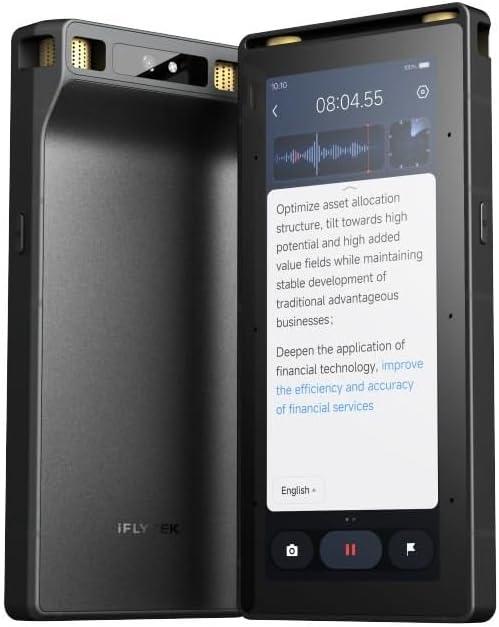

The Plaud Note Pro stands out as a leading solution for professionals needing reliable transcription. Its high rating reflects strong performance in capturing clear audio and generating useful summaries. This device integrates seamlessly into modern workflows with smart features.
We may earn a commission when you buy through this link, at no additional cost to you.
Its multimodal input allows users to snap photos or type notes while recording. The AI directional audio minimizes background noise effectively. You can ask questions to the recordings to get instant insights and next steps without manual searching.
While the device is powerful, some users may find the subscription model necessary for full utility. The screen is vivid but small for detailed text review. These trade-offs are acceptable given the convenience and speed it offers.
If you need a device that handles sensitive data securely, this is an excellent choice. It suits legal and medical professionals who require compliance. We recommend it for anyone seeking a premium, versatile transcription tool.
Capture audio along with images and typed notes instantly for deeper context.
Ask questions directly to your recordings to extract key points and summaries.
We may earn a commission when you buy through this link, at no additional cost to you.
The Comu Action Pro offers top-tier performance with an impressive 4.8 rating. It excels at turning conversations into structured documents without manual prompts. This makes it ideal for executives who need immediate follow-up materials.
We may earn a commission when you buy through this link, at no additional cost to you.
Its adaptive six-mic setup ensures high-quality audio in various environments. The battery lasts up to 70 hours on a single charge. Users can easily attach it to iPhones for hands-free recording during calls.
The device is premium and comes with a higher price tag. You rely on the app for accessing generated documents. However, the efficiency gained in workflow management justifies the cost for many professionals.
Choose this if you need a comprehensive solution for meeting notes. It is perfect for frequent travelers and busy teams. The automation features significantly reduce the time spent on administrative tasks.
Get professional AI-drafted slides and emails directly from your conversations.
Enjoy up to 70 hours of recording without needing to recharge often.
We may earn a commission when you buy through this link, at no additional cost to you.
The EurekaMind Lite provides exceptional value with its free unlimited transcription plan. It receives a strong rating for being accessible and easy to use. This device is great for students and freelancers on a tight budget.
We may earn a commission when you buy through this link, at no additional cost to you.
Its unique Ask AI feature allows web searches beyond your recordings. You can add context from the internet instantly. The design is incredibly slim and fits easily into any wallet or card holder.
Advanced tools like calendar sync require an upgrade to premium. The device relies on cloud processing for most features. Despite this, the core functionality meets the needs of most casual users effectively.
If you want to start recording without spending money upfront, pick this one. It works well for quick meetings and idea capture. We suggest it for anyone wanting a reliable entry-level transcription tool.
Search the web from your AI assistant for deeper insights during meetings.
Enjoy enterprise-level encryption in a device that fits in your wallet.
We may earn a commission when you buy through this link, at no additional cost to you.
This device offers a robust feature set with a strong focus on privacy and speed. The 4.4 rating indicates consistent reliability across different use cases. It is designed for professionals who need fast data transfer.
We may earn a commission when you buy through this link, at no additional cost to you.
Wi-Fi sync allows you to backup recordings while you continue talking. This saves time compared to Bluetooth methods. The vertical knowledge base helps understand specific industry terms accurately.
Users might need to upgrade to access deep dive analysis features. The device is practical but lacks unique design elements. Still, the combination of storage and speed makes it a solid contender.
Consider this if you need rapid syncing and strong security. It works well for interviews and long lectures. We recommend it for users who prioritize data safety and quick access.
Transfer files ten times faster than Bluetooth with Wi-Fi sync.
Accurate transcription for terms in law, finance, and real estate.
We may earn a commission when you buy through this link, at no additional cost to you.
RECPOINT delivers high accuracy with its advanced AI engine. The device is built to withstand daily wear and tear. It is a strong choice for international users needing multiple languages.
We may earn a commission when you buy through this link, at no additional cost to you.
The desktop software allows for detailed editing of your notes. You get generous free AI minutes every month. The rugged build ensures it survives drops during commutes or travel.
Editing on the device itself is limited due to screen size. You often need the app for complex tasks. However, the accuracy and language support are outstanding for the price.
If you work in a global environment, this device is essential. It suits researchers and translators well. We recommend it for those who need precise language support.
Experience 98% accurate transcription powered by advanced GPT engine.
Support for 150 languages helps you work anywhere in the world.
We may earn a commission when you buy through this link, at no additional cost to you.
The Non-Pro version retains most benefits of the Pro model. It is lightweight and easy to carry everywhere. This version is suitable for those needing solid features without premium extras.
We may earn a commission when you buy through this link, at no additional cost to you.
You can store up to 64GB locally for security. The vibration sensor captures internal phone sounds clearly. It supports industry-standard compliance for business users.
The starter plan includes limited minutes compared to Pro. Advanced AI features might require an upgrade. Despite this, it offers great value and privacy for daily use.
Choose this if you want a discreet and reliable recorder. It fits well for students and office workers. We suggest it for anyone prioritizing privacy and portability.
Store up to 64GB locally to record securely offline.
Vibration conduction sensor ensures clear internal call audio.
We may earn a commission when you buy through this link, at no additional cost to you.
This device stands out by offering offline AI capabilities. It is designed for areas where internet access is limited. The inclusion of a 5-year membership adds significant long-term value.
We may earn a commission when you buy through this link, at no additional cost to you.
The 8-microphone array captures audio from far away. Hardware encryption keeps your data strictly private. The touchscreen makes navigation easier than button-only devices.
It is bulkier and heavier than credit-card sized options. The cost is higher but includes extended support. For offline and secure needs, it is a unique choice.
Select this if you travel to remote locations often. It suits conferences and large halls well. We recommend it for users needing reliable offline transcription.
Process information and transcribe anywhere without internet dependency.
Included 5-year Pro membership unlocks all premium features fully.
We may earn a commission when you buy through this link, at no additional cost to you.
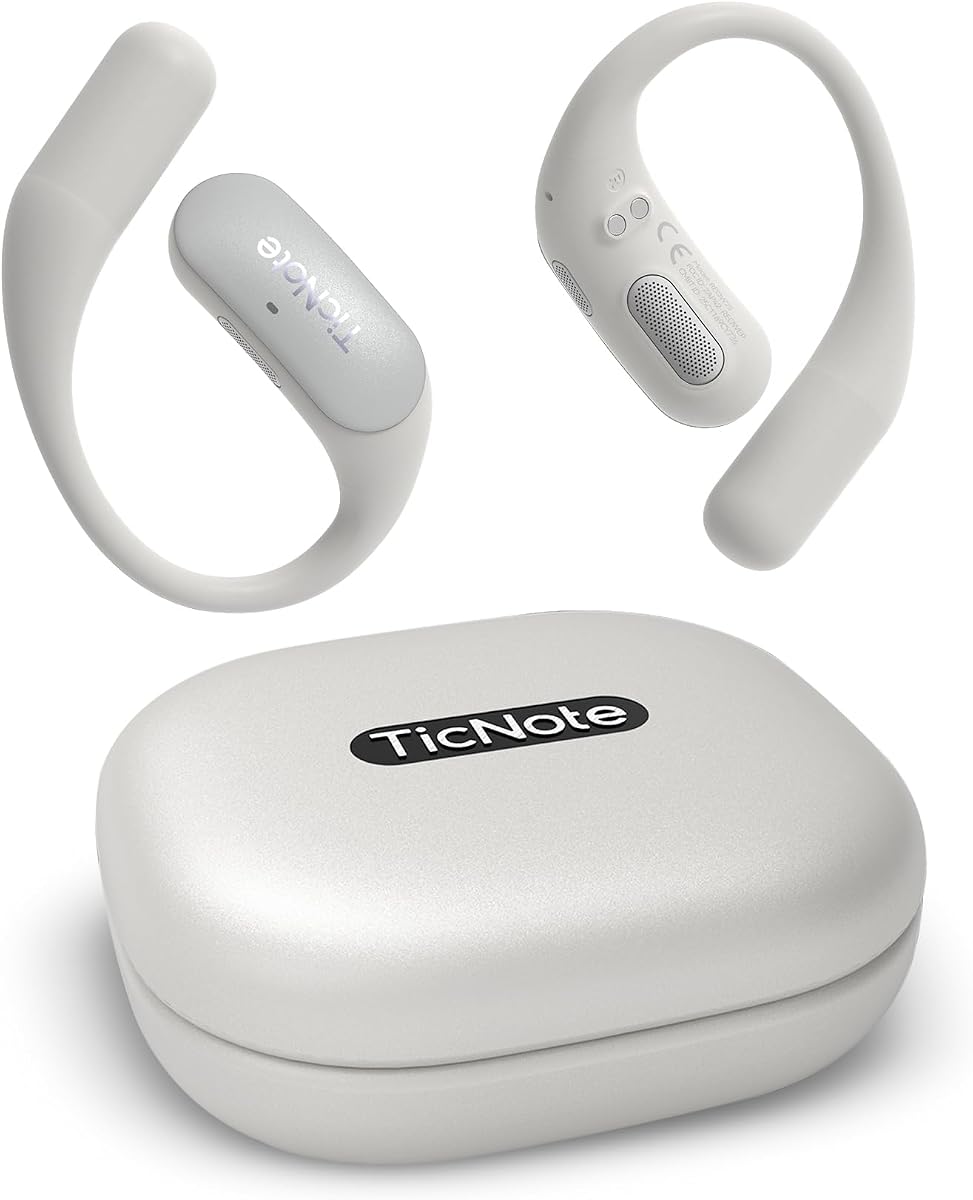
TicNote Pods are designed as wearables for hands-free use. This allows you to focus entirely on the discussion. It is ideal for teams that share notes via the cloud.
We may earn a commission when you buy through this link, at no additional cost to you.
Voice activation starts recording without pressing buttons. The system helps keep everyone aligned on outcomes. It supports multiple languages for diverse groups.
Battery life is shorter compared to larger devices. You need WiFi to access all features fully. Despite limits, it is excellent for collaborative environments.
Choose this if you want to record without holding a device. It suits students and team members well. We suggest it for those needing hands-free operation.
Voice activated recording keeps your hands free during tasks.
Share notes and transcripts securely with your team via cloud.
We may earn a commission when you buy through this link, at no additional cost to you.
This device emphasizes security and privacy standards. It meets CCPA regulations strictly for user data. The free unlimited transcription plan helps save costs for basic users.
We may earn a commission when you buy through this link, at no additional cost to you.
It supports both cloud and local storage options. Wi-Fi sync ensures quick access to your files. The battery lasts for long recording sessions comfortably.
Premium insights like detailed abstracts cost extra. The physical design is functional but not unique. Still, its compliance features make it stand out for legal users.
Select this if privacy is your main concern. It works well for lawyers and consultants. We recommend it for those needing strict data compliance.
Full CCPA compliance ensures your recordings are legally secure.
Use local and cloud backup for maximum data availability.
We may earn a commission when you buy through this link, at no additional cost to you.
Pocket AI is a highly rated compact device for daily use. It attaches magnetically to phones for convenience. Users appreciate its long battery life and simplicity.
We may earn a commission when you buy through this link, at no additional cost to you.
It turns audio into structured conversation maps easily. You can ask questions to find insights quickly. The setup is minimal and user-friendly.
Advanced power tools require an optional subscription. It is best for everyday personal productivity. However, it remains a top choice for iPhone users.
Choose this if you want simple magnetic attachment. It is great for daily meetings and calls. We recommend it for iPhone users seeking ease of use.
Attach securely to your iPhone for hands-free recording.
Automatic summaries and maps help you review content quickly.
We may earn a commission when you buy through this link, at no additional cost to you.
Choosing the right device involves balancing features with your specific needs. This guide covers key factors to consider before purchasing.
Look for devices that claim high accuracy rates like 98%. This ensures you do not miss critical details. Review user feedback to verify performance in noisy rooms.
Check how long the device lasts on one charge. Long meetings require extended recording time without interruption. Aim for devices with at least 30 hours of continuous use.
Ensure the device uses encryption like AES or ISO standards. This protects sensitive business data from leaks. Compliance with regulations like GDPR is vital for legal use.
Wi-Fi sync is faster than Bluetooth for uploading files. Some models support MagSafe or Bluetooth for easier pairing. Choose based on how you share your recordings.
Understand which features are free and which require paid plans. Unlimited transcription might need a subscription. Consider the long-term cost before buying.
If you work internationally, check the number of supported languages. Some devices offer translation for over 100 languages. This is essential for global business meetings.
Start by syncing your device to the companion app. This allows you to access your recordings easily. Ensure you have permissions to record based on local laws.
Keep the device dry and clean to maintain its quality. Store it in its protective case when not in use. Regularly update the firmware for new features.
Use the voice-activated feature to save time. This starts recording automatically when you speak. Always verify the transcription accuracy after important events.
Most devices need internet to access AI features and sync data. Some models like the 8-Mic Recorder support offline transcription. Always check specific offline capabilities before purchasing.
Recording laws vary by region regarding consent. You must inform participants before recording conversations. Always check local privacy regulations to stay compliant.
Reputable brands use end-to-end encryption for safety. Look for certifications like ISO or HIPAA for high security. Avoid models with vague privacy policies.
Most editing happens via the companion app or desktop software. The hardware usually focuses on recording and uploading. Use the app for detailed text changes.
Battery life ranges from 5 hours to 70 hours. Most standard models offer around 30 hours of recording. Consider your usage frequency when choosing.
Yes, they sync via apps or MagSafe connections. Most work with both iOS and Android devices. Check compatibility before buying.
We reviewed ten top models offering various features for professionals. The Plaud Note Pro and Comu Action Pro lead in performance and automation. EurekaMind Lite stands out as a budget-friendly option.
Prioritize privacy and battery life based on your specific workflow. If security is vital, choose a compliant device like Comulytic Note Pro. For frequent travelers, longer battery life is key.
Check current product prices and availability before buying. Features may update over time. We hope this guide helps you find the perfect transcription tool.