
HP OmniBook 3 14 inch Next Gen AI PC
4.4Editor score
Snapdragon X processor
2K OLED display
Up to 41 hours battery
AI laptops are transforming how we work and create by integrating intelligent processors directly into the hardware. These devices offer smarter workflows, better battery efficiency, and enhanced productivity tools built right into the system.
We evaluated ten top models based on processor power, AI capabilities, display quality, and real-world performance. Each selection balances innovation with practicality to help you find the right fit for your needs.
Every pick highlights key strengths and potential trade-offs so you can make an informed decision. Prices and availability change frequently, so check the links for the latest offers before you buy.
4.4Editor score
4.8Editor score

5.0Editor score
As an Amazon Associate we earn from qualifying purchases.
This side-by-side comparison outlines the key specifications and strengths of each AI laptop to help you quickly identify the best option for your workflow.


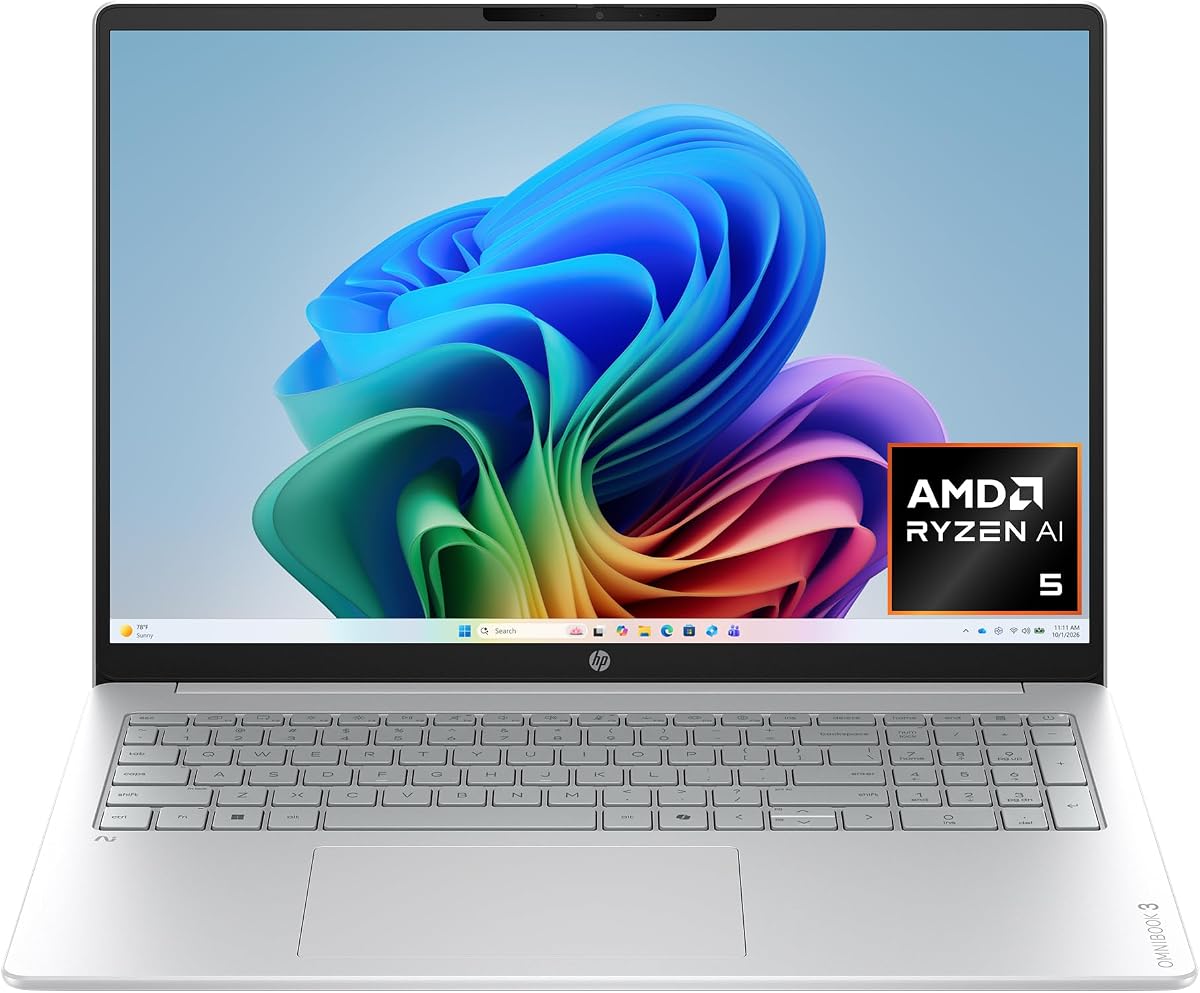
This HP OmniBook 3 combines strong AI performance with a solid 2K display. Rated highly by users, it delivers smooth multitasking and intelligent features for everyday tasks.
We may earn a commission when you buy through this link, at no additional cost to you.
The AMD Ryzen AI 5 processor powers Copilot+ PC experiences effectively. You get fast access to AI tools with a dedicated Copilot key for streamlined workflows.
Battery life reaches up to 19 hours 30 minutes which is excellent. Fast Charge restores power to 50% in about 45 minutes for quick top-ups on the go.
Best for students and professionals needing reliable AI support and long use. It balances performance and portability well making it a top choice in 2026.
Access the Copilot assistant instantly with a single key press for enhanced productivity and intelligent suggestions.
Use advanced noise reduction to isolate your voice during calls ensuring clearer team conversations even in noisy environments.
We may earn a commission when you buy through this link, at no additional cost to you.
This ThinkBook is built for business users needing secure and fast computing. It features a powerful Intel 16-Core Ultra 7 processor and 32 GB of RAM.
We may earn a commission when you buy through this link, at no additional cost to you.
AI acceleration helps with complex spreadsheets and video calls. Enterprise-grade security includes a fingerprint reader and Windows 11 Pro for data protection.
The 16 inch FHD+ display offers plenty of screen space. WiFi 6E ensures stable connections for seamless collaboration and file sharing.
Ideal for enterprises and professionals requiring robust performance and security. It handles heavy workloads without lag while maintaining reliability.
Windows 11 Professional and fingerprint access protect sensitive business data with advanced security protocols.
Ample screen real estate on the 16 inch display supports data analysis and presentations on the go.
We may earn a commission when you buy through this link, at no additional cost to you.
The ASUS Vivobook S16 stands out with its vibrant OLED display and top-tier AI specs. It achieves a perfect 5.0 rating for exceptional performance.
We may earn a commission when you buy through this link, at no additional cost to you.
Powered by AMD Ryzen AI 9 delivering up to 50 NPU TOPS. Copilot+ PC features make tasks like writing and searching effortless on the go.
The display offers deep contrast and vivid detail for creative work. Fast charge gives 60% power in 49 minutes ensuring minimal downtime.
Perfect for creators and users wanting premium visuals and power. It combines style and substance making it a standout choice in 2026.
The WUXGA OLED screen delivers stunning clarity and deep contrast for engaging work and entertainment.
IR FHD camera and Windows Hello provide quick secure sign-ins for added peace of mind.
We may earn a commission when you buy through this link, at no additional cost to you.
The HP OmniBook X offers a stunning 3K OLED touchscreen with incredible battery life. It is designed for users prioritizing display quality and efficiency.
We may earn a commission when you buy through this link, at no additional cost to you.
Battery reaches up to 27 hours 30 minutes. HP Fast Charge restores power to 50% in just 30 minutes for quick recharges.
AI features include Smart Sense optimizing performance based on activity. The 5MP IR camera with HDR ensures clear video calls in any lighting.
Best for creatives and mobile workers needing sharp visuals. The OLED screen and long battery make it ideal for all-day use.
3K OLED touchscreen brings deeper blacks and richer contrast for an immersive visual experience.
Smart Sense AI adjusts performance and fan noise automatically based on your current activity.
We may earn a commission when you buy through this link, at no additional cost to you.
This HP OmniBook 5 balances performance with a large immersive touchscreen. It is ideal for work presentations and creative tasks.
We may earn a commission when you buy through this link, at no additional cost to you.
The Intel Core Ultra 7 processor delivers fast intelligent performance. Copilot AI support helps streamline workflows and enhance security.
With 16 GB RAM and 1 TB SSD multitasking is smooth. The backlit keyboard aids productivity in low-light environments.
Great for professionals and students needing a versatile all-rounder. The touchscreen and strong specs make it a practical daily driver.
Runs Windows 11 with Copilot AI for intelligent suggestions and faster workflows.
16 inch touchscreen provides responsive control perfect for presentations and creative tasks.
We may earn a commission when you buy through this link, at no additional cost to you.
The HP OmniBook 5 uses Snapdragon X for long battery life and AI features. It is perfect for on-the-go productivity.
We may earn a commission when you buy through this link, at no additional cost to you.
Battery reaches up to 34 hours 45 minutes. Qualcomm Adreno GPU optimizes power for smooth UI and basic graphics.
Otter.ai assistant records and summarizes meetings automatically. HP True Vision FHD IR camera provides secure login and privacy.
Best for users prioritizing mobility and battery over heavy gaming. It stays efficient all day with advanced connectivity.
Otter.ai assistant automatically transcribes and summarizes meetings to save time and keep organized.
Qualcomm Wi-Fi 6E unlocks faster speeds and enhanced connectivity on the go.
We may earn a commission when you buy through this link, at no additional cost to you.
This 14 inch model packs incredible battery life into a compact frame. It delivers essential AI capabilities for everyday tasks.
We may earn a commission when you buy through this link, at no additional cost to you.
Battery lasts up to 41 hours 45 minutes. Fast Charge restores power to 50% in 45 minutes for quick charging.
The 2K OLED display provides rich visuals. Otter.ai helps organize meetings while secure camera features add peace of mind.
Ideal for travelers and budget users seeking portability. The long battery makes it perfect for all-day trips.
Enjoy up to 41 hours of battery life ensuring you stay efficient all day.
Otter.ai records and summarizes meetings automatically to help you stay organized.
We may earn a commission when you buy through this link, at no additional cost to you.
The Dell 16 Plus offers advanced AI and future-ready connectivity. It is built for productivity with strong specs and design.
We may earn a commission when you buy through this link, at no additional cost to you.
Intel Core Ultra 9 delivers up to 48 TOPS NPU performance. Wi-Fi 7 ensures ultra-fast wireless speeds for seamless use.
A range of ports includes Thunderbolt 4 and HDMI 2.1. Fingerprint reader and Copilot key enhance security and workflow.
Best for power users needing high bandwidth and AI. It balances durability with top-tier modern technology.
Wi-Fi 7 Gig+ technology provides unprecedented wireless speeds for modern connectivity.
Microsoft Studio Effects and AI noise cancellation ensure clear distraction-free calls.
We may earn a commission when you buy through this link, at no additional cost to you.
The acer Aspire 16 focuses on AI capabilities and smooth visuals. It features a 120Hz touchscreen and Snapdragon X processor.
We may earn a commission when you buy through this link, at no additional cost to you.
NPU delivers up to 45 TOPS for optimized AI workloads. Recall and improved search help locate past content efficiently.
Wi-Fi 7 ensures lightning fast speeds. The display offers vibrant colors making it great for creative expression.
Perfect for users wanting next-level AI tools. It streamlines tasks with powerful integrated AI engines.
Discover Recall and improved Windows search to locate past content effortlessly.
120Hz WUXGA display delivers sharp detail and rich colors for immersive viewing.
We may earn a commission when you buy through this link, at no additional cost to you.
This HP Omnibook brings enterprise-grade security and AI power. It features AMD Ryzen AI 7 and Windows 11 Pro.
We may earn a commission when you buy through this link, at no additional cost to you.
With 50 TOPS NPU Copilot+ experience is seamless. 32 GB RAM ensures smooth multitasking and large file handling.
DTS:X Ultra audio enhances collaboration. The 2K touchscreen provides crystal clear detail for high-end creative work.
Ideal for businesses needing powerful and secure machines. It offers elite performance with reliable features.
Windows 11 Pro delivers advanced security features for reliable collaboration and data protection.
DTS:X Ultra audio ensures high fidelity sound for professional audio experiences.
We may earn a commission when you buy through this link, at no additional cost to you.
Choosing the right AI laptop requires understanding core components and how they impact your daily workflows.
The CPU and Neural Processing Unit define AI speed. Look for processors with at least 40 TOPS NPU for smooth Copilot+ features.
Prioritize models with Intel Core Ultra or AMD Ryzen AI for balanced power.
At least 16 GB RAM is recommended for multitasking. More than 32 GB helps with heavy creative workloads.
A 512 GB SSD minimum ensures fast load times and ample space.
High-resolution screens improve productivity. OLED panels offer vivid contrast while IPS provides reliable color.
Touchscreens add flexibility for presentations and creative tasks.
Long battery life is critical for on-the-go users. Aim for 18 hours or more for full-day work.
Fast charging features reduce downtime significantly during travel.
Check for Copilot+ PC capabilities like Recall and Studio Effects. These tools enhance workflow efficiency.
Additional apps like Otter.ai add value for meeting productivity.
Wi-Fi 6E or 7 ensures stable connections. Bluetooth 5.3 improves peripheral compatibility.
Thunderbolt 4 and HDMI 2.1 ports support external displays and fast transfers.
Windows Hello and fingerprint readers offer secure access. Enterprise versions include advanced data protection.
Physical privacy shutters protect your camera when not in use.
Budget models offer essential AI but may compromise on storage. Premium options provide better screens and performance.
Balance features with your specific workflow needs to maximize value.
Maximize battery life by adjusting power settings and keeping your system updated. AI features like Smart Sense can automate this process effectively.
Use the Copilot key or assistant regularly to streamline tasks. Experiment with tools like Recall to manage information efficiently.
Protect your device with physical privacy shutters and secure login methods. Regular backups prevent data loss during system updates.
An AI PC includes a dedicated Neural Processing Unit alongside CPU and GPU. This hardware accelerates on-device AI features for faster performance.
Copilot+ features are available in Windows 11 with compatible hardware. Press the Copilot key or open the assistant to start using them.
Most AI laptops focus on productivity but can handle light gaming. High-end models offer better graphics capabilities than budget ones.
Yes 16 GB RAM supports most AI features well. Power users working with large datasets may benefit from 32 GB or more.
Many models offer 18 to 40+ hours of battery. AI optimization helps manage power for longer use across the day.
Most on-device AI features like Recall work offline. Some cloud-based features may require internet access for full functionality.
TOPS stands for Tera Operations Per Second. It measures how many operations the Neural Processing Unit can handle per second.
Yes they are ideal for students needing long battery life and productivity. Lightweight models help carry them across campus easily.
This guide highlights ten top AI laptops balancing performance and features. The HP OmniBook 3 leads with great specs while ASUS Vivobook S16 shines for premium users.
Prioritize battery life and NPU power when selecting. Ensure the RAM and storage match your workflow needs for smooth use.
Prices and availability change often so verify current offers before buying. Your choice should reflect both power and practicality.