
WALI Quad Monitor Desk Mount
4.6Editor score
Supports 22lbs per arm
Fits 13 to 32 inch screens
Includes cable management system
Creating a multi-monitor workstation requires a robust mounting solution that offers flexibility and stability. A 4 monitor mount with adjustable arms allows you to organize screens efficiently while maintaining ergonomic comfort throughout your workday.
We evaluated leading models based on load capacity, range of motion, build quality, and ease of assembly. Our comparison focuses on stands that support various screen sizes and provide reliable cable management for a clean desk environment.
Each selection highlights specific strengths like pneumatic adjustment or heavy-duty steel construction. Note that product details and availability may change over time, so verify current specifications before purchasing your ideal setup.
4.6Editor score

4.5Editor score

4.5Editor score
As an Amazon Associate we earn from qualifying purchases.
The following table provides a side-by-side comparison of all reviewed models to help you quickly identify the best option for your specific screen configurations and desk constraints.



The PUTORSEN Quad Monitor Mount stands out as a versatile choice for users needing both standard and ultrawide screen support. With a strong 4.5 star rating, it combines durability and flexibility for complex setups.
We may earn a commission when you buy through this link, at no additional cost to you.
Its ability to hold a 49-inch ultrawide monitor on the top arm while supporting three 27-inch screens below is a standout feature. The 3-section arm design distributes weight evenly, preventing sagging under heavy loads.
While it is slightly pricier than basic models, the robust construction and gas spring system justify the investment for those requiring reliable height adjustments. The modular arm segments also allow for customization based on your desk space.
This mount is ideal for traders or professionals who need a high-definition central display alongside secondary screens. It effectively transforms your desk into a commanding workstation without compromising ergonomics or visual clarity.
The 3-section arm allows you to remove segments for a tighter setup near the wall, offering flexibility that rigid arms cannot match.
Gas springs ensure that even the heavy ultrawide top screen remains stable and easy to adjust without constant manual re-tightening.
We may earn a commission when you buy through this link, at no additional cost to you.
For those seeking the ultimate in build quality and performance, the VIVO Pneumatic Arm offers a premium experience. Its cast aluminum construction provides exceptional strength and a sleek look for professional environments.
We may earn a commission when you buy through this link, at no additional cost to you.
The pneumatic height adjustment is a key feature, allowing you to reposition monitors effortlessly with a light touch. This feature is particularly valuable for users who frequently switch between sitting and standing desk configurations.
While the price point is higher, the durability and smooth operation make it a long-term investment. The ability to support up to 49-inch screens on multiple arms sets it apart for high-end visualization tasks.
This stand is best suited for power users or creative professionals who need reliable stability for heavy displays. It ensures that your screens stay exactly where you need them without sagging or drift over time.
Powerful pneumatic arms counterbalance the weight of your monitors so you can find the ideal screen height at the touch of a hand.
Designed specifically to fit four ultra-wide screens with VESA holes, offering flexibility for immersive multitasking setups.
We may earn a commission when you buy through this link, at no additional cost to you.
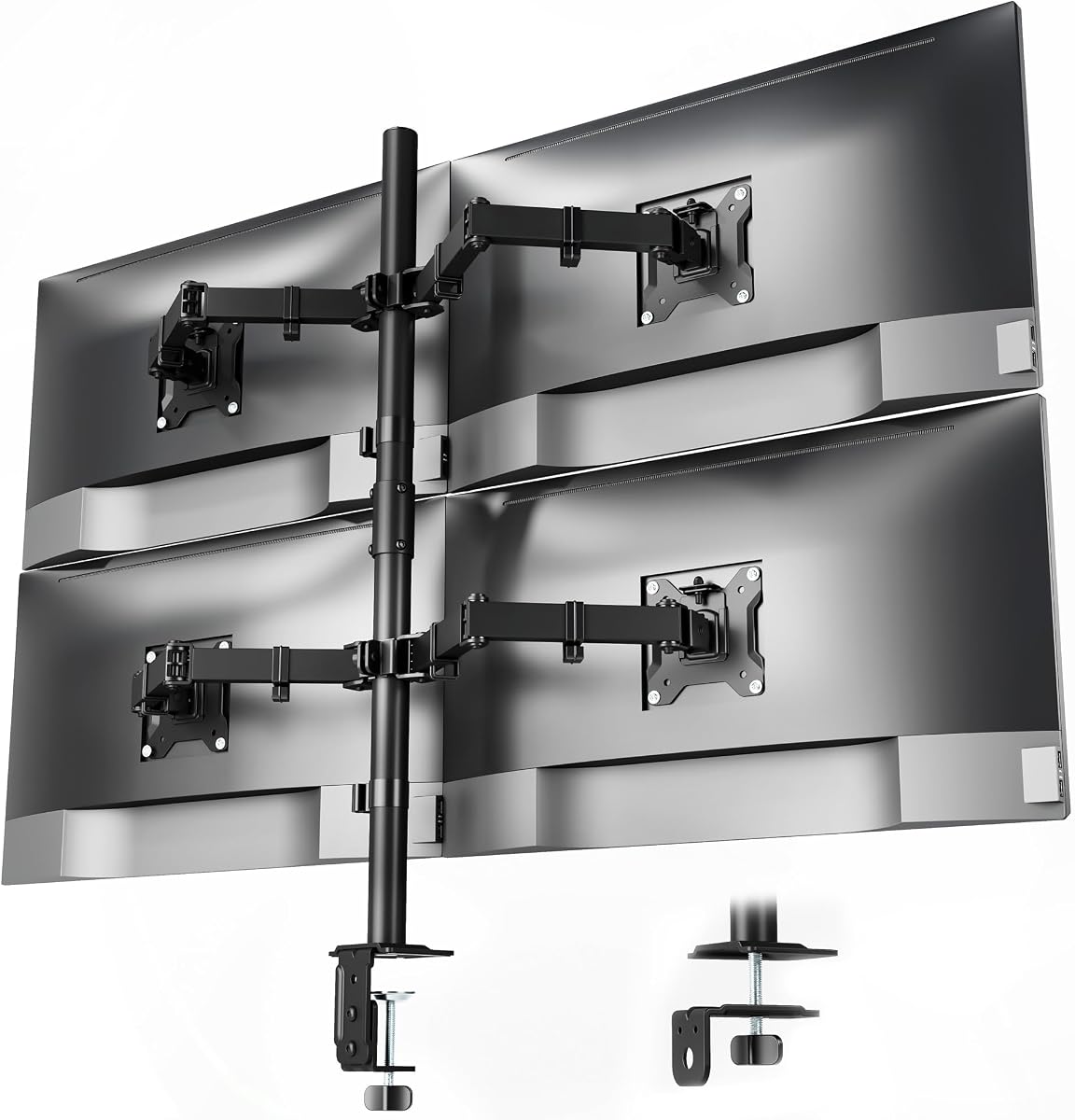
The WALI Quad Monitor Desk Mount proves that you do not need to spend a fortune to get a reliable multi-monitor setup. With a high 4.6 star rating, it offers exceptional value for its price point.
We may earn a commission when you buy through this link, at no additional cost to you.
It supports up to 22 pounds per arm, which is impressive for a budget model. The fully adjustable arms allow for extensive movement, making it easy to find comfortable viewing angles for every screen.
Some users might find the cable management to be more basic compared to premium units. However, for most standard setups, the included clips are sufficient to keep wires tidy and out of the way.
This mount is perfect for home office users looking to maximize desk space without overspending. Its sturdy construction ensures that your screens remain secure, providing a professional look at a very competitive price.
Provides high weight capacity and full motion adjustment at a price point that remains accessible for most users.
Fits most flat panel monitors up to 32 inches and supports VESA mounting patterns for broad device compatibility.
We may earn a commission when you buy through this link, at no additional cost to you.
The WALI Stacked 4 Monitor Mount is designed to keep your workstation organized and clutter-free. It supports screens up to 27 inches, making it a great choice for standard office monitors.
We may earn a commission when you buy through this link, at no additional cost to you.
Its integrated cable management system helps hide wires neatly within the arms, maintaining a clean look. The fully adjustable arms allow you to tilt and swivel screens to reduce glare and eye strain.
While it does not support larger ultrawide displays, it is highly effective for standard setups. The assembly process is straightforward, and the clear manual ensures you can get started quickly without frustration.
This option is ideal for shared workspaces or home offices where organization is a priority. It provides a solid, stable platform for your monitors while keeping the desk surface clear for other essential items.
Freely up valuable work space by elevating four monitors off of your desk, making your workstation spacious and clutter-free.
Allows easy adjustment of monitor swivel, tilt, and rotate to find an optimal view angle and position for comfortable work.
We may earn a commission when you buy through this link, at no additional cost to you.
The monTEK Quad Monitor Stand brings a modern touch to multi-monitor setups with its sleek design and high-capacity arms. It supports screens from 17 to 32 inches with a weight limit of 22 lbs each.
We may earn a commission when you buy through this link, at no additional cost to you.
The range of motion is excellent, allowing for significant tilt and swivel adjustments. This helps in minimizing neck strain by ensuring each screen can be positioned at the most ergonomic angle for your workflow.
Some users might find the assembly process slightly challenging if the desk thickness is near the limit. However, the inclusion of both C-clamp and grommet options provides flexibility for different desk types.
This stand is suitable for gamers and office workers who need a clean, organized desk. It combines functionality with style, ensuring your workspace looks professional while delivering reliable support for your displays.
Built with high-grade materials and an advanced joint design to keep your display securely in place and perfectly level.
Adjustments help you achieve an ergonomic viewing position, minimizing neck and eye strain during long work sessions.
We may earn a commission when you buy through this link, at no additional cost to you.
The VIVO Quad Pneumatic Monitor Mount offers a balance of affordability and high-quality features like pneumatic adjustment. It supports screens up to 32 inches and provides a robust platform for your workstation.
We may earn a commission when you buy through this link, at no additional cost to you.
The dual pneumatic springs allow smooth transitions by counterbalancing the monitors. This makes it easy to adjust the height of your screens without struggling with stiff mechanical joints or tension knobs.
While the price is higher than budget options, the build quality justifies it. The combination of steel and aluminum ensures that the stand remains stable even when the arms are extended to their full length.
This model is great for users who want the convenience of gas spring technology without the high cost of premium ultrawide mounts. It simplifies your daily workflow by making screen repositioning effortless and fast.
Dual pneumatic springs allow smooth transitions by counterbalancing the monitors so you can find the ideal screen height easily.
Securely holds four monitor screens with tension that can be increased for heavier monitors or decreased for lighter ones.
We may earn a commission when you buy through this link, at no additional cost to you.
The Pholiten Quad Monitor Arm is designed to save desktop space by lifting monitors off the surface completely. It uses advanced gas spring technology to ensure smooth and effortless positioning of your screens.
We may earn a commission when you buy through this link, at no additional cost to you.
Its scientific design allows users to adjust the stand according to their height and position, promoting better posture throughout the day. The arm adjusts forward and backward to accommodate different viewing distances.
While the weight limit is reasonable for most monitors, heavy ultrawides might exceed it. The VESA compatibility is broad, supporting standard mounting holes for most major brand monitors available on the market.
This mount is a solid choice for users looking to declutter their desk without compromising on adjustability. It transforms your setup into a streamlined and efficient workspace that supports healthy ergonomic habits.
The desktop stand allows users to adjust the stand according to their height and position for better health and comfort.
Features advanced gas spring arms that provide smooth and effortless monitor positioning with superior weight support.
We may earn a commission when you buy through this link, at no additional cost to you.
The VIVO Quad Monitor Clamp-on Mount offers a versatile 3 plus 1 articulating layout that adapts to different screen configurations. It supports screens from 13 to 32 inches and provides a solid foundation for your workstation.
We may earn a commission when you buy through this link, at no additional cost to you.
Its drill-free mounting options make installation simple without needing to modify your desk. The heavy-duty C-clamp provides a solid hold, and the included padding protects your surface from scratches during use.
The tilt range is somewhat limited compared to other models, but it is sufficient for standard office tasks. The longer upper bracket helps align the top monitor with the lower ones for a cohesive display grid.
This mount is well-suited for security monitoring or multi-tasking setups where you need to see several screens at once. It helps win back valuable space on your desk while keeping your displays organized and accessible.
Secures to your surface of choice up to 3.94 thick via a heavy-duty C-clamp or use the grommet mount for layout flexibility.
Cable clips are included to give your setup an organized appearance and keep cords out of sight and out of the way.
We may earn a commission when you buy through this link, at no additional cost to you.
The MOUNTUP Quad Monitor Stand is designed for simplicity and ease of use, making it a great choice for quick setup. It supports screens up to 32 inches with a capacity of 17.6 lbs per arm.
We may earn a commission when you buy through this link, at no additional cost to you.
Its solid base design supports four monitor arms with a single mounting point, maximizing the usable space on your desk. The cable clips are effective at keeping wires organized and protected from damage.
Some users might prefer a higher weight limit for heavier monitors. However, for most standard screens, this capacity is adequate and provides stable support without sagging during daily adjustments.
This stand is perfect for users who value a straightforward installation process. It helps you enjoy your working, gaming, or viewing hours in a more comfortable environment with less clutter on your desktop.
Comes with clear instruction and necessary hardware for mounting, and it takes less than 20 minutes from opening the box to use.
One solid base supports 4 monitor arms, helping you save table space and keep your desk organized and neat.
We may earn a commission when you buy through this link, at no additional cost to you.
The MOUNT PRO 4 Monitor Mount offers an extra tall pole that provides practical height adjustment for various sitting or standing positions. It fits most screens from 13 to 32 inches with a weight limit of 17.6 lbs per arm.
We may earn a commission when you buy through this link, at no additional cost to you.
Its fully adjustable range allows you to position or stack monitors in many different ways to suit your specific needs. The labeled parts and clear instructions make the installation process quick and straightforward for most users.
While the weight capacity is modest, it covers most standard displays well. The extra tall pole makes it versatile for users who need to raise screens higher for better eye-level alignment.
This mount is an excellent choice for budget-conscious users looking for ergonomic benefits. It helps reach a viewing height that reduces neck strain while keeping your cables organized with the included clips.
Reach a height of 31.7 inches with an extra tall pole that is more practical for many situations and standing positions.
Designed for four most fits flat and curved computer screens up to 32 inches with standard VESA mounting holes.
We may earn a commission when you buy through this link, at no additional cost to you.
Selecting the right quad monitor mount requires careful evaluation of several factors to ensure stability and ergonomic comfort for your specific screens.
Ensure the mount supports the maximum dimensions of your monitors. Most units handle screens between 13 and 32 inches, while specialized models accommodate ultrawide displays up to 49 inches.
Verify the VESA pattern compatibility, typically 75x75mm or 100x100mm, to ensure your screens fit securely on the mounting plates.
Check the maximum weight limit per arm. Heavier monitors require sturdier materials like steel or aluminum to prevent sagging over time.
Choose a mount with a higher weight rating if you plan to use thicker or larger screens to ensure long-term stability.
Look for models that offer full tilt, swivel, and rotation capabilities. This allows you to adjust screens from landscape to portrait and reduce glare from windows.
Pneumatic or gas spring systems make height adjustments smoother and more effortless compared to manual tension knobs.
Measure the thickness of your desk to ensure it fits the C-clamp or grommet hole. Most mounts support desks up to 3 inches thick, but some have limited ranges.
Select a base that offers both clamp and grommet options for flexibility if your desk does not have a pre-drilled hole.
Steel frames provide excellent stability, while aluminum offers a lighter and more scratch-resistant finish. Consider the finish as well to match your existing workstation equipment.
Invest in a model with reinforced joints to prevent wobbling when typing or bumping the desk during use.
A good mount should include integrated channels or clips to route cables cleanly along the arms. This keeps wires hidden and prevents tangling when you adjust screen positions.
Look for systems that bundle wires together at the base to reduce visual clutter and maintain a tidy desk surface.
Check if the package includes all necessary hardware and clear instructions. Models with quick-release VESA plates simplify attaching and detaching your monitors after installation.
Some mounts offer modular arm designs that allow for customization, making the setup process more adaptable to your space.
Consider how the mount helps position screens at eye level to reduce neck strain. Stacked configurations should allow enough height for multiple rows of monitors.
Select a stand that allows you to transition smoothly between focused work and meetings without straining your posture.
When installing your mount, start by clamping the base securely to the edge of your desk. Ensure the clamp is tight enough to prevent slipping but not so tight that it damages the wood or laminate.
Attach your monitors using the VESA plates and then secure them to the arms. Use a spirit level to ensure all screens are perfectly horizontal before tightening the final bolts.
Regularly check the tension and tightness of the joints every few months. This maintenance ensures that the arms continue to hold your monitors firmly and adjust smoothly without drooping.
Yes, certain models are specifically designed to support ultrawide displays up to 49 inches. Verify the weight capacity and VESA compatibility of these specialized mounts to ensure they fit your setup correctly.
A C-clamp attaches to the edge of your desk using pressure, while a grommet mount fits through a hole drilled in the desktop. Choose based on your desk's edge design and thickness limits.
Most standard models support between 17 and 22 pounds per arm. Heavy-duty or premium versions may support more, so check the specific product data to match your monitor weights.
Yes, most units come with clear instructions and all necessary hardware for a quick setup. Some models feature quick-release plates that make attaching screens significantly easier during installation.
Yes, fully adjustable mounts typically include 360-degree rotation features. This allows you to rotate your screens from landscape to portrait mode easily for different tasks.
Most units include integrated cable channels or clips to route wires along the arms. Keep wires bundled at the base to reduce clutter and prevent them from tangling when you adjust screens.
Premium models with gas springs or sturdy aluminum construction resist sagging better than basic steel units. Select a mount with a high weight rating to ensure stability for heavier screens.
Most quad mounts support the standard 75x75mm and 100x100mm VESA patterns. Always check your monitor's specifications to confirm it matches these hole distances before purchasing.
The best choice depends on your specific screen sizes and budget constraints. Top models like the PUTORSEN Quad and VIVO Pneumatic offer specialized features for ultrawide and heavy displays.
Prioritize build quality and adjustability features like gas springs to ensure your setup remains stable and ergonomic over the long term.
Remember to check current availability and specifications as product details can change over time before finalizing your purchase.