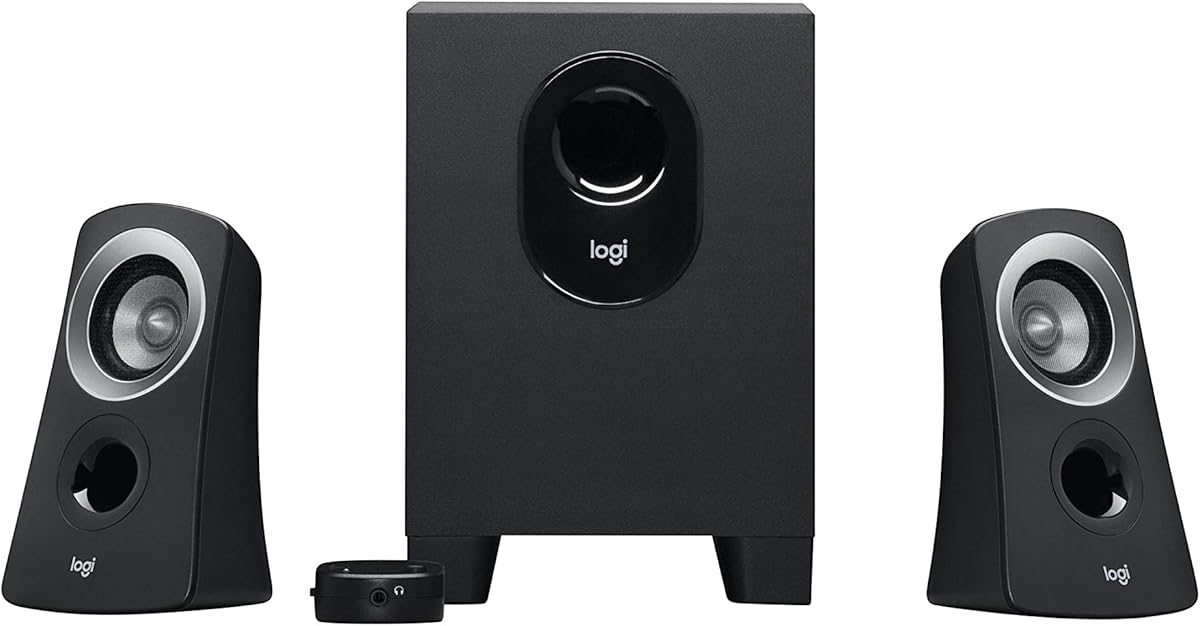
Logitech Z313 2.1 Multimedia Speaker System with Subwoofer – Black
4.4Editor score
Convenient control pod
25 watts RMS output
Compact subwoofer design
This guide compares the top 2.1 channel desktop speakers for gaming and music, evaluating sound quality, subwoofer power, connectivity options, and build
Choosing the right audio setup can transform your daily computing experience significantly. A quality 2.1 channel desktop speaker system delivers rich sound with deep bass that standard monitors cannot match for immersive entertainment.
We evaluated ten leading models based on sound performance, build quality, and connectivity features. Our comparison includes budget-friendly options alongside premium systems designed for audiophiles and serious gamers seeking clarity.
Each pick highlights key strengths and potential trade-offs to help you decide. Prices and availability change frequently so check current listings before purchasing to ensure you get the best value for your needs.
4.4Editor score

4.5Editor score

4.6Editor score
This side-by-side comparison details the specifications and key features of all ten models to help you find the right fit for your desk environment and budget constraints.


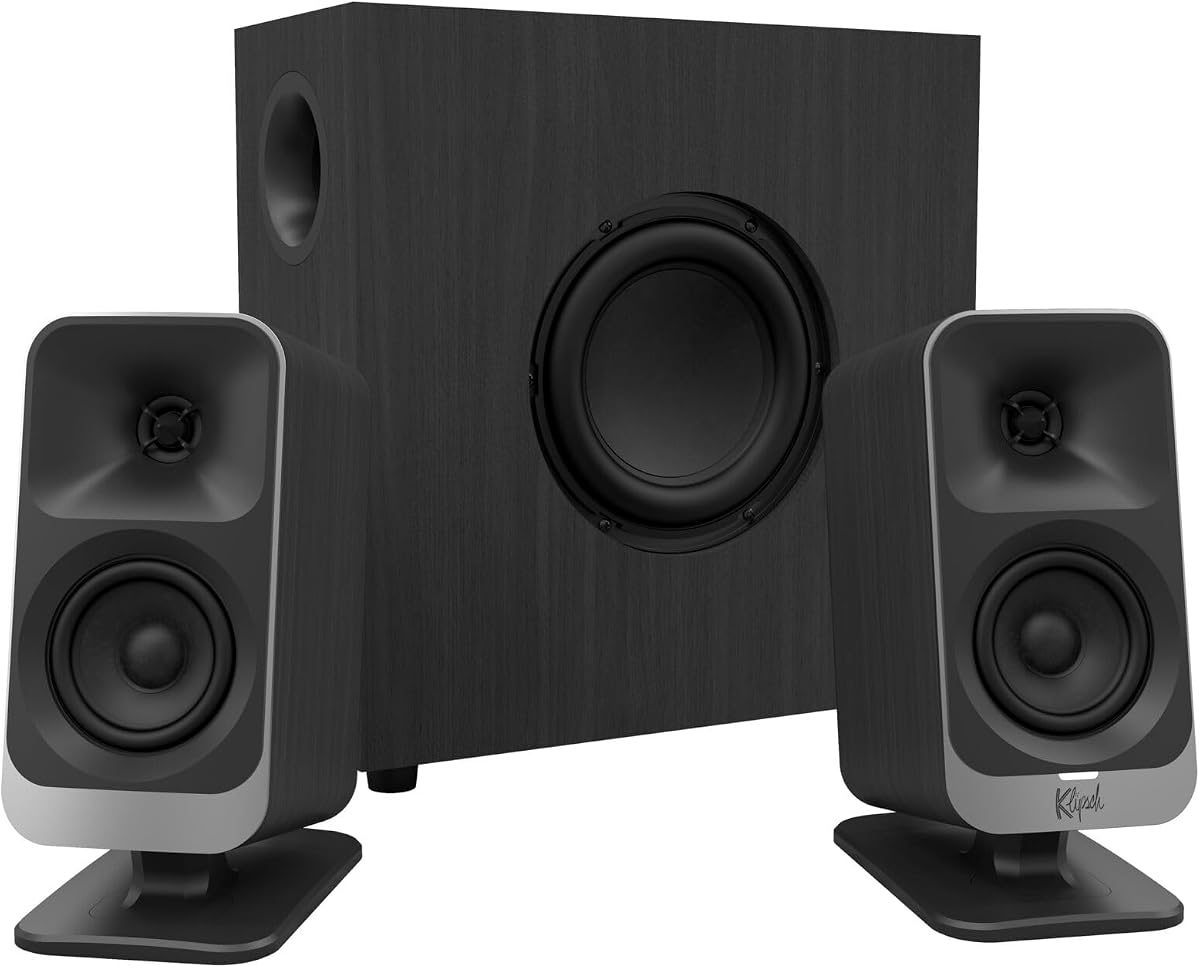
The Klipsch ProMedia 2.1 THX Certified system stands out as a top choice for desktop audio enthusiasts seeking high fidelity. Its THX certification guarantees that sound quality meets rigorous industry standards for clarity and dynamic range across various media types.
We may earn a commission when you buy through this link, at no additional cost to you.
Key strengths include the legendary MicroTractrix horn technology that efficiently directs sound to your ears without loss. The 6.5 inch side-firing subwoofer delivers deep bass that you can feel during intense gaming sessions or movie watching without muddying the mids.
Honest trade-offs involve the subwoofer size which may not fit under all desks and the cable routing which can be bulky. However these are acceptable given the exceptional sound performance and robust construction that justifies the price point for serious users.
Buyers prioritizing audio quality for music production or immersive gaming will find this system ideal. We recommend it for those willing to allocate floor space for the subwoofer and seeking long lasting reliable desktop speakers.
THX certification ensures the speakers meet strict performance criteria for frequency response and distortion levels often found in professional cinema audio setups.
The horn design increases sensitivity allowing more sound output per watt of power which improves dynamic range and reduces strain on the amplifier circuit.
We may earn a commission when you buy through this link, at no additional cost to you.
The Logitech Z313 offers a straightforward solution for users needing basic desktop audio without breaking the bank. It delivers consistent sound quality suitable for everyday tasks and casual media consumption with a compact footprint.
We may earn a commission when you buy through this link, at no additional cost to you.
Its main strengths lie in the convenience of the control pod which allows quick volume adjustments and the compact subwoofer that fits easily under desks. The 25 watts RMS output ensures clear audio for calls and light entertainment without distortion at moderate volumes.
Trade-offs include limited bass depth compared to higher powered systems and fewer connectivity options. However for budget conscious buyers this model provides reliable performance and essential features that meet the needs of most home office users effectively.
We recommend this for students or office workers prioritizing cost and space efficiency. It is an excellent starter system for those upgrading from built-in monitor speakers without needing advanced features or high volume output.
The subwoofer is designed to occupy minimal floor space making it ideal for smaller desks or tight room setups where larger units are impractical.
Having volume and power controls on a pod attached to the cable streamlines operation reducing clutter and keeping adjustments within easy reach during tasks.
We may earn a commission when you buy through this link, at no additional cost to you.
The Logitech Z623 delivers massive power suitable for filling larger rooms with immersive audio. Its 400 watt peak output ensures that music and movies sound dynamic and clear even at high volumes without sacrificing detail.
We may earn a commission when you buy through this link, at no additional cost to you.
Standout features include THX certification and RCA inputs which allow connection to multiple devices including consoles and players. The large subwoofer provides deep impactful bass that enhances gaming and movie experiences significantly compared to standard desktop speakers.
Trade-offs involve the size of the subwoofer which demands floor space and the higher power consumption. Yet for audiophiles and gamers wanting home theater quality audio on a desk the performance justifies the spatial requirements and investment.
We recommend this system for those with ample room and high audio demands. It is perfect for users seeking powerful sound that transcends typical desktop limitations and offers robust connectivity for diverse setups.
This high power output allows for significant volume headroom ensuring distortion free audio even when listening at loud levels in larger spaces.
Including RCA inputs expands compatibility beyond computers enabling connection to game consoles and standalone audio players for versatile media setups.
We may earn a commission when you buy through this link, at no additional cost to you.
The Creative Pebble X Plus brings modern connectivity to desktop audio with USB-C and Bluetooth 5.3 support. It fits seamlessly into contemporary setups with a sleek design that prioritizes space efficiency without compromising audio clarity.
We may earn a commission when you buy through this link, at no additional cost to you.
Strengths include the RGB lighting which adds a customizable aesthetic to your desk and the ability to amplify output using a USB PD adapter. This flexibility allows users to boost volume and bass when connected to higher power sources.
Trade-offs involve the need for an external adapter to reach peak performance and the lighting which some may find distracting. However for users valuing aesthetics and modern ports these features enhance the overall desktop experience significantly.
We recommend this for tech savvy users wanting a stylish and versatile speaker system. It works well for those who want wireless flexibility and clean desk setup without sacrificing sound quality.
Using USB-C for digital audio transmission ensures cleaner signal quality compared to analog connections reducing potential interference and noise in the audio path.
The customizable RGB lighting allows users to match speaker colors with their room theme or other devices creating a unified visual experience.
We may earn a commission when you buy through this link, at no additional cost to you.
Bluedee computer speakers feature built-in DSP tuning to deliver balanced and clear audio suitable for work and leisure. The design focuses on ease of use with a single control knob managing multiple functions efficiently.
We may earn a commission when you buy through this link, at no additional cost to you.
Key strengths include Bluetooth 5.4 which offers stable wireless connectivity and an 80W peak power that ensures robust sound. The DSP tuning helps reduce harsh highs and distortion making long listening sessions more comfortable for extended periods.
Trade-offs involve the RGB lighting which might not suit all decor styles and the moderate subwoofer size. Yet for most users the audio clarity and connectivity options provide a strong value proposition at this price range.
We recommend this for office environments or home users wanting clean sound with modern features. It suits those who prefer simple controls and wireless options without complex setup requirements.
Digital Signal Processing optimizes sound waves to reduce distortion and ensure vocals remain clear and natural across different listening volumes and media types.
A single physical knob handles volume playback and lighting effects reducing the need for multiple buttons and streamlining user interaction with the speaker system.
We may earn a commission when you buy through this link, at no additional cost to you.
The Cyber Acoustics CA-3090 serves as an entry-level option for basic audio needs. It provides essential features like a control pod and subwoofer in a simple package that works for casual listening tasks.
We may earn a commission when you buy through this link, at no additional cost to you.
Strengths include its low price and flat panel design which keeps the footprint small. The control pod makes volume adjustments easy and the system includes a standard warranty for added peace of mind for users.
Trade-offs are expected with the low power output which limits volume and bass depth. However for users who primarily need background noise or simple notification sounds this model offers functional utility without complexity.
We recommend this for very tight budgets or temporary setups. It works well for basic office needs where high fidelity and loud volume are not primary concerns or priorities.
The flat panel design allows speakers to sit flush against surfaces saving desk space and maintaining a tidy appearance in shared workspaces.
A dedicated pod for power and volume ensures quick access to adjustments without needing to navigate software or reach the main unit directly.
We may earn a commission when you buy through this link, at no additional cost to you.
The Creative Pebble Plus stands out for being fully USB powered eliminating the need for an AC outlet. This feature keeps your workspace clutter-free and simplifies setup for laptops and portable devices significantly.
We may earn a commission when you buy through this link, at no additional cost to you.
Strengths include 45 degree elevated drivers that direct sound towards you for better clarity and a High Gain mode for louder output with a better adapter. The front volume controls offer immediate access without digging for cables.
Trade-offs include limited power and no Bluetooth which restricts wireless use. However for users wanting clean cable management and decent desktop sound at a low price this system delivers strong practical value.
We recommend this for laptop users and minimalists. It suits those who prioritize desk space and simplicity over advanced connectivity or high-volume performance capabilities.
Drawing power directly from the USB port removes the need for extra wall outlets making it ideal for clean desk setups and portable use.
Angled drivers aim sound directly at the listener improving stereo imaging and reducing the need to turn up volume for clear audio.
We may earn a commission when you buy through this link, at no additional cost to you.
The Cyber Acoustics CA-3610 delivers strong bass and clarity through 62 watts peak power and titanium drivers. This system is built for multimedia use with a headphone jack for private listening without disturbing others nearby.
We may earn a commission when you buy through this link, at no additional cost to you.
Strengths include the angled satellite design that directs sound to your ears and a compact subwoofer that fits under desks. The headphone jack adds versatility for personal listening and ensures audio privacy during calls.
Trade-offs are the lack of Bluetooth and wired-only operation which limits flexibility. Yet for users prioritizing physical connectivity and strong bass at a mid-range price this system provides reliable performance.
We recommend this for desktop setups requiring robust sound without high-end complexity. It suits those who value bass impact and physical controls over wireless streaming features.
Titanium drivers provide a rigid cone structure that reduces distortion and allows for clearer high-frequency reproduction during complex audio mixes.
A dedicated headphone jack allows instant switch to private listening without unplugging devices which is useful for quick privacy needs in shared spaces.
We may earn a commission when you buy through this link, at no additional cost to you.
The Logitech Z407 offers a unique wireless control dial that lets you manage volume and playback from across the room. This feature adds significant convenience for users who want to control audio without reaching for their computer.
We may earn a commission when you buy through this link, at no additional cost to you.
Strengths include Bluetooth and USB inputs for versatile device switching and dual position satellites that fit various desk layouts. The sound is rich with deep bass that enhances movies and music significantly compared to smaller units.
Trade-offs involve the dial requiring batteries and a higher price point. Yet the convenience of wireless control and solid build quality justify the cost for users who value ergonomic audio control daily.
We recommend this for home office and entertainment setups. It suits those who want premium audio control and flexibility without sacrificing sound quality or connectivity.
The dial allows volume and track control via Bluetooth from up to thirty meters away which enhances usability during presentations or casual viewing.
Satellites can be placed vertically or horizontally giving users flexibility to adapt the setup to narrow or wide desk configurations easily.
We may earn a commission when you buy through this link, at no additional cost to you.
The Klipsch ProMedia Lumina reimagines the classic design with modern RGB lighting and USB-C connectivity. It aims to merge iconic audio quality with gaming aesthetics for a visually cohesive desktop setup experience.
We may earn a commission when you buy through this link, at no additional cost to you.
Strengths include the Klipsch Control app which allows precise EQ and lighting adjustments and a low-profile subwoofer that saves floor space. Bluetooth 5.3 ensures stable wireless connection for devices and peripherals.
Trade-offs include the higher price and reliance on the app for full customization. Yet for gamers and creators seeking both sound and style this system delivers a strong blend of aesthetics and performance.
We recommend this for gamers wanting a unified look. It suits those who value RGB integration and modern connectivity alongside the legendary Klipsch sound signature.
The desktop app allows deep customization of EQ and lighting which lets users tailor sound to specific genres and room lighting preferences.
The subwoofer is designed to sit under desks without taking up much floor space which helps keep larger rooms and workspaces uncluttered.
We may earn a commission when you buy through this link, at no additional cost to you.
Selecting the right speakers involves balancing power, connectivity, and design to fit your specific workspace needs and audio preferences.
Power output measured in watts determines how loud the speakers can get without distortion. For small desks 25 to 80 watts RMS is often sufficient while larger rooms may need 200 watts or more.
Look for higher RMS values for consistent performance and peak wattage for short bursts of volume. Ensuring the subwoofer has enough power is critical for balanced sound at high volumes.
The subwoofer size directly impacts bass depth and room fill. A 5 to 6 inch driver is standard for desktops but larger 8 inch drivers offer more impactful bass for movies.
Measure your desk space to ensure the subwoofer fits. Side-firing or down-firing designs can save floor space and direct bass differently depending on your room layout preferences.
Connectivity defines which devices can plug in. Look for 3.5mm AUX for universal use and RCA for consoles. USB-C is becoming common for modern laptops and digital audio quality.
Wireless options like Bluetooth allow easy switching between devices. Ensure the speaker supports the Bluetooth version you need for stable streaming without latency during calls.
Multiple inputs allow you to connect several devices at once. Systems with RCA and AUX or USB allow switching between computer and game console easily without unplugging cables constantly.
A control pod or dial makes switching inputs and volume easier. Check for features like headphone jacks if you need private listening options without disrupting others.
Build quality affects longevity. Look for plastic housings that feel solid and subwoofers with metal grilles to protect internal components from accidental bumps.
Check the warranty length which often ranges from one to two years. A longer warranty indicates confidence in build quality and protects your investment against manufacturing defects.
Sound signature varies by model. Some offer bright treble for clarity while others focus on warm mids and bass. Reading reviews helps you understand if the tuning matches your listening preferences.
Digital Signal Processing or DSP tuning helps reduce distortion and improve clarity. Systems with DSP often provide a more balanced listening experience across different music genres and volume levels.
Space efficiency is key for smaller desks. Slim satellites and compact subwoofers help keep your workspace clear. Consider designs that fit your aesthetic like minimalist or gaming-focused looks.
RGB lighting adds style but may not suit professional settings. Ensure the speakers complement your monitor and desk furniture for a cohesive look without adding clutter.
Ease of control impacts daily use. Physical knobs for volume are preferable to software controls if you need quick adjustments. Look for dedicated bass controls on the subwoofer.
Wireless controllers add convenience but require batteries. Ensure the control method you choose fits your workflow whether it is physical dials or remote control options for flexibility.
Place the main satellites at ear level if possible to optimize sound quality. Angling them towards your head can improve stereo separation and clarity significantly.
Connect the subwoofer first then plug in the satellites and power adapter. Ensure all cables are secure to prevent audio drops during use and to maintain safety.
Regularly clean the speaker grilles with a soft cloth to prevent dust buildup. Avoid using water or harsh chemicals which may damage the finish or internal electronics of the unit.
Most 2.1 speakers work with any device having a 3.5mm headphone jack or USB port. Check your computer's output options to ensure compatibility before purchase for smooth setup.
Yes 2.1 speakers add a dedicated subwoofer for deeper bass which 2.0 systems lack. This makes them superior for movies and gaming where low-frequency sound is important.
Ensure Bluetooth is enabled on both speakers and device then pair through system settings. Keep devices close to avoid latency or signal drops during initial setup.
They are better for casual listening due to potential coloration. Professional studios may prefer reference monitors with flatter response for accurate sound mixing.
Place satellites on either side of the monitor at ear level and angle them inward. Position the subwoofer near a wall for stronger bass response without distortion.
Lower the volume on both device and speaker and ensure cables are secure. Check that the subwoofer is not overloaded by reducing bass boost settings.
We have reviewed ten top models ranging from budget to premium. Each offers unique strengths whether you prioritize bass impact wireless control or modern connectivity for your desk.
Focus on power output and connectivity to match your specific needs. Consider how much space you have for the subwoofer and whether wireless features are necessary for your daily workflow.
Check current prices and availability as they vary frequently. Reading verified reviews can help confirm that a model fits your specific setup before finalizing your purchase.