
Hi8 8mm Tape Player Handycam CCD Camcorder w/Nightshot, Blank Tape, USB (USB)
4.2Editor score
Includes USB adapter and software
Nightshot low-light capability
Shoot vintage style video
This guide compares the top Hi8 and 8mm Video Cassette Player options for digitizing old tapes, ensuring you choose the best reliable player for your needs.
Preserving family memories requires reliable hardware to play vintage video formats. The Hi8 and 8mm Video Cassette Player market offers diverse solutions for transferring analog tapes to digital files. Selecting the right device ensures your cherished moments remain accessible for future generations without degradation.
We evaluated ten products based on compatibility, transfer capabilities, and build quality. Our comparison focuses on devices that support playback and digitization of 8mm, Hi8, and Digital8 formats. Each option includes necessary cables or software to streamline the conversion process for home users.
Every pick in this list highlights specific strengths like portability or bundled accessories. Prices and availability fluctuate frequently, so verify current listings before purchasing. Our goal is to help you find a working player that matches your technical comfort and budget requirements.
4.2Editor score

4.7Editor score

4.0Editor score
This table provides a side-by-side overview of key specifications for each top-ranked player. Use it to quickly compare features like tape compatibility, included accessories, and transfer methods before making a final decision.



The Sony GV-D200 stands out as a highly reliable portable solution for Digital8 and Hi8 playback. With a 4.7 rating from users, it offers robust playback quality for legacy tapes. Its integrated editing features provide unique value not found in standard VCRs.
We may earn a commission when you buy through this link, at no additional cost to you.
This device excels at preserving analog footage through direct digital transfer via its FireWire iLink interface. The ability to edit up to 20 assembled scenes directly on the unit allows for quick trimming before digitization. Composite ports ensure compatibility with older televisions for monitoring.
Users may find the reliance on older FireWire standards a constraint for modern Mac systems without adapters. However, this limitation is acceptable given the superior playback quality and editing control it offers. The portable design makes it ideal for users who travel with tape archives.
Tech enthusiasts seeking the best quality playback for Digital8 tapes should prioritize this model. Its proven track record and comprehensive format support make it a top choice for archiving important family videos with minimal quality loss.
The integrated 20-segment assemble editing allows users to trim scenes directly on the device before transferring.
A built-in IEEE1394 FireWire iLink port enables fast and direct digital connectivity without extra adapters.
We may earn a commission when you buy through this link, at no additional cost to you.
This bundle provides everything needed to play and transfer 8mm and Hi8 tapes effectively. It comes with a USB capture device to move files to your computer easily. The inclusion of a blank tape allows you to start recording or testing immediately.
We may earn a commission when you buy through this link, at no additional cost to you.
Users appreciate the guaranteed working condition which reduces risk when buying vintage electronics. The device supports shooting throwback video with a warm aesthetic if you wish to create new content. It serves as a complete package for digitization without needing extra peripherals.
The lack of visible user ratings makes it harder to assess long-term reliability compared to Sony models. However, the free returns policy and 100% working guarantee mitigate some of this uncertainty. It is a practical choice for those needing a quick solution.
Consider this option if you need a comprehensive kit with transfer hardware included. It simplifies the workflow by combining the player and digitization tool in one purchase.
Includes a USB capture device that transfers tapes directly to your computer for digital storage.
Create new content with a warm aesthetic while playing back vintage tapes on the same unit.
We may earn a commission when you buy through this link, at no additional cost to you.
This Sony camcorder is designed specifically for playback and transfer rather than recording. It supports all 8mm, Video8, Hi8, and Digital8 formats making it versatile for mixed archives. The included capture device allows for transfer to computer files or burning to DVDs.
We may earn a commission when you buy through this link, at no additional cost to you.
Users benefit from broad operating system support including Windows, Mac via USB, Firewire, and Thunderbolt. The inclusion of AV and S-Video cables ensures you can connect to various display or capture devices. This reduces the hassle of sourcing compatible cables separately.
The device is not intended for recording video which simplifies its focus to playback stability. It also lacks PAL support so international tapes from Europe might not play. These limitations are acceptable for users focused on NTSC tapes from the US market.
Choose this model if you need a versatile player that works across Mac and Windows systems easily. Its DVD burning feature adds an extra layer of redundancy for your digital archives.
Compatible with Windows and Mac via USB, Firewire and Thunderbolt connections for broad system support.
Transfer tapes to computer files or burn them to DVD for physical backup of your videos.
We may earn a commission when you buy through this link, at no additional cost to you.
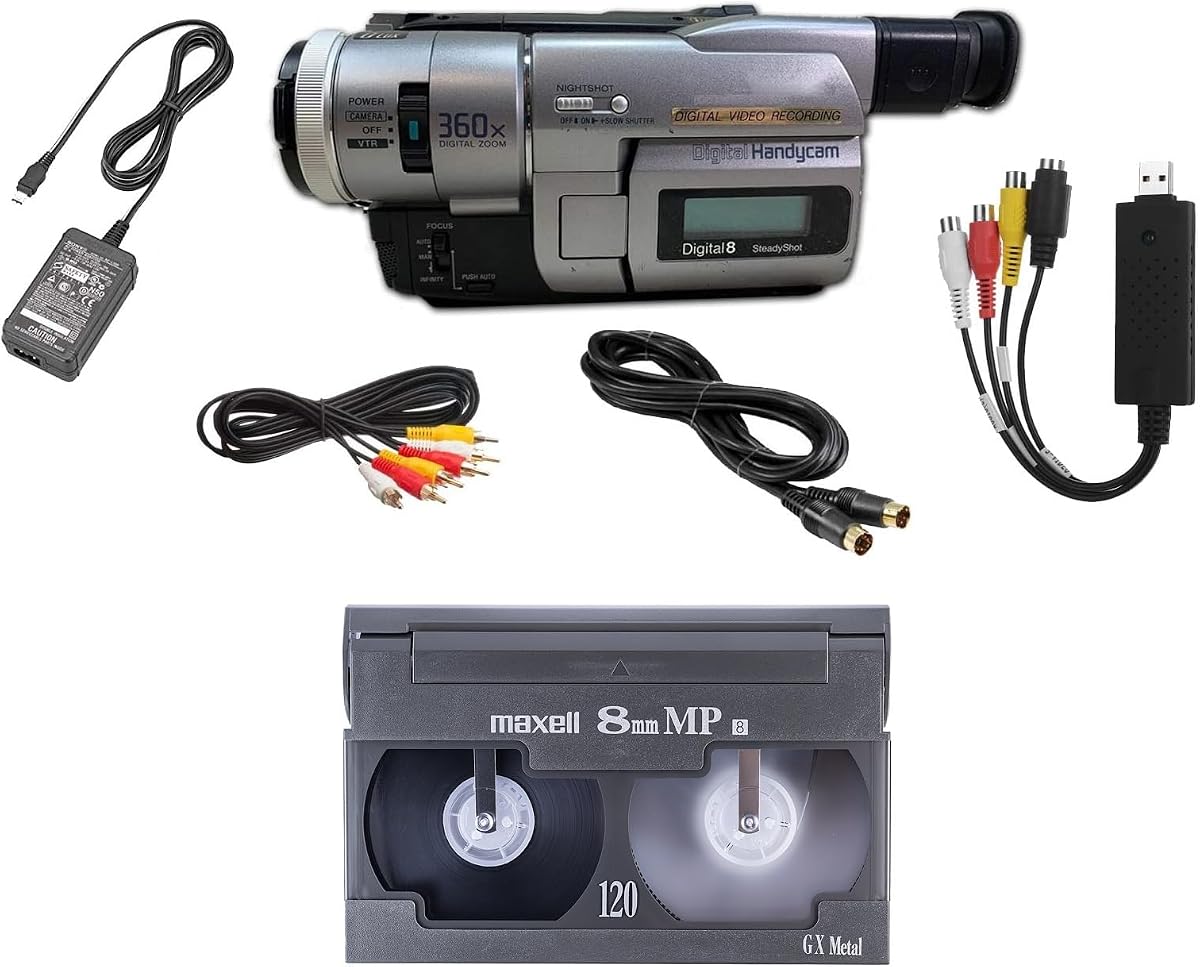
This Handycam features a CCD sensor with Nightshot capability which improves visibility in low-light conditions. It is designed to achieve a nostalgic VHS effect without needing digital filters. The bundle includes a USB adapter and software to help digitize your content.
We may earn a commission when you buy through this link, at no additional cost to you.
Users can play back tapes on any TV or computer making it flexible for viewing. The 1 Year Warranty and Free Returns policy add confidence to the purchase. The ability to shoot vintage style video directly to tape is a unique creative benefit.
While the specs are basic, the focus on nostalgia and transfer utility is clear. The price point suggests it is an affordable entry into the Hi8 ecosystem. Check current listings to ensure all advertised software is included with the unit.
Ideal for collectors wanting to create retro style content while preserving old tapes. The Nightshot feature sets it apart from basic camcorders in this category.
The CCD camcorder includes a Nightshot feature for improved performance in dark environments.
Includes a USB adapter and tape digitizing software to streamline the transfer process.
We may earn a commission when you buy through this link, at no additional cost to you.
This bundle is designed to playback and transfer 8mm, Hi8, and Digital8 tapes efficiently. It includes a USB capture device to move tapes to computer files or burn them to DVD. Accessories like battery and AV cables are included to ensure immediate use.
We may earn a commission when you buy through this link, at no additional cost to you.
Users value the guaranteed 100% working status which addresses common concerns about vintage electronics. The inclusion of a blank 8mm tape allows for test recordings or playback right away. The free returns policy further protects the buyer from potential defects.
The focus on functionality over brand prestige makes this a practical choice for digitization. While it may not have advanced features like high-end Sony models, it gets the job done. It is a solid option for users prioritizing simplicity.
Select this if you need a no-fuss kit to convert tapes to digital format. The bundled accessories reduce the need for additional purchases during setup.
Includes battery and AV cables for transfer or TV playback so you can start immediately.
Bundle includes an 8mm tape and can playback any 8mm tape for testing purposes.
We may earn a commission when you buy through this link, at no additional cost to you.
This device acts as a video to digital converter for analog signals from sources like Hi8 camcorders. It supports recording resolution up to 1080P and allows storage via USB or SD card. The plug and play design means no PC or drivers are needed for operation.
We may earn a commission when you buy through this link, at no additional cost to you.
Users appreciate the built-in speaker and preview LCD for monitoring video during capture. It accepts AV RCA S-Video and AUX inputs providing flexible connection options. The broad compatibility covers VHS, DVR, DVD, and gaming consoles too.
The main limitation is that it does not play tapes independently; you must provide your own Hi8 player. This makes it a complement to a player rather than a standalone solution. Ensure your camcorder outputs the correct analog signal for capture.
Best used as a high-quality capture tool when paired with a reliable player. Its ability to record without a computer makes it convenient for quick digitization workflows.
Plug and play operation means no software, PC, or drivers are needed to start recording.
Equipped with USB and SD card slots for storing recorded MP4 video or MP3 audio files.
We may earn a commission when you buy through this link, at no additional cost to you.
This compact camcorder is designed to shoot vintage style video directly to tape. It features a USB adapter and tape digitizing software to help convert older recordings. Users can play tapes on any TV or computer for convenient access.
We may earn a commission when you buy through this link, at no additional cost to you.
The ability to achieve a nostalgic VHS effect without filters appeals to creative users. The 1 Year Warranty and Free Returns policy add security to the purchase. Its small size makes it easy to store when not in use.
The 3.9 rating suggests average performance which might vary by unit. However, the low price and included accessories make it a reasonable experiment for hobbyists. Check recent reviews to confirm quality consistency before buying.
Consider this for casual users needing a cheap way to digitize tapes. It balances simplicity with utility for budget-conscious buyers.
Achieve a nostalgic VHS effect without needing filters or software post-production.
Includes a USB adapter and digitizing software to simplify the file transfer process.
We may earn a commission when you buy through this link, at no additional cost to you.
This Handycam uses a CCD sensor with Nightshot features for better low-light performance. It is optimized for users seeking to shoot vintage style video directly to tape. A USB adapter and digitizing software are included to assist with file transfers.
We may earn a commission when you buy through this link, at no additional cost to you.
The device allows playback on any TV or computer for flexible viewing options. It includes a blank tape to start your collection or testing immediately. The 1 Year Warranty and Free Returns reduce risk for first-time buyers.
With a 3.3 rating performance may be inconsistent compared to higher rated models. However, the unique Nightshot capability makes it an interesting choice for creative projects. Price and included accessories make it accessible for hobbyists.
Choose this if you need a budget player with low-light features. Its primary value lies in its nostalgic shooting capabilities.
Uses a CCD Handycam with Nightshot technology for capturing video in low-light settings.
Shoot vintage style video directly to tape achieving nostalgic effects without digital filters.
We may earn a commission when you buy through this link, at no additional cost to you.
This package includes an 8mm camcorder for playing old 8mm tapes. It is designed to digitize your tapes and includes a battery and AV cables for connection. The 8mm tape included helps you test playback and transfer immediately.
We may earn a commission when you buy through this link, at no additional cost to you.
Users value the guaranteed 100% working status which minimizes risk with used electronics. The free returns policy ensures you can send it back if it fails. It offers a straightforward way to access legacy video content.
The 3.6 rating indicates average satisfaction which may depend on specific unit quality. It provides basic functionality without advanced editing or burning capabilities. Ensure your computer has the right capture setup before relying on this.
Ideal for buyers needing a straightforward solution to play and transfer tapes. The included cables and tape simplify the setup process significantly.
Includes battery and AV cables for transfer or TV playback so you have everything you need.
Guaranteed 100% working and free returns policy to ensure customer confidence.
We may earn a commission when you buy through this link, at no additional cost to you.
The Panasonic PV-8450 is a standard Video Cassette Recorder for playing analog tapes. It is suited for users with traditional VHS or 8mm compatible cassettes. The device focuses on basic playback and recording without complex digital features.
We may earn a commission when you buy through this link, at no additional cost to you.
Users appreciate the reliability associated with the Panasonic brand for home electronics. It offers a simple interface for standard tape operations. While it may lack modern transfer capabilities, it serves as a stable playback device for collections.
This model is not intended for Digital8 transfers unless used with external capture devices. It is a classic option for those preferring physical media playback. Check connectivity ports to ensure they match your capture needs.
Select this if you need a standard VCR for basic viewing. It is a practical choice for maintaining physical archive access.
A Panasonic branded VCR designed for standard video cassette playback and recording.
Focuses on simple operation and standard tape formats for traditional users.
We may earn a commission when you buy through this link, at no additional cost to you.
Selecting the right player requires understanding your specific needs for playback, transfer, and storage. This guide covers the critical factors to consider.
Ensure the device explicitly states support for Hi8, 8mm, or Digital8 formats. Many players handle multiple variants but some are strictly limited to one. Check the product details for Video8 or MiniDV support if needed.
Look for clear confirmation of format support to avoid purchasing incompatible hardware.
Some units include USB capture devices to digitize tapes directly to your computer. Others only play back on TV without any digital output option. Decide if you need a standalone player or an all-in-one transfer solution.
Choose a bundle with a capture device if you plan to digitize your archives permanently.
Verify that the provided software works with your current Mac or Windows version. Some older capture tools may require specific drivers or operating systems. Check manufacturer specifications for USB Firewire or Thunderbolt compatibility.
Confirm OS support before buying to ensure smooth file transfers.
Bundles may include blank tapes, AV cables, power supplies or batteries. These extras save you from buying separate items to set up the device. Always review the full accessory list to see what is included.
A complete bundle with cables and software is often more cost-effective than buying separately.
Vintage electronics can be fragile so look for units with warranties or return policies. Brands like Sony and Panasonic typically offer more consistent build quality than unknown labels. Check reviews for mentions of mechanical reliability.
Prioritize devices with a warranty or free returns to protect against defects.
If you travel with tapes or plan to move the player frequently consider portable models. Desktop VCRs are bulkier while Handycam style units are easier to transport. Power options like batteries also affect portability.
Select a portable model if you need to use the player outside a fixed location.
High-end players like the Sony GV-D200 offer onboard editing for trimming clips before transfer. Basic units may not support any editing functions so you must rely on external software. Decide if in-device editing is worth the added cost.
Look for built-in editing if you want to edit scenes before digital conversion.
Check that the player has the necessary ports to connect to your capture box or TV. Common options include AV RCA S-Video and FireWire. Without the correct ports transferring may be difficult or impossible.
Verify input and output ports match your existing equipment before purchase.
Begin by cleaning the tape heads with a specialized cleaning cassette to ensure optimal playback. Dust or debris can cause signal loss or damage the tape surface. Always handle tapes by the casing to avoid touching the magnetic tape directly.
Connect the player to your capture device using the appropriate AV or S-Video cables. If using a USB capture box ensure the driver is installed and the software is running. Follow the software instructions to start recording while playing the tape.
Store the player in a cool dry place away from direct sunlight to prevent internal component wear. Avoid moving the unit while a tape is inside to protect the tape transport mechanism. Regular maintenance ensures longer life and consistent video quality.
Hi8 tapes are similar in size to 8mm tapes but use a higher resolution magnetic tape for better video quality. Most Hi8 compatible players can also play standard 8mm tapes. Digital8 uses the same tape shell but records digital data instead of analog.
Not all players require a computer. Some units have USB capture devices that connect directly to a PC for file storage. Others support burning directly to DVD. You can use a standalone converter box to save to SD cards as well.
Yes you can play old tapes on a modern TV using a converter box. Most modern TVs lack direct composite inputs so a converter changes the signal to HDMI. Ensure your player has AV or S-Video outputs to connect to the converter.
If a tape is damaged you should avoid forcing it into the player to prevent internal damage. Inspect the tape for cracks or mold before insertion. If mold is present clean the tape gently and let it dry before attempting playback.
8mm tapes can last 15 to 30 years if stored properly. Heat moisture and direct sunlight can accelerate degradation. It is best to digitize older tapes as soon as possible to prevent permanent data loss.
Saving to a computer is generally better for long term preservation and editing. DVDs can scratch or degrade over time so digital files offer more flexibility. You can create DVD backups if you prefer physical copies for sharing.
We reviewed ten options ranging from Sony premium camcorders to budget friendly transfer bundles. Each model offers unique benefits such as editing tools or simple plug and play digitization. The Sony GV-D200 remains the top pick for quality and built-in features.
When choosing prioritize format compatibility and transfer method to match your tech setup. If you want to burn to DVD or save to computer ensure the player supports it. Look for included software and cables to save time and money.
Prices and availability change frequently so check the current listings before purchasing. Verify warranty terms and return policies to ensure a smooth buying experience. With the right player you can preserve your analog memories for years to come.