
Caydo S1 Art Projector for Tracing
5.0Editor score
Pure optical tracing
Up to 80 inch projection
Long LED lifespan
This guide compares the top art tracing projectors for artists and creators, evaluating features like resolution, connectivity, and ease of use to help you
Finding the right art tracing projector can transform your creative workflow significantly. These devices allow you to project images onto various surfaces for precise tracing and sketching. A good projector offers high resolution, flexible connectivity, and intuitive controls for seamless operation.
We compared ten leading models based on key performance metrics and user feedback. Our analysis covers optical versus digital options, brightness levels, and unique features like built-in drawing assistants. This list helps you identify the best fit for your specific artistic needs.
Each pick highlights standout capabilities and potential trade-offs to consider. You will find detailed reviews and a comprehensive buying guide to inform your decision. Remember that product availability and features may change over time as technology evolves.
5.0Editor score

4.5Editor score

4.0Editor score
The following table provides a side-by-side overview of all ten models reviewed in this guide. Compare key specifications and features to determine which projector aligns best with your artistic workflow and budget constraints.
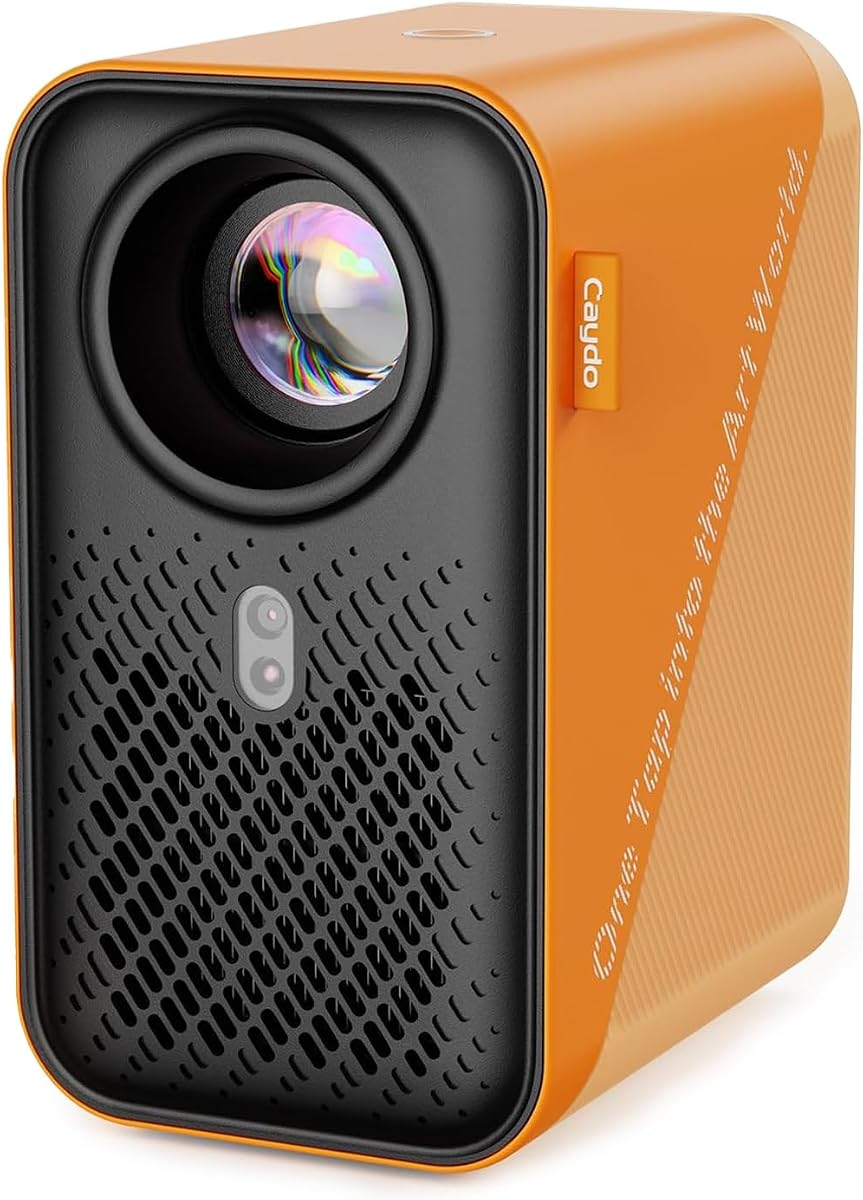



This projector stands out for its reliable dual-band WiFi and app-free web control. It mirrors images from phones or tablets with high-speed low-latency connection. The ability to work offline adds significant flexibility for remote creative environments.
We may earn a commission when you buy through this link, at no additional cost to you.
Key strengths include its versatile online and offline functionality. You can control projection settings directly from your browser by scanning a QR code. The manual focus adjustment button allows fine-tuning for sharp clear images on any surface.
Trade-offs involve reliance on a stable dual-band connection for optimal performance. Manual focus adjustment may take slightly longer than auto-focus systems. These are acceptable given the flexibility and accuracy provided for various artistic projects.
Ideal for artists needing precise real-time tracing without complex app setups. It suits studios remote locations or educational settings where flexibility is key. This tool helps accelerate skill development and creative accuracy effectively.
The dual-band chip ensures intricate lines mirror with precise accuracy. You get low-latency performance critical for detailed sketching tasks.
Managing settings without downloading apps saves time and storage. Just scan the QR code to access rotation scaling and other features easily.
We may earn a commission when you buy through this link, at no additional cost to you.
This model delivers crisp vivid images with 400 ANSI lumens brightness. It eliminates dark room requirements enabling daytime creative work. The built-in swivel base offers flexibility without extra stand costs.
We may earn a commission when you buy through this link, at no additional cost to you.
Strengths include an exclusive drawing assistant with zoom and rotation tools. Auto focus adjusts clarity in under three seconds for sharp images. Bluetooth 5.4 allows audio connections for immersive sound during work sessions.
Trade-offs involve a higher price compared to basic optical projectors. Batteries for the remote are not included. These are acceptable given the advanced features and long-lasting performance provided.
Best for artists needing precision and flexibility in varied lighting. Its high contrast and color accuracy ensure traced strokes match digital files perfectly. This projector combines precision with long-lasting performance effectively.
400 ANSI lumens ensure images stay vivid even in daylight. You can work without darkening rooms constantly improving productivity.
Exclusive drawing assistant features like gridify and sketchify adapt to styles. Select background colors and modes to match your artistic workflow.
We may earn a commission when you buy through this link, at no additional cost to you.
The S1 offers pure optical tracing for hand-drawn line art. Place printed images under the copy area and start tracing immediately. It lacks wireless modules but excels in simplicity and reliability.
We may earn a commission when you buy through this link, at no additional cost to you.
Strengths include fast accurate focus with a smooth sliding knob. The LED lasts up to 20000 hours reducing maintenance needs. Built-in handle and non-slip base make it a portable art studio.
Trade-offs include needing a darkened room for best performance. No digital input options limit its use to physical prints. These are acceptable for artists focused on traditional hand-drawn workflows.
Ideal for those prioritizing simplicity and long-term value. Plug in and create without subscriptions or firmware updates. This tool packs up and travels with you effortlessly.
No apps or connections needed. Just plug in and trace physical artworks directly. This reduces setup time significantly.
Built-in handle and hidden cord compartment aid transport. Front tray holds brushes making it ready for any location.
We may earn a commission when you buy through this link, at no additional cost to you.
This model features built-in exclusive drawing software for intuitive use. It projects images onto walls easels and blackboards. The auto-focus and keystone correction ensure precise image scaling.
We may earn a commission when you buy through this link, at no additional cost to you.
Strengths include transfer via QR code or USB drive. Dual-band WiFi provides faster data transmission. The sealed optical core prevents dust entry for long-lasting performance.
Trade-offs involve remote batteries not included. Brightness may be lower than premium models. These are acceptable for home use and casual tracing tasks.
Best for enthusiasts needing a compact projector. It works as an HD video projector too. This sealed core ensures high-quality performance over time.
Built-in software includes zoom rotation and grid tools. Adapt the projector to your style with artistic modes.
Prevents dust entry reducing screen black spots. Ensures long-lasting high-quality performance without maintenance.
We may earn a commission when you buy through this link, at no additional cost to you.
This projector offers stable 5G dual-band WiFi for real-time precision. App-free web control lets you manage settings via browser. Online offline flexibility suits any environment from studios to remote areas.
We may earn a commission when you buy through this link, at no additional cost to you.
Strengths include reduced latency compared to standard models. The sturdy adjustable mount adapts to various workspaces easily. FCC ID certified for safety and performance.
Trade-offs involve reliance on router compatibility. Lower ratings suggest potential issues. These are acceptable for users needing consistent connection speeds.
Ideal for projects requiring fluid real-time tracing. It turns mobile photos into tangible art. This tool accelerates skill development and creative precision.
Upgraded chip offers high-speed consistent connection. Reduce latency significantly for seamless tracing of complex sketches.
Engineered for any environment with both connection types. Your creative workflow stays uninterrupted even without Wi-Fi.
We may earn a commission when you buy through this link, at no additional cost to you.
This model provides clear 720P reference images for controlled tracing. It scales photos from 9.5 to 150 inches. Flexible connections support WiFi USB and HDMI options.
We may earn a commission when you buy through this link, at no additional cost to you.
Strengths include a sturdy 32.3-inch metal stand. You can rotate it for overhead or angled placement. The remote supports convenient operation for various users.
Trade-offs involve lower resolution compared to 1080P models. Light weight may affect stability. These are acceptable for budget-friendly large projection needs.
Ideal for artisans needing large mural outlines. It supports projects from small details to large compositions. Easy repositioning enhances workflow efficiency.
Scale patterns from tiny details to massive compositions. One setup supports diverse project sizes effectively.
Metal stand rotates for overhead or angled placement. Includes base for stable surface placement as needed.
We may earn a commission when you buy through this link, at no additional cost to you.
This projector delivers clear images with 250 ANSI lumens. Built-in drawing app includes zoom and grid tools. Transfer images via QR code or USB instantly.
We may earn a commission when you buy through this link, at no additional cost to you.
Strengths include offline functionality for drawing tools. Unlike mirroring tools work without internet. Auto focus and keystone correction ensure sharp images.
Trade-offs involve lower brightness than P3. Batteries not included. These are acceptable for offline basement work flexibility.
Best for artists needing seamless adaptability. It supports projection distances up to 5.8 ft. Focus on art not equipment with long lamp life.
Drawing tools remain functional without internet connection. Work in basements or areas with poor connectivity freely.
Transfer reference images in seconds. Once loaded tools work without requiring internet connection.
We may earn a commission when you buy through this link, at no additional cost to you.
This projector suits diverse creative uses from sewing patterns to presentations. Smart image processing tools support keystone correction and zoom. Bright projection is clear even without closing curtains.
We may earn a commission when you buy through this link, at no additional cost to you.
Strengths include flexible projection size from desktop to wall. Four connection options including wireless mirroring. Adjustable telescopic stand height reaches 40 inches.
Trade-offs involve ensuring tabletop edge thickness. Brightness may need darker rooms for best results. These are acceptable for multi-purpose creative workflows.
Ideal for creators needing versatile tools. It fits onto paper banners and walls easily. Four connection options enhance compatibility.
Support line art extraction and right-angle marking. Makes it great as sewing pattern projector.
Adjusts from 15 to 40 inches for flexible use. One of tallest desktop stands available.
We may earn a commission when you buy through this link, at no additional cost to you.
This mini projector offers seamless wireless streaming with AirPlay. Extended battery performance allows up to 2.5 hours of use. Precision mounting tools ensure perfect alignment.
We may earn a commission when you buy through this link, at no additional cost to you.
Strengths include versatile connectivity with HDMI and USB. Stunning visual clarity with 60 ANSI-lumen DLP engine. Suitable for diverse media sources.
Trade-offs involve lower brightness than full-size models. Compact size limits projection range. These are acceptable for portable presentations.
Best for creators needing mobility. Enjoy cable-free art tracing anywhere. This setup ensures image always perfectly aligned.
Create without needing constant power source. Longer sessions indoors or out.
Adjustable overhead tripod and articulating arm clamp. Ideal for art tracing.
We may earn a commission when you buy through this link, at no additional cost to you.
This projector supports phone wireless projection or Airdrop. Adjustable focus lens allows 11 to 80 inch distance. Clear and bright projecting image helpful for beginners.
We may earn a commission when you buy through this link, at no additional cost to you.
Strengths include multiple source import options. Designed system compatible with iPhone and iPad. USB and HDMI inputs provide alternatives to mirroring.
Trade-offs involve Apple-only wireless compatibility. Lower resolution affects image sharpness. These are acceptable for basic tracing tasks.
Ideal for kids and beginners using Apple devices. Foldable stand easy to carry. Contact via Amazon for product quality issues.
Only supports iPhone iPad Airplay. Make sure phone has function.
Distance could be 11inch to 80inch. Effective area 6x10inch to 60x90inch.
We may earn a commission when you buy through this link, at no additional cost to you.
Choosing the right art tracing projector depends on your specific artistic needs and budget. Here are key factors to consider.
Higher resolution ensures sharper images critical for detailed tracing. Look for native 1080P if possible.
Prioritize resolution for precise line accuracy.
Consider dual-band WiFi USB and HDMI inputs. Wireless mirroring offers convenience.
Select compatible connection types for your devices.
Brightness measured in ANSI lumens affects visibility in light. 400 ANSI lumens allows daytime work.
Choose higher brightness for non-darkened rooms.
Features like auto focus and keystone correction simplify setup. Manual focus may be slower but sufficient.
Look for intuitive controls for workflow efficiency.
LED lifespans range up to 20000 hours. Longer life reduces replacement costs.
Prioritize longer lamp life for frequent use.
Weight and stand adjustability affect transport. Lightweight models suit travel.
Check stand height options for your workspace.
Exclusive drawing assistants provide zoom and grid tools. Offline functionality adds flexibility.
Look for drawing modes matching your workflow.
Ensure support for iOS or Android devices. Some models are Apple-only.
Verify device compatibility before purchase.
Set up the projector on a stable surface. Use the adjustable stand for correct angles.
Connect your device via WiFi USB or HDMI. Ensure proper focus for sharp images.
Clean the lens regularly with provided tools. Keep dust away from optical core.
Optical projectors use physical lenses to trace printed images without digital inputs. Digital projectors use software and connectivity to project images from devices. Optical models are simpler while digital offers more features.
Optical projectors work best in darkened rooms. Digital models with high brightness can work in daylight. Check ANSI lumens before purchasing for specific conditions.
Yes many models support projection sizes up to 80 inches. Use adjustable stands to scale images properly on walls. Ensure brightness matches wall size for clarity.
Some models require apps for full features others use web control. Check if app-free options suit your needs. Some work directly via browser settings.
LED bulbs typically last up to 20000 hours. This reduces replacement costs and maintenance. Consider this for frequent long-term usage.
Yes many models have intuitive controls for beginners. Adjustable focus and clear images help skill development. Look for versatile options for learning.
Most support HDMI USB or mirroring connections. Check compatibility for your operating system. Ensure correct input ports available.
Clean lens with provided tools to prevent dust. Avoid direct finger contact. Store in protective case when not used.
Our top picks highlight the best options for diverse needs. The Caydo P3 offers premium features while S1 provides budget value.
Prioritize resolution connectivity and brightness based on your workflow. Ensure compatibility with your devices before buying.
Remember to check current availability and reviews. Prices and features may change over time.