
HP 17 inch Business Laptop
4.5Editor score
AMD Ryzen 5 Processor
16GB RAM Configuration
17.3 Inch FHD Display
Discover the top laptops for Enscape rendering in October 2026. This guide compares performance, display quality, and portability for 3D professionals.
Choosing the right laptop for Enscape requires balancing powerful graphics capabilities with portability for on-site presentations. Professionals need machines that handle real-time rendering smoothly without compromising battery life during travel.
This guide evaluates ten top models based on processor speed, memory capacity, and display fidelity. We prioritize devices that deliver consistent performance across various project complexities and rendering scenarios.
Each pick highlights key strengths and ideal use cases for different workflows. Prices and availability change frequently so verify current details before purchasing to ensure you get the best value today.
4.5Editor score

4.3Editor score

4.1Editor score
This side-by-side comparison highlights critical specifications across all ten selected laptops. Use this overview to quickly identify which model aligns with your specific rendering requirements and budget constraints.


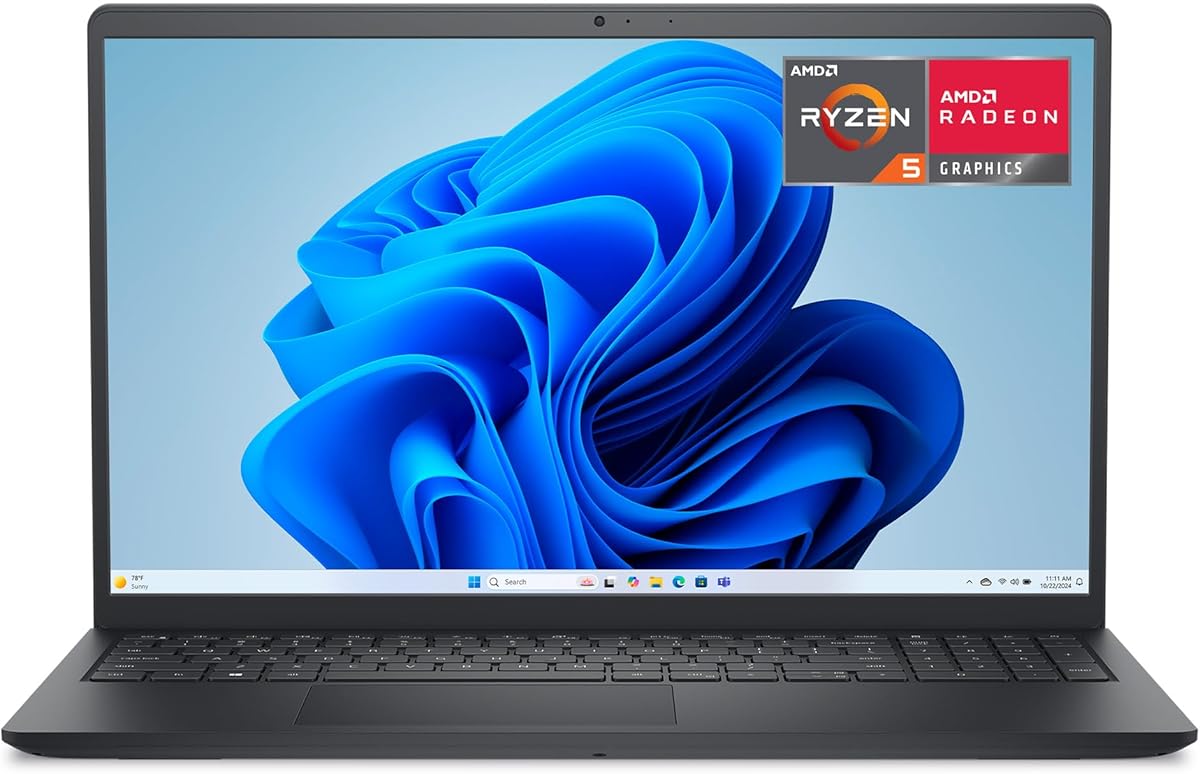


This HP model delivers exceptional value for entry-level Enscape users requiring basic rendering capabilities. Its 17.3 inch FHD screen provides ample workspace for detailed architectural views and client presentations.
We may earn a commission when you buy through this link, at no additional cost to you.
The AMD Ryzen 5 processor paired with 16GB RAM ensures smooth multitasking during moderate project workflows. Preloaded Windows 11 and Office 365 support immediate productivity upon unboxing without extra software installation.
While integrated graphics limit high-end 3D model handling the system handles smaller renders efficiently. The numeric keypad is a practical addition for professionals needing rapid data entry during design reviews.
Ideal for students or consultants needing a reliable portable workstation under budget constraints. Verify current pricing to ensure it meets your specific performance expectations before purchasing today.
The 17.3 inch FHD anti-glare display offers vivid colors and sharp details essential for accurate design reviews and client presentations.
Windows 11 and Office 365 for Web enable seamless document editing and task management directly from the browser or desktop.
We may earn a commission when you buy through this link, at no additional cost to you.
The KAIGERR light gaming laptop excels in multitasking environments with its robust AMD Ryzen 7430U processor. Users benefit from 16GB RAM allowing multiple Enscape instances or reference files to run simultaneously.
We may earn a commission when you buy through this link, at no additional cost to you.
Its 512GB NVMe SSD ensures rapid boot times and quick project loading which is crucial for tight deadlines. The thin bezel FHD display maximizes screen space enhancing visibility during complex rendering tasks.
Performance is solid for moderate architectural visualizations though heavy textures might challenge integrated Radeon graphics. Connectivity options like HDMI and Type-C expand peripheral support for external monitors or storage.
A compelling choice for freelancers balancing cost with performance needs. Confirm compatibility with your specific Enscape version before finalizing your purchase decision.
The 512GB M.2 NVMe SSD delivers lightning-fast boot speeds and rapid application loading essential for time-sensitive project work.
WiFi 6 and Bluetooth 5.2 provide strong wireless signals and reliable transmission speeds for seamless cloud file transfers.
We may earn a commission when you buy through this link, at no additional cost to you.
This HP 14 inch model offers an accessible entry point for basic design documentation and client reviews. It handles lightweight tasks well though heavy Enscape rendering requires external tools or simpler projects.
We may earn a commission when you buy through this link, at no additional cost to you.
The compact form factor makes it ideal for travel while the 14 inch HD display ensures clear viewing. Windows 11 and Office 365 support standard workflow requirements without additional software costs.
Users should note the 4GB memory and 128GB storage may need external drives for larger files. It suits those focusing on 2D plans or needing a secondary device for presentations.
A practical option for students needing a reliable machine for schoolwork and basic drafts. Check current inventory as stock fluctuates frequently for this budget model.
Multiple ports including USB Type-C and HDMI allow easy connection to external displays or projectors during client meetings.
HP True Vision HD camera with AI Noise Reduction ensures clear video calls essential for remote collaboration sessions.
We may earn a commission when you buy through this link, at no additional cost to you.
The HP OmniBook 3 14 inch delivers premium visual fidelity with its 2K OLED display perfect for color-accurate presentations. Snapdragon X X1 processor provides AI capabilities that streamline workflow tasks without compromising battery efficiency.
We may earn a commission when you buy through this link, at no additional cost to you.
Users enjoy up to 41 hours of battery life ensuring all-day productivity during client site visits or remote work sessions. The Adreno GPU offers optimized power consumption for light 3D tasks and media playback.
Windows 11 Home and Copilot+ PC features introduce intelligent assistants for organizing meetings and summarizing notes quickly. Premium build quality combines durability with a sleek silver finish suitable for professional settings.
Ideal for design professionals valuing display quality and portability. Confirm software compatibility with Snapdragon processors before purchase to avoid driver issues.
Up to 41 hours of battery life ensures uninterrupted work sessions without needing frequent recharges during travel.
Copilot+ PC experiences offer intelligent assistants that automate note-taking and meeting summaries for enhanced efficiency.
We may earn a commission when you buy through this link, at no additional cost to you.
The Lenovo V15 Gen 4 Business model balances performance and reliability for professional design workflows. Its Intel Core i5-13420H processor handles moderate rendering tasks efficiently paired with 16GB RAM.
We may earn a commission when you buy through this link, at no additional cost to you.
Windows 11 Pro offers advanced security and collaboration features essential for enterprise environments. The inclusion of RJ45 ensures stable network connections crucial for large file transfers without Wi-Fi latency.
The numeric keypad and full-size keyboard support rapid data entry during client reviews. Build quality ensures durability for daily transport to job sites or conference meetings.
A top recommendation for consultants needing stable business-grade hardware. Verify thermal management capabilities for sustained high-performance sessions before purchasing.
Windows 11 Pro includes robust security tools ensuring sensitive client data remains protected during remote work sessions.
RJ45 Ethernet port provides reliable wired internet speeds essential for large file uploads and stable video conferencing.
We may earn a commission when you buy through this link, at no additional cost to you.
This HP 17 inch laptop excels in storage capacity offering 1.5TB total space with an included portable SSD for project backups. 32GB RAM ensures smooth multitasking during complex Enscape rendering sessions.
We may earn a commission when you buy through this link, at no additional cost to you.
The AMD Ryzen 5 7430U processor delivers robust performance for handling multiple architectural models efficiently. A large 17.3 inch FHD display enhances visibility for detailed design work and client presentations.
Ideal for professionals needing extensive local storage without relying solely on cloud services. The portable SSD allows quick data transfer between devices for collaborative projects.
Recommended for users managing large project archives or multiple client files. Verify shipping weight before travel to ensure portability meets your needs.
Total 1.5TB storage with included portable SSD provides ample space for extensive project archives and frequent backups.
32GB DDR4 RAM enables seamless multitasking allowing multiple design applications and browser tabs to run smoothly.
We may earn a commission when you buy through this link, at no additional cost to you.
The HP OmniBook 3 16 inch features a vivid 2K touchscreen enabling intuitive navigation and detailed design reviews. Its AMD Ryzen 3 30 processor supports everyday tasks and moderate rendering efficiently.
We may earn a commission when you buy through this link, at no additional cost to you.
Users benefit from AI noise reduction during video calls ensuring clear communication with remote teams. The Copilot key offers quick access to AI-powered assistance for managing tasks and summaries.
While 8GB RAM limits extreme multitasking the 256GB SSD ensures rapid file access. Battery life supports a full workday with HP Fast Charge providing quick top-ups during breaks.
Ideal for designers prioritizing touch interaction and color fidelity. Confirm memory requirements for your specific workflow before deciding.
2K IPS touchscreen delivers lifelike color reproduction and wide viewing angles perfect for interactive design reviews.
HP Fast Charge restores battery from 0 to 50% in approximately 45 minutes keeping work sessions uninterrupted.
We may earn a commission when you buy through this link, at no additional cost to you.
This Dell model focuses on ergonomic design with lifted hinges ensuring comfortable typing angles during long design sessions. Adaptive thermals optimize performance based on usage preventing overheating during intensive tasks.
We may earn a commission when you buy through this link, at no additional cost to you.
Ryzen 5 processor provides reliable efficiency for daily workloads and moderate rendering. Dell's 1 Year Onsite Service offers peace of mind for business users needing quick hardware support.
The numeric keypad aids quick calculations while the HD webcam ensures clear video conferences. Build quality supports consistent performance even when used on laps during travel.
A practical choice for users valuing comfort and reliable service support. Check thermal performance under heavy workloads before finalizing purchase.
Lifted hinges provide ergonomic typing angles reducing wrist strain during extended design and documentation sessions.
Adaptive thermals adjust power and cooling based on usage ensuring smooth performance whether at desk or on lap.
We may earn a commission when you buy through this link, at no additional cost to you.
The Dell 16 Laptop offers expansive FHD+ visuals ideal for detailed architectural drawings and client reviews. Intel Core 7 150U processor balances performance and efficiency for sustained workloads.
We may earn a commission when you buy through this link, at no additional cost to you.
16GB RAM ensures smooth multitasking while Dell ComfortView Plus reduces blue light for eye comfort. Adaptive thermals optimize cooling ensuring consistent performance during long rendering sessions.
Designed for professionals needing large screen real estate without compromising portability. Full HD+ aspect ratio provides immersive viewing for detailed design work and media consumption.
Ideal for users prioritizing screen size and visual quality. Verify battery requirements for all-day use before purchasing.
16 inch FHD+ display with 16:10 aspect ratio delivers immersive viewing experience for detailed architectural workflows.
Dell ComfortView Plus reduces harmful blue light emissions preserving true-to-life color for prolonged screen time.
We may earn a commission when you buy through this link, at no additional cost to you.
The HP OmniBook 3 17.3 inch delivers excellent value with a large display and ample storage at an accessible price point. Its Ryzen 3 30 processor handles daily tasks efficiently supporting moderate design work.
We may earn a commission when you buy through this link, at no additional cost to you.
Users enjoy AI noise reduction and Copilot key for enhanced productivity during meetings. The 512GB NVMe SSD ensures fast file access for project management and rendering tasks.
Battery life supports full workdays while the Full HD IPS display offers vibrant visuals for reviews. Ideal for consultants needing a large screen without investing in premium hardware.
Recommended for those seeking cost-effective productivity tools. Verify rendering performance limits before committing for intensive workflows.
17.3 inch Full HD display offers crystal-clear visuals and wide viewing angles at a competitive price point.
512GB NVMe SSD provides fast speed and efficient storage for rapid project loading and file transfers.
We may earn a commission when you buy through this link, at no additional cost to you.
Selecting the right laptop for Enscape requires balancing performance and budget. This guide outlines critical factors to evaluate for optimal rendering workflows.
A strong multi-core CPU like Intel Core i5 or AMD Ryzen 5 ensures smooth rendering and multitasking capabilities during project work.
Prioritize processors with high turbo frequencies to handle complex architectural models efficiently.
16GB RAM is the recommended standard for running Enscape alongside other design tools without performance bottlenecks or lag.
Avoid models with 8GB RAM for primary design work to prevent slowdowns during heavy rendering tasks.
NVMe SSDs offer faster boot times and project loading speeds essential for meeting tight deadlines and efficient workflows.
Aim for at least 512GB storage to keep project files and assets easily accessible without external drives.
Full HD resolution with accurate color reproduction is crucial for viewing architectural details and client presentations effectively.
Larger screens like 16 or 17 inches provide more workspace but reduce portability during travel.
Dedicated graphics cards significantly outperform integrated GPUs for real-time rendering and complex 3D model handling.
If budget allows choose models with NVIDIA RTX or AMD Radeon dedicated GPUs for better visualization quality.
Long battery life ensures uninterrupted work during client site visits or remote meetings without frequent recharging.
Look for devices offering 8+ hours of usage for reliable all-day productivity on the go.
Lighter laptops under 4 lbs are easier to carry for consultants who frequently travel to different project sites.
Balance screen size with weight to ensure comfort during travel without sacrificing workspace.
Multiple USB ports HDMI and Ethernet support connecting external monitors or storage drives for collaborative work.
Ensure the device has enough USB Type-C ports for modern peripherals and docking stations.
Keep your laptop on a flat hard surface to ensure proper airflow and prevent overheating during rendering sessions.
Regularly update graphics drivers and Enscape software to access the latest performance improvements and bug fixes.
Use a cooling pad during intensive tasks to maintain optimal temperatures and extend the hardware lifespan significantly.
You need at least 16GB RAM for smooth performance when running Enscape alongside other design tools like SketchUp or Revit. 8GB may work for basic renders but often leads to slowdowns during complex projects. Always check project size requirements before purchasing your laptop.
While integrated graphics can run Enscape for small projects a dedicated GPU like NVIDIA RTX or AMD Radeon ensures smoother real-time rendering. Professional work benefits greatly from dedicated graphics to handle large textures and complex models efficiently. Budget constraints may dictate choices.
Multi-core processors like Intel Core i5 or AMD Ryzen 5 provide excellent performance for rendering tasks and multitasking. High turbo frequencies help speed up complex rendering processes significantly. Look for newer generations for better efficiency and support.
Enscape requires specific GPU drivers not typically supported on tablets making traditional laptops the only viable option. Convertibles with dedicated graphics exist but are often expensive and less powerful than standard laptops. Use a tablet only for viewing completed renders.
Windows 11 provides the latest driver support and optimization features essential for modern rendering software. While Windows 10 still works upgrading ensures better compatibility and security. Check Enscape system requirements before deciding.
Regularly clean dust from vents to prevent overheating and keep your drivers updated for optimal compatibility. Avoid running too many background apps during rendering to maintain speed and stability. Consider SSD upgrades if storage becomes slow.
The HP 17 inch Business Laptop and Lenovo V15 Gen 4 stand out for balancing performance and value across various professional needs.
Prioritize RAM and storage speed when building your design workstation to ensure smooth rendering and efficient project management workflows.
Prices change frequently so always check current listings and promotions before purchasing to secure the best deal available today.