
ARCTIC Liquid Freezer III Pro 420
4.4Editor score
High performance at low cost
Integrated cable management system
Natively offset mounting design
Finding the right cooling solution for high-performance processors is crucial for stability. The 420mm Aio Liquid Coolers category offers top-tier thermal performance for demanding workloads and gaming setups.
We compared ten leading models based on pump efficiency, radiator design, fan noise, and feature sets. Our analysis focuses on real-world cooling potential, build quality, and value for money across different budgets.
Each pick highlights unique strengths like OLED displays, quiet operation, or budget-friendly pricing. Prices and availability change frequently so check current listings before purchasing your next cooling upgrade.
4.4Editor score

4.6Editor score

4.4Editor score
As an Amazon Associate we earn from qualifying purchases.
Here is a side-by-side look at all ten models to help you compare features like radiator thickness, fan type, and unique capabilities at a glance.


This is a top performer in the 420mm Aio Liquid Coolers category with a 4.6 rating. It features optimized contact pressure and an integrated VRM fan for complete system cooling.
We may earn a commission when you buy through this link, at no additional cost to you.
The P14 PRO fans deliver more power at any speed than the standard P14. The native offset mounting shifts the cold plate to the hotspot for better heat transfer.
While the radiator is thick, the thermal gains are worth it. The integrated cable management hides wires which keeps the build looking clean.
If you want the best balance of cooling and features this model is the clear choice. It delivers exceptional value for high-end builds.
The contact frame ensures even pressure distribution on the CPU die which helps maximize heat dissipation.
The P14 PRO fans are designed to be quieter than standard P14s especially at lower speeds while maintaining high airflow.
We may earn a commission when you buy through this link, at no additional cost to you.
This model offers nearly identical performance to the Pro version but at a lower cost making it ideal for budget conscious builders. It features the same P14 PRO fans and offset mounting technology.
We may earn a commission when you buy through this link, at no additional cost to you.
The cooling performance is excellent thanks to the optimized contact frame and high speed fans. The integrated VRM fan helps keep voltage regulators cool during heavy loads.
While it lacks RGB lighting the functional design is very strong. The cables are well managed which simplifies the installation process.
If you prioritize raw cooling over looks this is the best value option. It delivers top tier thermal performance without the extra cost.
You get the same core cooling tech as the pricier Pro model without the RGB features for a much lower price.
The native offset mounting ensures the cold plate covers the CPU hotspot directly improving heat extraction efficiency.
We may earn a commission when you buy through this link, at no additional cost to you.
As the name suggests this cooler prioritizes silence without sacrificing cooling power. It features a 3-chamber pump design that reduces turbulences significantly for a quieter experience.
We may earn a commission when you buy through this link, at no additional cost to you.
The Silent Wings 4 fans are engineered for high speed yet low noise operation. The dampened and adjustable pump with a 6-pole motor keeps vibration to a minimum.
The performance is incredibly high thanks to the engineered cooling block and wide CPU plate coverage. This design ensures efficient heat transfer even with high heat CPUs.
If silence is your top priority this is the best choice. The build quality and acoustic engineering are top notch for a quiet PC build.
The 3-chamber pump design minimizes internal turbulence which drastically reduces pump noise while maintaining cooling flow.
These fans are designed for virtually inaudible operation even at high speeds thanks to optimized blade and bearing design.
We may earn a commission when you buy through this link, at no additional cost to you.
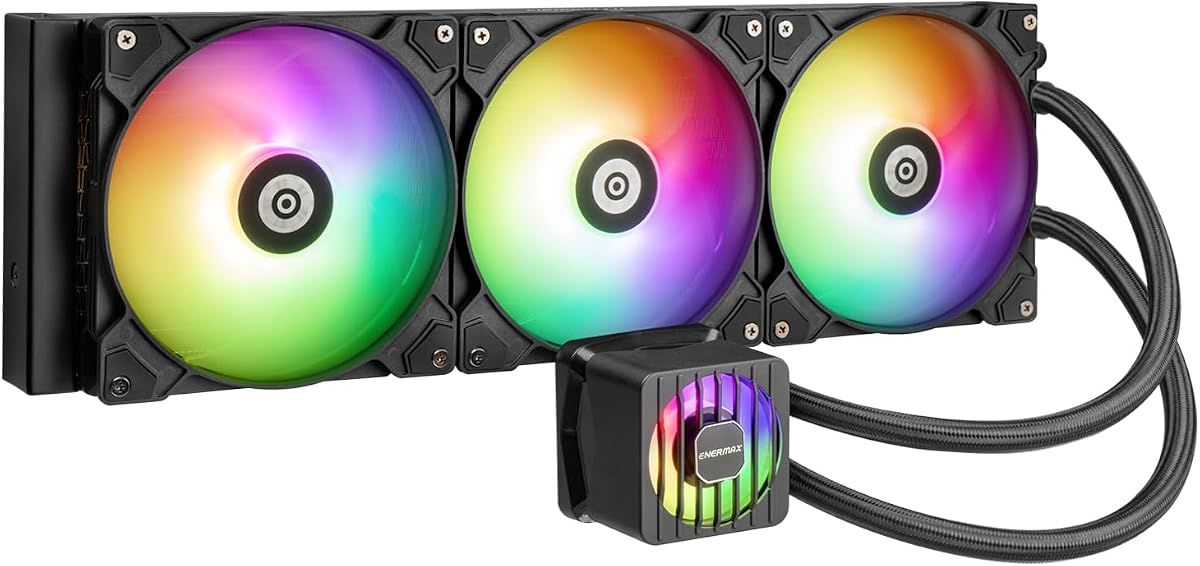
This variant of the Pro model offers similar cooling features with a focus on A-RGB lighting. It uses the same P14 PRO fans and contact frame design for efficiency.
We may earn a commission when you buy through this link, at no additional cost to you.
The integrated VRM fan is a key benefit for stability during high load tasks. The offset mounting ensures better heat transfer by targeting the CPU hotspot directly.
The ARGB lighting adds a nice aesthetic touch to the build. However the price is higher than the non-RGB version which may affect value.
If you want the Pro features with added lighting this is a good option. It balances performance and aesthetics well for modern gaming PCs.
The A-RGB lighting allows for customizable visual effects to match your PC build theme and motherboard setup.
The core cooling tech remains the same as the main Pro model ensuring reliable thermal performance under load.
We may earn a commission when you buy through this link, at no additional cost to you.
This model stands out with its massive 2.72-inch IPS LCD that shows visuals or system stats. It uses a custom designed NZXT turbine pump for superior cooling.
We may earn a commission when you buy through this link, at no additional cost to you.
The display is bright with high resolution and supports 60Hz refresh rate. You can show GIFs or images while monitoring real-time system performance.
Installation is simple with pre-applied thermal paste and tool-free brackets. The RGB Core single-frame fan provides optimal airflow and vibrant lighting.
If you want a showstopper cooler with great performance this is ideal. It combines top cooling with high-end visual customization for enthusiasts.
The 2.72-inch IPS LCD offers crisp visuals and high brightness making it a focal point for any PC case.
The custom NZXT turbine pump delivers high flow rate and head pressure for efficient cooling of heat-prone CPUs.
We may earn a commission when you buy through this link, at no additional cost to you.
This cooler offers strong specs with a K6 liquid pump and large 55.8mm copper base. It fits the latest Intel and AMD sockets with ease.
We may earn a commission when you buy through this link, at no additional cost to you.
The vibrant ARGB diffused CPU block adds visual flair to your build. The pre-installed Squama 2503 fans provide high static pressure for effective heat transfer.
The pump flow rate of 1.5 L/min ensures efficient circulation throughout the loop. This model aims to balance performance and aesthetics for modern rigs.
If you need a capable mid-range option with good features this is a good fit. It supports current sockets and offers solid cooling performance.
The 55.8mm copper base ensures efficient heat absorption from the CPU for improved cooling stability.
The Squama fans are designed with high static pressure to push air through the dense radiator fins effectively.
We may earn a commission when you buy through this link, at no additional cost to you.
This cooler is designed for workstation use with a minimalist design that fits professional aesthetics. It uses Noctua NF-A14 industrial fans for high airflow and low noise.
We may earn a commission when you buy through this link, at no additional cost to you.
The three-phase motor offers excellent cooling capability and quieter operation. The illuminated meter indicates live system load temperatures and fan speeds easily.
The radiator is thicker with larger coolant storage to deliver enhanced cooling performance. The tubing is reinforced and durable for chassis compatibility.
If you need reliability for a professional setup this is a top choice. It delivers robust performance with a focus on build quality and design.
The minimalist design perfectly complements the aesthetics of ProArt-family components for a clean look.
The 450mm reinforced sleeved tubing ensures flexibility and long-term durability during installation and use.
We may earn a commission when you buy through this link, at no additional cost to you.
This model offers a 2.1-inch LCD on the water block for custom visuals. It syncs with major RGB software for cohesive lighting effects.
We may earn a commission when you buy through this link, at no additional cost to you.
The high-performance copper base accelerates heat conductivity effectively. The reliable pump enables maximum water circulation to keep the copper plate cool.
The new design gives an industrial look with a 480×480 resolution. You can show off 16.8M color videos or photos easily.
If you want an LCD cooler at a lower cost this is a good option. It balances visual features with solid cooling hardware for most users.
The 2.1-inch LCD display offers high resolution and custom color control for personalizing your PC look.
Sync support with ASUS Aura Sync and others allows you to match lighting across all system components.
We may earn a commission when you buy through this link, at no additional cost to you.
This cooler features a massive 3.95-inch square LCD display for showing off pictures and system data. It uses MAGForce 2.0 magnetic connections for easy fan linking.
We may earn a commission when you buy through this link, at no additional cost to you.
The SWAFAN EX fans deliver high static pressure and airflow at 500 to 2000 RPMs. Included reverse blades let you change airflow direction while keeping LEDs visible.
The improved contacts prevent signal drop out from misalignment. This design ensures a stable connection between fans without complex wiring.
If you want maximum features and visual impact this is a strong pick. It offers high pressure and large display options for custom builds.
MAGForce 2.0 uses magnetic connections to daisy chain fans which simplifies installation and improves stability.
Swappable fan blades allow you to reverse airflow while keeping the LED side visible for better aesthetics.
We may earn a commission when you buy through this link, at no additional cost to you.
This model includes a 60mm VRM fan for dedicated cooling of voltage regulators. The pump can reach speeds up to 3000RPM for high performance.
We may earn a commission when you buy through this link, at no additional cost to you.
The 38mm thick radiator provides enhanced cooling performance with larger coolant storage. The pressure-optimized FDB PWM fans ensure silent operation.
The magnetic detachable pump cover can be rotated 90 degrees for customisation. Cable management is easy with tube clips and a daisy-chained design.
If you need VRM cooling and solid thermal performance this is a great option. It offers high-speed pumps and thick radiators for stable systems.
The integrated 60mm VRM fan helps lower the temperature of voltage converters for reliable performance.
The 38mm thick radiator stores more coolant and enhances cooling performance under high thermal loads.
We may earn a commission when you buy through this link, at no additional cost to you.
Selecting the right 420mm Aio Liquid Coolers requires checking specs like pump speed, radiator thickness, and fan noise to match your build needs.
Radiator thickness affects cooling capacity. Thicker radiators hold more coolant and allow better heat exchange but require more case clearance. Look for 38mm to 40mm thickness for optimal thermal performance.
Choose a radiator thickness that fits your case while maximizing heat dissipation potential.
Fan noise levels are measured in decibels. PWM fans allow speed control for better silence at low loads. High static pressure fans help push air through dense radiators effectively.
Prioritize quiet PWM fans with high pressure to balance noise and cooling.
Pump flow rate and chamber design impact cooling and noise. Multi-chamber pumps reduce turbulence and noise while maintaining flow. High RPM pumps improve heat transfer but may increase sound.
Choose a pump with low noise and sufficient flow rate for your system load.
Ensure the cooler supports your CPU socket like LGA1851 or AM5. Check the mounting kit compatibility for proper fit and pressure on the CPU die.
Verify socket support before buying to avoid installation issues.
RGB lighting and LCD displays add visual appeal. Some models show system stats on the pump block. Decide if you want these extras or just plain cooling for your build.
Match the aesthetic features to your PC build style and budget.
VRM cooling fans help cool voltage regulators near the CPU. Models with integrated VRM fans offer complete system cooling without extra mounts. This ensures stability during high loads.
Select a cooler with VRM fans if you use high-performance CPUs.
Integrated cable management simplifies installation. Models that hide PWM cables in hoses reduce clutter. Look for easy-to-manage cables for a clean build inside your case.
Prioritize models with clean cable management to keep your case organized.
Pre-applied thermal paste speeds up installation. Some models include extra tubes for reapplication. Check if the paste is high quality for good thermal conductivity on contact.
Choose models with pre-applied paste for a smoother setup experience.
Ensure your PC case can fit a 420mm radiator. Measure top or front panel dimensions to confirm clearance for the thick radiator and fans.
Install the cold plate securely on the CPU socket and attach the VRM fan if included. Route the cables neatly to avoid obstruction by other hardware.
Monitor temperatures using software to adjust fan speeds. Periodically check for dust buildup on fans to maintain quiet cooling and airflow.
A 420mm Aio Liquid Cooler uses water cooling to remove heat from the CPU with a 420mm radiator. It includes a pump cold plate and three 140mm fans to dissipate heat efficiently.
Most models operate between 20 and 35 decibels at typical loads. Fans with noise ratings under 25 dB are considered quiet for daily use and gaming.
You may not need extra fans if your case has good airflow. A 420mm radiator with high pressure fans handles CPU cooling without additional support.
Many models support Intel LGA1851 sockets natively. Check the product page for compatibility lists to ensure proper mounting hardware is included.
ARGB allows individual LED control for more color options. RGB uses standard color cycles. ARGB models offer better integration with modern motherboard software.
A VRM fan cools voltage regulators to prevent overheating during high loads. It is beneficial for overclocking or running power-intensive CPUs.
The ARCTIC Liquid Freezer III models offer top performance with integrated VRM fans. The NZXT Kraken Elite adds a large LCD for visual customization.
Focus on radiator thickness and fan noise to match your case and build. High static pressure fans help push air through dense radiators for better cooling.
Always verify current availability and pricing before purchasing. Prices change often so check listings for the latest deals on these coolers.