
AZERON Gaming Keypad Cyborg ll
4.3Editor score
Hall Effect Analog Thumbstick
30 Programmable Inputs
Adjustable Ergonomic Fit
This guide compares the top ten left handed gaming keyboards featuring unique layouts, ergonomic designs, and advanced tech for competitive players and
Left handed gaming keyboards offer a unique solution for players who want to keep their mouse on the right while using a keypad on the left. These devices often feature programmable keys, ergonomic shapes, and specialized switches to enhance performance during intense gaming sessions or daily tasks.
We evaluated ten distinct models ranging from affordable mini keypads to high-end wireless mechanical boards. Our comparison considers build quality, switch technology, customization options, and overall comfort to help you find the right tool for your specific setup and gaming style.
Each pick below highlights key strengths, potential trade-offs, and ideal user scenarios. Please note that availability and pricing fluctuate frequently on retailer platforms, so always verify current stock and deals before making your final purchase decision.
4.3Editor score

4.6Editor score

4.4Editor score
The following table provides a side-by-side overview of the ten selected products, highlighting their core specifications and unique selling points to simplify your decision-making process.



The RK ROYAL KLUDGE L98 Wireless stands out as the most versatile option for left handed gamers who still want a full keyboard experience. It features a unique southpaw layout that moves the numpad to the left side, freeing up desk space for mouse movement. With a high rating and robust build quality, it bridges the gap between productivity and performance effectively.
We may earn a commission when you buy through this link, at no additional cost to you.
Its gasket-mounted structure combined with PBT keycaps provides a cushioned typing feel that reduces fatigue during long sessions. The five-layer sound dampening ensures a smooth and quiet experience. Connectivity is seamless with support for 2.4GHz wireless, Bluetooth 5.0, and USB-C wired modes. The massive 8000mAh battery supports over 300 hours of use without RGB.
While it is larger than dedicated mini keypads, the extra keys offer more utility for non-gaming tasks. The hot-swappable PCB allows users to customize switch types easily. Some users might find the layout takes adjustment compared to standard keyboards. However, the ergonomic benefits for right-handed mouse users make it a compelling choice for mixed-use setups.
This keyboard is ideal for players who want a dedicated left-handed numpad without sacrificing typing comfort. It suits those looking for wireless flexibility and long battery life. We recommend it for anyone wanting a balanced solution that works for both gaming and office work. Check current availability to ensure you get the latest revision.
Moving the numpad to the left allows right-handed users to keep their mouse close while accessing numbers easily without leaning over the keyboard.
The gasket structure isolates the plate from the case, delivering a softer impact and reduced resonance that enhances overall typing comfort.
We may earn a commission when you buy through this link, at no additional cost to you.
The RedThunder One Handed Gaming Keyboard offers an entry-level solution for gamers wanting a separate left-handed keypad. It features 35 keys with anti-ghosting to ensure accurate input during fast-paced games. The RGB lighting adds a stylish touch without needing complex software. Its small footprint makes it easy to fit on crowded desks.
We may earn a commission when you buy through this link, at no additional cost to you.
Macro recording is accessible through simple key combinations, allowing users to bind complex commands to single keys. The ergonomic design includes a wrist rest to minimize strain. Plug-and-play compatibility with various operating systems means you can start using it immediately. The affordable price makes it an accessible choice for beginners.
Build quality is standard for its price range, so it may not withstand heavy years as well as premium models. Customization is limited compared to software-driven devices. However, for casual gamers or those on a tight budget, it provides solid functionality. The lack of drivers simplifies setup significantly.
We recommend this device for students or casual players needing basic macro support. It works well for simple gaming tasks where high-end features are unnecessary. The portability is a bonus for those who travel frequently. Verify stock before ordering as availability can change quickly on retail platforms.
Users can record sequences using FN keys to execute complex moves with a single press, streamlining gameplay for titles that require rapid inputs.
The portable design ensures maximum desk space for mouse movement, which is essential for low-sensitivity gamers in FPS titles.
We may earn a commission when you buy through this link, at no additional cost to you.
The AZERON Gaming Keypad Cyborg ll is a high-end device designed to replace the keyboard entirely for left-hand use. Its standout feature is the Hall Effect analog thumbstick, which offers precision movement and drift control. With 30 programmable keys, it supports complex mappings for MMOs and RPGs. The 3D printed build allows for extensive customization.
We may earn a commission when you buy through this link, at no additional cost to you.
The software enables deep customization of thumbstick settings, RGB lighting, and keybinds. You can store multiple layouts directly on the device. The ergonomic shape adapts to different hand sizes, ensuring comfort over long sessions. It functions as both a keyboard and a mouse input source. This versatility makes it unique in the market.
The price is significantly higher than standard keypads, reflecting its advanced technology. The setup process can be complex for new users. However, for competitive gamers seeking a unique edge, the investment pays off. The modular design allows for future upgrades without buying a new unit.
This keypad is best for enthusiasts who want maximum control and customization. It suits players in genres like MOBA or MMORPGs where key density matters. The analog stick provides an advantage in games supporting 360-degree movement. Check if your favorite games are compatible with the analog features before purchasing.
Magnetic sensors in the thumbstick prevent physical wear and offer infinite adjustability for dead zones and sensitivity settings.
Multiple control layouts can be stored on the device, allowing quick switching between game modes or specific character builds.
We may earn a commission when you buy through this link, at no additional cost to you.
The AZERON Keyzen offers a robust mechanical experience with a Hall-effect joystick. It features 32 fully mappable keys and uses genuine Cherry MX switches. The design includes adjustable ergonomic features to fit various hand sizes comfortably. The DSA keycaps provide a uniform profile that aids in reaching different zones quickly.
We may earn a commission when you buy through this link, at no additional cost to you.
Users can choose from different switch types to match their tactile preferences. The joystick offers drift-free control for movement in games. Six onboard profiles support quick changes during gameplay. The 3D-printed construction allows for modular replacements of parts if needed. This ensures longevity and adaptability over time.
The price is comparable to the Cyborg II but focuses more on mechanical switch quality. It might require a learning curve to set up macros and layouts. However, the build quality is excellent. It is a strong choice for those who prefer mechanical feedback over membrane keys.
Ideal for gamers who want a premium mechanical keypad. It works well for titles needing precise movement and many macros. The ergonomic design helps reduce strain. Verify your hand size fits the recommended length before buying to ensure maximum comfort.
Selecting from Red, Brown, or Blue switches lets users tailor the feedback to their specific gaming or typing preferences.
Multiple palm rest options allow users to find the perfect height and angle to maintain a healthy wrist posture.
We may earn a commission when you buy through this link, at no additional cost to you.
The AJAZZ AK029 is engineered for competitive FPS players needing rapid response times. It uses Hall Effect magnetic switches with rapid trigger technology for fast key resets. The 8KHz polling rate ensures minimal latency during intense matches. The compact 29-key layout maximizes mouse space on your desk.
We may earn a commission when you buy through this link, at no additional cost to you.
SOCD and DKS technologies allow for advanced movement techniques like instant counter-strafing. The 5-layer acoustic structure reduces noise while maintaining a solid feel. RGB lighting adds visual flair without distraction. The aluminum build provides durability and a premium touch. It is a specialized tool for high-performance gaming.
Since it is wired, mobility is limited compared to wireless options. The small key count means fewer macros compared to larger keypads. However, for pure FPS performance, the features are unmatched. The price is reasonable for the tech included. This device is built for speed and accuracy above all else.
Best for serious FPS gamers who need every advantage in movement. It supports rapid direction changes and fast inputs. The ergonomic wrist rest helps maintain comfort. Ensure your setup supports the polling rate and driver requirements before purchasing.
Keys reset instantly upon release rather than waiting for a fixed reset point, allowing for quicker repeated inputs.
A premium aluminum alloy plate ensures the keypad remains stable even during aggressive key presses and movements.
We may earn a commission when you buy through this link, at no additional cost to you.
This ergonomic keyboard is designed for professionals dealing with heavy data entry. It features a patented natural shape to improve posture and reduce shoulder strain. The left-handed numeric keypad allows efficient number entry while keeping the right hand on the mouse. It supports Windows and Mac systems for broad compatibility.
We may earn a commission when you buy through this link, at no additional cost to you.
The 8 multimedia hotkeys provide quick access to common functions. The laser-inscribed keys ensure durability and clear visibility. While it offers essential comfort features, it lacks gaming-specific enhancements like RGB or high polling rates. The USB and PS/2 interfaces ensure it works with older systems too. It is a solid tool for office productivity.
For gamers, this device is too basic. The layout focuses on typing efficiency rather than rapid key presses. However, for accountants or data specialists, it addresses physical strain issues. The ergonomic design promotes a healthier posture during long workdays. Verify OS compatibility for your specific version.
The unique shape encourages a more natural alignment of the arms and shoulders to prevent repetitive strain injuries.
Moving the numpad to the left keeps hands closer together, reducing reach and increasing data entry speed.
We may earn a commission when you buy through this link, at no additional cost to you.
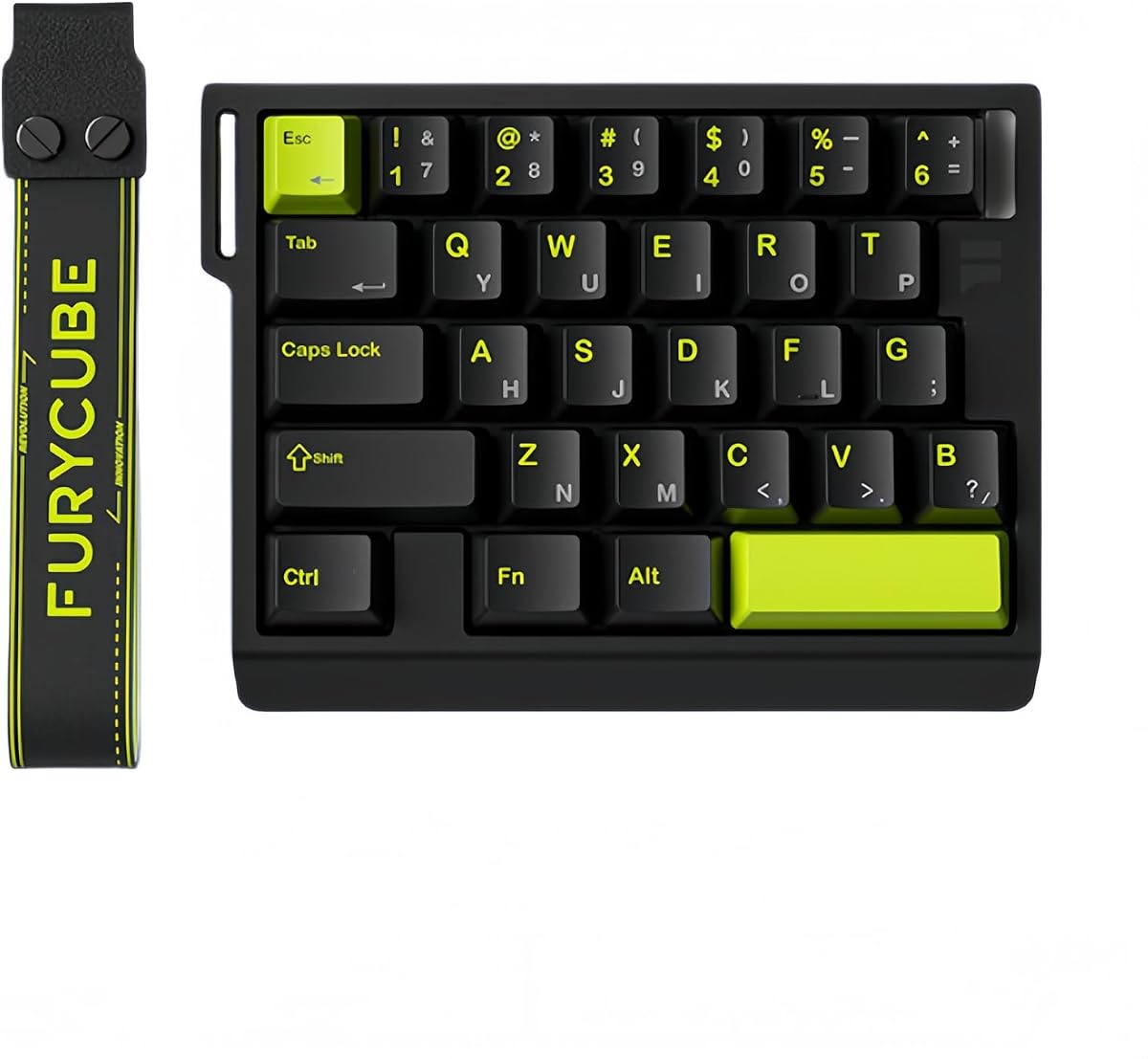
The Keychron C0 HE brings rapid trigger technology to a versatile one-handed keypad. It supports Windows and macOS through a web-based configurator, removing the need for heavy drivers. The Hall Effect switches allow precise actuation adjustments. With 35 keys, it balances size and function well for MMO or MOBA players.
We may earn a commission when you buy through this link, at no additional cost to you.
Users can customize per-key RGB lighting directly in the browser. The 8K polling rate ensures responsiveness for competitive titles. It serves well for creators who need streaming shortcuts. The compact design leaves room for mouse movement. Setup is straightforward for those with internet access.
Relying on a web-based tool means you need an internet connection for configuration changes. The lack of wireless connectivity limits portability. However, the ease of cross-platform use is a major benefit. It is a modern solution for users with multiple systems. Check your browser requirements before using the configurator.
Configure maps and lighting directly in your browser for easy switching between Windows and Mac environments.
Streamers can assign OBS commands and push-to-talk shortcuts to streamline their broadcasting workflow efficiently.
We may earn a commission when you buy through this link, at no additional cost to you.
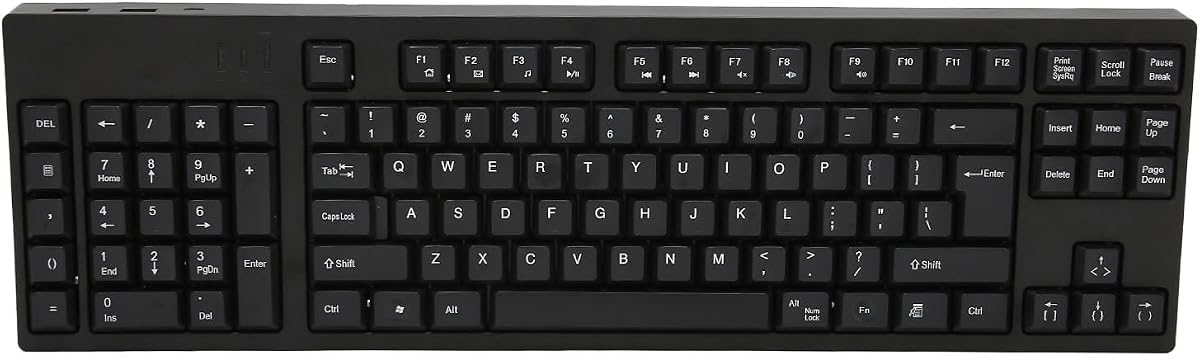
This 109-key model provides a complete keyboard experience with a left-sided numpad. It eliminates the need to reach across a standard keyboard for numbers. The plug-and-play nature makes it easy to use without drivers. It includes two extra USB ports for peripherals. The ergonomic layout helps reduce fatigue during extended use.
We may earn a commission when you buy through this link, at no additional cost to you.
The Micro USB connection offers reliable wired stability. It is designed for business and accounting tasks where number entry is frequent. The ABS material ensures durability for daily typing. Users praise its comfort and convenience. While it lacks gaming features, it is perfect for office efficiency.
Micro USB is an older standard, but sufficient for stationary setups. The lack of RGB or macro software is expected for this type. The perfect rating reflects high satisfaction with its basic function. It is a practical choice for those prioritizing ergonomics over gaming specs. Check if Micro USB fits your system ports.
With 109 keys, this keyboard includes all standard functions plus a separate left numpad for balanced work.
Two additional USB interfaces allow you to connect mice or drives without plugging into the computer directly.
We may earn a commission when you buy through this link, at no additional cost to you.
The FKZ M30HE offers a unique mix of magnetic switches and hot-swap capabilities. Users can change switches without soldering to adjust tactile feedback. The actuation point is adjustable from 0.1 to 3.4 mm. North-facing LEDs ensure better visibility of keycaps. It supports 8K polling for low latency.
We may earn a commission when you buy through this link, at no additional cost to you.
The web driver allows for mapping macros and adjusting lighting effects. Rapid trigger support aids in fast-paced gaming. The compact 30-key size keeps your desk clear. While it has a lower rating than others, its features appeal to enthusiasts. The adjustable actuation lets you fine-tune sensitivity per key.
Hot-swap adds versatility but requires buying extra switches. The web-based setup might take time to configure. It is a good choice for those wanting to experiment with magnetic tech without paying premium prices. Check the software requirements to ensure it runs smoothly on your PC.
Swap switches instantly to experiment with different feels without needing advanced soldering skills or tools.
LEDs placed on top of the switch shine directly up through the keycaps for brighter and clearer colors.
We may earn a commission when you buy through this link, at no additional cost to you.
A4tech offers a dedicated left-handed keyboard designed for accounting and business use. It features ergonomic design to reduce shoulder strain and improve posture. The 8 multimedia hotkeys allow easy access to volume and browser functions. It is a practical solution for those spending hours typing daily. Wired USB ensures a stable connection.
We may earn a commission when you buy through this link, at no additional cost to you.
The focus is on eliminating repetitive strain injuries during long workdays. It lacks RGB or fast response times, keeping it professional and affordable. The layout helps keep hands in a natural position. It is suitable for data entry roles where comfort is priority. The build is functional and straightforward.
Not suitable for gaming due to slow response times. The design prioritizes long-term health over rapid inputs. It is a solid budget choice for office work. Ensure your system matches the USB standard. Check reviews for long-term durability expectations before purchasing.
Designed to reduce repetitive strain and carpal tunnel risks by maintaining a natural hand position.
Basic plug and play operation ensures compatibility with standard office systems without complex setup.
We may earn a commission when you buy through this link, at no additional cost to you.
Choosing a left handed gaming keyboard depends on balancing specific game needs with desk space and ergonomic comfort.
The number of keys ranges from 29 to over 100 depending on whether you want a mini keypad or full keyboard. Mini keypads save space for your mouse but limit macro options. Full layouts offer utility for work but take up more desk real estate.
Select a layout that fits your gaming style and desk size to ensure you have enough keys without clutter.
Mechanical, magnetic, and membrane switches offer different feel and speed. Magnetic switches offer precise adjustable actuation and are ideal for competitive games. Mechanical switches provide tactile feedback. Membrane switches are softer and quieter.
Prioritize magnetic or mechanical switches for gaming to reduce latency and increase accuracy during key presses.
Left handed layouts are designed to place the numpad or keypad on the left side to free the right hand for the mouse. Look for wrist rests and adjustable palm rests to maintain a healthy posture. Poor ergonomics can lead to strain over time.
Choose models with adjustable components to match your hand size and wrist angle comfortably.
Wired connections offer zero latency and reliability. Wireless options provide flexibility for cleaner setups but may have battery concerns. Check for dual mode support if you need both. Ensure Bluetooth works with your PC if wireless is required.
Wired is best for competitive play while wireless suits tidy desk setups.
Software determines how much you can remap keys and create macros. Some tools use web-based configuration for cross-platform support. Others require installing drivers on Windows or Mac. Check if the software allows profile storage on the device.
Choose devices with easy software that supports your operating system to avoid setup issues.
Polling rate determines how often the PC receives input. Higher rates like 8KHz mean faster response times. Standard rates are 125Hz or 1000Hz. Competitive FPS players benefit from high polling rates.
Look for higher polling rates if you play fast-paced games requiring precise movement.
Materials like aluminum or reinforced plastic ensure durability. Hot-swappable PCBs allow you to replace switches later. Check for robust cable connections and solid keys that do not flex.
Invest in sturdy materials that can withstand frequent intense usage over years.
Prices vary from basic mini keypads to high-end ergonomic devices. Determine how much you need for your tasks. Budget options may lack advanced switches but offer good function.
Balance cost with the features you truly need to avoid overspending on unused tech.
Start by connecting the device via USB or Bluetooth and installing any required software. Map your most used keys to convenient positions. Configure macros if supported for complex actions.
Clean the keys regularly using compressed air to remove dust. Wipe the surface with a damp cloth to maintain hygiene. Avoid eating near the device to prevent spills.
For wireless models, charge the battery before it drains completely to prolong lifespan. Check for firmware updates periodically to improve performance. Store in a dry place when not in use to protect internal components.
Yes, many of these layouts allow right-handed users to keep their mouse on the right while accessing the keypad or numpad on the left. This setup can improve ergonomics by reducing arm crossing. Some users find the layout improves their workflow and comfort levels.
Most models support both operating systems. However, specific software may require configuration for each platform. Check compatibility before buying to ensure full access to macros and RGB features. Some devices offer cross-platform solutions without extra setup.
Hall Effect switches use magnetic sensors instead of physical contact to detect key presses. This allows for adjustable actuation points and rapid trigger reset. They prevent wear over time and offer faster response for competitive gaming.
Most work with laptops via USB ports. Some may require an adapter if the laptop lacks a standard port. Wireless options offer more flexibility for laptop setups without extra cables. Verify connection types before purchasing.
Some are plug and play for basic typing. Advanced features like RGB or macros usually require drivers. Software-based configurators eliminate the need for installation. Check if your system supports the required software before setup.
Consider your desk space and gaming style. Larger layouts offer more keys while mini ones save space. Measure your area to ensure a proper fit. If you use a mouse often, a compact layout keeps your hand close.
We reviewed ten unique devices ranging from budget mini keypads to advanced ergonomic keyboards. The RK ROYAL KLUDGE L98 led as the top all-rounder while the RedThunder offered great value. The AZERON devices provide high-end customization for serious players.
Prioritize ergonomics and switch type based on your specific gaming needs. Competitive players should look for rapid trigger and high polling rates. Productivity users should focus on comfort and key layouts. Ensure the device supports your operating system fully.
Always check current prices and stock before purchasing as offers change often. These keyboards offer unique advantages for left-handed setups or optimized workflows. Find the model that fits your setup best to improve your gaming experience.