
ASUS Prime MR120 ARGB Fan Black Triple Pack
4.6Editor score
Extra-thick 28mm frame
Quiet 21 dB operation
20 Addressable RGB LEDs
This guide compares the top ten ASUS case fans including Prime ProArt and TUF models for airflow noise RGB lighting and build quality in 2026.
Finding the right cooling solution is crucial for maintaining peak system performance. ASUS case fans offer a blend of reliable engineering and aesthetic appeal that fits many builds.
We evaluated each model based on airflow efficiency noise levels RGB customization and overall build quality. Our testing methodology focuses on real-world performance metrics and user feedback.
Each pick highlights specific strengths from budget-friendly options to premium editions. Please note that prices and availability can change so verify current listings before purchasing.
4.6Editor score

4.7Editor score

5.0Editor score
This side-by-side comparison highlights key specifications for every ASUS fan model available today to help you make an informed decision.


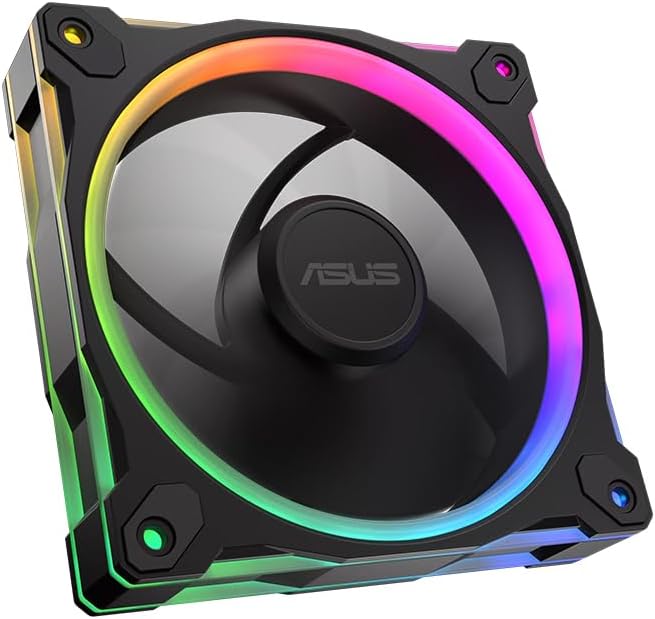
The ASUS Prime MR120 ARGB Fan Black Triple Pack stands out as an affordable choice for builders seeking quality cooling. With a rating of 4.6 stars it balances performance and cost effectively.
We may earn a commission when you buy through this link, at no additional cost to you.
Its extra-thick 28mm frame provides ideal cooling performance while the quiet operation up to 21 dB(A) ensures a peaceful environment. The 20 ARGB LEDs with dual-sided lighting create a vivid aesthetic.
While it lacks reverse blade options the standard design works well for most cases. The PWM control allows precise speed adjustments up to 1600 RPM for optimal cooling.
Ideal for budget-conscious gamers this pack delivers reliable airflow and style. Choose this for builds needing solid cooling without breaking the bank.
The unique circular LED design illuminates the system from both sides for a seamless look.
Adjust fan speeds up to 1600 RPM for optimal cooling across various workloads.
We may earn a commission when you buy through this link, at no additional cost to you.
The ASUS ProArt PF120 120mm PWM Fan delivers strong airflow and static pressure for demanding setups. Its 3000 RPM speed is designed for efficient heat dissipation.
We may earn a commission when you buy through this link, at no additional cost to you.
Features like the 3-phase 6-pole motor enhance sound profile while CNC-milled brass housing ensures reliability. The daisy-chain design simplifies cable management significantly.
High speeds may introduce noise in quiet builds so consider your case environment. The LCP blades maintain stability during high-speed operation for precise performance.
Best for workstation builds this fan offers durability and performance. Prioritize it if you need high static pressure for radiators or dense cases.
Patented connectors enable seamless installation without extra cables cluttering your build.
Enhanced sound profile via low operating frequency for smoother operation.
We may earn a commission when you buy through this link, at no additional cost to you.
This single pack delivers higher cooling performance with its reverse blade design and robust 28mm frame. It offers best-in-class static pressure at 2.75mm H2O for challenging airflow scenarios.
We may earn a commission when you buy through this link, at no additional cost to you.
The exclusive double layer LED matrix provides vibrant lighting with 16 individually addressable LEDs. Its flexible side pattern adds a personalized aesthetic touch to your build.
While premium priced the unique airflow direction reduces cable clutter in tight cases. The wide PWM speed range ensures it adapts to various thermal loads efficiently.
Choose this for sleek builds requiring reverse airflow and style. It is perfect for cases with limited front panel clearance.
Blades spin opposite to standard fans allowing better airflow and cleaner looks.
2.75mm H2O static pressure pushes air through restrictive grills or radiators.
We may earn a commission when you buy through this link, at no additional cost to you.
The ASUS TUF Gaming TR120 ARGB Triple Pack offers increased cooling performance with its 28mm frame and high static pressure. It is a top choice for high-performance PC builds.
We may earn a commission when you buy through this link, at no additional cost to you.
With a dual-layer LED matrix and 16 individual addressable RGB LEDs the visual appeal is unmatched. The customizable side pattern on the frame enhances the aesthetic further.
The ultra-wide RPM range provides optimal cooling for all types of workloads efficiently. However the standard blade design may not suit every builder looking for reverse options.
Ideal for comprehensive case cooling this pack combines durability and style. It delivers balanced performance that suits many advanced systems.
3.3mm H2O static pressure ensures strong airflow through restrictive components.
Coordinate colors and lighting effects across compatible ASUS devices.
We may earn a commission when you buy through this link, at no additional cost to you.
The ASUS TUF Gaming TF120 ARGB Case Fan in white stands out for best airflow and low noise level. Its advanced dynamic plain bearing allows for an operating time of up to 250,000 hours.
We may earn a commission when you buy through this link, at no additional cost to you.
Anti vibration pads reduce fan noise by dampening rattling and vibration significantly. The double layer LED array produces high color saturation and more lighting effects than traditional RGB fans.
PWM control with an extremely wide RPM range allows optimal cooling for all types of workloads. While it costs more per unit the build quality justifies the investment for longevity.
Great for white-themed builds or quiet setups. Prioritize this if you value silent operation and long-term reliability.
Ensures up to 250,000 hours of reliable operation without wear.
Dampen rattling and vibration to reduce noise effectively.
We may earn a commission when you buy through this link, at no additional cost to you.
This white pack offers higher cooling performance with an extra-thick 28mm fan frame. It delivers best-in-class static pressure at 3.3mm H2O with high airflow for efficient cooling.
We may earn a commission when you buy through this link, at no additional cost to you.
The exclusive double layer LED matrix with 16 individually addressable RGB LEDs provides vibrant lighting. The flexible side pattern on the frame adds a personalized aesthetic touch.
PWM control with an extremely wide speed range allows optimal cooling for all types of workloads. Aura Sync compatibility helps you coordinate colors with other devices seamlessly.
Perfect for white builds needing high static pressure. Choose this for robust cooling and style combined.
Extra-thick frame ensures increased airflow and better chassis compatibility.
Top-tier static pressure pushes air through obstructions effectively.
We may earn a commission when you buy through this link, at no additional cost to you.
This white single pack ensures cooling performance with its extra thick 28 mm fan frame. Quiet operation with a noise level of up to 23 dBA makes it suitable for office setups.
We may earn a commission when you buy through this link, at no additional cost to you.
The 20 addressable RGB LEDs with circular design illuminate the system effectively. Double-sided frame lighting provides a vibrant aesthetic that enhances the build's look.
PWM control with a fan speed of up to 1600 RPM ensures optimal cooling for a variety of workloads. While single pack pricing may be higher it offers flexibility for small builds.
Choose this for quiet white builds needing reverse airflow. It balances style and acoustic comfort well.
Provides a vibrant aesthetic from both sides of the frame.
Noise level up to 23 dBA keeps environments peaceful.
We may earn a commission when you buy through this link, at no additional cost to you.
This black reverse fan features an extra-thick 28mm fan frame for ideal cooling performance. It operates quietly up to 23dB(A) for peaceful system operation.
We may earn a commission when you buy through this link, at no additional cost to you.
The 20 addressable RGB LEDs in circular shape illuminate your system vividly. Double-sided frame lighting provides crisp uninterrupted writing aesthetic without visual interference.
PWM control up to 1600 RPM delivers optimal cooling for a variety of workloads. Single pack availability offers flexibility but may cost more than a full set.
Best for reverse airflow needs in black builds. Select this to reduce cable clutter and maintain performance.
Illuminates your system vividly for an engaging visual experience.
Provides crisp uninterrupted writing aesthetic without visual interference.
We may earn a commission when you buy through this link, at no additional cost to you.
This model is designed to deliver high cooling efficiency and quiet operation consistently. It features a 28mm thick frame that provides increased airflow static pressure and better chassis compatibility.
We may earn a commission when you buy through this link, at no additional cost to you.
The fan blades made of LCP composite provide exceptional resistance stable high-speed operation and natural vibration damping. The CNC milled brass bearing housing ensures manufacturing accuracy and long-term reliability.
The 3-phase 6-pole fan motor delivers smooth robust performance with minimal noise and vibration. While the price is higher the build quality justifies the investment for enthusiasts.
Ideal for precision builds needing high performance. Choose this for stability and quiet operation in professional settings.
Provide exceptional resistance and natural vibration damping for stability.
Delivers smooth robust performance with minimal noise and vibration.
We may earn a commission when you buy through this link, at no additional cost to you.
This CORSAIR triple pack offers streamlined fan connections with daisy-chain cables for easy setup. Eight LEDs per fan shine bright with customizable lighting through your motherboard ARGB control.
We may earn a commission when you buy through this link, at no additional cost to you.
Precise PWM speeds allow setting fan speeds up to 2100 RPM while providing up to 72.8 CFM airflow. AirGuide technology directs airflow at your hottest components for concentrated cooling.
High static pressure of 2.8mm-H2O helps push through obstructions in radiators. It serves as a strong alternative if you seek high static pressure or specific branding.
Consider this for radiator cooling or alternative builds. It provides reliable airflow and magnetic dome bearing for durability.
Multiple fans connect via one 4-pin PWM and one +5V ARGB connector.
Anti-vortex vanes direct airflow at your hottest components.
We may earn a commission when you buy through this link, at no additional cost to you.
Selecting the right case fans involves balancing airflow static pressure noise levels and aesthetic preferences. Here are key factors to consider.
A thicker frame such as the 28mm design often improves cooling performance by increasing blade surface area and stability. This is especially important for maintaining consistent speeds under load.
Look for frames that are extra-thick to ensure ideal cooling performance without compromising chassis compatibility.
PWM control allows you to adjust fan speeds dynamically based on system needs. This provides optimal cooling across a variety of workloads while minimizing noise when idle.
Ensure your motherboard supports PWM for full control over RPM ranges.
Airflow is measured in CFM and determines how much air moves through your case. Static pressure measured in mm H2O helps push air through dense radiators or restrictive grills.
Choose high static pressure for radiators and high airflow for general case cooling.
Noise is measured in dB(A). Quieter fans operate below 23 dB(A) for peaceful environments while high performance fans may exceed this.
Check noise ratings to ensure your build fits your acoustic needs.
RGB fans often feature addressable LEDs for customizable lighting effects. Look for dual-sided lighting or matrix designs for more immersive visuals.
Ensure compatibility with your motherboard RGB headers.
Daisy-chain connectors allow multiple fans to connect with fewer cables reducing clutter. This simplifies installation and improves aesthetics in tight spaces.
Check if your fans support seamless daisy-chain connections for easy setup.
Bearings determine the lifespan and noise of the fan. Options like liquid crystal polymer or plain bearings offer long-term reliability.
Select bearings that ensure consistent operation over time.
Reverse blade fans allow for better airflow while hiding motor and hub components. This is ideal for builds where cable management and aesthetics are priorities.
Consider reverse options if you want clean front intake setups.
Connect your fans to the motherboard PWM headers and ensure cable management aligns with daisy-chain capabilities if available. Proper connection ensures accurate control and minimal clutter.
Set up your RGB lighting through software like Aura Sync or your motherboard utility. Customize colors to match your case aesthetics while ensuring your motherboard is compatible.
Periodically clean dust from blades and bearings using compressed air to maintain performance and noise levels. Regular maintenance extends the lifespan of your cooling system.
Most ASUS fans support standard PWM headers. ARGB lighting requires specific motherboard compatibility for synchronization. Check your motherboard manual before purchasing.
Airflow is the volume of air moved per minute while static pressure is the force to push air through obstructions. High static pressure suits radiators while high airflow suits cases.
Installation usually includes necessary screws. Verify packaging details for specific models.
Reverse fans reduce cable clutter and improve aesthetics. They are valuable if you prioritize clean builds.
Use compatible software like Aura Sync or motherboard utilities. Ensure your headers match the fan connectors.
Fans often last thousands of hours. Proper maintenance and clean environments extend their life significantly.
We have covered ten ASUS case fans offering options from budget-friendly packs to premium precision models. Each delivers reliable cooling and aesthetic options.
Prioritize your needs whether that is high static pressure for radiators or reverse blades for clean looks. Balance airflow and noise levels for your specific setup.
Remember that prices change so verify current listings on Amazon before purchasing.
