
ORICO 5.25 Trayless Hot Swap Mobile Rack CD-ROM 3.5 inch Internal SATA Hard Drive SSD Adapter-1106SS
4.1Editor score
Tool-free mounting process
Durable stainless steel
Supports hot swapping
Choosing the right Hot Swap SATA Mobile Rack is crucial for efficient storage management in servers and workstations. These devices allow quick drive access without opening the chassis, saving time and reducing downtime during maintenance tasks.
We compared ten leading models based on build quality, ease of use, and compatibility. Each product was evaluated for its design, cooling capabilities, and ability to support various drive types in standard drive bays.
Each pick highlights specific strengths, such as tool-less installation or advanced cooling. Prices may vary over time, so always check current listings before purchasing to ensure you get the best value for your needs.
4.1Editor score

4.4Editor score

5.0Editor score
As an Amazon Associate we earn from qualifying purchases.
This side-by-side comparison highlights the key specifications and features of each selected Hot Swap SATA Mobile Rack to help you make an informed decision.




The StarTech 3.5in SATA Trayless Mobile Rack stands out as a top choice for professionals needing reliable drive access. With a 4.4 rating, it offers a practical solution for mounting SATA drives in 5.25 inch bays.
We may earn a commission when you buy through this link, at no additional cost to you.
Its trayless design allows you to insert or remove drives without opening the chassis, saving significant time. The internal rubber shock absorbers protect drives from vibration and damage during hot swapping.
While it supports 3.5 inch drives primarily, users needing 2.5 inch support might require an adapter. The lockable bay adds security but may limit accessibility in some cases.
Ideal for IT professionals and data centers, this rack ensures longevity with a 50,000+ insertion rating. Its durability and ease of use make it a highly recommended choice.
The trayless design eliminates the need for separate trays, allowing direct drive access. This simplifies maintenance and reduces setup time significantly.
With a 50,000+ insertion rating and aluminum build, this rack ensures long-term reliability. The internal shock absorbers further protect drives from physical stress.
We may earn a commission when you buy through this link, at no additional cost to you.
The ORICO 5.25 Trayless Hot Swap Mobile Rack offers excellent value for budget-conscious users. With a 4.1 rating, it provides essential features for easy drive management in 5.25 inch bays.
We may earn a commission when you buy through this link, at no additional cost to you.
Its tool-free mounting process makes installation simple. The durable stainless steel construction ensures longevity. The on/off button allows switching between connection and sleep mode.
While it lacks advanced features like individual drive indicators, it remains reliable for basic tasks. The automatic detection on Windows ensures seamless integration.
For home users or small offices, this rack is a great starting point. Its simplicity and affordability make it a practical choice for standard drive access.
Despite its affordable price, this rack delivers essential functionality. The tool-free design and durable materials ensure it meets basic storage needs effectively.
Automatic detection on Windows simplifies the setup process. This feature ensures that drives are recognized immediately, reducing configuration time.
We may earn a commission when you buy through this link, at no additional cost to you.
The ICY DOCK MB326SP-1B 6-Bay is a top-tier solution for those needing maximum capacity. With a perfect 5.0 rating, it excels in performance and usability.
We may earn a commission when you buy through this link, at no additional cost to you.
Its ExpressTray system allows tool-less installation. Active Power Technology ensures efficiency by powering up only when drives are installed. The dual 40mm fans keep drives cool.
While the price is higher, the features justify the cost. The three-speed fan control offers flexibility for noise and performance preferences.
For data centers and professional setups, this rack is ideal. Its reliability and advanced features make it a standout choice for demanding environments.
Active Power Technology optimizes energy use by powering drives only when installed. This feature reduces electricity costs and minimizes heat generation.
Dual 40mm fans with three-speed control ensure drives stay cool. This prevents overheating and extends the lifespan of connected hardware.
We may earn a commission when you buy through this link, at no additional cost to you.
The ICY DOCK Dual 2 Bay offers excellent support for 2.5 inch drives. With a 4.3 rating, it provides reliable hot-swap functionality in a compact design.
We may earn a commission when you buy through this link, at no additional cost to you.
Its tray-less design accepts bare drives without trays. Individual eject buttons and activity indicator lights enhance usability. The 3-year warranty adds peace of mind.
While limited to 2.5 inch drives, it is ideal for those using SSDs or smaller HDDs. The active power technology ensures energy efficiency.
For professionals needing quick access to multiple drives, this dock is ideal. Its design ensures convenience and reliability in various environments.
Designed for 3.5 inch bays, this dock maximizes space efficiency. It is perfect for systems requiring quick access to 2.5 inch drives.
Individual eject buttons and activity lights make drive management simple. This feature ensures users can easily monitor drive status.
We may earn a commission when you buy through this link, at no additional cost to you.
The Kingwin Tray-Less Hot Swap Mobile Rack Cage is designed for demanding server applications. With a 4.5 rating, it offers robust performance and durability.
We may earn a commission when you buy through this link, at no additional cost to you.
Its patented non-scratch connector ensures safe drive handling. The ABS and metal material provides excellent heat dissipation. The key lock feature adds essential security.
While it is limited to 2.5 inch drives, its compatibility with SATA and SAS makes it versatile. The 50k insertion rate ensures longevity.
For server systems and cloud storage, this cage is ideal. Its design ensures reliable performance in critical environments.
The built-in key lock ensures data security. This feature is vital for enterprise systems where unauthorized access must be prevented.
The patented non-scratch connector protects drive interfaces. This ensures secure connections and reduces the risk of damage during hot swapping.
We may earn a commission when you buy through this link, at no additional cost to you.
The StarTech.com 2 Drive 2.5in Trayless Hot Swap transforms a single bay into two hot-swappable interfaces. With a 4.1 rating, it is ideal for technicians.
We may earn a commission when you buy through this link, at no additional cost to you.
Its maximum compatibility ensures it works with various SATA drives. The open-top design and vented slot divider maximize passive heat dissipation.
While it is limited to 2.5 inch drives, its design allows for easy expansion. The included kit provides everything needed for setup.
For IT professionals, this backplane offers flexibility. Its design ensures efficient drive management in diverse environments.
Transforming one bay into two hot-swappable interfaces saves space. This design is ideal for systems needing multiple drives.
The open-top design and vented divider ensure heat is dissipated. This prevents overheating and maintains drive performance over time.
We may earn a commission when you buy through this link, at no additional cost to you.
The ICY DOCK ExpressCage MB324SP-1B 4 Bay is designed for robust storage needs. With a 4.6 rating, it offers reliable performance in data center environments.
We may earn a commission when you buy through this link, at no additional cost to you.
Its ExpressTray system allows tool-less installation. Individual LED indicators show drive status clearly. The locking latch design ensures secure connections.
While it requires a 5.25 inch bay, its capacity is valuable. The three-speed fan control ensures flexible cooling.
For data centers, this enclosure is ideal. Its reliability and high capacity make it a top choice for professionals.
The ExpressTray system simplifies installation. This reduces maintenance time and enhances operational efficiency in critical setups.
Locking latches ensure connectors remain secure. This prevents accidental disconnections during critical operations.
We may earn a commission when you buy through this link, at no additional cost to you.
The Rosewill Internal Hard Drive Enclosure converts three 5.25 inch bays into four 3.5 inch bays. With a 4.3 rating, it is an effective space-saving solution.
We may earn a commission when you buy through this link, at no additional cost to you.
Its rear 120mm fan ensures optimal cooling. The rugged design ensures years of reliable use. Hot-swap functionality simplifies drive management.
While it requires significant space, the increased capacity is valuable. Its compatibility with SATA and SAS makes it versatile.
For systems needing more drive bays, this enclosure is ideal. Its design ensures efficient storage management.
Converting three optical drive bays into four storage bays optimizes space. This is ideal for systems needing high storage capacity.
The rear exhaust fan ensures airflow. This prevents overheating and maintains consistent performance for connected drives.
We may earn a commission when you buy through this link, at no additional cost to you.
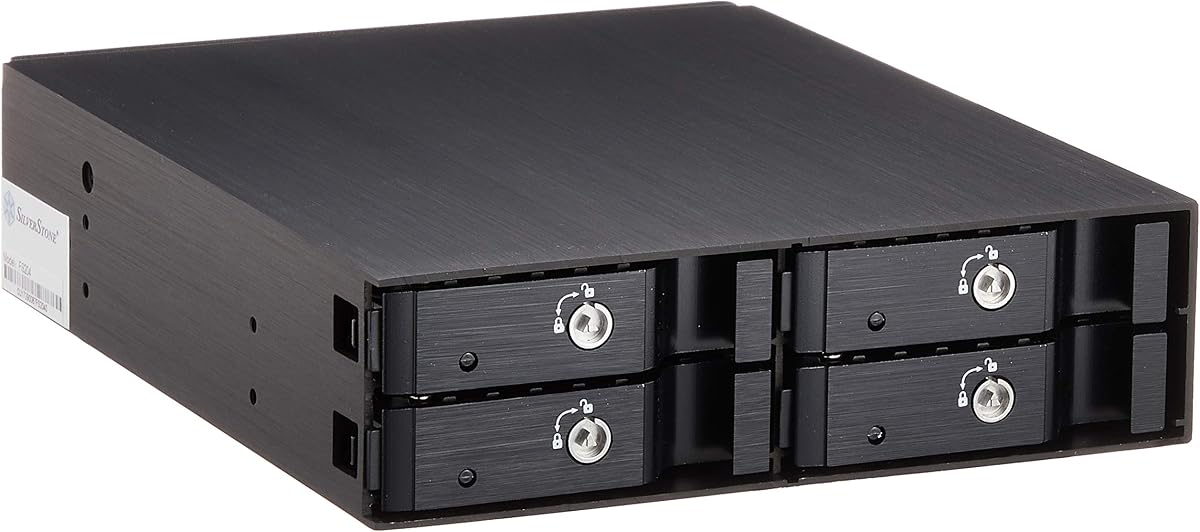
The Silverstone SST-FS204B combines functionality with aesthetic appeal. With a 4.2 rating, it offers reliable performance for 2.5 inch drives.
We may earn a commission when you buy through this link, at no additional cost to you.
Its all-aluminum body features a hairline brushed finish. Individual metal key locks ensure drive security. The built-in cooling fan enhances longevity.
While it is limited to 2.5 inch drives, its design is robust. The individual status LEDs make monitoring simple.
For systems where design matters, this rack is ideal. Its build quality ensures both form and function.
The all-aluminum body with hairline finish adds a premium touch. This is ideal for workstations where aesthetics matter.
Individual metal key locks allow secure access to each drive. This ensures data safety in shared environments.
We may earn a commission when you buy through this link, at no additional cost to you.
The LYNICESHOP 5-Bay Mobile Rack Backplane expands storage significantly. With a 5.0 rating, it offers exceptional versatility for diverse needs.
We may earn a commission when you buy through this link, at no additional cost to you.
It converts three optical bays into five hot-swap positions. Its aluminum alloy construction ensures durability. The included fan dissipates heat effectively.
While it requires significant bay space, its capacity is unmatched. The support for SATA and SAS makes it flexible.
For systems needing expansion, this backplane is ideal. Its design ensures reliable and efficient storage management.
Converting three contiguous optical bays into five storage bays maximizes capacity. This is ideal for systems needing significant storage expansion.
Compatible with both SATA and SAS interfaces. This flexibility ensures it meets various storage requirements.
We may earn a commission when you buy through this link, at no additional cost to you.
Selecting the right Hot Swap SATA Mobile Rack requires evaluating several factors to ensure compatibility and performance.
Ensure the rack supports the drive type you need, whether it is 2.5 inch SSDs or 3.5 inch HDDs. Some racks support both, while others are specialized.
Check for SATA and SAS compatibility if you have mixed drive types.
Verify the rack fits your available drive bay, typically 5.25 inch or 3.5 inch. This ensures proper installation in your case.
Mismatched sizes can prevent installation or require adapters.
Look for tool-less trays and latches for quick installation. This reduces setup time and simplifies maintenance tasks.
This feature is especially useful for frequent drive swapping.
Racks with built-in fans or open-top designs improve heat dissipation. This helps prevent drive failures due to overheating.
Good airflow is essential for systems with multiple drives.
Choose racks made from metal or durable alloys for longevity. Aluminum and steel provide better protection than plastic.
High insertion ratings indicate the rack can withstand frequent use.
Racks with lockable bays or key locks secure drives physically. This is vital for shared or sensitive environments.
Security features protect against unauthorized access to data.
LED indicators for power and activity help monitor drive status. Some models include eject buttons for easy removal.
These features simplify drive management and troubleshooting.
Check for manufacturer warranties to ensure support in case of defects. Longer warranties indicate confidence in product quality.
This protects your investment and reduces risk.
Install the rack in the designated drive bay by securing it with screws if required. Ensure it is stable and properly aligned.
Insert drives gently into the tray or slot until the connector clicks into place. Avoid forcing drives to prevent damage.
Regularly clean the rack and ensure fans are free of dust to maintain cooling efficiency.
A Hot Swap SATA Mobile Rack is a device that allows you to add or remove hard drives without shutting down the computer. It fits into standard drive bays, typically 5.25 inch or 3.5 inch, and provides a front-accessible interface for drives.
Many racks support both SATA and SAS interfaces, but you should check the product specifications. Some models are designed specifically for SATA, while others support both for more flexibility.
Some racks are designed to accommodate 2.5 inch drives in 3.5 inch bays. Others may require an adapter tray. Always verify the product details for compatibility.
Hot Swap racks are designed to allow drive swapping while the system is running. However, ensure your system and drive support hot swapping to avoid data corruption.
Use compressed air to remove dust from the rack and fans. Keep the area around the rack clean to ensure proper airflow and cooling.
Tool-less designs simplify installation and removal, saving time. They are ideal for users who frequently swap drives or need quick access.
We have reviewed ten top Hot Swap SATA Mobile Rack models, each offering unique features for different needs.
Prioritize compatibility, cooling, and durability when making your choice to ensure long-term reliability.
Always check current listings for availability and value before purchasing your ideal rack.