
PROZOR 192KHz Digital to Analog Audio Converter
4.4Editor score
Supports 192kHz/24bit audio
Aluminum alloy housing
Includes optical cable and USB power
This guide compares the top ten audio converters for Mac users seeking high fidelity digital to analog conversion and seamless integration with Apple devices.
Mac users often need reliable audio converters to enhance their listening experience. Whether you are recording vintage media or streaming high resolution tracks, the right hardware ensures pristine sound quality across your setup.
We evaluated ten top rated products based on compatibility, sound fidelity, and build quality. Our analysis focuses on devices that integrate smoothly with macOS while delivering professional grade performance for audiophiles and casual listeners alike.
Each pick highlights key strengths and ideal use cases for different needs. Prices and availability change frequently, so verify current details before purchasing to ensure you get the best value for your specific audio requirements.
4.4Editor score

4.5Editor score

4.5Editor score
This table provides a side-by-side overview of the ten leading audio converters evaluated for Mac compatibility. It highlights essential specifications and core capabilities to help you quickly identify the best fit for your specific audio setup needs.
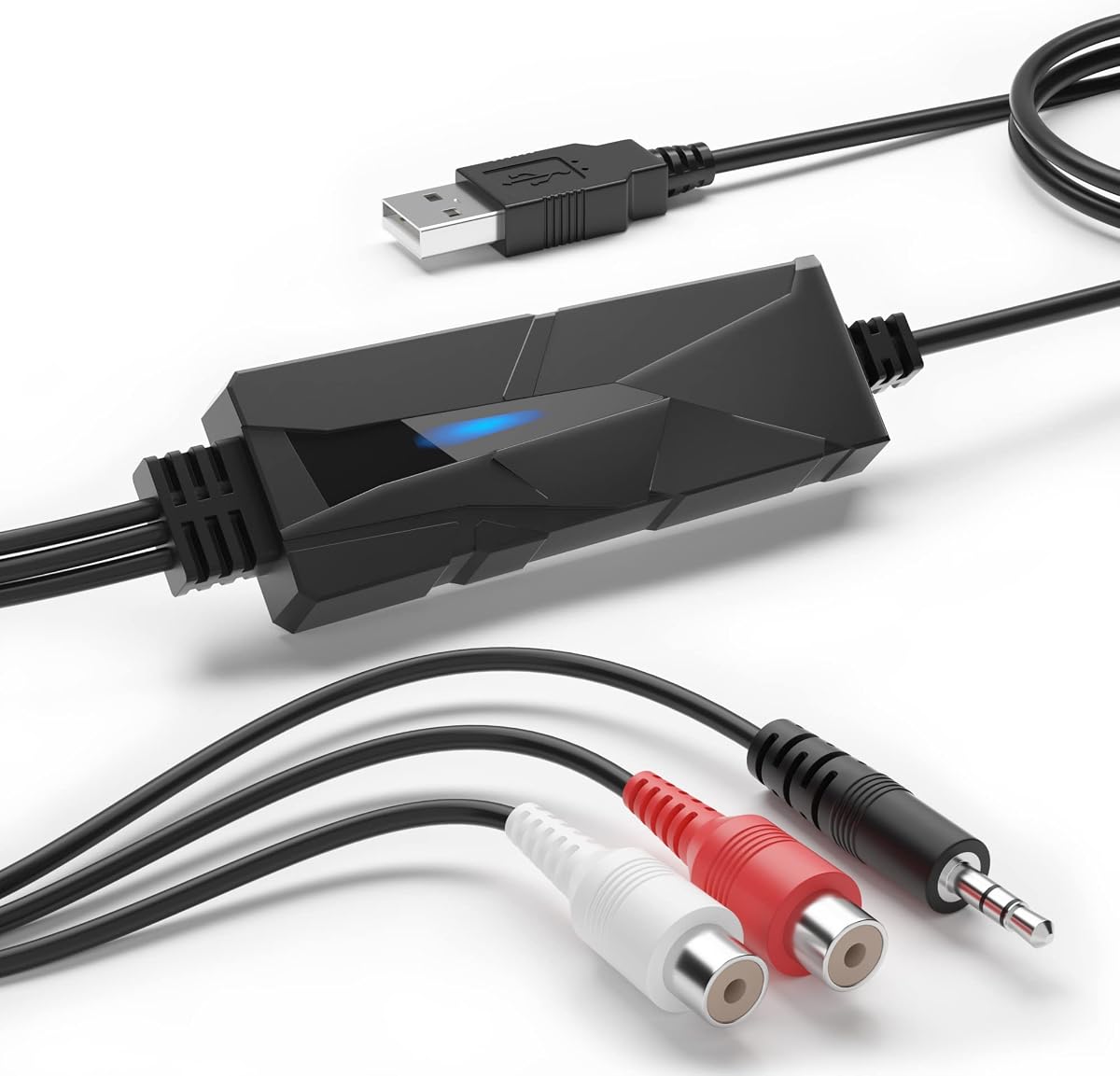


The DriverGenius AudioXfer stands out as a specialized tool for reviving old analog recordings. With a solid rating of 4.2 stars, it offers a straightforward path to converting cassette tapes and vinyl into digital formats like MP3 and WAV on your Mac.
We may earn a commission when you buy through this link, at no additional cost to you.
Its key strength lies in the dedicated hardware design that accepts 3.5mm and RCA inputs. This allows you to connect vintage devices directly to your computer. The included Audacity software support ensures you can edit and save your restored memories efficiently.
However, users should note that the macOS compatibility is specific to version 15. Windows 12 support is not currently available. This limitation means you must verify your system before purchase to ensure seamless operation without driver conflicts.
This device is ideal for collectors and families looking to preserve physical media archives. It prioritizes functionality over modern streaming capabilities. If your goal is archiving analog sources, this remains a reliable and accessible choice for Mac users.
Convert old cassettes and LPs into digital files without needing complex studio gear.
Ensure your Mac runs macOS 15 to avoid potential driver issues during setup.
We may earn a commission when you buy through this link, at no additional cost to you.
The Fosi Audio K5 Pro combines a DAC and headphone amplifier into a sleek mini unit. Rated at 4.3 stars, it delivers immersive audio quality that satisfies both gamers and audiophiles using Mac systems for high fidelity output.
We may earn a commission when you buy through this link, at no additional cost to you.
Its strength comes from the Texas Instruments NE5532 op-amp chip which ensures low noise. The device converts USB Type C and optical signals effectively. It drives headphones ranging from 16 Ohm to 300 Ohm with significant power output.
Some users might find the combined volume and power button interface slightly unintuitive at first. Additionally, microphone support varies depending on the specific source setup. These are minor trade-offs given the overall sound performance.
Choose this if you need a versatile hub for your Mac and console setup. It handles digital inputs well and provides a clean signal path to your speakers or headphones. It is a robust choice for desktop audio enhancement.
Experience clean sound with reduced distortion thanks to optimized circuit design.
Connect various sources including Mac and PS5 with a single compact device.
We may earn a commission when you buy through this link, at no additional cost to you.
The PROZOR 192KHz converter offers impressive specs for its low price. With a rating of 4.4 stars, it handles high resolution audio up to 192kHz and 24 bits making it a strong contender for budget-conscious Mac users.
We may earn a commission when you buy through this link, at no additional cost to you.
It features an upgraded audio amplifier chipset that delivers cleaner output. The aluminum alloy housing provides excellent shielding against interference. It converts optical and coaxial signals to analog RCA or 3.5mm jack outputs effectively.
Note that this device requires a 5V power adapter which is not included in the box. You also need to configure your source device settings to PCM format for optimal performance. These steps add minor complexity to setup.
This is the go-to option for connecting Apple TV or other optical sources to analog speakers. It balances cost and performance exceptionally well. For simple conversions without breaking the bank, this unit is highly recommended.
Supports up to 192kHz sampling for detailed sound reproduction.
Aluminum case protects internal components and reduces heat.
We may earn a commission when you buy through this link, at no additional cost to you.
The Douk Audio U2PRO is a powerful tool for those needing high resolution audio conversion. Rated at 4.1 stars, it uses the XMOS XU316 chip to deliver jitter-free digital signals to external DACs connected to your Mac.
We may earn a commission when you buy through this link, at no additional cost to you.
Its ability to support PCM up to 768kHz and DSD512 sets it apart from standard converters. The dual mode switch allows compatibility with gaming consoles or high-end PCs. This flexibility makes it a versatile choice for various setups.
Users should be aware that the unit is small and portable. While convenient, it might feel less sturdy than desktop models. Additionally, the mode switches must be set correctly for your specific device to function properly.
Opt for this if you already have a dedicated DAC and need a clean digital interface. It bridges the gap between modern Mac outputs and classic audio equipment. The upgrade in sound clarity justifies the purchase for serious listeners.
Unlocks lossless audio potential for streaming and local files.
Switch between plug-and-play and high-res modes easily.
We may earn a commission when you buy through this link, at no additional cost to you.
The SMSL SU-1 distinguishes itself with robust MQA decoding support. With a rating of 4.2 stars, it serves as a dedicated audio decoder for CD players and computers. It uses the AK4493S chip to maintain signal integrity.
We may earn a commission when you buy through this link, at no additional cost to you.
Its key feature is the ability to restore original high-resolution signals from MQA encoded content. The distortion is exceptionally low. This ensures you hear the music as the artist intended. It supports 768kHz and DSD512 formats natively.
While performance is strong, note that the volume control relies on your computer settings. Also, ensure macOS versions are supported as drivers vary. It is not a standalone amp so it needs external amplification for speakers.
This unit is perfect for streaming services that offer MQA content. It enhances the listening experience on a Mac system significantly. If you value authentic audio reproduction and file quality, this is a top choice.
Restores the original studio signal from MQA encoded files.
Uses AKM AK4493S for superior sound processing.
We may earn a commission when you buy through this link, at no additional cost to you.
The SMSL PO100 PRO earns a high rating of 4.6 stars for its reliability and performance. It is a compact USB interface that allows seamless digital to analog conversion for Mac users on the go or at a desk.
We may earn a commission when you buy through this link, at no additional cost to you.
Its standout feature is the support for MQA playback without extra software. It uses the XMOS XU316 chip for asynchronous transmission. The Type-C input ensures modern compatibility. You get high resolution audio in a small package.
Because it is so small, managing cables and mode switches can be slightly fiddly. You must select the correct mode for I2S or optical output. These small inconveniences are outweighed by the excellent sound quality and portability.
Select this if you travel with your Mac or need a discreet audio upgrade. It fits easily in bags and offers professional features. For portable high fidelity needs this is arguably the best in its class.
Decode MQA files natively using your preferred music player.
Fits anywhere in your setup without taking up desk space.
We may earn a commission when you buy through this link, at no additional cost to you.
The Sound Blaster Play! 3 is designed for users who want immediate results. Rated at 4.5 stars, it offers a direct USB connection to your Mac. It supports 24-bit 96kHz audio without requiring any driver installation or complex setup.
We may earn a commission when you buy through this link, at no additional cost to you.
Its primary strength is ease of use. You plug it in and it works. It handles analog headsets well including split stereo/mic connectors. This makes it perfect for calls or casual listening without fussing with settings.
It does not support optical or coaxial inputs so options are limited. The software enhancements are helpful but basic compared to dedicated audiophile gear. If you need advanced signal routing this unit falls short.
This is the ideal choice for general users and students. It provides a quick upgrade over standard ports. For straightforward audio needs on a Mac this adapter is reliable and hassle free.
Works out of the box without needing software downloads.
Compatible with standard and gaming headsets easily.
We may earn a commission when you buy through this link, at no additional cost to you.
The iFi Audio Go Link Max delivers top-tier performance in a dongle format. With a 4.5 rating it stands out for its balanced circuit design using dual ESS Sabre DAC chips. It is a favorite for audiophiles on Mac systems.
We may earn a commission when you buy through this link, at no additional cost to you.
Its strengths include 384kHz PCM and native DSD256 support. The dynamic range enhancement ensures clarity and depth. The 4.4mm balanced output drives high impedance headphones efficiently. Build quality uses gold-plated connectors for durability.
The main trade-off is the higher cost compared to standard adapters. It is larger than typical dongles which affects portability slightly. However the gain in audio quality justifies the expense for serious listeners.
Choose this if you demand the best from your headphones. It transforms your Mac into a portable high-fidelity system. For those willing to invest in sound, this is a premium solution that exceeds expectations.
Enhanced dynamic range brings more life to your music.
Use 4.4mm jack for balanced signal connection.
We may earn a commission when you buy through this link, at no additional cost to you.
The Fosi Audio Q6 is a sleek desktop unit with exceptional performance. Rated at 4.6 stars it uses the AKM AK4493S DAC and XMOS XU316 processor. It handles high-resolution formats up to 768kHz and DSD512 effortlessly.
We may earn a commission when you buy through this link, at no additional cost to you.
Its low-noise design ensures clean signal conversion. The aluminum alloy casing provides durability. It connects via Optical Coaxial or USB-C. This flexibility makes it a great hub for multiple audio sources and output devices.
Keep in mind this does not drive passive speakers directly. You need a separate amplifier for home stereo. The Sub-Out feature is useful but requires compatible subwoofers. This limits some standalone use cases.
Ideal for home offices or living rooms needing a central audio hub. It improves sound quality from Mac devices significantly. For desktop users seeking a robust DAC this is a highly recommended choice.
Engineered for high fidelity with minimal distortion.
Aluminum casing offers style and protection.
We may earn a commission when you buy through this link, at no additional cost to you.
The Shure MVX2U Gen 2 transforms your Mac into a professional recording station. With a 4.5 rating it supports XLR microphones directly. It features onboard digital audio processing that handles noise reduction and level adjustments automatically.
We may earn a commission when you buy through this link, at no additional cost to you.
Its key strength is the clean gain capability up to +60 dB. This ensures your voice captures well on podcasts or streams. The plug-and-play convenience removes barriers for creators. You can customize tone settings via the Shure apps.
The complexity of DSP settings may be overwhelming for simple listening. The price reflects its professional capabilities which may be overkill for casual use. However the sound quality justifies the investment for content creators.
Choose this if you need professional audio input capabilities. It bridges the gap between Mac and studio gear effectively. For podcasters and streamers this interface delivers consistent and high-quality audio results.
Direct XLR mic connection with phantom power support.
Use Auto Level Mode and Denoiser for clean audio.
We may earn a commission when you buy through this link, at no additional cost to you.
Selecting the right audio converter for your Mac requires understanding your specific needs and technical requirements. This guide outlines key factors to consider to ensure you make an informed decision.
Ensure the device explicitly supports your macOS version. Some older models may require specific driver versions. Always check compatibility notes before buying to avoid setup issues.
Verify that the converter is compatible with your macOS version to prevent driver conflicts.
Look for support for high resolution formats like 24-bit/96kHz or higher. Some users need MQA decoding for streaming services. Check if the device handles DSD and PCM signals.
Prioritize high resolution audio support to ensure your recordings and streams sound crisp and clear.
Identify what inputs you need such as Optical Coaxial or USB-C. Some devices offer RCA outputs for speakers. Ensure the connector types match your existing equipment.
Confirm the device has the correct ports to connect with your Mac and audio system.
Aluminum alloy housings provide better heat dissipation and shielding. Plastic cases might be cheaper but less durable. Look for gold-plated connectors to prevent corrosion over time.
Choose a device with solid construction to ensure longevity and consistent performance.
Some converters are bus-powered via USB. Others require an external power adapter. Consider your port availability and need for mobility before deciding.
Check if the device needs external power to ensure you have a suitable power source.
Some devices come with software for editing. Others offer onboard processing like noise reduction. Evaluate if these software tools add value to your workflow.
Consider if included software features are useful for your specific audio projects.
Budget models often lack advanced features. Premium units offer better sound and build. Determine your budget ceiling and compare value across options.
Balance the cost with the features you actually need to get the best value.
If you travel often choose a compact dongle. Desktop units offer more connections but are stationary. Decide based on your usage environment.
Pick a form factor that fits your workspace and travel habits.
To start using your audio converter connect it to your Mac via the appropriate cable. Ensure the power source is connected if required. Select the device in your audio settings as the output or input.
For optimal audio quality adjust the volume settings on your Mac and the device itself. Use high-quality cables to minimize interference. Update drivers if provided to maintain compatibility.
Keep the device in a well-ventilated area to prevent overheating. Avoid bending the cables excessively to protect the connectors. Clean the surface regularly to remove dust and debris.
Some devices require specific drivers while others are plug-and-play. Always check the product specifications before purchasing to ensure your macOS version is supported and necessary downloads are available.
A DAC converts digital signals to analog for playback while an ADC does the opposite for recording. Choose the type that fits your specific audio needs for listening or capturing sound.
Some models provide RCA outputs for speakers while others need an external amplifier. Check the output options on your chosen device to ensure it matches your speaker setup.
Check your cable connections and power source. Ensure the audio settings in System Preferences select the device. Updating macOS and drivers often resolves recognition issues.
They are essential for high-fidelity listening or recording. While Macs have built-in audio converters dedicated units often offer better quality and more connection options.
Look for a device with RCA inputs and analog to digital capabilities. Ensure it supports the sample rates needed for high-quality music conversion.
Most bus-powered devices work with standard USB ports. However complex setups might benefit from a powered hub to ensure stable power delivery.
Yes many models offer low-latency performance ideal for streaming. Ensure you have the right inputs for your microphone or camera setup.
We explored ten top-rated audio converters for Mac ranging from budget-friendly units to premium interfaces. Each option offers unique benefits tailored to different user needs and audio requirements.
Prioritize compatibility and sound quality when making your decision. Consider your specific workflow whether you are recording listening or converting media.
Prices and availability fluctuate frequently. Always check current listings to ensure you get the best value and up-to-date support for your setup.