
BENFEI 4in1 USB-C Card Reader
4.5Editor score
Reads four cards simultaneously
USB-C and USB 3.0 support
Up to 160MB/s transfer speed
We compare ten top-rated Compact Flash Card Reader models for speed, durability, and compatibility to help you choose the right one for your workflow.
Finding the right Compact Flash Card Reader is essential for photographers and videographers who need reliable data transfer. These devices allow you to access stored media quickly without needing built-in card slots. A quality reader ensures stable connections and fast speeds for large files.
Our team evaluated ten leading models based on portability, transfer rates, and card compatibility. We looked at USB-C options, legacy support, and build quality to narrow down the best choices. This list covers versatile hubs and dedicated readers for various camera workflows.
Each pick highlights key strengths and ideal use cases for different professionals. While prices fluctuate on major marketplaces, our selections focus on performance and value. Check current listings for the latest deals before making your final purchasing decision today.
4.5Editor score

4.7Editor score

4.4Editor score
The following table provides a quick side-by-side comparison of all ten Compact Flash Card Reader models we reviewed. It highlights key specifications, compatibility, and unique features to help you decide which device fits your needs.


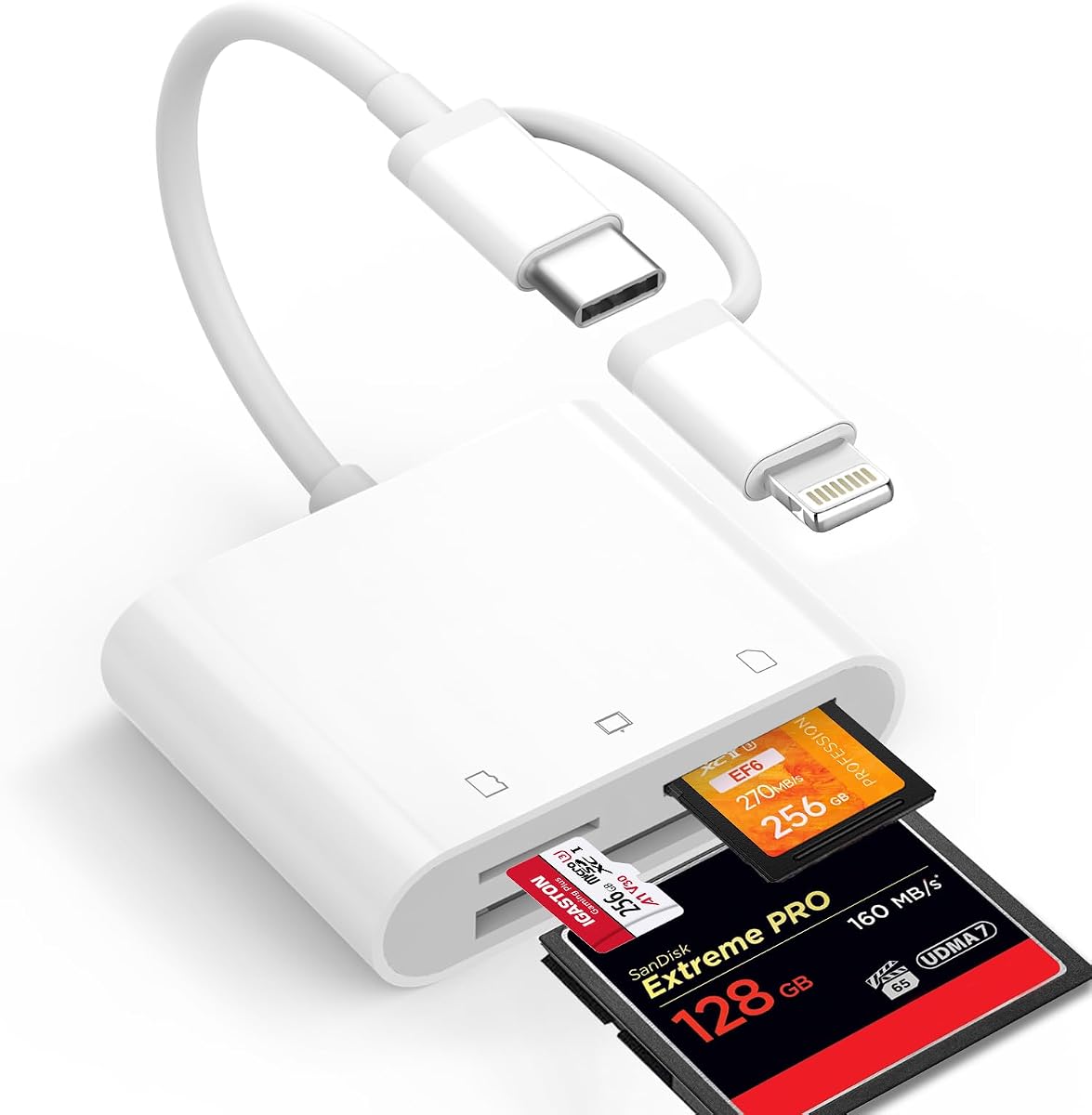

The BENFEI 4in1 card reader offers an affordable solution for those needing reliable Compact Flash support. With a 4.5 rating, it delivers solid performance for daily transfers and works seamlessly with modern laptops.
We may earn a commission when you buy through this link, at no additional cost to you.
It supports SD, Micro SD, MS, and CF cards simultaneously, making it ideal for users with mixed media. The integrated USB-C and USB 3.0 design ensures compatibility with everything from iPhones to MacBook Pros.
While it lacks support for CF Type I cards, the transfer speeds up to 160MB/s are impressive for the price. It handles large files efficiently and remains stable during prolonged data access tasks.
Best for budget-conscious users or students needing a versatile reader, this model balances cost and functionality well. If you need basic CF support without breaking the bank, this is a top pick.
The dual USB-C and USB 3.0 design ensures it works with both modern laptops and older PCs without adapters.
Built-in advanced IC chips ensure stable transfers, reducing the risk of data corruption during large file moves.
We may earn a commission when you buy through this link, at no additional cost to you.
UGREEN SD Card reader offers excellent performance with USB 3.0 support and a 4.6 rating. It allows reading multiple card types simultaneously, which is rare at this price point.
We may earn a commission when you buy through this link, at no additional cost to you.
Designed for speed, it reaches up to 5Gbps transfer rates, making it perfect for quickly offloading large video files. Its compact design fits easily into bags, making it ideal for field work.
While it is not USB-C native, the USB 3.0 performance is fast enough for most tasks. Compatibility with Windows, Mac, and Linux ensures it works across different professional environments easily.
This reader is perfect for travelers or content creators needing a simple hub for multiple card types. Its balance of speed and size makes it a dependable choice for everyday use.
The hub design allows you to read and write to four different memory cards at the same time for efficiency.
No drivers are required, allowing you to plug it in and start transferring files immediately on any supported OS.
We may earn a commission when you buy through this link, at no additional cost to you.
The Lexar Multi-Card 3-in-1 stands out with a 4.7 rating and impressive transfer speeds up to 312MB/s for SD cards. It is an excellent choice for professionals needing fast and reliable data access.
We may earn a commission when you buy through this link, at no additional cost to you.
This reader supports SD, microSD, and CompactFlash cards, covering most needs for photographers. Its USB 3.1 interface ensures quick transfers of large files like high-resolution images or 4K video.
While it lacks simultaneous reading for multiple cards, its speed and reliability make up for it. The included two-year warranty adds extra peace of mind for long-term usage in demanding environments.
If you prioritize speed and quality over multi-card convenience, this model is the top pick. It is ideal for creatives who need to offload footage quickly after a shoot without waiting around.
With speeds up to 312MB/s for SD and microSD cards, this reader minimizes wait times during critical post-production workflows.
Lexar is known for high-quality memory products, ensuring this reader delivers consistent performance and durability over time.
We may earn a commission when you buy through this link, at no additional cost to you.
This 6-in-1 reader is designed for professionals using older DSLRs and newer cameras alike. With a 4.3 rating, it offers extensive compatibility including rare formats like XD-Picture and CFast cards.
We may earn a commission when you buy through this link, at no additional cost to you.
The aluminum alloy chassis dissipates heat effectively during long transfers, ensuring stability. Its dual USB-C and USB-A connectors allow use with both modern laptops and older PCs without extra dongles.
While the price is higher than basic models, the support for six card types simultaneously makes it unique. It reduces the need for multiple readers, simplifying your tech gear significantly.
This reader is ideal for archive projects or multi-camera setups with mixed card types. If you own legacy equipment, this is one of the few options that keeps everything connected and accessible.
Supporting formats from XD-Picture to CFast ensures your reader works with both old archives and new high-speed video gear.
The robust aluminum body helps dissipate heat during prolonged transfers, preventing performance throttling or overheating issues.
We may earn a commission when you buy through this link, at no additional cost to you.
ZIYUETEK offers a slim aluminum reader that is both durable and fast. With a 4.5 rating, it supports reading five cards at once, including CF, SD, and MS types for versatile access.
We may earn a commission when you buy through this link, at no additional cost to you.
Its slim design makes it easy to slip into a camera bag, while the aluminum cover helps manage heat during use. The built-in protection against over-voltage ensures your connected devices stay safe.
Transfer speeds are excellent for a mid-range model, making file access quick and efficient. The plug-and-play nature means no drivers are needed, keeping your workflow smooth and interruption free.
Best for travelers needing a compact hub, this reader balances portability with performance. It is a great value for those who want simultaneous card reading without the bulk of larger hubs.
The aluminum alloy cover provides a lightweight yet durable chassis that feels premium and resists damage during travel.
Intelligent multiple protection safeguards your equipment against electrical surges or short circuits, ensuring long-term reliability.
We may earn a commission when you buy through this link, at no additional cost to you.
This UGREEN USB C reader is specifically optimized for modern USB-C devices like the iPhone 15 series and newer MacBooks. With a 4.5 rating, it offers fast, reliable access to SD and CF cards.
We may earn a commission when you buy through this link, at no additional cost to you.
The 5Gbps transfer speed ensures quick offloading of files, and simultaneous reading for four cards makes it ideal for multi-device workflows. Its compact design fits comfortably in any pocket or bag.
While it lacks USB-A support, it covers most modern needs perfectly. The plug-and-play functionality ensures compatibility with Windows, Mac, and Chrome OS without needing extra drivers or software.
Perfect for iPhone and Android users switching to USB-C, this reader bridges the gap between cameras and phones. It is a great choice for on-the-go content creators needing immediate file access.
Compatible with the latest smartphones and tablets, this reader allows you to edit photos directly on your device instantly.
The native USB-C port ensures you get the full speed potential of your modern laptop without using slower adapters.
We may earn a commission when you buy through this link, at no additional cost to you.
The SmartQ C368 is a straightforward and reliable choice for basic card reading needs. With a 4.6 rating, it supports SD, Micro SD, MS, and CF cards, covering the essentials for most photographers.
We may earn a commission when you buy through this link, at no additional cost to you.
A blue LED light indicates power status, which is helpful for troubleshooting connection issues. Its USB 3.0 support ensures fast transfers, while the compact design keeps it portable for everyday use.
While it lacks advanced features like simultaneous reading or USB-C, it is simple and effective. The included cable organizer helps keep your gear tidy and prevents tangling in bags or backpacks.
Ideal for beginners or users needing a spare reader, this model offers excellent value. If you just need to access your photos quickly without complicated features, this reader gets the job done.
The built-in blue LED light provides immediate visual confirmation that the device is powered and connected correctly.
A focus on essential features keeps the device lightweight and affordable while maintaining reliable performance for daily use.
We may earn a commission when you buy through this link, at no additional cost to you.
Designed for professional videographers and cinematographers, this reader supports the CFast 2.0 standard for blazing-fast speeds. With a 4.4 rating, it handles high-resolution video offloading effortlessly and reliably.
We may earn a commission when you buy through this link, at no additional cost to you.
The aluminum body is robust and dissipates heat effectively during extended use. It supports five card types simultaneously, including legacy XD and modern CF cards, making it a versatile tool for pros.
While not needed for casual users, the speed and reliability justify the cost for professionals. The dual USB-C and USB-A connectivity ensures it works with any workstation or laptop in the field.
This model is the ultimate choice for those working with high-end cameras and massive file sizes. If you need to offload 8K footage quickly and safely, this is the best premium option available.
Designed for professional workflows, this reader supports the latest CFast 2.0 cards for the fastest possible data transfer speeds.
The aluminum body withstands the rigors of on-set work, providing reliability during critical production schedules and travel.
We may earn a commission when you buy through this link, at no additional cost to you.
This Denlane reader is ideal for mobile users needing to view photos on iPhones and iPads directly. With a 4.3 rating, it supports CF and SD cards, bridging the gap between cameras and smartphones.
We may earn a commission when you buy through this link, at no additional cost to you.
MFi certification ensures a secure connection, reducing the risk of errors during data transfer. Its bi-directional support allows you to move files back to the card to free up phone storage easily.
While the speeds are not as high as USB 3.0 options, it is sufficient for quick previews and social media uploads. The dual connector design means one device works across multiple generations of Apple products.
Best for travelers who shoot on a camera but edit on a phone, this reader is perfect. It simplifies the process of transferring memories without needing cables or complex file management apps.
Designed specifically for iOS users, this reader allows you to import photos directly into your photos app for easy sharing.
MFi certification guarantees safety and compatibility with your Apple device, preventing power or connectivity issues during use.
We may earn a commission when you buy through this link, at no additional cost to you.
The ChiaoPio reader features a built-in USB-C cord that does not block other ports on your devices. With a 4.5 rating, it is a convenient option for accessing CF and SD cards on modern laptops.
We may earn a commission when you buy through this link, at no additional cost to you.
Its compact design ensures it fits easily in bags without bulk. It supports iPad Pro and MacBook models perfectly, allowing quick access to photos and videos without needing separate dongles.
While the cord length is fixed, it is usually sufficient for desktop and laptop use. The plug-and-play experience means no software installation is required, keeping your workflow simple and fast.
Best for iPad users and those wanting a non-obtrusive reader, this model is excellent. It offers a straightforward way to access legacy CF cards on devices that no longer have built-in slots.
The built-in cord is designed to avoid blocking adjacent USB ports, allowing you to use multiple devices simultaneously.
No drivers or power needed means it is ready to use the moment you plug it in, perfect for quick file transfers.
We may earn a commission when you buy through this link, at no additional cost to you.
Selecting the right Compact Flash Card Reader depends on your specific workflow, devices, and budget. This guide breaks down the key factors to consider before making your purchase.
Ensure the reader supports all the card types you use, including CF, SD, and Micro SD. Some models are specialized for legacy cards while others focus on modern formats.
Check the product details for specific limitations like CF Type I or Memory Stick support to avoid compatibility issues.
Look for USB 3.0 or USB-C connectivity which offers much faster transfer speeds compared to USB 2.0. This is crucial for large 4K video files or high-resolution photo libraries.
Aim for speeds of at least 100MB/s to ensure your workflow is not bottlenecked by slow data transfer.
If you travel frequently, choose a compact and lightweight model with durable materials like aluminum. A robust build protects the device during transit.
Consider cable length and connector types to ensure it fits comfortably in your camera bag.
Some readers allow you to read multiple cards at once, which is useful for multi-camera setups. This saves time by avoiding constant card swapping.
If you work with single cards, a single-slot reader may be sufficient and cheaper.
Verify that the reader works with your specific OS, such as Windows, macOS, or Linux. Most modern readers are plug-and-play, but it is always good to confirm.
Some legacy systems might require specific drivers for older card types.
Readers with metal bodies dissipate heat better and feel more durable than plastic ones. This is important for high-volume data transfers.
A sturdy construction extends the lifespan of the device and protects your investment.
Look for models that offer a warranty, typically ranging from 12 to 24 months. This ensures you are protected against defects or manufacturing issues.
Good customer service can help resolve connection or compatibility issues quickly.
Prices vary significantly based on features and brand. Determine your budget and prioritize features that matter most to your workflow.
A higher price does not always mean better performance, so compare specs carefully before buying.
To use your Compact Flash Card Reader, simply insert the memory card into the appropriate slot until it clicks into place. Ensure the card is oriented correctly to avoid damaging the pins inside the reader.
Plug the reader into an available USB port on your computer or device. Your operating system should automatically detect the device as a removable drive, allowing you to access the files within.
To maintain your reader, keep it clean and free of dust. Avoid bending the cable excessively and store the device in a dry place to ensure it lasts for many years.
Most modern Compact Flash Card Readers are plug-and-play, meaning they do not require additional drivers. Your operating system will automatically recognize the device. However, very old systems might need specific software for legacy card types.
Yes, if you have a USB-C or Lightning compatible reader. Some models are designed specifically for mobile devices allowing you to import photos directly to your smartphone or tablet.
USB 3.0 is a standard for high-speed data transfer usually using an older rectangular port. USB-C is a newer, reversible connector found on modern laptops and phones, often offering similar or faster speeds.
No, CFast cards are not compatible with standard Compact Flash slots. You need a reader specifically designed to support CFast formats to read these cards properly.
Check if the file system on your card is compatible. Cards formatted in exFAT or FAT32 work best on Mac. If the reader is not detected, try a different port or restart your computer.
Yes, many readers support bi-directional transfer. This allows you to move photos from your device to the memory card to free up storage space on your phone.
We have reviewed ten top-rated Compact Flash Card Reader models ranging from budget-friendly options to professional-grade hubs. Each offers unique benefits depending on your camera gear and workflow needs.
Consider your priority whether it is speed, portability, or compatibility with older cards. The Lexar and UGREEN models stand out for their balance of performance and affordability.
Always check current listings for the latest prices and availability before purchasing. Prices fluctuate frequently so finding the best deal may require timing your purchase carefully.