
V-one Wired USB Gaming Controller
4.2Editor score
Supports multiple input modes
Vibration feedback function included
Affordable price point
This guide compares the top joysticks for Windows 11 to help gamers and sim enthusiasts find the perfect controller for flight and action games.
Finding the right joystick for Windows 11 can transform your gaming experience significantly. Whether you love flight sims or arcade action, the right controller offers precision and comfort. We evaluated the top models to help you choose wisely.
Our team reviewed ten distinct joysticks designed for Windows 11 compatibility. We considered build quality, button count, ergonomics, and software support. This list covers budget options and high-end flight simulation systems for every type of pilot.
Each pick below highlights unique strengths and potential trade-offs for buyers. Prices and availability change frequently so check current listings before purchasing. We aim to provide honest insights based on product specifications and user feedback.
4.2Editor score

4.4Editor score

4.0Editor score
This side-by-side comparison highlights key specifications across all ten products to help you compare features at a glance.






The Thrustmaster T-Flight Hotas One stands out as an excellent choice for pilots seeking realism without a huge investment. With a solid build and precise inputs, this joystick brings flight simulation to life on Windows 11 systems.
We may earn a commission when you buy through this link, at no additional cost to you.
Its modular design allows the throttle to be used separately or attached to the stick, offering versatility for different desk setups. The adjustable resistance ensures you can tailor the feel to your preference for combat or commercial aviation scenarios.
While it lacks force feedback and the trigger can feel stiff initially, these are minor trade-offs for the price point. Most users adapt quickly to the controls and appreciate the seamless plug and play functionality with modern Windows operating systems.
We recommend this model for enthusiasts who want a reliable entry into hotas systems without breaking the bank. It delivers consistent performance across most major flight sim titles and pairs well with additional accessories like rudder pedals.
The detachable throttle allows users to configure the controller based on their available desk space or personal preference for cockpit layouts.
Designed to comfort the hand naturally, this stick reduces fatigue during long missions whether you are training or enjoying casual gameplay.
We may earn a commission when you buy through this link, at no additional cost to you.
The V-one Wired USB Gaming Controller offers incredible value for those seeking an affordable joystick that works across multiple platforms. It supports PC gaming and Android devices, making it a versatile choice for casual pilots.
We may earn a commission when you buy through this link, at no additional cost to you.
This controller features both Xinput and Dinput modes ensuring it adapts to various game requirements. The included vibration feedback enhances immersion significantly without adding complexity to the setup process on Windows 11.
While it is built primarily of plastic and does not support Xbox 360 consoles, it performs reliably for most PC titles. Users appreciate the turbo and joystick functions that allow for customized gameplay experiences.
We suggest this option for beginners or those on a tight budget who still want a functional joystick experience. It provides a solid introduction to PC flight controls without requiring expensive hardware investments.
Support for Windows and Android means you can use this controller on different devices without needing separate purchases for each platform.
The turbo feature allows players to map rapid fire actions to buttons adding a tactical edge to games that support this function.
We may earn a commission when you buy through this link, at no additional cost to you.
The Logitech G X56 H.O.T.A.S delivers a premium experience for serious simmers who demand maximum control and customization. With over 189 programmable controls, this system offers unparalleled depth for complex flight simulations.
We may earn a commission when you buy through this link, at no additional cost to you.
Its twin throttle design and adjustable spring options allow pilots to fine tune the physical feedback of their stick. The RGB lighting adds a modern aesthetic that complements high end gaming rigs while remaining functional in the dark.
While it is large and expensive, the build quality and precision justify the cost for dedicated enthusiasts. The requirement for two USB ports and ample desk space are considerations for those with limited room.
We highly recommend this controller for users who want to replicate a full cockpit environment. It excels in VR environments and complex commercial flight scenarios where precise input is critical.
With nearly two hundred programmable controls this system allows you to map every critical function directly to your hands for rapid execution.
The included spring options let you change the resistance of the stick to match your personal preference for lighter or heavier flight control.
We may earn a commission when you buy through this link, at no additional cost to you.
The PXN 2113PRO offers a dedicated flight stick experience for PC gamers looking for realistic controls without a high cost. It supports a wide range of flight titles and includes suction cups to keep the base stable during play.
We may earn a commission when you buy through this link, at no additional cost to you.
This joystick features twelve programmable buttons and a four axis control system for accurate maneuvering. The vibration function is present but often requires high settings to be felt effectively by users.
While it lacks force feedback and vibration sensitivity can be inconsistent, the ergonomic grip remains comfortable for long sessions. The included software allows for key mapping which is essential for complex flight sim setups.
We recommend this model for casual flight enthusiasts who want more precision than a gamepad offers. It is a solid intermediate step for those exploring flight simulation on a budget.
Four power grip suction cups at the base ensure the joystick stays firmly in place on smooth tables during intense flight maneuvers.
Advanced software options enable various custom adjustments and keyboard mapping allowing you to optimize the controller for specific games.
We may earn a commission when you buy through this link, at no additional cost to you.
The Guillemot Thrustmaster T.16000M FCS is renowned for its precision thanks to H.E.A.R.T technology that ensures accuracy does not degrade over time. This model is fully ambidextrous making it accessible for all users regardless of handedness.
We may earn a commission when you buy through this link, at no additional cost to you.
Sixteen action buttons with braille style identification allow for quick tactile recognition without looking away from the screen. The four independent axes including twist rudder provide comprehensive control for various aircraft types.
While it is relatively expensive for an entry level stick and does not include a throttle, the build quality is exceptional. Many users prefer this for its reliability and smooth performance in demanding flight scenarios.
We suggest this option for pilots who prioritize precision and longevity over additional features. It serves as a robust foundation for a cockpit setup that can be expanded later with pedals or throttles.
This patented technology uses magnetic sensors to eliminate mechanical wear ensuring consistent accuracy throughout the lifespan of the joystick.
Removable components allow the joystick to be tailored for left-handed or right-handed use without requiring a separate purchase.
We may earn a commission when you buy through this link, at no additional cost to you.
The Microsoft Sidewinder Precision 2 Joystick remains a staple for gamers appreciating classic design and reliable performance. Its rotating handle provides precise rudder control without requiring a separate pedal unit.
We may earn a commission when you buy through this link, at no additional cost to you.
With sixteen programmable functions and a substantial throttle action range, this stick covers a wide variety of gaming needs. The ergonomic shape has been tested over years of use and proven to be comfortable.
While it lacks some modern features found in newer models, its simplicity and build quality are appealing. It is a great option for those who prefer straightforward controls without complex software dependencies.
We recommend this for players who value durability and a proven track record. It is an excellent choice for those looking to add a dedicated stick to their setup without needing advanced digital features.
The rotating handle mechanism allows users to manage yaw independently without needing to use a keyboard or separate pedals.
You can save and download programmed game commands into game-specific controller profiles for quick access when switching games.
We may earn a commission when you buy through this link, at no additional cost to you.
The Thrustmaster USB Joystick is designed for entry level users seeking basic flight control capabilities on Windows systems. Its standout feature is the dedicated point of view button which simplifies camera control during gameplay.
We may earn a commission when you buy through this link, at no additional cost to you.
With three axes and four buttons plus a trigger, this device covers the essentials for many games. The ergonomic handle ensures comfortable handling even during extended sessions of gaming or simulation practice.
While it lacks the extensive buttons of higher end models, its simplicity is a benefit for casual players. The focus on immersion through camera control sets it apart from generic gamepads available on the market.
We suggest this for those wanting to dip their toes into flight simulation without complexity. It serves as an accessible introduction to using a stick instead of a keyboard or mouse for aircraft.
The unique point of view button allows for easy camera control giving you perfect immersion in games without complex key binds.
The ergonomic handle with enlarged rest ensures optimal gaming comfort allowing you to play for longer without hand strain.
We may earn a commission when you buy through this link, at no additional cost to you.
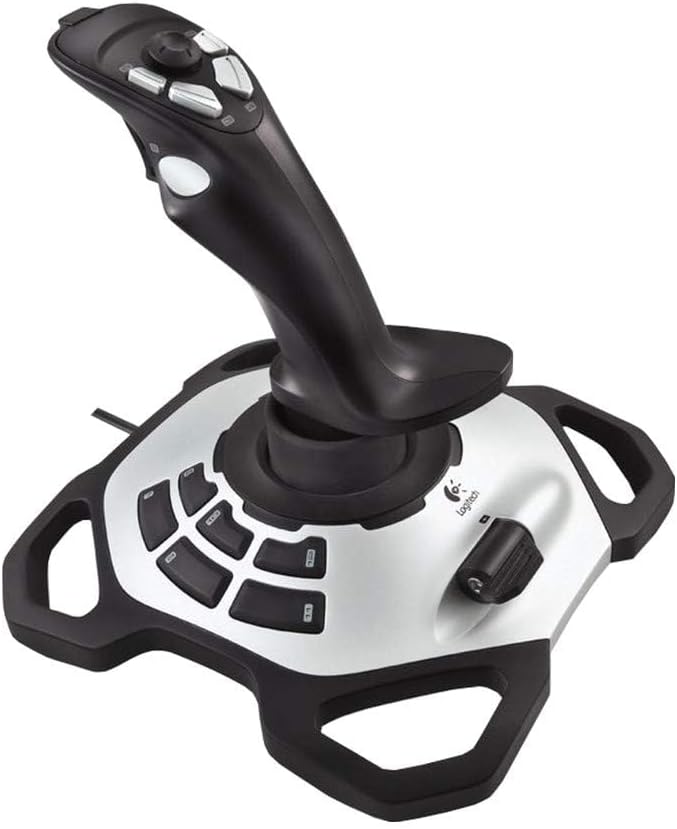
The Logitech Extreme 3D Pro Precision Fightstick combines a robust build with precision controls suitable for demanding flight sims. Its dedicated rudder twist offers significant advantage over standard sticks for those who need yaw control.
We may earn a commission when you buy through this link, at no additional cost to you.
The ergonomic shape is designed for comfort and stability ensuring that your hand remains in a natural position. This reduces strain during combat maneuvers or long flight hours across different simulation environments.
While it does not include a throttle and the base is large, the core functionality is excellent for its price. It is often praised for its reliability and longevity in the market for PC gaming peripherals.
We recommend this model for intermediate pilots who need rudder control but not a full hotas system. It balances performance and practicality for those seeking a reliable flight controller.
The twist rudder mechanism provides immediate yaw control without requiring additional pedals for a more realistic flight experience.
The stick is shaped to fit the hand naturally allowing for agile operation without causing fatigue over long sessions.
We may earn a commission when you buy through this link, at no additional cost to you.
The VOYEE PC Controller functions as a versatile gamepad that mimics Xbox controls for easy integration into PC setups. It supports a wide range of Windows versions and Xbox 360 systems making it highly compatible.
We may earn a commission when you buy through this link, at no additional cost to you.
Upgraded trigger buttons and sensitive joysticks ensure quick responses to commands without delay. The long cord length allows greater freedom of movement while keeping the device connected securely to your console or PC.
While it is not ideal for FPS games and lacks the precision of a flight stick, it excels in general gaming. The ergonomic grips are designed to fit hands comfortably reducing strain during long play sessions.
We suggest this for users seeking a reliable alternative to standard Xbox controllers. It provides a comfortable experience for general gaming needs with excellent value for its price.
Compatibility with Xbox 360 and various Windows versions ensures you can use this controller across multiple devices effortlessly.
Upgraded trigger buttons and sensitive joysticks respond quickly to player commands eliminating lag for a smoother gaming experience.
We may earn a commission when you buy through this link, at no additional cost to you.
The Thrustmaster SimTask FarmStick is a specialized controller designed specifically for farming simulation enthusiasts. It delivers true plug and play functionality for those looking to enhance their agricultural gaming experience.
We may earn a commission when you buy through this link, at no additional cost to you.
Featuring Hall Effect sensors, this stick ensures ultra accurate performance by eliminating drift and wear over time. With up to 33 programmable inputs, you can manage every function without relying on a keyboard.
While it is niche and requires a racing wheel for full cockpit setups, its precision for machinery operation is unmatched. The ambidextrous design allows flexible configurations for different simulation preferences.
We recommend this for serious farming sim players who want realistic control over tractors and equipment. It is a specialized tool that offers unmatched immersion for its target audience.
Designed specifically for Farming Simulator 25, this joystick delivers realistic control when operating tractors and construction equipment.
Magnetic sensors ensure consistent accuracy and eliminate drift ensuring long term precision for demanding simulation gameplay.
We may earn a commission when you buy through this link, at no additional cost to you.
Choosing the right joystick requires understanding your specific gaming needs and budget constraints.
Ensure the joystick supports Windows 11 natively. Many models also support older versions but checking current OS compatibility avoids driver issues.
Always check manufacturer specs to confirm the device works with your current system configuration.
Flight simulations demand durable materials that can withstand repeated use. Look for metal components or reinforced plastics in critical stress areas.
Higher build quality ensures longevity and consistent input reliability during intense gameplay sessions.
More buttons allow for complex mappings essential for flight sims. Entry level sticks may have fewer buttons while high end models offer dozens.
Choose a button count that matches the complexity of the games you play regularly.
Comfort is key for long sessions. A well designed stick should fit naturally in your hand without requiring excessive grip strength.
Prioritize models with adjustable grips or balanced weight distribution for better comfort.
Quality software allows for custom mapping and calibration. Ensure the manufacturer provides updated drivers for Windows 11.
Robust software support ensures your joystick adapts to new games and updates over time.
Budget sticks are great for casual users while premium models offer advanced features like force feedback. Determine how much you value precision.
Balance your budget with the level of immersion and control you expect from your setup.
Consider whether the joystick works with rudder pedals or throttles. Modular systems allow expansion as your skills improve.
Choosing expandable hardware ensures you can upgrade your cockpit without replacing your entire controller.
Vibration and force feedback enhance immersion significantly. Check if the model supports these features based on game compatibility.
Advanced feedback options can make a significant difference in realism during flight simulations.
Always connect the joystick to the PC before launching games to ensure proper recognition. Follow manufacturer drivers for optimal calibration and setup.
Clean the stick gently with a soft cloth to prevent dust buildup in the sensors. Avoid using harsh chemicals that might damage the plastic surfaces.
Store the joystick in a dry place away from direct sunlight to preserve its components. Regular calibration ensures the stick remains accurate over time.
Most modern joysticks listed work seamlessly with Steam games. Ensure you select models that support Xinput or Dinput modes for full compatibility with the Steam Input system.
Some models support plug and play on Windows 11, but others may require specific drivers. Check the product specifications for detailed software requirements before purchase.
While optimized for flight sims, many sticks work with other genres like racing or action games. Always check the game's control settings to map inputs correctly.
HOTAS systems include a separate throttle unit in addition to the stick. This setup provides more control options than a standard joystick alone.
Use the Windows Game Controller settings to calibrate axes and buttons. Most manufacturers also provide software tools for advanced calibration and mapping.
Several high-end models are designed specifically for VR. Check the product requirements to ensure it works with your VR headset and software.
Most reputable manufacturers offer at least a one year warranty. Review the specific seller policy to understand coverage for defects and returns.
Basic sticks require minimal space while HOTAS units need a larger area. Measure your desk and consider modular designs if space is limited.
Our top picks highlight the Thrustmaster T-Flight Hotas One, V-one Wired USB, and Logitech G X56 H.O.T.A.S as standout options. Each offers distinct advantages for different types of pilots.
Prioritize compatibility and build quality when making your final decision. Ensure the model matches your gaming habits and budget constraints effectively.
Remember that prices fluctuate so check current listings before purchasing. A quick price comparison can save you money on these excellent controllers.