
Lexar E31 64GB USB 3.2 Gen 1 Flash Drive
4.6Editor score
Transfer speeds up to 100MB/s
Durable all metal build
Integrated keyring loop
This guide compares the top Lexar USB Flash Drive models for speed capacity and durability helping you choose the perfect portable storage solution for your
Finding the right portable storage is essential for modern workflows. A reliable Lexar USB Flash Drive ensures your files are safe and accessible anywhere. We examine key features like transfer speed and durability to help you decide.
Our team analyzed ten top models based on performance specs and user feedback. We focused on USB types and encryption tools alongside build quality. This list covers everything from budget options to high capacity dual connectors for versatile needs.
Each pick highlights specific strengths like metal housing or fast read speeds. We include pros and cons to guide your decision clearly. Prices and availability change often so verify details before purchasing your new drive today.
4.6Editor score

4.6Editor score
4.6Editor score
We have compiled a detailed side-by-side comparison of the top ten Lexar USB Flash Drive options available today. This table helps you quickly identify the right model based on capacity interface type and key performance metrics.


The Lexar D50E stands out as the top choice for users needing speed and versatility. With a solid state design it offers read speeds up to 400MB/s. This performance makes it ideal for large media files and rapid backups.
We may earn a commission when you buy through this link, at no additional cost to you.
Its dual connectors allow direct connection to both traditional laptops and modern USB-C phones. The metal housing provides excellent protection against physical damage. Additionally the Lexar App simplifies media management on iOS and Android devices significantly.
While it is priced higher than standard flash drives the speed and durability justify the cost. The app support is useful but does not yet cover iCloud backups. Overall it is a robust solution for professionals and power users alike.
If you need a reliable drive for high speed transfers across multiple devices this is the pick. It balances performance and portability better than most competitors. We recommend it for anyone who prioritizes speed and build quality.
The solid state technology enables file transfers four times faster than standard USB 3.0 drives ensuring minimal wait times.
With both USB-A and USB-C connectors included you can access files from almost any device without needing extra cables.
We may earn a commission when you buy through this link, at no additional cost to you.
The Lexar E31 offers an affordable entry into high speed USB storage. It delivers transfer speeds up to 100MB/s which is ten times faster than USB 2.0. This makes it a great budget option for everyday file transfers and backups.
We may earn a commission when you buy through this link, at no additional cost to you.
Its all-metal build feels durable despite the low price. The compact design fits easily on a keychain thanks to the integrated ring. It works seamlessly with PCs laptops and car audio systems without requiring any software installation.
While the 64GB capacity may not suit large video libraries it is perfect for documents and photos. The lack of advanced security features is a trade-off for the price. However for general use it provides reliable performance.
If you need a simple dependable drive for daily tasks this model is highly recommended. It balances cost and quality effectively. We suggest it for students or casual users needing basic portable storage.
Users get USB 3.2 performance at a fraction of the cost of premium drives making it accessible for everyone.
The sleek all-metal design protects the internal components and ensures the drive lasts through daily wear and tear.
We may earn a commission when you buy through this link, at no additional cost to you.
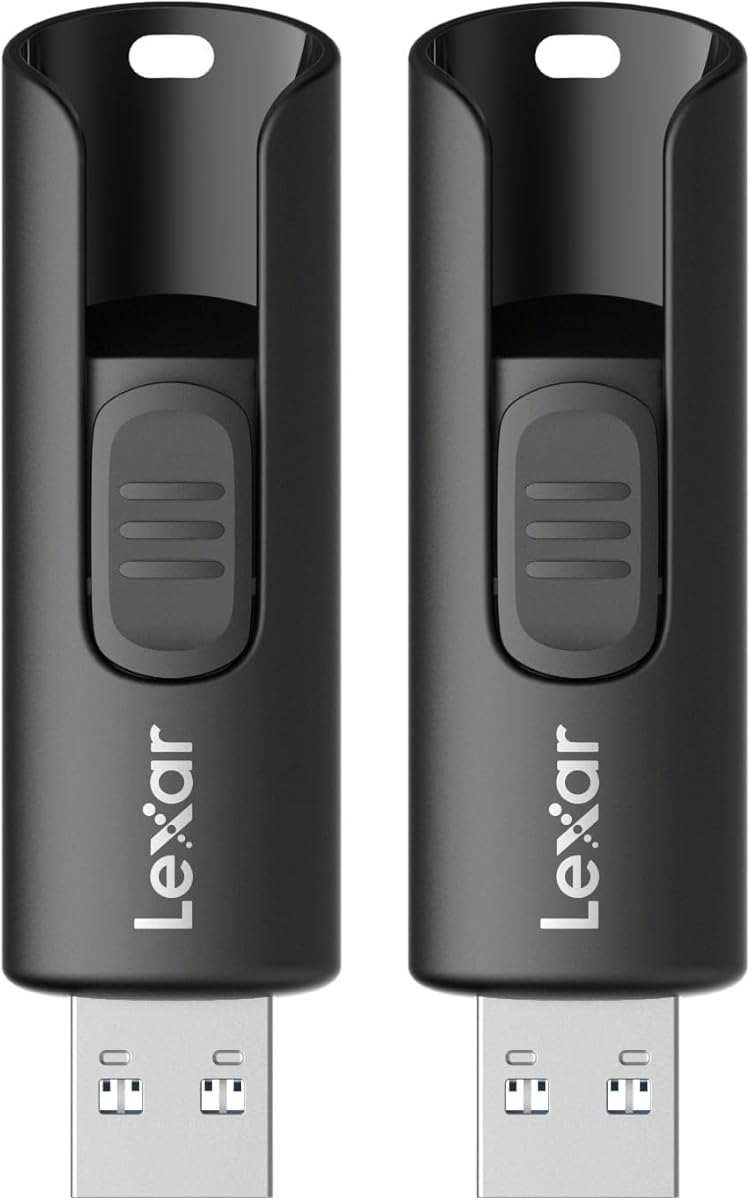
The Lexar A30E comes as a two pack offering great value with premium security features. Each drive offers 128GB capacity and speeds up to 100MB/s. The included DataShield software adds a layer of protection for sensitive files automatically.
We may earn a commission when you buy through this link, at no additional cost to you.
Its slim and lightweight design makes it easy to carry everywhere. The push-button retractor keeps the connector safe when not in use. A lanyard loop allows you to attach it to a bag or keychain for extra security.
While it lacks a USB-C connector the performance is solid for standard laptops. The software requires installation for full security features which might be a minor inconvenience. However the encryption ensures your data remains private.
If you need secure portable storage for work files this set is an excellent choice. The dual drive option is handy for backups or sharing. We recommend it for professionals who value data safety.
Lexar DataShield creates password protected safe folders that auto encrypt files and securely erase deleted items.
Weighing only 7.41 grams the drive is virtually weightless and fits comfortably in a pocket or pouch.
We may earn a commission when you buy through this link, at no additional cost to you.
The Lexar S80 focuses on delivering high read speeds for quick access to data. It offers 150MB/s read performance which is excellent for launching applications or loading large files. The retractable design protects the connector effectively.
We may earn a commission when you buy through this link, at no additional cost to you.
Security is a priority with 256-bit AES encryption software included. This ensures your personal or business data stays protected during transfers. The drive is backwards compatible with older USB ports ensuring wide usability.
While write speeds are not highlighted the read performance is impressive for this price point. The housing is durable enough for regular use though not metal. The three year warranty adds confidence in the product longevity.
If you need fast access to files on various systems this drive is a strong contender. It balances speed and security well. We recommend it for users who prioritize read performance and data protection.
With read speeds of 150MB/s users can access media and documents significantly faster than with standard USB 2.0 drives.
Advanced security software allows you to lock sensitive files with 256-bit AES encryption to prevent unauthorized access.
We may earn a commission when you buy through this link, at no additional cost to you.
The Lexar D40E provides two drives with dual connectors for maximum flexibility. Each drive features USB-C and USB-A ports allowing connection to laptops and smartphones. The metal enclosure offers protection against everyday wear and temperature changes.
We may earn a commission when you buy through this link, at no additional cost to you.
The 360-degree swivel design makes switching between ports easy without losing caps. It is plug and play requiring no software installation. Security software with 256-bit AES encryption protects your files effectively across devices.
While transfer speeds are up to 100MB/s it is not the fastest option. The dual design adds some bulk compared to single connector drives. However the versatility is valuable for users with mixed device environments.
If you need versatile storage for both mobile and desktop use this two pack is practical. It simplifies file sharing between different systems. We recommend it for users who value convenience and compatibility.
With both USB-C and USB-A connectors you can transfer files between modern smartphones and traditional computers effortlessly.
The 360-degree swivel design keeps the connectors safe from dust and damage without the need for removable caps.
We may earn a commission when you buy through this link, at no additional cost to you.
The Lexar TwistTurn2 offers three drives in one pack at a very affordable price. It uses USB 2.0 which is slower but sufficient for small document files. The twist mechanism protects the interface without requiring separate caps.
We may earn a commission when you buy through this link, at no additional cost to you.
This design makes it easy to use on the go. Just twist open and plug in. The drives work reliably with most PC and Mac computers. They are great for sharing small files or backups of essential data.
While the speed is not high compared to USB 3.0 models it remains stable. The 32GB capacity is small but handy for basic needs. The multi-pack allows you to distribute drives among family or colleagues easily.
If you need several drives for simple tasks this set is a cost effective choice. It eliminates the hassle of missing caps. We recommend it for casual users or office supplies.
The twist open mechanism reveals the USB interface instantly preventing loss of protective caps during transport.
Getting three drives in a single package offers great value for households or offices needing multiple portable storage options.
We may earn a commission when you buy through this link, at no additional cost to you.
The Lexar D400 provides 256GB of storage for those needing more space. It features both USB-C and USB-A connectors for broad compatibility. The metal housing and swivel design protect the connectors and add durability.
We may earn a commission when you buy through this link, at no additional cost to you.
DataShield software helps secure your files with encryption. It works well with Android devices allowing easy file management on the go. With read speeds of 130MB/s it handles large files efficiently without major delays.
While it costs more than smaller drives the capacity justifies the price. The dual connector design reduces the need for adapters. However it is slightly bulkier due to the larger capacity and dual ports.
If you need to store movies or large project files this drive is ideal. It balances capacity and convenience. We recommend it for content creators and users with significant data storage needs.
With 256GB of capacity users can carry thousands of photos hours of video or large project files in one drive.
The combination of USB-C and USB-A ensures you can connect to both new smartphones and older laptop models seamlessly.
We may earn a commission when you buy through this link, at no additional cost to you.
The Lexar S60 set offers five drives for extensive sharing needs. Each drive has 32GB capacity and uses USB 2.0 for transfers. The sliding cover protects the connector effectively while keeping the design compact.
We may earn a commission when you buy through this link, at no additional cost to you.
These drives are simple to use right out of the box. They work with most PC and Mac systems without issues. The warranty provides assurance for their reliability over time. It is a practical choice for events or classes.
Speed is not a priority here but it is sufficient for text files. The bulk packaging allows you to have spares on hand. The assorted colors make it easy to differentiate files or owners.
If you need multiple drives for sharing or distribution this set is the best option. It provides great value for the quantity. We recommend it for organizations or educational purposes.
Having five drives allows you to distribute files to multiple recipients or keep backups for different team members easily.
The sliding cover protects the connector from dust and damage ensuring the drive remains functional for long term use.
We may earn a commission when you buy through this link, at no additional cost to you.
The Lexar M400 combines style with solid performance for modern users. It offers read speeds of 150MB/s which is ideal for quick access to documents. The design is durable and looks professional for business environments.
We may earn a commission when you buy through this link, at no additional cost to you.
It includes DataShield for encryption to keep sensitive files secure. The drive is backwards compatible with older USB standards ensuring it works everywhere. It requires no software installation for basic storage needs.
While write speeds are not detailed the read speed is strong. It is a reliable choice for everyday tasks without excessive bulk. The aesthetic appeal makes it a good choice for professionals.
If you want a drive that performs well and looks great this model is suitable. It offers a balance of speed and security. We recommend it for office users and students.
The M400 is designed to be as stylish as it is durable appealing to users who value the look of their tech gear.
Lexar DataShield secures your files with encryption ensuring that your personal and work data remains safe from prying eyes.
We may earn a commission when you buy through this link, at no additional cost to you.
The Lexar S60 pack offers three reliable drives for everyday use. Each has 32GB capacity and features a sliding cover to protect the connector. It works well with most PC and Mac systems for basic file sharing.
We may earn a commission when you buy through this link, at no additional cost to you.
These drives are simple and effective for transferring documents and photos. The sliding cover ensures the interface stays safe from dust and damage. With a 2-year warranty they offer good value for money.
While they do not offer high speed USB 3.0 performance they are consistent. The black design is sleek and professional. For simple storage needs they are a dependable choice for most households.
If you need simple backup drives for occasional use this set is recommended. It avoids complexity while providing storage flexibility. We recommend it for general home office needs.
The sliding cover ensures the USB connector remains protected from physical damage during transport or storage.
These drives work seamlessly with most PC and Mac systems making them easy to share across different device environments.
We may earn a commission when you buy through this link, at no additional cost to you.
Selecting the right Lexar USB Flash Drive requires considering several factors to ensure it meets your specific needs. We have outlined key aspects to help you make an informed decision.
Storage capacity determines how much data you can hold on the drive. For documents and photos 32GB to 64GB may suffice. However if you work with videos or large files consider 128GB or 256GB options.
Choose a capacity that matches your typical file sizes to avoid running out of space during transfers.
Transfer speeds impact how quickly files are moved to and from the drive. USB 3.2 Gen 1 offers much faster speeds than USB 2.0. Look for read speeds of 100MB/s or higher for efficient workflows.
Prioritize higher speeds if you frequently transfer large media files to save time.
Connector types determine compatibility with your devices. USB-A works with most older laptops while USB-C is standard on newer devices and phones. Dual connector drives offer the most versatility.
Select a drive with connectors that match your devices to avoid needing extra adapters.
Build quality affects durability and longevity. Metal housing provides better protection against impact and heat than plastic. Retractable or swivel designs prevent connector damage.
Opt for metal cases and protective designs if you carry the drive daily.
Security features protect your data from unauthorized access. Lexar DataShield offers encryption and password protection for sensitive files. This is vital for business or personal privacy.
Look for drives with encryption software if you store confidential documents.
Warranty terms indicate the manufacturer confidence in the product. Lexar typically offers limited warranties ranging from two to three years. This covers defects and ensures support.
Check the warranty period to ensure adequate coverage for your purchase.
To begin use your Lexar USB Flash Drive simply plug it into an available USB port on your computer. The system should recognize it automatically and assign a drive letter allowing you to access files immediately.
When transferring files drag and drop them from your computer to the drive window. Always use the safe remove option in your operating system before unplugging to prevent data corruption.
For longevity keep the drive in a cool dry place away from magnets and liquids. Clean the connectors gently with a dry cloth if dust accumulates and avoid bending the drive during transport.
Yes most Lexar USB Flash Drives are fully compatible with Mac computers. They work out of the box with macOS provided the drive is formatted correctly. Some drives require reformatting for optimal Mac use.
USB 3.2 Gen 1 is essentially the same as USB 3.0 but with a newer naming standard. Both offer similar transfer speeds up to 5Gbps. The main difference is in naming conventions across brands.
No most Lexar USB Flash Drives do not require driver installation. They are plug and play devices that work immediately with Windows and macOS. Software tools like DataShield are optional downloads.
Recovering deleted files depends on whether they were overwritten. Use professional data recovery software immediately if possible. Avoid writing new data to the drive to increase success rates.
Yes drives with USB-C connectors work directly with Android phones and some iPads. You can use the Lexar App for media backup and management on supported mobile devices easily.
USB Flash Drives have a limited number of write cycles typically lasting years with normal use. Avoid frequent large writes and extreme temperatures to maximize its lifespan and data integrity.
We have reviewed ten top models ranging from budget options to high performance dual connectors. The D50E and A30E stand out for their speed and security features respectively. Each pick serves different user needs effectively.
When selecting a drive prioritize speed and connector type based on your devices. Security features and durability should also guide your choice for sensitive work. Ensure the capacity matches your typical storage needs.
Remember that prices and availability can change frequently. Always check current listings and verify compatibility before buying. We hope this guide helps you find the perfect Lexar USB Flash Drive.