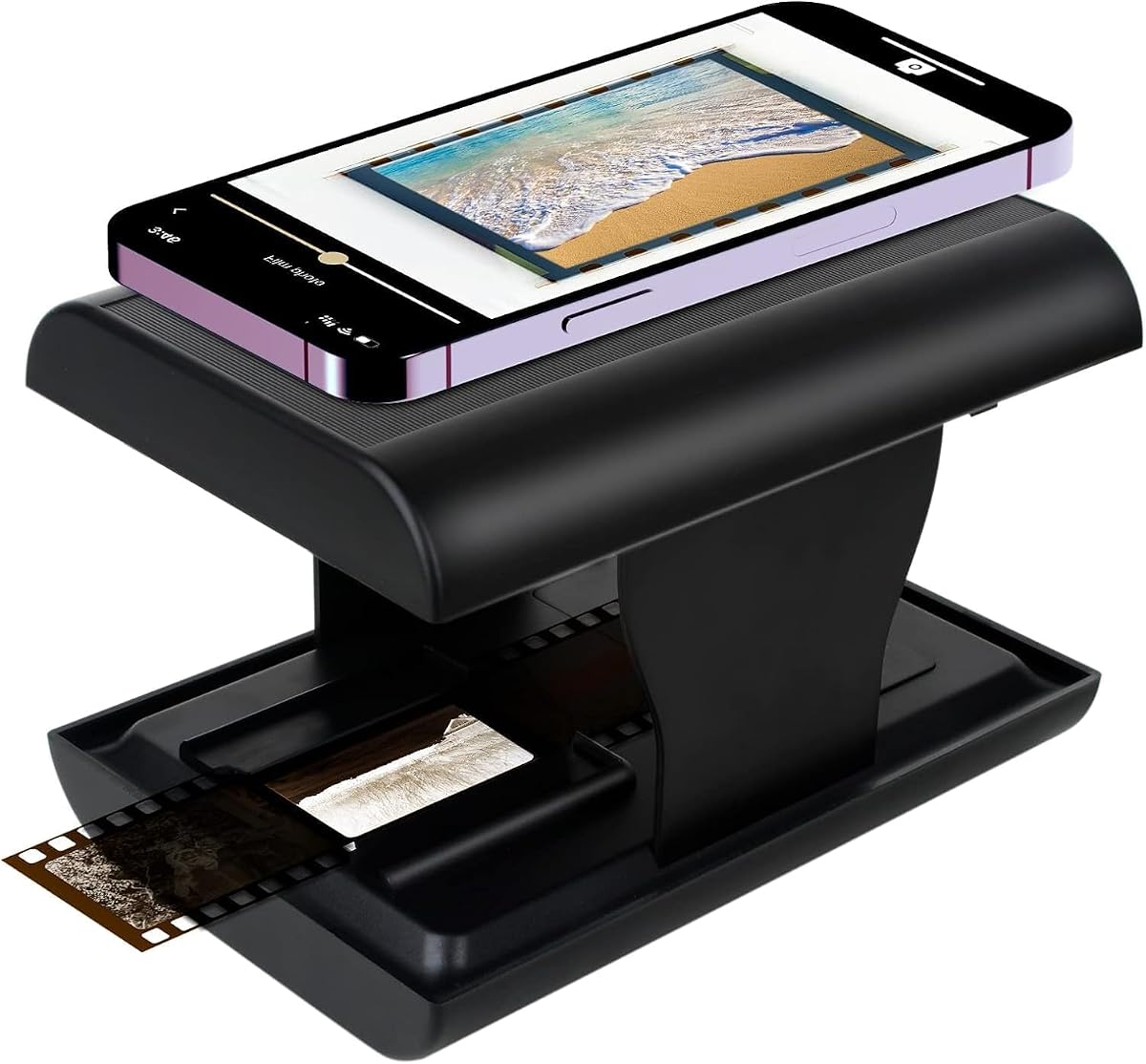
TCNEWCL 35mm Negative Slide Scanner
4.3Editor score
Foldable portable design
Uses smartphone camera
Includes LED backlight
Preserving your precious film memories requires a reliable black and white negative scanner that delivers crisp digital files without hassle or complexity.
We evaluated each model based on resolution, ease of use, format support, and overall value to help you find the right tool for your archiving needs.
Each pick below highlights key features and real-world performance so you can choose confidently while keeping in mind that prices may change over time.
4.3Editor score

4.2Editor score

4.3Editor score
As an Amazon Associate we earn from qualifying purchases.
Here is a side-by-side overview of all ten models to help you quickly identify the right scanner for your specific film formats and needs.


The BEONEGLOBAL ClearScan MINI earns our Editor's Choice award with its intuitive design and high resolution CMOS sensor.
We may earn a commission when you buy through this link, at no additional cost to you.
It delivers crisp 16MP images directly to SD card without requiring any computer or complex software installation.
Trade-offs include a smaller display and support only for 35mm 126 and 135 film formats.
Perfect for hobbyists seeking a reliable portable tool for digitizing home film collections efficiently.
Front-facing buttons below the screen let you scan comfortably without awkward hand movements.
Adjust brightness color flip or rotate images directly on the device before saving them to SD card.
We may earn a commission when you buy through this link, at no additional cost to you.
The KODAK Slide N Scan Max stands out with advanced capture software that simplifies resizing converting and adjusting images effortlessly.
We may earn a commission when you buy through this link, at no additional cost to you.
Its smooth moving tray feeds film without constant repositioning making it ideal for batch scanning many slides or negatives.
While the price is higher the premium 22MP interpolation output justifies the cost for serious photographers.
Choose this scanner if you need high fidelity digital files and reliable multi-format compatibility for your archives.
Accommodates 135mm 110mm and 126mm formats handling both slides and black and white negatives seamlessly.
Eliminates the need for a computer by saving your memories directly to SDHC cards up to 32GB.
We may earn a commission when you buy through this link, at no additional cost to you.
The TCNEWCL 35mm Negative Slide Scanner offers an incredibly affordable way to digitize old slides using just your smartphone.
We may earn a commission when you buy through this link, at no additional cost to you.
You insert the negative into the shell turn on the LED and hold your phone lens over the hole to capture images.
Quality depends on your phone camera resolution but it is a fun cheap solution for casual sharing.
Ideal for parents children or travelers who want a lightweight tool to revive memories without investing in expensive gear.
Folds up to the size of a small box making it easy to store and take anywhere.
Use a free app to capture rotate filter and adjust color contrast before sharing on social media.
We may earn a commission when you buy through this link, at no additional cost to you.
The Magnasonic All-in-One 24MP features a stunning 5 inch LCD screen for viewing scanned images directly on the device.
We may earn a commission when you buy through this link, at no additional cost to you.
You can even connect to a TV using HDMI to share memories with family on a larger display without a laptop.
It includes fast-loading film trays to scan photos in under five seconds with simple adjustments on screen.
Great for home users who want immediate previews and TV viewing capabilities while digitizing their film collection.
View images directly on the scanner or use HDMI to connect to a TV or monitor for sharing.
Simple setup and fast-loading trays let you scan photos in less than five seconds each.
We may earn a commission when you buy through this link, at no additional cost to you.
This product listing currently shows no detailed specifications or description available to evaluate its performance.
We may earn a commission when you buy through this link, at no additional cost to you.
We recommend checking the retailer page directly for updated information before making a purchase decision.
Until more details are provided we cannot assess how it compares to other scanners on this list.
If you find additional specs please verify compatibility with your film formats and supported file types.
Always review the product page on the retailer site for the most current specifications and details.
Confirm that the scanner supports your specific film formats and resolution needs before buying.
We may earn a commission when you buy through this link, at no additional cost to you.
The Memory Vault Box Negative Scanner is designed for simple at home use with built-in LCD preview and simple buttons.
We may earn a commission when you buy through this link, at no additional cost to you.
Advanced enhancement technology automatically improves brightness color and detail helping you restore faded memories easily.
This kit includes holders cleaning brush and cables to start digitizing immediately without extra purchases.
Choose this if you want a straightforward tool to preserve family history without complex software setup or services.
Built-in LCD preview screen and simple buttons make it easy for beginners to use comfortably at home.
Advanced enhancement technology automatically improves brightness natural color and image detail in your scans.
We may earn a commission when you buy through this link, at no additional cost to you.
The HP Film & Slide Scanner HPFS500 features a 5 inch all-angle LCD touch screen enabling intuitive editing directly on device.
We may earn a commission when you buy through this link, at no additional cost to you.
Gallery mode turns it into a vibrant picture frame displaying your favorite digital scans after digitization is done.
USB-C power offers flexibility using a PC USB or external adapter with quick-load trays for multiple formats.
Ideal for those wanting modern connectivity and touch controls while maintaining professional quality results for old film.
Use the 5 inch all-angle LCD touch screen to preview and edit images directly on the device.
Utilize the gallery mode to turn the scanner into a vibrant picture frame for your favorite moments.
We may earn a commission when you buy through this link, at no additional cost to you.
Choosing the right scanner depends on your budget film formats and desired digital quality for your archives.
Look for scanners with at least 12MP CMOS sensors to capture fine details in black and white negatives.
Higher resolution ensures you can print larger images without losing sharpness or clarity.
Verify the scanner supports 35mm 126 110 or Super 8 formats depending on your specific film types.
A versatile unit saves you from buying multiple devices for different negative or slide formats.
Larger built-in displays make it easier to preview images before saving without needing a computer.
Consider models with HDMI output if you plan to share photos directly on a TV screen.
Scanners with front buttons and simple menus reduce the learning curve for beginners.
Models offering direct SD card saving eliminate the need for complex drivers or cables.
Compact and lightweight designs allow you to digitize films while traveling or at home easily.
Foldable options are perfect if storage space is limited in your home office.
USB-C power and SD card slots offer modern convenience for transferring files to devices.
Avoid models that require constant external power or complicated connection setups for simple tasks.
Insert your negative or slide into the provided tray ensuring the film is aligned flat and free from dust.
Press the scan button to start the digitization process and preview the resulting image on the built-in screen.
Clean the scanner lens gently with a soft dry cloth after every few uses to avoid smudges affecting image quality.
Most modern scanners save files directly to SD cards and do not require a computer for basic scanning. This allows you to digitize photos anywhere without connecting to a laptop.
Yes the recommended models explicitly support 35mm negatives including black and white varieties with adjustable settings for better clarity.
A resolution of 12MP or higher is recommended for archival quality to ensure detail retention when printing large sizes or editing later.
Use a soft brush or anti-static cloth to gently remove dust from the film surface before inserting it into the scanner.
Many scanners on this list accept both negatives and slides so you can digitize different media types using one device.
Most built-in options offer brightness and color adjustments on the device though you can use free apps later for further refinement.
Our top picks include the TCNEWCL for budget shoppers BEONEGLOBAL for overall ease and HP for premium touchscreen features.
Prioritize resolution and format support to ensure your black and white negatives are digitized with maximum detail and care.
Prices and availability change frequently so verify current specs and deals on the product links before finalizing your purchase.