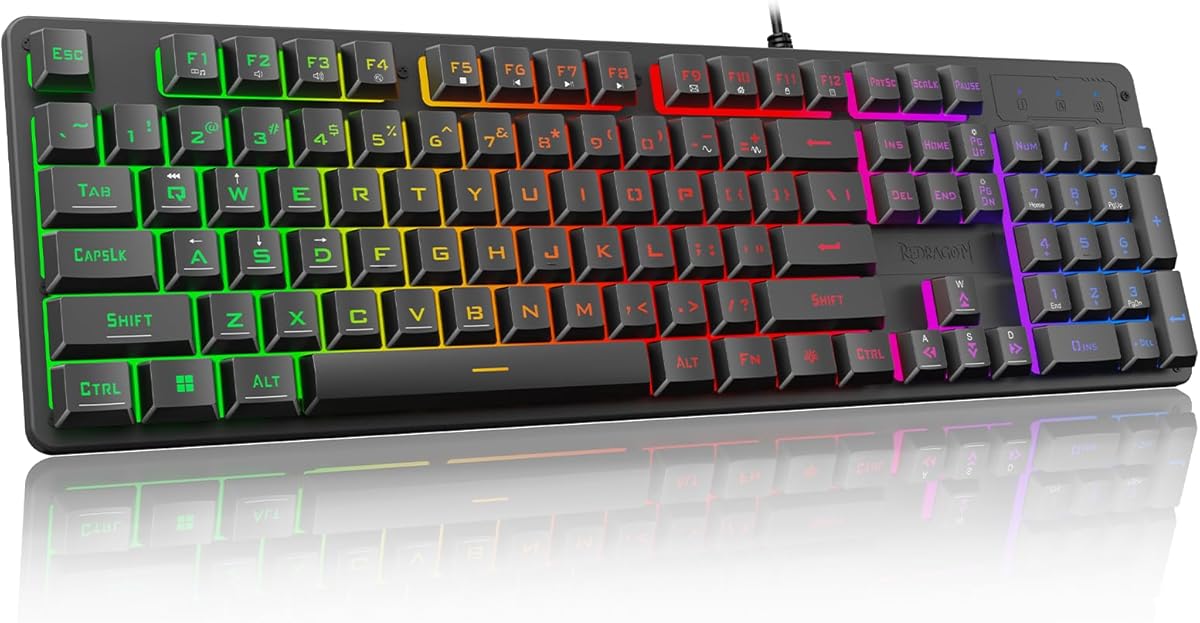
Redragon K521 Upgrade
4.4Editor score
19-key anti-ghosting
Mechanical feeling keys
RGB backlight with brightness control
Compare top keyboards for Rainbow Six Siege featuring mechanical switches, low latency, and durability to enhance your tactical gameplay performance today.
Finding the right keyboard for Rainbow Six Siege can significantly impact your tactical gameplay and reaction times during critical moments.
We analyzed ten top-rated gaming keyboards based on switch type, latency, durability, and key features essential for competitive FPS gaming.
Each pick highlights unique strengths to help you choose the perfect match for your setup while keeping in mind that prices may vary.
4.4Editor score

4.6Editor score

4.6Editor score
Here is a side-by-side comparison of the top ten keyboards designed to enhance your performance in Rainbow Six Siege and similar FPS titles.


The ASUS ROG Strix Scope II 96 Wireless is a top-tier choice for Rainbow Six Siege players seeking reliability and performance. With a 4.6 rating, it balances wireless freedom and precision effectively.
We may earn a commission when you buy through this link, at no additional cost to you.
Its hot-swappable pre-lubed switches allow for smooth keystrokes essential for rapid inputs in tactical shooters. The integrated sound-dampening foam reduces noise, keeping your focus during intense firefights.
While it comes at a premium price, the tri-mode connectivity ensures you can switch between devices effortlessly. The macro programmable keys help you execute complex utility combinations with ease.
This keyboard is ideal for serious competitors who value build quality and customization. For those looking to elevate their Siege setup, this model delivers consistent results.
ROG SpeedNova technology ensures low latency comparable to wired connections for competitive play.
Three adjustable tilt positions and a detachable wrist rest support long gaming sessions.
We may earn a commission when you buy through this link, at no additional cost to you.
The Corsair K55 RGB PRO is a fantastic starting point for players on a budget who still want gaming features. Its 4.4 rating reflects solid performance for casual to semi-competitive use.
We may earn a commission when you buy through this link, at no additional cost to you.
The six dedicated macro keys are perfect for binding game-specific commands like utility deployment. You can program these easily through the iCUE software to streamline your workflow.
While the membrane switches lack the tactile feel of mechanical options, they remain responsive enough for most gameplay. The spill-resistant design adds durability to protect against accidental accidents.
This keyboard is a great choice for students or those building their first gaming setup. It offers enough functionality to support your Siege experience without breaking the bank.
Six macro keys allow quick access to in-game commands without complex key combinations.
IP42 rating guards against dust and spills to keep the keyboard working longer.
We may earn a commission when you buy through this link, at no additional cost to you.
The SteelSeries Apex 3 stands out for its robust water resistance and quiet operation. It has earned a 4.6 rating from users who value durability and a clean environment.
We may earn a commission when you buy through this link, at no additional cost to you.
Its IP32 rating prevents liquid spills from damaging the internal components. This makes it ideal for gamers who enjoy drinks while playing or have busy setups.
The whisper quiet switches are designed for low-friction keystrokes that minimize noise. While not mechanical, they provide a smooth typing experience suitable for long sessions.
If you prioritize a quiet and durable keyboard, this model fits the bill perfectly. It supports multiple platforms making it versatile for console and PC gaming alike.
Whisper quiet switches reduce noise for peaceful gaming sessions at night.
The magnetic wrist rest provides full palm support to reduce fatigue during play.
We may earn a commission when you buy through this link, at no additional cost to you.
The Razer Ornata V3 offers a unique blend of comfort and responsiveness. With a 4.5 rating, it appeals to users seeking a slim profile without sacrificing performance.
We may earn a commission when you buy through this link, at no additional cost to you.
The mecha-membrane switches fuse mechanical feedback with membrane durability. This results in precise keystrokes that are satisfying to use during fast-paced gameplay.
Its low-profile keys allow for natural hand positioning reducing strain over time. The UV-coated keycaps ensure legends remain visible even after extensive use.
Ideal for users who prefer a sleek setup, this keyboard delivers reliable performance. The magnetic wrist rest ensures comfort during long tactical matches.
Mecha-membrane switches provide a clicky feel similar to mechanical switches.
UV coating on keycaps protects against fading and wear from frequent use.
We may earn a commission when you buy through this link, at no additional cost to you.
The Logitech G413 TKL SE brings mechanical precision in a compact form. Its 4.6 rating highlights its reliability for users who want a solid mechanical experience.
We may earn a commission when you buy through this link, at no additional cost to you.
PBT keycaps offer superior resistance to wear and heat ensuring long-lasting legends. The tactile switches provide clear feedback for accurate inputs without accidental presses.
Its tenkeyless layout saves desk space allowing for larger mouse movement. This is critical for precise aim adjustments in competitive games like Siege.
This keyboard is recommended for players who value simplicity and durability. It delivers consistent performance without complex software dependencies.
Tenkeyless design frees up space for wide mouse movements and precision.
PBT keycaps resist wear better than standard ABS for longer lifespan.
We may earn a commission when you buy through this link, at no additional cost to you.
The Redragon K521 Upgrade offers exceptional value for budget-conscious gamers. With a 4.4 rating, it proves that affordable options can still deliver gaming performance.
We may earn a commission when you buy through this link, at no additional cost to you.
Keys are designed for a mechanical feeling allowing fast tapping without fatigue. Anti-ghosting ensures that complex key combinations register correctly during intense action.
The one-touch lighting button makes it easy to adjust visual effects instantly. Breathability modes add flair without requiring driver software installation or setup.
If you need a cost-effective solution that supports competitive play this is it. It handles multimedia functions well for streaming or recording while you play.
Priced under most rivals it offers strong features without high cost.
Anti-ghosting ensures accurate inputs during multi-key combos in matches.
We may earn a commission when you buy through this link, at no additional cost to you.
The AULA F75 Pro is a powerhouse for those who want full customization. It has a 4.6 rating for its smooth typing feel and versatile connection options.
We may earn a commission when you buy through this link, at no additional cost to you.
Hot-swap support allows you to change switches without soldering. This makes it easy to experiment with different tactile or linear options for better gameplay.
The advanced structure with filled silencers reduces noise to a satisfying thock. This improves acoustics without disrupting your streaming or team communication.
Perfect for enthusiasts who love tweaking gear this keyboard supports deep customization. The multi-function knob gives quick access to volume or lighting adjustments.
Hot-swappable base allows easy switch changes to suit personal preference.
Tri-mode support covers wired wireless and Bluetooth for flexible setup.
We may earn a commission when you buy through this link, at no additional cost to you.
The ASUS ROG Strix Scope II X brings premium features to a full-size wired keyboard. It holds a 4.5 rating for its robust build and smooth switch performance.
We may earn a commission when you buy through this link, at no additional cost to you.
Hot-swappable pre-lubed ROG NX switches provide reliable and smooth inputs. The aluminum top plate adds stability and a professional look to your setup.
Integrated sound-dampening foam absorbs noise to create a pleasant typing experience. This ensures that keystrokes do not interfere with in-game audio clarity.
Ideal for those who prefer traditional layouts and wired stability this model excels. The dedicated macros help streamline utility usage during intense matches.
ROG NX V2 switches offer smooth keystrokes and enhanced RGB illumination.
Aluminum top plate ensures durability and resistance to flex during play.
We may earn a commission when you buy through this link, at no additional cost to you.
The Razer BlackWidow V4 X delivers rapid-fire inputs for competitive gamers. With a 4.5 rating, it is praised for its responsive switches and smooth gameplay.
We may earn a commission when you buy through this link, at no additional cost to you.
Yellow mechanical switches actuate quickly for instant inputs. This responsiveness helps with quick reactions in tactical shooters where timing is everything.
Built-in sound dampeners keep the keyboard quiet for peaceful environments. The dedicated macro keys allow you to bind complex commands for streamlined play.
For those who prefer smooth and silent switches this keyboard is a strong choice. The Chroma RGB integration adds dynamic lighting effects to enhance atmosphere.
Yellow switches provide rapid-fire inputs for fast-paced gaming reactions.
Per-key Chroma RGB allows customization of lighting for immersive effects.
We may earn a commission when you buy through this link, at no additional cost to you.
The Aula WIN60 HE introduces magnetic switch technology for ultra-fast response. It has a 4.5 rating for its advanced features designed for competitive advantage.
We may earn a commission when you buy through this link, at no additional cost to you.
Magnetic switches eliminate physical contact allowing for consistent actuation. This reduces wear and ensures precise inputs even during high-frequency tapping.
Rapid trigger mode enables faster peeking and quick-stop shooting. The web-based driver allows quick customization without heavy downloads or system conflicts.
This model is perfect for competitive players seeking cutting-edge tech. While compact it offers high performance for those who can adapt to the layout.
Hall Effect magnetic switches ensure precise and consistent actuation.
Rapid trigger mode optimizes inputs for peak performance in matches.
We may earn a commission when you buy through this link, at no additional cost to you.
Selecting the ideal keyboard requires understanding several key factors that directly affect your in-game performance and comfort.
Switch type determines how a keystroke registers and how it feels. Mechanical switches offer distinct tactile or linear feedback that aids precision. Membrane switches are softer and quieter but less precise. For FPS games like Siege, mechanical switches often provide the fastest response.
Choose switches that match your preference for tactile feedback versus smoothness.
Latency refers to the delay between pressing a key and the signal reaching the game. Low latency is critical for competitive play. Wireless keyboards with technologies like 2.4GHz often rival wired performance. Always check polling rates and connection specs.
Prioritize keyboards with high polling rates to minimize delay during gameplay.
Durability ensures your keyboard survives long sessions and spills. Look for features like spill resistance and durable keycaps. PBT keycaps resist wear better than standard ABS. High-quality materials extend the life of your gear significantly.
Invest in durable construction to protect your investment over time.
Form factor refers to the layout size such as full-size, TKL, or 60%. Full-size keyboards have number pads for general use. TKL saves desk space for mouse movement. Choose based on your desk size and usage needs.
Select a layout that balances space efficiency with functionality.
Customization features like programmable macros and RGB lighting can enhance your experience. Macros allow complex commands to be executed with one keypress. Ensure the software is user-friendly. This helps streamline utility binding in tactical shooters.
Look for software that supports easy macro programming for game efficiency.
Budget determines the range of features you can access. Higher price usually brings better build quality and switches. However, affordable options can still deliver excellent performance. Balance features with your financial constraints.
Find a model that offers the best value within your price range.
Ergonomics impact comfort during long sessions. Look for wrist rests and adjustable tilt. Proper ergonomics reduce strain on your wrists and hands. This helps maintain focus during competitive matches.
Prioritize comfort features to prevent fatigue during gameplay.
Connectivity options include wired and wireless. Wired offers stability while wireless offers freedom of movement. Ensure the wireless model supports low-latency modes. Check device compatibility for PC or console usage.
Choose connectivity based on your setup needs and mobility preferences.
Keep your keyboard clean by regularly wiping away dust and debris with a soft cloth. This prevents key jamming and maintains responsiveness.
Utilize software drivers to customize key bindings and macros to suit your playstyle in tactical shooters.
Avoid eating or drinking directly over the keyboard to prevent spills that could damage sensitive components and circuitry.
For competitive FPS, look for mechanical switches with low actuation points. A high polling rate ensures minimal delay. Wireless models with low-latency modes are also excellent options for freedom of movement.
Yes, modern wireless keyboards with 2.4GHz connectivity offer latency comparable to wired options. Ensure the model supports stable connections and has a reliable battery life for uninterrupted gaming.
Sticky keys are often caused by debris. Use compressed air to clean under the keycaps. If spills occur, unplug the keyboard and let it dry completely before attempting to use it again.
A polling rate of 1000Hz or higher is ideal for gaming. It ensures the computer registers inputs quickly. Higher rates like 4000Hz or 8000Hz provide even faster response times.
Yes, a wrist rest helps maintain a neutral wrist position. This reduces strain during long sessions. It improves comfort and can prevent repetitive strain injuries over time.
Macros allow you to program complex commands to a single key. Most games like Rainbow Six Siege allow standard macros but forbid those that automate gameplay entirely. Check game rules before using advanced scripts.
Mechanical switches offer tactile feedback and durability. They provide consistent actuation compared to membranes. This helps you know when a keypress registers which is critical for rapid inputs.
The top picks offer a range of options from budget-friendly to premium high-performance models suitable for various setups and preferences.
Prioritize low latency and durable switches to gain a competitive edge and ensure long-lasting performance during your matches.
Always check current pricing and deals before buying since values can change and limited offers may provide better savings.