
Dell Desktop Computer Package
3.8Editor score
Intel Quad Core i5 Processor
8GB RAM Memory Capacity
500GB HDD Storage Option
Finding the right desktop computer for kids can be challenging. You need a machine that balances performance with durability while staying within budget. This guide explores the best options available for young users in 2026.
We evaluated ten top-rated desktop computers based on processor speed, memory capacity, and storage options. Our analysis focuses on systems that support learning, creativity, and entertainment without overwhelming young hands with complexity.
Each pick highlights specific strengths like build quality, display clarity, and ease of use. Prices and availability change frequently so check current listings before making your final decision for your family needs.
3.8Editor score

3.8Editor score

4.2Editor score
As an Amazon Associate we earn from qualifying purchases.
This side-by-side comparison highlights key specifications across all ten selected desktop computers. Review each model to understand how they differ in processing power, storage types, and included peripherals.


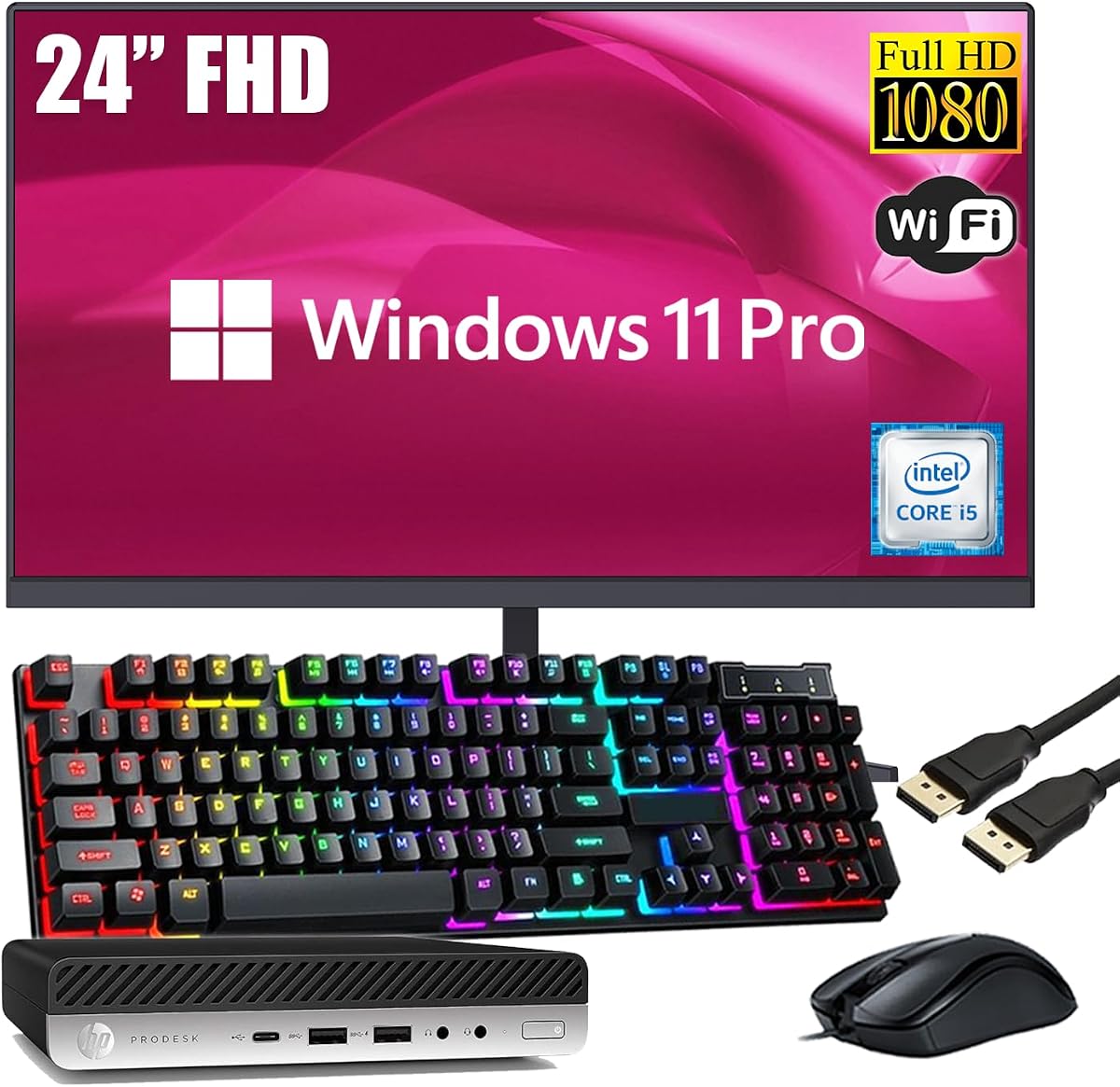


This HP desktop offers a balanced mix of power and practicality for kids. It features a reliable i5 processor paired with ample RAM to handle schoolwork and games simultaneously. The inclusion of an SSD ensures that applications load quickly without frustrating wait times.
We may earn a commission when you buy through this link, at no additional cost to you.
The 24-inch monitor provides a comfortable viewing area for long study sessions. Connectivity is solid with WiFi 6 support allowing for stable internet access during video classes. The RGB keyboard and mouse add a fun element that often appeals to younger users.
While the renewed status means cosmetic wear is possible, the internal hardware is tested for functionality. Some users report minor variations in included accessories but the core experience remains consistent. This model represents a smart choice for budget conscious buyers seeking high specs.
Families looking for a dependable computer that can grow with their child will find this appealing. It supports modern operating systems and can handle basic creative tasks like photo editing or light video work. Consider it for any home needing a versatile main computer.
The Intel i5 processor ensures smooth operation across multiple browser tabs and educational apps. This prevents lag during video calls or interactive learning sessions.
The 500GB SSD provides fast boot times and quick file access. This storage capacity is sufficient for documents, photos, and moderate media collections.
We may earn a commission when you buy through this link, at no additional cost to you.
This Dell package is an excellent entry point for families needing a functional computer without breaking the bank. It includes all essential components such as a monitor keyboard and mouse. The processor handles daily tasks like web browsing and document editing with ease.
We may earn a commission when you buy through this link, at no additional cost to you.
The 19-inch LCD monitor is sufficient for basic tasks though it offers less screen real estate than larger models. Having a DVD drive is a plus for schools that still use physical media for educational content. The included keyboard and mouse are reliable and responsive.
Users should note that HDD storage means longer boot times compared to modern SSDs. This might be noticeable when starting up the computer or opening heavy applications. However for general home use this difference is often acceptable given the price point.
If you need a simple reliable machine for homework and media consumption this is a strong contender. It is particularly useful for secondary rooms where performance demands are lower. The Windows 11 Pro license adds extra security features useful for families.
Everything needed to get started is in the box. This reduces setup time and ensures compatibility between components.
The built-in DVD drive allows reading of optical discs. This remains important for some educational materials and old software installations.
We may earn a commission when you buy through this link, at no additional cost to you.
This Lenovo All-in-One computer eliminates cable clutter by integrating the PC into the monitor. It features a sharp 24-inch display that delivers crisp images for both work and play. The wireless keyboard and mouse provide a clean desk setup that kids will appreciate.
We may earn a commission when you buy through this link, at no additional cost to you.
Performance is robust thanks to 16GB of RAM which allows many browser tabs and apps to run together. The PCIe SSD ensures that the system wakes up quickly from sleep mode. This responsiveness is key for keeping young users engaged during lessons.
The anti-glare screen reduces eye strain during long study sessions which is vital for health. Connectivity options include HDMI out allowing for a second screen if needed. The integrated speakers and webcam support smooth video conferencing without extra purchases.
Families seeking a modern look with strong performance will find this model ideal. It combines professional features with user-friendly design making it suitable for shared spaces. The Windows 11 Pro operating system adds business class security for peace of mind.
Integrating the computer into the monitor saves desk space. This design reduces trip hazards and creates a cleaner study environment.
16GB RAM ensures multiple programs run smoothly. This capability is essential for research projects involving many tabs and documents.
We may earn a commission when you buy through this link, at no additional cost to you.
This HP Elite desktop offers significant storage space with a full 1TB hard drive. This is perfect for families storing large libraries of photos videos or games. The 16GB RAM supports demanding software used in advanced creative projects or coding classes.
We may earn a commission when you buy through this link, at no additional cost to you.
The 22 inch monitor provides a good balance between screen real estate and desk footprint. It uses an IPS panel for wide viewing angles making it easy for multiple kids to collaborate on a task. The RGB lighting adds a playful touch to the workspace.
Performance is generally smooth for most tasks though the hard drive will be slower than an SSD for booting. This trade-off is acceptable if storage capacity is the priority. The renewed certification ensures the unit has been tested for reliability.
Choose this model if you need to save many files without using external drives. It suits users who prioritize capacity over raw boot speed. The included speakers and keyboard make it ready to use right out of the box.
The 1TB hard drive allows extensive media storage. This is ideal for saving projects without worrying about running out of space.
The IPS monitor offers clear visibility from different angles. This helps when parents and children look at screens together.
We may earn a commission when you buy through this link, at no additional cost to you.
This Dell OptiPlex stands out for its massive 2TB hard drive capacity. It allows families to store years of school photos homework assignments and videos on one machine. The 16GB of RAM ensures that system memory does not become a bottleneck for daily tasks.
We may earn a commission when you buy through this link, at no additional cost to you.
The 22 inch LED monitor delivers a sharp Full HD image that is easy on the eyes. RGB lighting on the peripherals makes the setup feel modern and fun. The included Windows 11 Pro license provides advanced networking tools that may be useful for home offices.
Performance is adequate for general use but the older processor generation means it may not handle the newest games as well as fresh models. This makes it a great choice for productivity and media consumption rather than high-end gaming. The renewed status adds value to the package.
Select this if you need maximum storage without buying external drives. It is a practical solution for archiving data while maintaining daily usability. The bundled monitor and peripherals simplify the setup process significantly.
The 2TB drive offers room for growing digital collections. This minimizes the need for complex cloud storage plans.
High RAM and Windows Pro features support efficient workflows. This helps students manage complex schedules and projects easily.
We may earn a commission when you buy through this link, at no additional cost to you.
This mini desktop is perfect for rooms with limited desk space. It fits easily in corners or shelves while delivering full computer functionality. The 24 inch monitor provides a bright and clear screen for reading and watching educational videos.
We may earn a commission when you buy through this link, at no additional cost to you.
Speed is a priority here with a solid state drive that boots the system quickly. The processor is efficient enough for schoolwork and web browsing without excessive power use. USB-C ports offer flexible options for connecting modern peripherals and drives.
The compact tower runs quietly which helps maintain a peaceful study environment. It is designed for efficiency and reliability over raw graphical power. The Windows 11 Pro setup ensures security features are active for safe browsing.
Ideal for dorm rooms or small apartments this system saves valuable floor space. It handles everyday tasks with grace and keeps your area organized. A smart choice for those who want a tidy and efficient setup.
The mini tower takes up very little desk space. This leaves more room for books and school materials.
The SSD allows quick starts for morning classes. This ensures users can begin work without delay.
We may earn a commission when you buy through this link, at no additional cost to you.
This HP All-in-One features a unique built-in docking hub for easy peripheral connections. It allows users to plug in multiple devices at once which simplifies organizing cables and drives. The white finish adds a clean look to any room.
We may earn a commission when you buy through this link, at no additional cost to you.
The 21.5-inch display is bright and sharp with an anti-glare coating that protects eyes. This is helpful during long sessions of reading or online classes. The Intel N100 processor provides reliable performance for everyday applications.
Storage includes both internal drive and SD card support for expanding capacity. This flexibility is great for storing extra media files without buying external boxes. The included keyboard and mouse work smoothly out of the box.
For users who value simplicity and connectivity this model is a strong candidate. It reduces cable clutter while offering useful ports for modern accessories. An efficient choice for home offices needing a tidy workspace.
The docking hub simplifies connecting external devices. This helps keep the desk area free of messy wires.
Anti-glare screen technology reduces reflections. This makes viewing easier for children with sensitive eyes.
We may earn a commission when you buy through this link, at no additional cost to you.
This Lenovo All-in-One features a newer generation processor with eight cores for better efficiency. It handles multitasking well allowing students to keep multiple windows open while researching. The 512GB SSD offers a great balance of speed and storage.
We may earn a commission when you buy through this link, at no additional cost to you.
The display uses a borderless design for a sleek professional look on desks. Colors are vibrant and text is sharp making it perfect for reading ebooks and viewing photos. The webcam and audio are integrated for seamless video calls.
The slim profile saves space while maintaining a premium feel. It includes a tiltable stand for ergonomic viewing angles. This helps users maintain good posture during long study sessions at home.
A great choice for students needing a modern reliable computer without tower clutter. It supports heavy web use and document creation effortlessly. Consider it for a clean and efficient study space.
Eight cores allow smooth handling of multiple apps. This reduces lag when switching between browser tabs and editors.
The screen design maximizes viewing area. This provides a more immersive experience for educational videos.
We may earn a commission when you buy through this link, at no additional cost to you.
This IdeaCentre offers a straightforward solution for family computing needs. It features a modern design that fits well on desks and counters. The 512GB SSD ensures that files load quickly and the system boots instantly.
We may earn a commission when you buy through this link, at no additional cost to you.
The built-in webcam and microphone support clear calls with friends and teachers. Speakers are tuned to deliver decent audio without extra hardware. The layout is intuitive for anyone transitioning from laptops to desktops.
Connectivity includes both USB-C and HDMI for connecting additional displays. This flexibility is useful if a second screen is needed for homework. The slim profile keeps the workspace organized and tidy.
Ideal for home offices needing a clean efficient machine. It handles basic tasks with reliability and looks good while doing so. A practical option for general household use.
The sleek finish adds style to home setups. This makes the computer blend well with modern furniture.
SSD storage allows quick opening of programs. This saves time during daily study routines.
We may earn a commission when you buy through this link, at no additional cost to you.
This Dell Optiplex bundle is an affordable way to get a complete desktop setup. It includes a 20 inch monitor which is suitable for smaller desks. The quad-core processor provides solid power for browsing and writing tasks.
We may earn a commission when you buy through this link, at no additional cost to you.
The RGB productivity bundle adds color to the desk with a backlit keyboard and mouse. This fun feature engages younger users during their study time. Windows 11 Pro offers robust security for safe web browsing.
Memory is DDR3 which is slower than modern DDR4 standards but still adequate for light use. It supports basic multitasking without major slowdowns. For general home needs this remains a functional and cost effective option.
Consider this for a second computer in the house or for basic learning tasks. It offers good value for the included accessories and software. A sensible pick for tight budgets needing reliable performance.
The package includes monitor and accessories together. This simplifies purchasing for those needing a complete setup.
Windows 11 Pro provides enterprise security features. This helps protect personal data during online activities.
We may earn a commission when you buy through this link, at no additional cost to you.
Selecting a desktop for children requires balancing performance with durability and ease of use. Focus on these key factors to find a computer that meets their current and future needs.
The processor determines how fast the computer can run apps and games. For schoolwork and general browsing an Intel Core i5 or newer is a safe choice. It handles multiple tabs and educational software without lag.
Prioritize models with at least a quad-core processor to ensure smooth performance during long study sessions.
RAM controls how many programs can run simultaneously. Aim for at least 8GB of RAM for daily use. If your child uses creative apps or many browser tabs 16GB will provide better multitasking capability.
More RAM means fewer slowdowns when switching between video calls and homework documents.
Solid state drives (SSDs) offer faster boot times than traditional hard drives (HDDs). An SSD is essential for a responsive experience. Ensure there is enough space for photos and school projects.
Look for systems with 256GB SSD or larger to balance speed and capacity effectively.
A clear screen is vital for reading and watching educational videos. Sizes between 21 and 24 inches are generally ideal for desks. Anti-glare coatings help reduce eye strain during long use.
Choose Full HD resolution to ensure text and images appear sharp and legible.
Check for USB ports to connect keyboards mice and external drives. WiFi 6 support ensures a stable internet connection for online classes. A headphone jack is also useful for private listening.
Verify that the system has enough ports to avoid needing extra hubs frequently.
Kids may accidentally bump their computers or knock on them. Look for sturdy frames and well-attached peripherals. All-in-One designs reduce cable clutter which lowers the risk of trips and spills.
Opt for units with reliable warranties to protect your investment from unexpected issues.
Many bundles come with a keyboard mouse and monitor. This saves money compared to buying parts separately. Check if the peripherals match the aesthetic preferences of your child.
Ensure the included keyboard and mouse are comfortable for smaller hands.
Windows 11 is the standard for modern desktops and offers built-in safety tools. It is compatible with most school software and games. Ensure updates are easy to manage for long-term support.
Select a model with a licensed OS to avoid security risks from unverified software.
Set up the computer on a stable surface away from direct sunlight and heat sources. Keep liquids far from the keyboard to prevent spills that could damage internal parts. Use a surge protector to safeguard the hardware from power spikes.
Teach kids to close unused apps before turning off the system to save energy. Regularly update the operating system to maintain security and performance. Use built-in tools to manage screen time and protect personal data online.
Yes desktop computers offer better screens and keyboards for learning. They support complex applications used in education and are generally easier to maintain than laptops.
8GB is enough for basic browsing and homework. 16GB is better for creative projects or multitasking. More RAM ensures smoother performance over time.
Most bundles listed include a monitor keyboard and mouse. Always check the product details to confirm what is included before purchasing.
Windows 11 Home is sufficient for most needs. Pro adds security and management features useful for families with multiple devices.
Some desktops allow adding extra drives. Check the specific model specs to see if it supports additional memory or storage upgrades.
Windows includes parental controls to limit access. These tools help manage screen time and safe browsing for younger children.
This guide highlights top models that balance performance and durability for families. The HP Windows 11 Desktop offers strong value while the Lenovo All-in-Ones provide sleek designs for home offices.
Prioritize speed and screen quality to ensure a comfortable experience. A computer with an SSD and 16GB RAM will handle schoolwork smoothly for years.
Always check current availability and warranty terms before buying. Technology updates quickly so verify the latest specs to ensure your purchase meets your needs today.