
Cooling Fan for Nintendo Switch 1/2
4.6Editor score
LED temperature display
Adjustable fan speed
Micro USB power
This comprehensive guide compares the top 10 Cooling Fan Nintendo Switch Dock models to help you choose the best cooling solution for your gaming setup.
Long gaming sessions can cause your console to heat up significantly. A reliable Cooling Fan Nintendo Switch Dock helps maintain optimal temperatures. This ensures smooth performance and protects your hardware from thermal stress over time.
We evaluated ten top rated cooling accessories based on performance and features. Our analysis includes airflow capacity noise levels and ease of installation. Each product was selected to offer unique benefits for different user needs and budgets.
Each pick highlights key specifications and real world advantages. Prices and availability change frequently so verify details before buying. These recommendations aim to help you find the perfect accessory for your docked gaming experience.
4.6Editor score

3.9Editor score

4.0Editor score
This side by side comparison evaluates all ten cooling fans based on critical performance metrics and design features to help you make an informed decision for your console.




This unit tops our list due to its comprehensive feature set and strong ratings. It combines an LED display with adjustable speed controls for precise cooling management. The kit includes accessories like joystick caps and a fixed pad for added value.
We may earn a commission when you buy through this link, at no additional cost to you.
The LED display shows real time fan RPM and exhaust temperature in Celsius. This transparency helps users understand exactly how much cooling is active during sessions. Speed adjustment ranges from 510 RPM to 6000 RPM ensuring flexibility for different heat levels.
Noise becomes noticeable when speeds exceed 2400 RPM which might disturb quiet environments. The micro USB connection is reliable but less universal than USB C. These trade offs are acceptable given the strong cooling performance and included accessories.
Gamers needing detailed control and visibility will find this model ideal. The lifetime warranty adds peace of mind for long term use. Its balanced performance makes it a top choice for anyone seeking a versatile cooling solution.
The LED display provides immediate feedback on exhaust temperature and fan speed for better thermal management.
Speed can be tuned from silent low RPM to high power turbo settings depending on your thermal needs.
We may earn a commission when you buy through this link, at no additional cost to you.
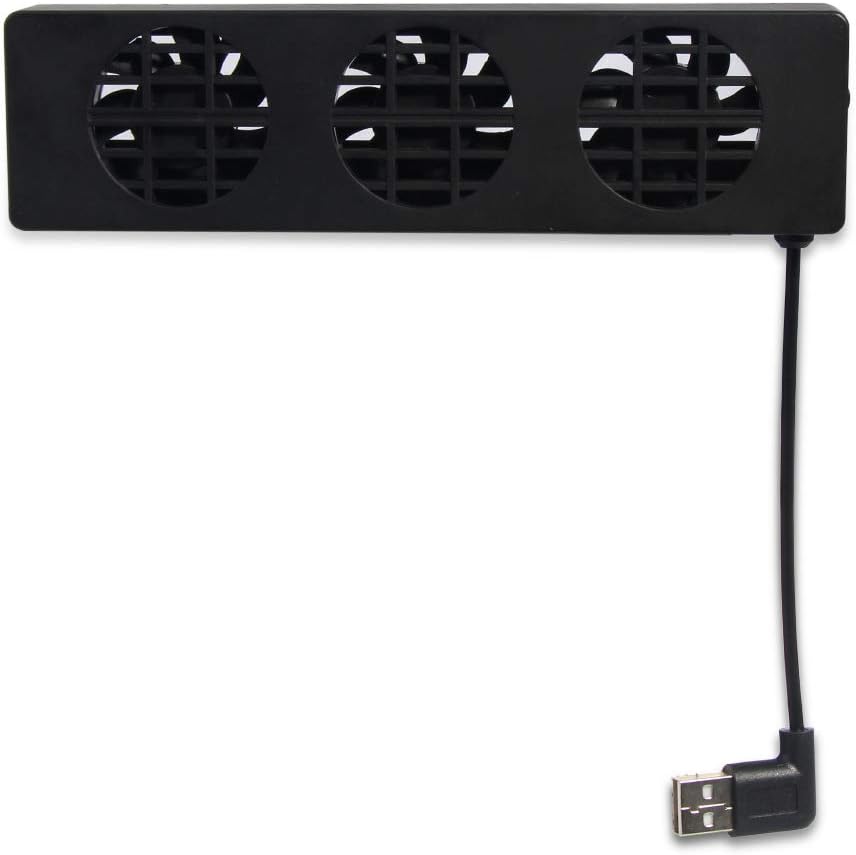
This model offers three fans for strong airflow at a budget friendly price. It is designed specifically for the original dock to improve heat dissipation. The turbo and normal modes allow quick switching between performance levels.
We may earn a commission when you buy through this link, at no additional cost to you.
Three high speed fans provide robust ventilation to lower temperatures quickly. The compact design saves space on your entertainment cabinet while maintaining effectiveness. USB power makes setup straightforward without needing extra adapters or cables.
The user rating is lower than top picks suggesting some quality control variance. It lacks a temperature display so users rely on feel or game performance. These drawbacks matter less if you prioritize raw airflow and low cost.
Budget conscious gamers needing basic cooling should consider this option. Its simple design is easy to use and store. While not as refined as premium models it delivers solid value for entry level cooling needs.
Three fans work together to increase air volume and move heat away from the console faster.
Compact dimensions fit neatly on the back of the dock without taking up much room.
We may earn a commission when you buy through this link, at no additional cost to you.
This model targets future Switch 2 docks with advanced features like dual fans and USB ports. It includes slots for game cards and USB expansion for accessories. The RGB lights add a customizable aesthetic to your setup.
We may earn a commission when you buy through this link, at no additional cost to you.
Dual fans and three stage cooling provide efficient heat dissipation for demanding sessions. The six game card slots keep your library organized within arm's reach. Three USB ports allow charging controllers without occupying dock slots.
Support relies on future hardware release which may cause compatibility uncertainty. The RGB lights may be distracting for some users though they can be disabled. These features reflect a forward looking design focused on future console capabilities.
Early adopters or those planning ahead for next gen consoles may prefer this. It combines cooling with organization and charging in one unit. Consider it if you value multi function accessories and RGB lighting effects.
Six slots allow quick access to cartridges so you never lose track of your collection.
USB A and C ports enable charging controllers or phones without extra adapters.
We may earn a commission when you buy through this link, at no additional cost to you.
Designed for the 2021 OLED dock this model fits perfectly with a blue light aesthetic. It features fourteen game slots and a high efficiency fan for targeted cooling. The Type C cable matches the dock power standard.
We may earn a commission when you buy through this link, at no additional cost to you.
Fourteen slots on top store your most used cards for quick access. The fan blows directly onto the base to dissipate heat faster. Blue light syncs with power status providing visual feedback without extra controls.
The light may be too bright for dark room gaming though it can be turned off. It fits only the OLED dock which limits compatibility with original models. These constraints suit users committed to the OLED setup.
OLED users wanting organized storage and precise cooling should consider this option. The Type C connection reduces cable clutter and simplifies setup. Its design balances form and function for a polished gaming station.
Fourteen slots accommodate large game libraries so you do not need extra organizers.
Type C cable ensures a secure connection that matches the dock power input.
We may earn a commission when you buy through this link, at no additional cost to you.
This unit is designed for the OLED model with a white finish and blue LED light. It uses a single high speed fan to boost air circulation inside the dock. Power comes from the dock Type C port.
We may earn a commission when you buy through this link, at no additional cost to you.
The fan accelerates air circulation to achieve heat dissipation without high noise. Its white design matches the OLED console aesthetic for a cohesive look. The switch turns on and off with lighting sync.
It lacks speed control so users cannot adjust performance for different needs. A single fan may not be enough for extreme thermal loads. These trade offs are acceptable for general use and clean design.
Users seeking a silent and visually matching accessory will appreciate this model. Its simplicity reduces complexity while providing steady cooling. Consider it if you prefer a streamlined setup with minimal controls.
White color and blue light match the OLED dock for a unified visual style.
High speed fan delivers airflow while keeping noise levels low during gaming.
We may earn a commission when you buy through this link, at no additional cost to you.
This model focuses on instant cooling with a super turbo fan for the dock. It claims to keep your OLED running smoothly during intense sessions. The compact design saves space while providing effective airflow.
We may earn a commission when you buy through this link, at no additional cost to you.
The 3000 RPM fan moves air quickly to lower dock temperatures fast. White finish and blue LED light enhance the OLED setup look. Plug and play USB power simplifies installation without extra steps.
Lack of user ratings makes performance harder to verify objectively. Controls are minimal so users cannot adjust speed or turn off the light. These limitations fit users who need basic cooling without complex features.
Gamers wanting a simple visual upgrade with cooling may find this useful. It addresses heat issues directly with strong airflow. Consider it if you prefer minimal interfaces and quick setup.
Super turbo fan accelerates air to cools the dock immediately during play.
USB connection uses the dock power directly requiring no extra outlets or adapters.
We may earn a commission when you buy through this link, at no additional cost to you.
This accessory includes three fans inside a compact bracket for the dock. A side switch lets you toggle between turbo normal or off. It is built from durable material and easy to set up.
We may earn a commission when you buy through this link, at no additional cost to you.
Three fans ensure consistent airflow to keep the console cool. Turbo mode adds power for heavy games while normal suits lighter sessions. The small size fits neatly on the back of the dock.
Lack of display or detailed controls may limit visibility into performance. Brand reputation varies so quality can differ by batch. These are acceptable trade offs for a functional and affordable cooler.
Users wanting reliable cooling with basic controls will find this useful. Its durable build withstands regular use and movement. Consider it for a practical solution that balances performance and size.
Turbo and normal speeds let you match cooling power to current heat needs.
Small design preserves space around the dock without crowding the stand.
We may earn a commission when you buy through this link, at no additional cost to you.
This model uses three fans to provide powerful ventilation for the console. It connects via the dock USB port without needing extra power. Turbo normal and off modes cover most use cases for cooling.
We may earn a commission when you buy through this link, at no additional cost to you.
Built in fans reduce console temperature quickly and effectively during long sessions. The design allows easy insertion onto the back of the dock. Its size makes it easy to carry and store when not in use.
Lower ratings may indicate durability or quality inconsistency over time. Materials are basic and may not resist wear as well as premium units. These factors are acceptable if you need budget cooling without long term guarantees.
Users needing quick heat reduction with minimal setup should consider this. It moves air well and fits the dock without hassle. Look into warranty options if you plan to use it daily.
Three fans increase airflow to speed up heat exchange and lower temperature fast.
Direct USB port connection ensures steady power without extra cables or bricks.
We may earn a commission when you buy through this link, at no additional cost to you.
This fan offers bottom cooling with an adjustable speed range and LED display. It fits both Switch OLED and Steam Deck setups. Three physical buttons allow power on and speed adjustment easily.
We may earn a commission when you buy through this link, at no additional cost to you.
Speed ranges from 510 RPM to 6000 RPM for versatile heat needs. Below 2400 RPM it runs nearly silent balancing cooling and noise. A stabilizer pad prevents slipping and scratching on the surface.
Lack of user rating leaves some uncertainty about real world performance. Micro USB power is less common now and may need a spare cable. These limitations suit users prioritizing visibility and speed control.
Users needing visible metrics and broad compatibility will find this useful. The low speed silence helps keep rooms quiet during relaxed play. Consider it if you want precise control without high noise.
Compatible with Switch OLED and Steam Deck for broad cooling utility.
Runs nearly silent below 2400 RPM ensuring minimal noise during play.
We may earn a commission when you buy through this link, at no additional cost to you.
This model is designed for the OLED dock in specific regional markets. It shows a solid 4 rating among users in those regions. The black design fits well with dark console setups.
We may earn a commission when you buy through this link, at no additional cost to you.
Its OLED specific fit ensures stable placement on the dock base. User ratings suggest consistent performance and reliability in practice. The simple design focuses on cooling without extra visual effects.
Language on packaging and documentation may challenge users outside regional markets. Lack of detailed English specs reduces transparency on performance metrics. These are minor issues if you can verify the fit beforehand.
Users in compatible regions seeking a reliable OLED cooling accessory may like it. Its high rating indicates satisfaction with cooling results. Check regional compatibility before purchase to avoid fit issues.
High regional rating suggests consistent performance and user satisfaction.
Designed specifically for OLED dock base ensuring stable physical fit.
We may earn a commission when you buy through this link, at no additional cost to you.
Selecting the right cooling fan involves evaluating several key factors to ensure optimal performance and compatibility with your setup.
Ensure the fan is designed for your specific dock whether original OLED or a future model. Some units only fit OLED docks while others suit original models.
Check product details to confirm fit before purchase to avoid returns or installation issues.
Look for multiple fans or high RPM ratings to ensure effective heat dissipation during long sessions. More fans usually mean stronger airflow and better temperature control.
Higher airflow is essential for intense games to prevent lag caused by overheating.
Adjustable speeds allow you to balance cooling power with noise levels for your environment. Models with buttons or switches give more control over performance settings.
Choose units with multiple modes to adapt to different gaming scenarios and room conditions.
Check if the fan uses micro USB or USB C and whether it draws power from the dock or needs an outlet. Dock powered units simplify your setup and reduce cable clutter.
Prioritize models that match your dock power ports to avoid needing extra adapters.
Noise becomes more noticeable in quiet rooms so seek models rated as quiet during operation. Lower speeds should ideally run silently while higher speeds may produce some sound.
Read reviews on noise to ensure it will not disrupt your gaming experience or others nearby.
Durable materials like ABS plastic ensure the fan withstands regular use without breaking. A stable base prevents slipping and protects your console from scratches.
Look for sturdy construction and non slip pads to ensure safe and secure placement.
Features like LED displays game card slots or RGB lights add value and functionality to the cooling unit. Choose features that align with your organization and aesthetic preferences.
Prioritize practical extras over flashy ones if you want maximum utility and reliability.
A good warranty and responsive customer service provide peace of mind and help resolve issues quickly. Lifetime or extended warranties show confidence in product quality.
Check the seller reputation and warranty terms before buying to protect your investment.
Install the fan onto the dock by aligning it with the USB port and securing it. Most models slide into place using a fixed pad or clip for stability.
Connect the power cable to the dock USB port or outlet to enable operation. Turn on the fan using the switch and adjust speed as needed for cooling.
Clean the fan blades regularly with compressed air to remove dust and maintain performance. Keep vents clear and check cables for wear to ensure long term reliability.
No a properly installed fan does not damage your dock or console as it only moves air. It is designed to fit safely and draw power from available USB ports without stress. Ensure correct installation to avoid physical interference with other components or ports.
Most fans connect directly to the dock USB port so you do not need an extra adapter. Some may use micro USB which works with many available power bricks. Check power requirements before buying to confirm if your setup supports it.
Noise varies by model but many are nearly silent at low speeds. Higher speeds may produce noticeable sound which is normal for strong airflow. Look for quiet rated units if noise sensitivity is a priority.
Some models fit both docks while others are designed for one specific model. Check product compatibility details carefully before buying to ensure a proper fit. Using the wrong unit may result in poor placement or instability.
Clean the fan every few months or when you notice reduced airflow. Use compressed air to remove dust from blades and vents. Regular cleaning maintains performance and prevents overheating from clogged filters.
A fan helps maintain lower temperatures which reduces thermal stress on internal components. Consistent cooling can prevent overheating issues and extend the life of your system. While not a guarantee it supports better long term health for the console.
We reviewed ten top cooling fans offering unique features for different needs. The best picks include adjustable speed options multiple fans and durable designs to keep your console cool.
Prioritize compatibility airflow and noise levels when selecting a unit. Models with displays or game slots add practical value beyond cooling alone.
Prices change often so verify current availability and details before buying. Choose the fan that fits your dock and budget for the best experience.