
TP-Link 1 to 2
4.6Editor score
Compact size
USB power included
Gigabit speeds
Compare the top 10 Internet Splitter models of October 2026 for speed, durability, and port expansion in homes and offices.
Finding the right Internet Splitter can transform your home or office network setup by solving limited port issues efficiently. A good splitter ensures stable connections for multiple devices without compromising on speed or reliability during daily use.
We compared ten leading Internet Splitter models based on performance, build quality, and user feedback to create this comprehensive guide. Each product was evaluated for speed capabilities, compatibility with various cables, and ease of installation for users.
Each pick in this list highlights specific strengths and ideal use cases to help you make an informed decision. Please note that prices and availability change frequently, so check current listings before purchasing your preferred device.
4.6Editor score

4.7Editor score

4.4Editor score
The following table provides a quick side-by-side comparison of all ten Internet Splitter models reviewed in this guide to help you identify key differences at a glance.



This LIEZHUA Gigabit Ethernet Splitter offers an efficient network expansion solution for those needing more ports. With a rating of 4.3 stars, it allows two devices to transfer data simultaneously at speeds up to 1,000 Mbps.
We may earn a commission when you buy through this link, at no additional cost to you.
The device features six LED indicators that make it easy to determine which connected device is currently running. It works seamlessly with various cable types like Cat 5 through Cat 8, ensuring versatility across different network environments.
While it provides stable data transmission through a PCB circuit board and aluminum alloy casing, it requires a USB power cable to function. This might be a minor inconvenience for users expecting a passive device.
This splitter is ideal for office or home setups where a single port needs to serve two devices reliably. Its universal compatibility and clear indicators make it a strong contender for network expansion needs.
Allows two devices to connect simultaneously optimizing network resource utilization without complex setup.
Six LED lights provide visual feedback on active connections for easier network management.
We may earn a commission when you buy through this link, at no additional cost to you.
The TP-Link TL-SG105 stands out with a 4.7 rating as a reliable 5 Port Gigabit Unmanaged Ethernet Switch. It supports 10/100/1000Mbps RJ45 Ports with auto negotiation and auto MDI/MDIX for flexible network expansion.
We may earn a commission when you buy through this link, at no additional cost to you.
Its latest innovative energy-efficient technology expands network capacity with much less power consumption. The fanless design ensures quiet operation, making it perfect for home offices or quiet environments where noise is a concern.
This device offers IEEE 802.3X flow control for reliable data transfer and port-based 802.1p/DSCP QoS to prioritize traffic. The metal casing is durable and supports both desktop and wall mounting options for versatile placement.
Ideal for users needing more than two ports, this switch offers robust performance with a 3-year warranty. It is a top choice for expanding networks with stability and speed in mind.
Innovative technology reduces power consumption while expanding network capacity effectively.
Quality of Service features prioritize video or voice data transmission for better performance.
We may earn a commission when you buy through this link, at no additional cost to you.
This TP-Link Ethernet Splitter expands one Gigabit Ethernet port into two active ports for simultaneous device connections. It supports up to 1000Mbps total bandwidth with smooth stable data transmission and no signal crosstalk.
We may earn a commission when you buy through this link, at no additional cost to you.
Compatible with Cat8 to Cat5 Ethernet cables, it works seamlessly with routers and switches. The device is part of the Secure-by-Design pledge ensuring it is built with advanced security as a core requirement.
While it includes a USB power cable and is compact for desk or travel use, the bandwidth is shared between devices. Actual speed depends on the network environment and connected equipment which is typical for splitters.
For those needing a quick two-port expansion with reliable performance, this model offers excellent value. It is easy to set up and ideal for streaming or file transfers on a budget.
Built with advanced security requirements following the Secure-by-Design pledge.
Expands one Gigabit port into two active ports for easy network extension.
We may earn a commission when you buy through this link, at no additional cost to you.
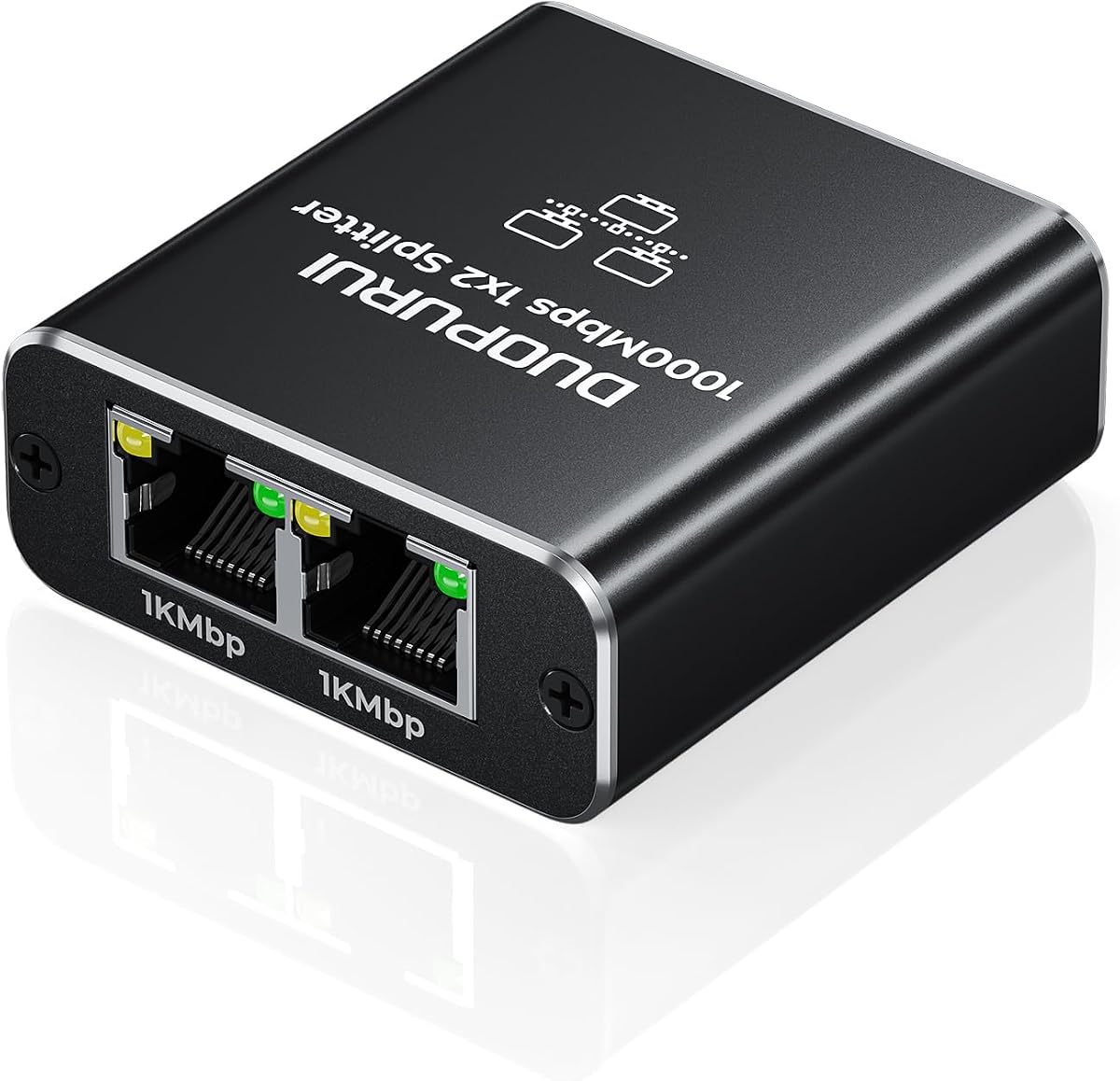
The DUOPURUI Ethernet Splitter can expand one Gigabit Ethernet signal into two independent outputs with a concurrent rate of 1000Mbps. It is designed for high-speed transmission and is backward compatible with 10/100Mbps networks.
We may earn a commission when you buy through this link, at no additional cost to you.
Its shell is made of high-quality alloy material ensuring strong anti-jamming ability in complex use scenarios. The internal high-performance circuit board ensures stable and reliable signal transmission for various devices.
While it comes with a 3.3FT USB power cable, it must be connected to a power source like a cell phone charger rather than a laptop port. This ensures the best stability and performance for the device operation.
This splitter is a solid choice for those needing a reliable two-port solution with durable construction. Its plug and play design makes it easy to integrate into existing network setups quickly.
Supports up to 1000Mbps rates perfect for 4K video and online gaming.
Compatible with routers, switches, computers, and gaming consoles easily.
We may earn a commission when you buy through this link, at no additional cost to you.
This Gigabit Ethernet Splitter connects one Ethernet port to four devices providing a fast stable network connection for all. It supports Gigabit Ethernet with ultra-fast data transfer speeds of up to 1000Mbps.
We may earn a commission when you buy through this link, at no additional cost to you.
The network switches include USB power cords and LAN cables for plug and play use without configuration. Its compact lightweight design makes it easy to carry around for home, office, or travel use.
While it offers great versatility for connecting multiple devices simultaneously, it requires a USB power cord to function. This adds a bit of bulk but ensures stable performance across all four ports.
For users needing to connect more than two devices, this model offers excellent functionality. It is a strong choice for media streaming and gaming setups requiring multiple wired connections.
Connects one Ethernet port to four devices for extensive network expansion.
Provides ultra-fast data transfer speeds ideal for large file transfers.
We may earn a commission when you buy through this link, at no additional cost to you.
This Internet Splitter is compatible with Cat5 to Cat8 Ethernet cables for maximum flexibility in network setups. It supports data transfer speeds up to 1000Mbps for fast and reliable network connections.
We may earn a commission when you buy through this link, at no additional cost to you.
The Ethernet Splitter features 4 RJ45 output ports from a single input allowing four devices to be connected simultaneously. It includes a USB-C power cable for reliable and stable operation without external adapters.
Setup is simple with no configuration required just connect your cables and power source to start using. It is perfect for expanding wired network connections in various environments.
This model is ideal for users needing more connectivity without complex networking gear. Its plug and play nature and high-speed support make it a convenient choice for network expansion.
Features 4 RJ45 output ports from a single input for easy expansion.
Includes USB-C power cable ensuring stable operation without adapters.
We may earn a commission when you buy through this link, at no additional cost to you.
This high-performance adapter allows you to expand your network without requiring additional cables. It supports speeds up to 1000Mbps ensuring uninterrupted internet access for two devices simultaneously.
We may earn a commission when you buy through this link, at no additional cost to you.
The upgraded transmission chip ensures high-speed connectivity without compromising performance. The RJ45 ethernet splitter is made of high-quality lightweight plastics with nickel-plated jacks for stable signal transmission.
LED indicators clearly display the working status of each port which is helpful for troubleshooting. It is compatible with most network Ethernet cables including Cat8 through Cat5e.
Ideal for home or office use, this splitter offers plug-and-play installation for long-lasting performance. It is a solid option for extending network reach efficiently.
LED lights display working status of each port for easy monitoring.
Upgraded transmission chip ensures high-speed connectivity and stability.
We may earn a commission when you buy through this link, at no additional cost to you.
This Ethernet splitter high speed supports three devices sharing a single ethernet line at the same time. It ensures stable reliable data transfer between devices at rates up to 1000M.
We may earn a commission when you buy through this link, at no additional cost to you.
The LAN splitter is compatible with various network cable types including Cat8 through Cat5e. Its lightweight compact design allows you to fit it into any laptop travel bag for flexibility.
Made of high-quality aluminum metal material it provides durability and stability. Advanced socket technology ensures safe and comfortable plugging while the included USB charging cable powers it.
This model is perfect for home office or hotel environments where multiple wired connections are needed. It offers a simple way to expand network access without configuration steps.
Supports three devices sharing a single ethernet line simultaneously.
Made of high-quality aluminum metal for durability and stability.
We may earn a commission when you buy through this link, at no additional cost to you.
This Ethernet Splitter allows three devices to share a single Ethernet line effectively solving connection issues. It supports rates up to 1000Mbps ensuring stable reliable data transfer between devices.
We may earn a commission when you buy through this link, at no additional cost to you.
The RJ45 1 to 3 splitter adapter is crafted from high-quality aluminum metal material providing durability and efficient heat dissipation. It supports the LAN cable up 100 meters for sharing a network across locations.
Plug and play functionality means no configuration or computer reboots are required. It is compatible with various Ethernet cables and works seamlessly with routers and computers.
This model is suitable for home office and industrial environments meeting full network connectivity needs. It offers a simple efficient solution for connecting multiple devices simultaneously.
Crafted from high-quality aluminum metal providing durability and heat dissipation.
Compatible with various Ethernet cables and devices seamlessly.
We may earn a commission when you buy through this link, at no additional cost to you.
This RJ45 ethernet splitter can divide the one-gigabit network into two-gigabit networks allowing simultaneous transmission speed of two devices to reach 1000Mbps. It is made of high-quality aluminum alloy with a Space Grey finish.
We may earn a commission when you buy through this link, at no additional cost to you.
The ethernet switch supports a maximum of 1000M Ethernet network connections with no crosstalk between signals. It includes a 5V power connection via USB cable for stable operation.
The design is compact and lightweight making it highly portable for business trips. Full metal protection for RJ45 sockets ensures safer and more reliable data transfer.
Ideal for those requiring fast consistent transfer of large amounts of data. It offers a stylish and efficient way to expand network ports for various devices.
Full metal protection ensures safer and more reliable data transfer.
High-quality aluminum alloy offers a stylish space grey finish.
We may earn a commission when you buy through this link, at no additional cost to you.
Choosing the right Internet Splitter depends on several factors including speed needs, port requirements, and build quality.
Consider how many devices you need to connect simultaneously. While 1 to 2 splitters are common, options for 4 ports exist for larger setups.
Choose a port count that matches your immediate needs to avoid buying unnecessary hardware.
Ensure the splitter supports Gigabit speeds if your internet plan is fast. Look for models rated at 1000Mbps for optimal performance.
Higher speed support ensures your devices can utilize the full bandwidth of your connection.
Some splitters require an external USB power cable for stable operation. Check if your setup can easily provide this power source.
Power requirements are crucial for stable performance especially with higher speed connections.
Metal casings like aluminum provide better durability and heat dissipation compared to plastic. Look for rugged materials if the device will be moved often.
Robust build material ensures longer lifespan and stability in various environments.
Verify the splitter works with your existing Ethernet cables like Cat6 or Cat7. Universal compatibility reduces the need for new purchases.
Check cable compatibility to ensure seamless integration with your current network setup.
Reputable brands often offer warranties and technical support. This adds value and peace of mind for long-term use.
A good warranty protects your investment against defects or issues.
If you travel or need flexible placement, compact designs are better. Smaller units fit easily behind TVs or in bags.
Portable size is key for users who need network expansion on the go.
To use an Internet Splitter, connect one end of a Cat6 or Cat7 Ethernet cable from your router to the splitter input port. Then plug in the power cable to ensure stable operation.
Connect your devices to the output ports using additional Ethernet cables. Ensure all connections are secure to avoid signal drops or interruptions.
Care for your splitter by keeping it clean and free of dust. Avoid placing it in areas with excessive heat or moisture to prolong its lifespan.
While splitters allow multiple devices, the bandwidth may be shared. However, modern Gigabit splitters maintain high speeds up to 1000Mbps. Actual speed depends on your router and total network load.
Not all splitters require power, but many high-performance ones do for stable operation. Always check the product specifications before purchase. Most models include a USB power cable.
Splitters are generally designed for routers not modems. Connecting directly to a modem might not work correctly. Consult technical support if unsure about your modem setup.
Most splitters work with Cat5 Cat5e Cat6 Cat7 and Cat8 cables. Universal compatibility is common for these devices. Ensure your cables are in good condition for best results.
Most Internet Splitters are plug and play with no software required. Just connect the cables and power source to start using. It is a quick process for most users.
Splitters are compact for simple expansion while switches offer more ports and features. Choose based on your specific needs for port count and advanced options.
Choosing the right Internet Splitter depends on your port needs and speed requirements. The top picks offer reliable performance for various home and office setups.
Prioritize build quality and power requirements to ensure stable connections. A metal casing and proper power supply enhance overall durability.
Always check current prices and availability before purchasing. This guide helps you select the best model for your specific networking needs.