
ASUS Z170-A
4.3Editor score
5-Way Optimization
USB 3.1 Boost
DTS Studio Sound
Compare the top 1151 Z170 Skylake gaming motherboards for performance, features, and value in our expert guide for October 2026.
Finding the right gaming motherboard is crucial for building a high-performance PC that delivers smooth gameplay and reliable stability during intense sessions.
We evaluated ten leading Z170 Skylake boards based on power delivery, connectivity options, audio quality, and overall durability to help you make an informed choice.
Each pick highlights unique strengths and trade-offs so you can match the board to your specific needs while keeping in mind that prices fluctuate over time.
4.3Editor score

4.2Editor score

4.2Editor score
Here is a side-by-side look at all ten Z170 Skylake motherboards to help you quickly compare their key specifications and standout features.


The ASUS ROG Maximus VIII Hero stands out as a top choice for gamers seeking reliability and performance on the Z170 chipset with a strong 4.2 rating.
We may earn a commission when you buy through this link, at no additional cost to you.
Its Extreme Engine DIGI+ technology ensures stable power delivery while the SupremeFX 2015 audio provides immersive sound for competitive gaming scenarios.
Users note that while the board offers extensive features like USB 3.1 Type C, the price might be steep for those on a strict budget.
This board is ideal for enthusiasts who want premium features and are willing to invest in a board that supports overclocking and high speed memory.
Extreme Engine DIGI+ delivers precise voltage control ensuring your CPU runs smoothly even under heavy load conditions.
SupremeFX 2015 audio hardware and software combine to reduce background noise and enhance in game sound clarity.
We may earn a commission when you buy through this link, at no additional cost to you.
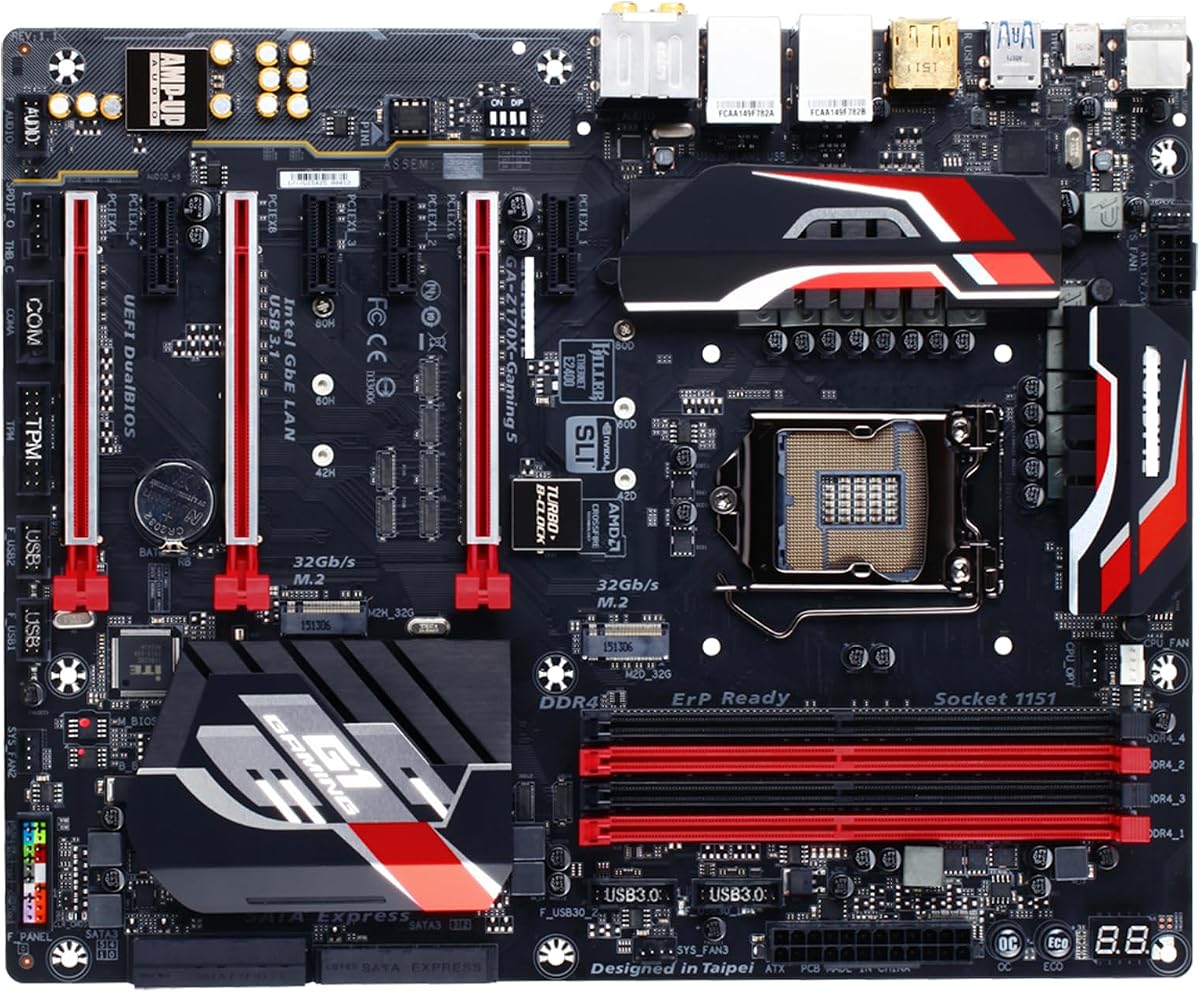
The GIGABYTE GA-Z170X-Gaming 5 offers a high rating of 5.0 and supports up to DDR4 3466 memory which is excellent for performance tuning.
We may earn a commission when you buy through this link, at no additional cost to you.
It includes two M.2 sockets and multiple PCIe lanes providing ample expansion for storage and graphics cards in a standard ATX chassis.
While it comes in industrial packaging without original retail boxes it is genuine and works well if you have basic assembly skills.
This board is a solid choice for builders who prioritize raw specifications and connectivity over aesthetic packaging or brand prestige.
Supports DDR4 3466 MHz via XMP profiles allowing for faster data transfer rates and improved overall system responsiveness.
Two M.2 sockets enable dual NVMe SSDs for massive bandwidth and quick load times in modern gaming titles.
We may earn a commission when you buy through this link, at no additional cost to you.
The ASUS Z170 PRO Gaming provides a balanced feature set with SupremeFX audio and a protected network connection for smooth online play.
We may earn a commission when you buy through this link, at no additional cost to you.
It supports M.2 storage and USB 3.1 ensuring that your PC remains relevant for modern peripherals without breaking the bank.
Reviewers appreciate the Gamer's Guardian features that help protect components from dust or voltage surges during operation.
This board is suitable for gamers who want a dependable platform with good audio and networking without needing top tier overclocking.
LANGuard technology protects your Ethernet port from physical damage and reduces packet loss during critical matches.
SupremeFX delivers clear positional audio helping you hear footsteps and environmental cues accurately during gameplay.
We may earn a commission when you buy through this link, at no additional cost to you.
This board emphasizes durability and optimized power delivery which helps maintain performance during extended gaming marathons.
We may earn a commission when you buy through this link, at no additional cost to you.
It features high grade storage standards and advanced cooling to manage heat efficiently while keeping your system stable.
Users note that the design focuses on function with a rugged build that can handle daily use without issues.
Consider this option if you need a stable platform for continuous use and prefer reliability over flashy features or branding.
Upgraded power design ensures consistent voltage to the CPU for stable performance under load.
Cooling features help maintain lower temperatures for components which prolongs their lifespan during heavy use.
We may earn a commission when you buy through this link, at no additional cost to you.
The Gigabyte GA-Z170X-Gaming 7 is a premium board offering 2-Way SLI support and seven USB 3.0 ports for excellent connectivity.
We may earn a commission when you buy through this link, at no additional cost to you.
It accommodates four DDR4 DIMMs and has multiple PCIe slots allowing for future expansion of graphics and network cards.
The ATX form factor means it requires a larger case but provides more room for cooling and cable management.
This board is perfect for power users who need high speed connectivity and multi GPU capabilities without compromising stability.
Supports 2-Way NVIDIA SLI enabling higher frame rates in compatible games by using two graphics cards.
Seven USB 3.0 ports plus additional USB 2.0 offer plenty of connections for peripherals without hubs.
We may earn a commission when you buy through this link, at no additional cost to you.
This version of the GIGABYTE gaming board offers a mix of SATA Express and standard SATA ports for flexible storage configurations.
We may earn a commission when you buy through this link, at no additional cost to you.
It supports 3-Way AMD Crossfire which can be useful for AMD GPU users looking to boost graphical performance.
The layout is straightforward making it easier to install compared to boards with complex routing or dense components.
Buyers looking for a simple board with essential expansion slots will find this a practical choice for their build.
Multiple SATA Express and standard ports allow connecting various storage devices simultaneously.
Supports 3-Way Crossfire for AMD users wanting increased power for demanding graphics applications.
We may earn a commission when you buy through this link, at no additional cost to you.
The ASRock Z170 EXTREME4 offers a high 4.2 rating at an affordable price making it ideal for budget conscious builders.
We may earn a commission when you buy through this link, at no additional cost to you.
It features the Realtek ALC1150 audio codec which delivers crisp sound without needing an external sound card or DAC.
With three PCIe x16 slots and six SATA3 ports there is plenty of room for expansion and storage growth.
This board is a strong contender for those who prioritize raw utility and specs over extra lighting or software features.
The ALC1150 codec provides high definition sound that rivals dedicated audio cards for gaming and media.
Multiple PCIe x16 slots enable flexible configurations for network cards or additional GPUs.
We may earn a commission when you buy through this link, at no additional cost to you.
The MSI Z170 Krait Gaming includes Steel Armor to protect PCIe slots from damage and support for DDR4 up to 3000 MHz.
We may earn a commission when you buy through this link, at no additional cost to you.
Audio Boost 3 delivers improved clarity while the generous number of USB 3.1 Gen1 ports keeps your peripherals connected.
Reviewers note it offers reliable performance for mid range builds though the software can be overwhelming for new users.
It is a good fit for gamers who want durable hardware and good sound quality without paying premium brand prices.
Steel Armor reinforces PCIe slots to prevent damage from heavy graphics cards over time.
Audio Boost 3 separates analog and digital signals to reduce interference and improve sound quality.
We may earn a commission when you buy through this link, at no additional cost to you.
The ASUS Z170-A holds a high 4.3 rating for its balance of performance and affordability for entry level enthusiasts.
We may earn a commission when you buy through this link, at no additional cost to you.
5-Way Optimization lets you tune system settings easily and DTS Studio Sound provides immersive audio for media.
It also includes 5X Protection II which guards against dust humidity and other environmental threats to the board.
For builders on a budget this board delivers strong reliability and essential features without unnecessary extras.
5-Way Optimization simplifies tuning so you can get the most from your CPU and memory easily.
5X Protection II keeps your board safe from common threats like dust or moisture inside the case.
We may earn a commission when you buy through this link, at no additional cost to you.
This Certified Refurbished option gives you access to ROG quality in a compact mATX form at a slightly lower cost.
We may earn a commission when you buy through this link, at no additional cost to you.
It retains top features like SupremeFX 2015 and USB 3.1 Type C so you do not lose performance due to size.
The refurbishment process includes testing and cleaning with a minimum ninety day warranty to assure functionality.
Choose this if you need a smaller board but still want premium audio and USB features in a reliable package.
Micro ATX form factor fits smaller cases while still supporting high end components.
SupremeFX audio ensures high quality sound regardless of the board's smaller footprint.
We may earn a commission when you buy through this link, at no additional cost to you.
Selecting the right motherboard depends on your performance needs budget and the features you prioritize for your gaming setup.
Ensure the motherboard uses the LGA1151 socket and Z170 chipset to support 6th and 7th gen Intel Core processors.
Check BIOS requirements especially for 7th gen CPUs as some boards may need an update to boot newer processors correctly.
Look for boards with four DDR4 DIMM slots to allow up to 64 GB of memory and dual channel performance.
Support for memory speeds above 2400 MHz via XMP is important for gaming performance and system responsiveness.
Prioritize boards with M.2 slots for NVMe SSDs which offer faster boot and load times than standard SATA drives.
Check the number of SATA ports and SATA Express connectors to ensure you have enough space for all your storage.
Verify PCIe slot configurations to ensure you can install your graphics card and additional peripherals like capture cards.
If you plan multi GPU setups confirm support for SLI or Crossfire before purchase to avoid compatibility issues.
Integrated audio codecs like SupremeFX or ALC1150 provide good in game sound without needing extra hardware or software.
Look for Intel Gigabit Ethernet or similar reliable network chips to minimize lag and packet loss during online play.
USB 3.1 Type C and multiple Type A ports ensure fast data transfer and future proofing for newer peripherals.
Check if the board offers header options for USB 3.0 front panel connections so your case ports work at full speed.
Boards with features like 5X Protection or military grade components offer better protection against dust and voltage spikes.
Solid heatsinks and power delivery systems help maintain stability during long gaming sessions and overclocking.
Consider refurbished boards if you need premium features but want to save money while still getting a warranty.
Set a budget based on features you actually need such as audio or USB rather than paying for unnecessary extras.
Install the motherboard in a sturdy case ensuring all standoffs are correctly placed to prevent shorts or damage to the PCB.
Apply thermal paste evenly on the CPU before mounting the cooler and connect the fan header securely to ensure proper cooling.
Update the BIOS immediately after installing the CPU to ensure compatibility and unlock all supported features and speeds.
Yes many Z170 boards support 7th gen Skylake Kaby Lake CPUs but often require a BIOS update. Check your model page for specific compatibility lists before purchasing.
Z170 boards are great budget choices for 6th gen builds but for modern CPUs you may need newer boards. They are best for upgrades on existing Skylake platforms.
Most Z170 boards support up to 64 GB of DDR4 RAM across four slots. Ensure you check the specific model support for speeds above 2400 MHz via XMP.
Yes many Z170 boards include M.2 slots supporting PCIe or SATA based NVMe SSDs. This offers much faster speeds than standard SATA drives for boot and games.
Most standard Z170 boards do not include built-in Wi-Fi. You may need to add a separate USB or PCIe wireless adapter unless the specific model lists Wi-Fi.
Certified refurbished boards from reputable sellers include testing and warranties. They are a cost effective way to get premium features without the full retail price.
Integrated options like SupremeFX or ALC1150 provide high quality audio for most users. If you need pro audio consider a dedicated PCIe card instead.
Z170 boards support 2-Way SLI but NVIDIA has dropped support for new titles. It may still work for older games but expect limited compatibility with newer titles.
The ASUS ROG Maximus VIII Hero leads our picks for its advanced features and stability while the ASUS Z170-A offers great value for budget builders.
Focus on connectivity and power delivery when choosing a board since these factors directly impact your system's reliability and performance over time.
Remember that prices change often so check current listings to confirm which model fits your budget before finalizing your purchase.