
sata Power Splitter Cable 6 Way
4.7Editor score
Six output connectors
Universal SATA compatibility
Durable construction
This expert guide compares the top hard drive power cables for reliability and performance, helping you choose the best splitter, extension, and adapter
Finding the right hard drive power cables is essential for any computer build or upgrade. These cables ensure your storage devices receive stable electricity, preventing data loss and hardware failure. Choosing quality connectors protects your investment in SSDs, HDDs, and optical drives over the long term.
We evaluated ten top-rated products based on compatibility, durability, and connector design. Each option was assessed for its ability to maintain steady voltage and support multiple drive configurations. Our analysis covers splitters, adapters, and extensions to help you find the perfect match for your system.
Every pick highlights key features like length, material quality, and ease of installation. You will see how each cable performs in real-world scenarios without relying on vague marketing claims. Prices can change frequently, so always check current listings before making your final purchase decision today.
4.7Editor score

4.8Editor score
4.9Editor score
The following table provides a side-by-side comparison of all ten selected hard drive power cables. Review the specifications to understand how each product differs in length, connector type, and intended use case for your specific storage needs.




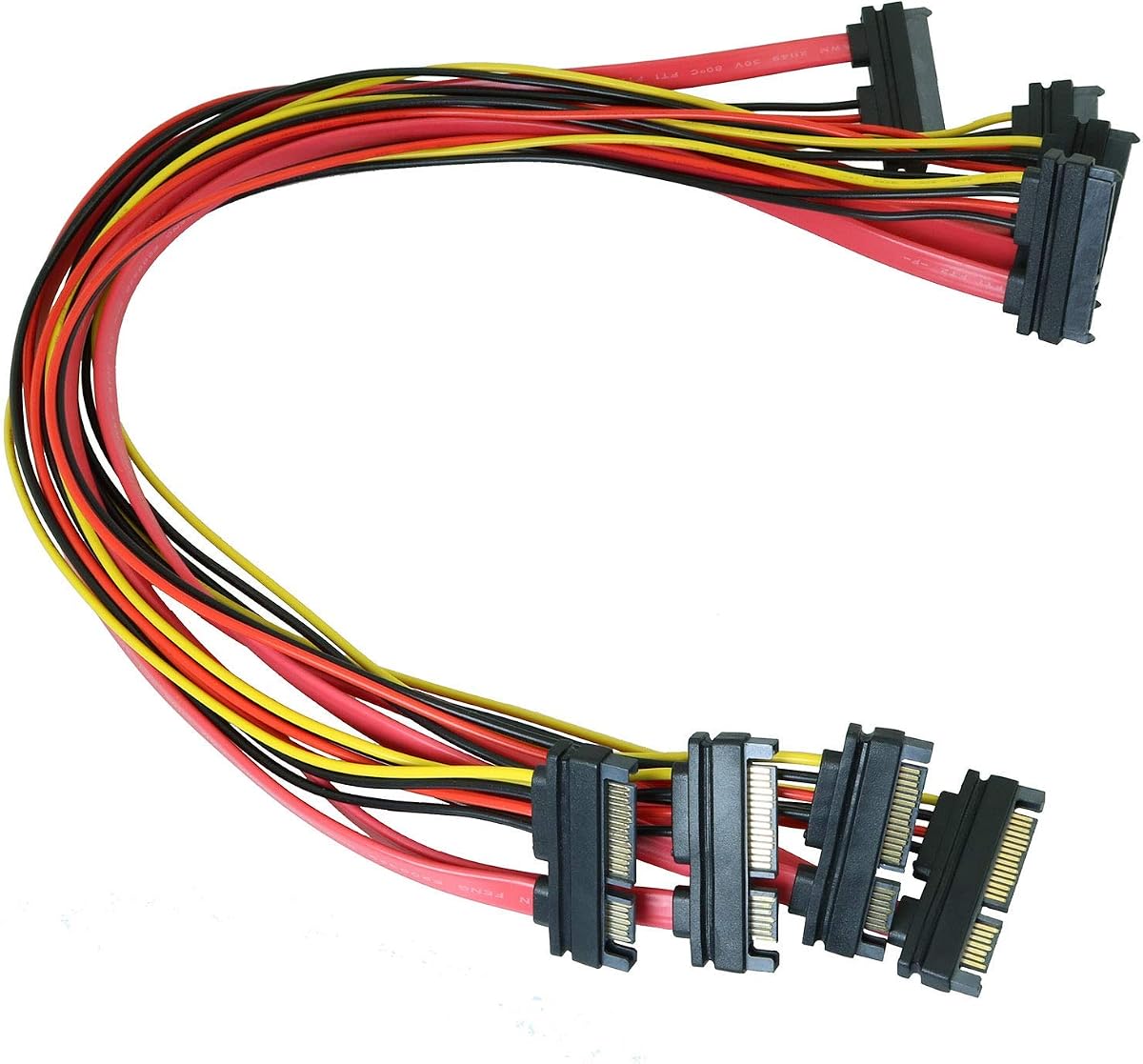
This SATA power splitter cable ranks as a top budget choice for expanding your storage array. It transforms a single 15-pin SATA connector into six separate outputs, allowing you to connect multiple drives easily. The high-quality construction ensures stable power delivery which is critical for preventing data corruption across all connected devices.
We may earn a commission when you buy through this link, at no additional cost to you.
Users appreciate its wide compatibility with HDDs, SSDs, and optical drives. The cable is designed to prevent performance interruptions by delivering consistent power to each individual device. Its user-friendly design means you can install it without any additional tools or technical expertise, making it perfect for DIY builders.
While the cable is durable and built to last, it does not offer extended lengths which might be a limitation in larger cases. The standard black finish is functional but lacks premium aesthetic touches found in higher-end modular cables. However these trade-offs are acceptable given the low price point.
If you need to power up to six devices from one port without breaking the bank, this is the ideal solution. It efficiently handles simultaneous connections while maintaining optimal functionality. We recommend this for anyone looking to maximize drive capacity with minimal investment.
Connect up to six drives simultaneously using a single power source for efficient system expansion.
High-quality internal wiring ensures every device receives stable voltage to prevent data loss during operation.
We may earn a commission when you buy through this link, at no additional cost to you.
This four-pack kit stands out by combining power splitters with high-speed SATA data cables. It is ideal for comprehensive system upgrades where you need both power and data connectivity for new storage devices. The pure copper conductors ensure eco-friendly durable material and stable signal transmission for all your storage needs.
We may earn a commission when you buy through this link, at no additional cost to you.
The cables support SATA III speeds of up to 6Gbps which is twice as fast as SATA II. This blazing-fast transfer capability is enhanced by the inclusion of both straight and right-angle data cables to tidy wiring in small form factor cases. The locking latches on connectors prevent accidental disconnections during system operation.
While the dual power splitter adapters are useful for legacy systems, the combination of power and data cables can result in a slightly bulkier package. The right-angle cables are great for tight spaces but might not suit everyone's cable management preferences. These minor issues are balanced by the value of the complete set.
Choose this kit if you are building a new PC or upgrading an older system with multiple drives. It provides everything you need for a clean and fast setup without buying components separately. It is a smart choice for users prioritizing speed and complete connectivity.
Get both power and data cables in one box to simplify your system upgrade process efficiently.
Pure copper wiring and SATA III support ensure your storage devices run at top speeds reliably.
We may earn a commission when you buy through this link, at no additional cost to you.
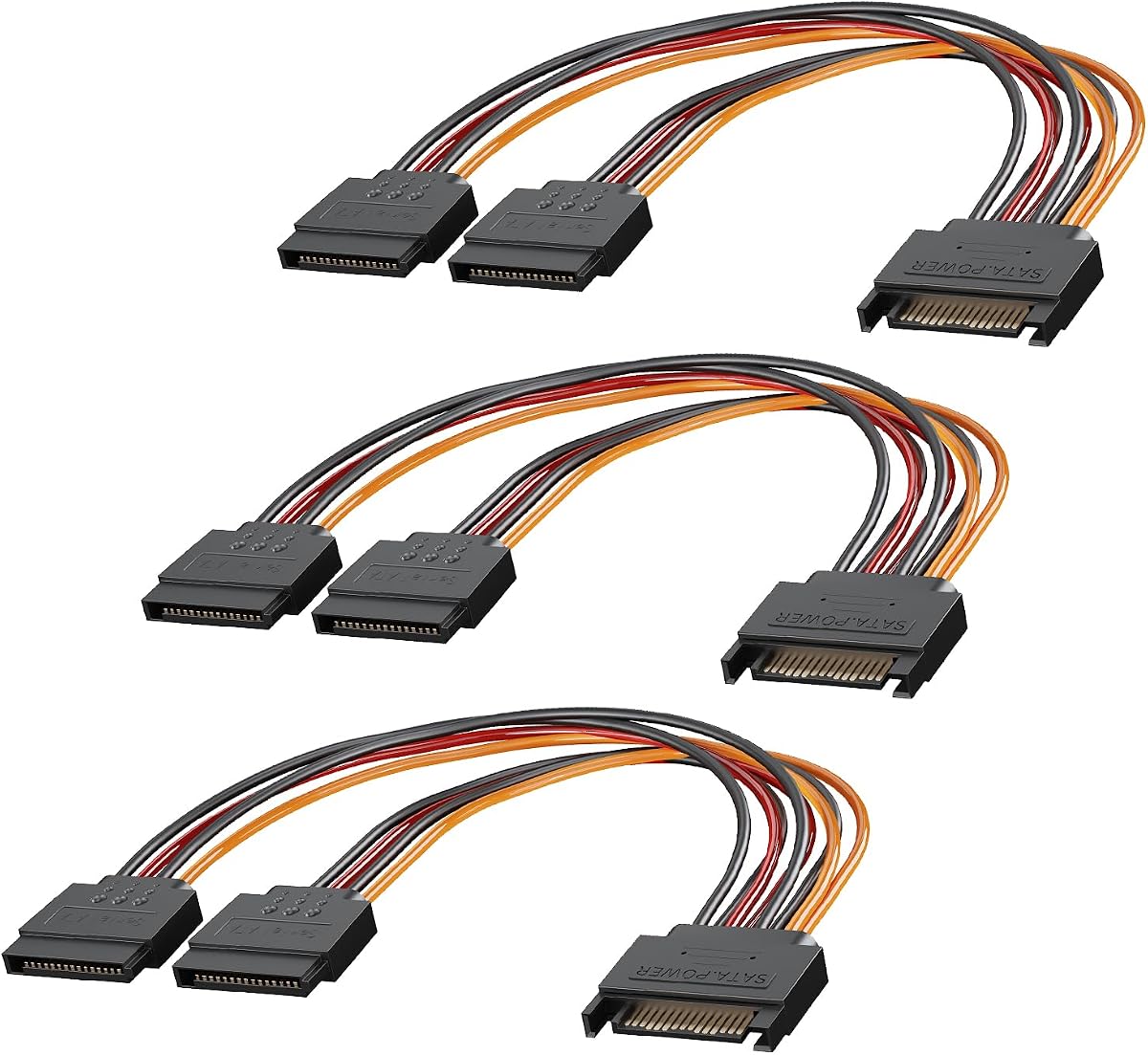
Cable Matters delivers a reliable three-pack of Y-splitter cables designed for secure and stable power delivery. The snug-fitting connectors with channel guides ensure that the cables lock tightly and won't accidentally disconnect from your power supply. This feature makes it a top choice for builders who value long-term stability.
We may earn a commission when you buy through this link, at no additional cost to you.
Each cable is eight inches long which keeps internal cabling neat and reduces clutter inside your PC case. The heavy-duty conductors safely support 3.3V, 5V, and 12V voltages required by HDDs, SSDs, and optical drives. This multi-voltage compatibility ensures reliable performance across all standard SATA-powered components without risking electrical issues.
While the eight-inch length is sufficient for most towers it might feel limiting in cases where the PSU is far from the drive bays. Also the design is straightforward without extra features like right-angle bends which some users prefer for airflow. These limitations are acceptable for the price and the security of the connection.
Buy this if you need a cost-effective solution to power multiple drives without upgrading your entire PSU. It is perfect for DIY builders and IT professionals who need spare cables for future upgrades. We rate it highly for its secure connections and consistent power delivery.
Channel guides and snug connectors prevent loose connections that could lead to system instability.
Supports all standard SATA voltages to ensure safe operation for every connected storage device.
We may earn a commission when you buy through this link, at no additional cost to you.
This adapter set is essential for users with older power supplies that still use 4-pin Molex ports. It allows you to connect modern SATA HDDs and optical drives to a legacy PSU without needing to replace the entire unit. The flexible design ensures stable power delivery which is crucial for maintaining reliable system performance over time.
We may earn a commission when you buy through this link, at no additional cost to you.
The six-inch length is compact which makes it ideal for tight internal cable management inside smaller cases. By keeping connections short you reduce clutter and ensure efficient connection between SATA devices and the power source. The three-pack provides spare options for multiple builds or repairs which adds significant value.
Since this cable is designed for legacy systems it cannot be used with newer PSUs that lack Molex ports. The short length is great for organization but might be too short if your drive bays are far from the power supply. These constraints are specific to its intended use case though.
Select this adapter if you are upgrading an older PC and want to extend its life with modern storage. It is the perfect solution for IT technicians and DIYers working on legacy hardware. It saves the expense of buying a new power supply while enabling modern upgrades.
Turn existing Molex ports into SATA power for modern drives and avoid replacing your PSU.
Short length keeps cables organized and reduces clutter for better airflow and cleaner builds.
We may earn a commission when you buy through this link, at no additional cost to you.
This power splitter cable is designed to split one 15-pin SATA connector into two separate outputs for easy expansion. It allows you to connect multiple drives to your system with minimal effort and high reliability. The high-quality materials ensure stable power transmission preventing interruptions that could affect drive performance.
We may earn a commission when you buy through this link, at no additional cost to you.
Users find it very easy to install since it requires no additional tools or expertise. Simply plug the male end into the power supply and the female ends into your devices. The eight-inch length provides sufficient reach for most standard PC tower configurations without creating excess slack or clutter inside.
While the cable is durable and built to last it does not include advanced features like locking mechanisms or right-angle connectors. This basic design is functional but may lack the premium feel of higher-end alternatives. For the price these trade-offs are acceptable for simple storage expansion projects.
If you need a straightforward and reliable way to add one more drive to your setup this is a solid choice. It offers wide compatibility with HDDs, SSDs, and optical drives. We recommend it for users who prioritize simplicity and cost-effectiveness over advanced features.
Quickly double your available power ports for storage drives without changing your power supply unit.
Built with high-quality materials to ensure long-lasting durability and consistent power delivery.
We may earn a commission when you buy through this link, at no additional cost to you.
StarTech.com offers a robust splitter that divides one input into four separate SATA power receptacles. This is ideal for workstation builds that require multiple drives without needing extra cables from the power supply. The durable construction ensures that the cable can withstand regular use and maintain safe power delivery.
We may earn a commission when you buy through this link, at no additional cost to you.
At 15.7 inches this cable provides a longer reach than many standard options which helps in complex cable routing scenarios. It reduces the strain on your power supply connectors by extending the distance between the PSU and the drives. This is particularly useful in larger cases where drives are located far from the power supply.
The longer length and professional build quality come with a higher price point compared to shorter adapters. The cable thickness might also be a bit bulky which could limit airflow if not managed properly inside tight cases. However for professional applications this is often a necessary trade-off.
Choose this if you are building a workstation or server that needs reliable power for several drives. It provides the flexibility to expand storage capacity efficiently without complex wiring. We recommend it for users who need professional-grade reliability and extra length.
Get four separate power outputs from one cable to maximize your system's storage potential.
Engineered for durability and longevity to ensure safe and stable power delivery in demanding setups.
We may earn a commission when you buy through this link, at no additional cost to you.
This extension cable adds valuable length to your existing PSU connection for more flexible drive placement. The twelve-inch length offers a balance between flexibility and space-saving design which is perfect for standard PC towers. It helps reduce strain on tight motherboard and PSU connections while improving internal airflow and clean cable routing.
We may earn a commission when you buy through this link, at no additional cost to you.
By extending the reach you can route cables more efficiently to improve the overall look of your build. This is especially useful when the original power cables are too short to reach specific drive bays comfortably. The durable conductors ensure stable 3.3V, 5V, and 12V power transmission without any loss or degradation over time.
While the three-pack is cost-effective for multiple installations it is strictly designed for extension and not for splitting power. This means it cannot create additional ports but simply moves existing ones further away. Users needing extra ports will need a separate splitter along with this extension cable.
Buy this if you need to reposition drives or reach ports that are too short in your current setup. It is ideal for system builders and IT technicians who need multiple replacements or upgrades. We recommend it for its role in improving internal cable management and reducing physical stress on connectors.
Extends cables to improve routing and keep airflow paths clear for better system cooling.
Maintains stable power levels across all required voltages to ensure consistent drive operation.
We may earn a commission when you buy through this link, at no additional cost to you.
This premium combo cable combines both data and power lines into a single thin wire for a cleaner look. It features a fifty-centimeter length which is much longer than most standard extension cables. The thin design helps reduce clutter and increase airflow in the computer chassis for optimal system performance.
We may earn a commission when you buy through this link, at no additional cost to you.
The copper material ensures high-quality signal transmission for both power and data connections. Because the cables are combined you save space inside your case which is critical for modern builds with tight clearances. This feature alone makes it a top choice for enthusiasts who value clean aesthetics and performance.
The downside is that it combines both functions which might be too specialized for simple power needs only. If you already have separate cables this might not be necessary for your build. However for new builds or major upgrades the convenience and space savings are hard to ignore.
Choose this if you want the most streamlined solution for connecting your drives. The long length and thin profile make it perfect for complex setups where space is at a premium. We rate it highly for its unique design and excellent performance ratings.
Connect data and power with one cable to save space and simplify your internal wiring.
Thin design reduces bulk and allows air to flow freely to cool your components efficiently.
We may earn a commission when you buy through this link, at no additional cost to you.
Be Quiet is known for high-quality components that minimize noise and maximize reliability. This power cable is designed to meet those standards ensuring a secure and stable connection for your storage drives. While specific technical details are minimal the brand reputation suggests a focus on performance and build quality.
We may earn a commission when you buy through this link, at no additional cost to you.
The professional build quality ensures that the cable will perform reliably in demanding environments. It is suitable for users who prioritize consistent power delivery and want to trust in a well-regarded brand. The connection points are designed to maintain a steady link throughout the lifespan of the computer system.
Limited public data makes it harder to compare exact specifications like length or material against other options. The product code suggests it is part of a specific bundle or PSU line. This might make it less flexible for users looking for a generic replacement cable.
Select this if you are already using Be Quiet components and want a matching power solution. It provides confidence in the connection quality and aligns with high-end system goals. We recommend it for users who value brand consistency and reliability.
Built by a premium manufacturer to ensure reliable and stable power for your storage devices.
Designed to meet high standards of performance and durability for long-term use.
We may earn a commission when you buy through this link, at no additional cost to you.
Monoprice delivers a robust adapter that turns a single 4-pin Molex plug into four 15-pin SATA connectors. The two-foot length is generous which makes it useful for reaching distant drives in larger cases. The net jacket design adds a layer of protection and improves the aesthetic of your internal cable management.
We may earn a commission when you buy through this link, at no additional cost to you.
A standout feature is the lifetime warranty which shows the company stands behind its products. This gives you peace of mind that the cable will perform as expected or be replaced if needed. The rugged design and rigid quality control standards ensure high-quality products at a fair price.
The reliance on Molex ports means it is not compatible with all modern PSUs that have moved away from this standard. The price is slightly higher than basic adapters but the warranty and build quality justify the cost. For older systems it remains a top choice for expansion.
Buy this if you have an older PSU and need to expand storage significantly with reliable connections. The warranty and length make it a versatile and safe option for various setups. We recommend it for users who want long-term protection and robust connectivity.
Enjoy full product protection with a lifetime warranty from a trusted cable manufacturer.
Two feet of cable allows you to route power to drives even in large cases.
We may earn a commission when you buy through this link, at no additional cost to you.
Selecting the right power cable involves understanding connector types, length requirements, and build quality. This guide breaks down the key factors you should consider before making your final choice.
Ensure the cable matches your power supply outputs and drive inputs. Common types include 15-pin SATA, 4-pin Molex, and proprietary modular connectors. Using the wrong type will prevent connections and risk hardware damage.
Always check your PSU manual and drive specs to verify compatible connector shapes before purchasing any adapters.
Measure the distance between your power supply and drive bays. Cables that are too short cannot reach while overly long cables create clutter and reduce airflow. Standard lengths range from 6 inches to over 20 inches depending on the build.
Choose a length that allows for clean routing without tension or excessive slack to maintain airflow and stability.
Decide how many devices you need to power from a single port. Single output cables are for extensions while splitter cables offer 2, 4, or 6 ports. Using too many drives on one splitter can overload the circuit.
Limit your connections to the safe current rating of the source port to prevent electrical issues.
High-quality copper conductors ensure stable signal and power transmission with minimal resistance. Plastic connectors should be durable and heat resistant to withstand internal case temperatures over time.
Look for products that specify pure copper or high-grade materials for reliability.
Secure connectors with locking latches prevent cables from vibrating loose during system operation. This reduces the risk of accidental disconnections that could lead to data corruption or system instability.
Prioritize models with built-in locking features for long-term peace of mind.
Buying in packs of three or four often saves money compared to single units. This is helpful for multiple drive setups or keeping spares on hand for repairs.
Check if the bundle includes necessary adapters or tools to maximize your value.
Established brands often provide better quality control and reliable warranties. Look for companies that have a track record of supporting computer hardware components effectively.
A reputable brand adds value through consistent testing and customer support.
Some cables offer unique traits like data-power combos or right-angle connectors for specific cases. These features can simplify builds but might limit flexibility for general use.
Assess if these features align with your specific case layout and component needs.
Before installing, inspect the cable for any physical damage such as cuts or bent pins. Ensure your power supply is completely powered off and unplugged to avoid electrical hazards during setup.
Plug the male connector firmly into the power supply port and the female ends into your storage devices. Make sure locking clips click into place to secure the connection and prevent vibration loosening.
Avoid bending the cables sharply near the connectors and keep them away from moving parts like fans. Regular dusting with compressed air keeps the connectors clean and prevents overheating over time.
Yes, you can use splitter cables to connect multiple drives to a single power port. However, ensure the total current draw does not exceed the PSU port's safe limit to prevent overloading. Most splitters support up to four devices reliably.
Molex connectors are older and typically used in legacy systems with four pins. SATA power connectors are newer, slimmer, and have fifteen pins to provide separate voltage lines. Adapters exist to bridge these two standards for compatibility.
It is generally safe as long as the splitter is rated for the power requirements of your SSDs. High-performance SSDs draw very little power so standard splitters work well. Always check the wattage rating to stay within safe limits.
The ideal length depends on your case size. Standard six to twelve inch cables work for most towers while larger cases may need longer options. Choose a length that reaches without excessive slack to maintain clean airflow.
Yes, each hard drive or SSD requires its own power connection to operate correctly. Sharing power through splitters is fine but every device still needs a dedicated physical plug from the source.
Over-tightening can damage the connector pins or the drive port causing poor electrical contact. This might lead to data errors or drive failures. Always plug connectors in firmly but without forcing them.
Yes, SATA power standards are universal across most manufacturers. A cable from one brand will fit drives from another as long as the connector type matches. This makes replacements and upgrades very flexible.
These cables are designed for internal computer use inside cases. External drives typically use USB or proprietary connectors and external power bricks instead. Check your external drive's manual for the correct power requirements.
Our top picks offer reliable solutions for expanding storage across different system types. Whether you need a simple splitter or a premium combo cable there is an option for every build.
Prioritize secure connectors and proper length to ensure stability and airflow. Using quality cables protects your expensive storage components from potential power issues.
Check current prices and availability before purchasing since stock can vary by vendor. Always ensure the cable matches your specific hardware needs for a smooth installation.