
AI Auto-Tracking Sports Filming System
4.4Editor score
180 Degree Full-Field Lens
Hands-Free Auto-Tracking
No Subscription Required
This guide compares the top ten court cameras with auto tracking for tennis to help you choose the best hands-free recording solution for your matches and
Finding the right court camera with auto tracking for tennis can transform how you analyze your game and share highlights. Modern systems use artificial intelligence to follow the ball and players automatically, allowing you to focus on play without a dedicated camera operator.
We evaluated ten leading models based on tracking accuracy, video quality, ease of setup, and compatibility with sports workflows. Our selection includes dedicated sports cameras and versatile PTZ options capable of handling dynamic court environments effectively.
Each pick highlights key strengths and ideal use cases so you can match a system to your specific needs. Please note that availability and pricing may change over time, so verify details on the product page before purchasing.
4.4Editor score

3.9Editor score

4.4Editor score
The following table provides a side-by-side overview of each model's core specifications to help you quickly identify which system aligns with your technical requirements and shooting preferences.


The XbotGo Falcon stands out as a leading choice for tennis enthusiasts seeking a complete recording solution. It combines 4K dual-lens recording with powerful AI tracking to keep the action centered without manual intervention.
We may earn a commission when you buy through this link, at no additional cost to you.
Its 6 TOPS AI performance ensures smooth recognition of players and the ball across the court. The dual-lens system separates recording and tracking tasks, providing clarity for analysis and high fidelity for highlights.
While it delivers professional-grade results, the initial setup requires some familiarity with the app and mounting options. Users should allocate time to calibrate tracking zones for optimal performance during matches.
This camera is ideal for serious players, coaches, and families who want reliable automated footage. Its ability to stream live adds value for remote viewing and community engagement.
The Falcon uses advanced algorithms to maintain focus on key moments, reducing the risk of losing action during fast rallies or complex plays.
Built-in Wi-Fi allows you to broadcast games instantly, making it easy to share matches with fans or review them in real time.
We may earn a commission when you buy through this link, at no additional cost to you.
The Chameleon offers broad sport coverage including tennis, basketball, and soccer. Its 360-degree panoramic tracking ensures no movement is missed across the full court expanse.
We may earn a commission when you buy through this link, at no additional cost to you.
AI-assisted auto-editing simplifies post-production by generating montages automatically. This feature saves time for users who want quick highlights without manual editing skills.
Tracking performance depends heavily on lighting and contrast, which can affect consistency in varied outdoor conditions. Users may need to adjust positioning for best results during overcast days.
This model suits multi-sport families or clubs needing one system for various activities. The lack of subscription costs makes it an attractive long-term investment for casual recording.
Users can create professional montages quickly, allowing for faster sharing of highlights with teammates or social media followers.
The flexible tracking algorithm adapts to different court sizes and play styles, making it useful beyond just tennis matches.
We may earn a commission when you buy through this link, at no additional cost to you.
This system uses your iPhone on a tripod to capture and track matches digitally. The 180-degree lens provides full context without mechanical movement that could cause errors.
We may earn a commission when you buy through this link, at no additional cost to you.
It recognizes the court and follows the ball automatically using sports-tracking AI built on extensive game data. This approach keeps the play centered without needing a separate camera device.
Performance is tied to your phone's processing power and battery life, so ensure you have a powerful device for consistent results. Compatibility is currently limited to certain iPhone models.
Ideal for budget-conscious users who already own a compatible phone, this system offers impressive value. It eliminates the need for dedicated hardware while delivering solid tracking functionality.
By using software to crop and track rather than moving a camera, it avoids mechanical issues and ensures continuous focus on the action.
Starting a live stream is straightforward, allowing you to invite viewers instantly without complex login procedures or setup steps.
We may earn a commission when you buy through this link, at no additional cost to you.
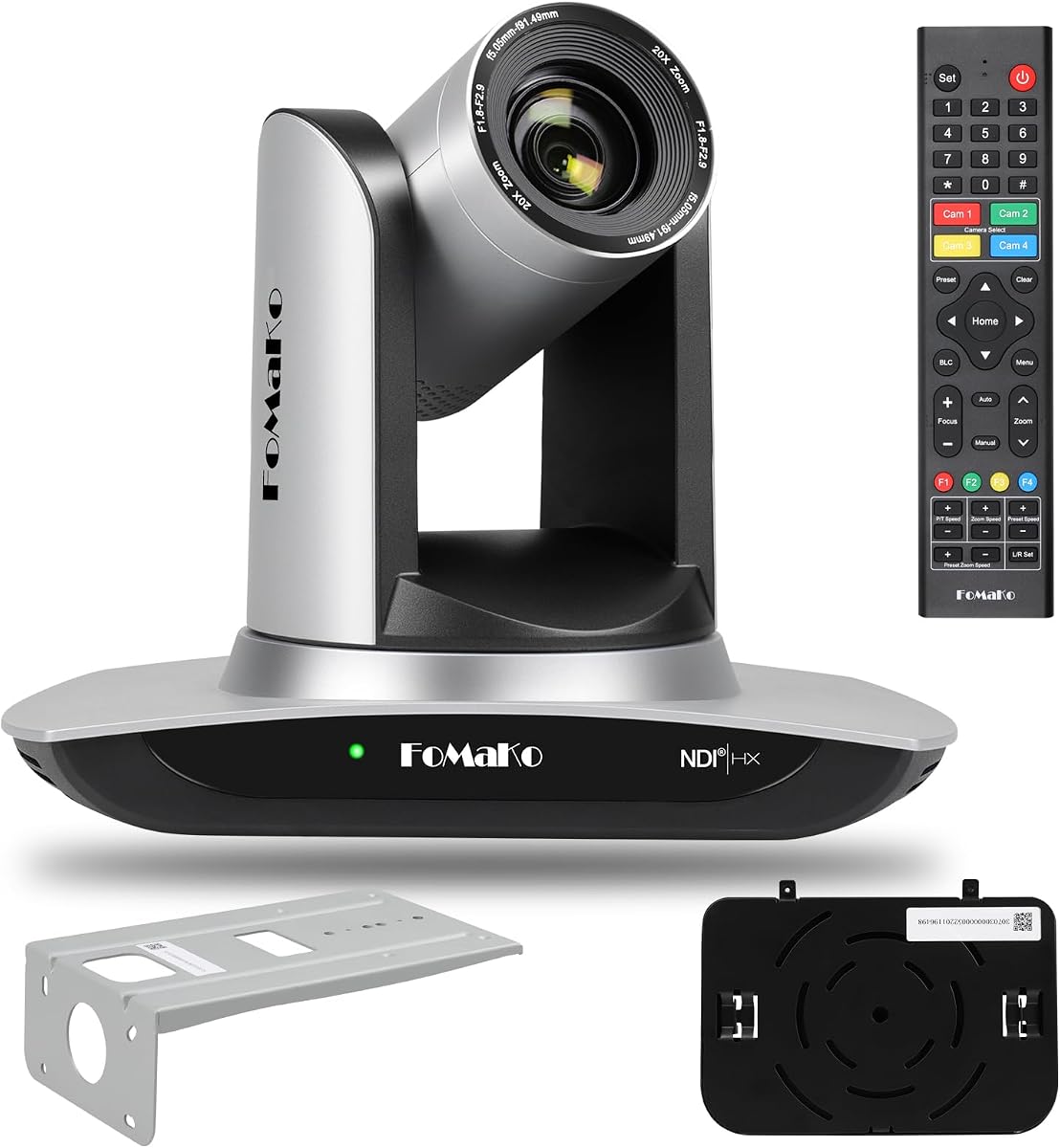
The FoMaKo PTZ camera brings professional AV capabilities to sports recording. Its NDI HX3 certification ensures low-latency streaming and high fidelity for complex setups.
We may earn a commission when you buy through this link, at no additional cost to you.
Gen 3 AI Tracking allows customized features like sensitivity and target switching, offering control over how the camera responds to court activity. The 20x optical zoom provides detailed views of play.
Setting this up requires network knowledge and compatible hardware like mixers or switches. It is less plug-and-play than dedicated sports cameras but offers superior flexibility for broadcast needs.
This option suits clubs or centers with existing AV infrastructure that want professional-grade recording. It excels in environments where stable IP-based streaming is a priority.
Using NDI protocols allows seamless connection to video software, enabling multi-camera productions and high-quality live streams without excessive bandwidth.
The optical zoom lets you capture close-ups of serves or footwork from a distance, providing detail that wide lenses miss.
We may earn a commission when you buy through this link, at no additional cost to you.
This bundle pairs the Falcon camera with a dedicated NT4 steel tripod for a stable recording setup. The tripod ensures consistent positioning across different courts or fields.
We may earn a commission when you buy through this link, at no additional cost to you.
It is designed specifically for team sports, offering quick assembly and reliable support for hands-free recording. The combination removes the guesswork of finding compatible mounting gear.
While the tripod adds stability, the weight may make frequent transport more challenging than lighter alternatives. Users should consider the weight versus stability trade-off for travel.
For coaches or families needing a turnkey solution, this bundle simplifies setup. It ensures the camera stays level and secure throughout the match for better tracking accuracy.
The steel build resists wind and movement, keeping the camera steady during intense play to prevent shaky footage.
Lightweight assembly allows you to move between locations easily, making it suitable for tournaments or multiple courts.
We may earn a commission when you buy through this link, at no additional cost to you.
This bundle delivers 4K at 60 frames per second for smooth motion capture. It includes advanced connectivity options like SDI and HDMI to suit professional broadcast workflows.
We may earn a commission when you buy through this link, at no additional cost to you.
It supports simultaneous outputs, allowing recording and streaming at the same time without quality loss. The Gen 3 AI Tracking ensures subjects stay centered during fast movement.
The system is designed for fixed installations like studios or gyms where power and network are stable. It is complex for casual users but unmatched for production value.
Clubs aiming for broadcast-quality streams should consider this option. It offers the tools needed to create polished content with professional standards.
Recording at 60fps captures fast tennis movements clearly, reducing motion blur during serves or rapid rallies.
You can send video to different platforms or devices simultaneously, maximizing flexibility for live events.
We may earn a commission when you buy through this link, at no additional cost to you.
The Tenveo camera features advanced humanoid and face auto-tracking to lock on to individuals. This is useful for solo training sessions or coach-player interactions.
We may earn a commission when you buy through this link, at no additional cost to you.
Its silent pan and tilt mechanism ensures quiet operation without distracting players. The NDI support allows integration into IP-based production workflows easily.
Tracking is optimized for people rather than balls, so it may not follow a tennis ball consistently without a player visible. Users should test tracking sensitivity for court dynamics.
This model is best for applications involving interviews or coaching demonstrations on the court. It provides professional-grade image quality and smooth motion control.
The camera can lock onto a player's face even when partially blocked, keeping the subject framed during intense play.
The motor design minimizes noise, which is crucial when recording audio or during quiet practice sessions.
We may earn a commission when you buy through this link, at no additional cost to you.
The PTZOptics Move SE provides reliable auto-tracking with a 30x zoom for detailed views. It offers multiple control options including web UI and remote to fit different workflows.
We may earn a commission when you buy through this link, at no additional cost to you.
Video quality reaches 1080p at 60fps, ensuring smooth playback for analysis. Simultaneous outputs allow connecting to monitors and computers at once without switching.
While it lacks 4K, the resolution is sufficient for most review needs. The auto-tracking works well for general coverage but may require preset positioning for specific courts.
This model is a solid choice for institutions needing dependable hardware. It balances cost and performance for standard sports recording needs.
Easy network connection simplifies setup, allowing quick access to camera settings without complex IP configuration.
The 30x zoom lets you focus on specific players or serves while maintaining a wide-angle view of the court.
We may earn a commission when you buy through this link, at no additional cost to you.
This budget-friendly NDI camera offers 20x optical zoom and multiple video interfaces. It supports HX3 for efficient streaming with low latency across networks.
We may earn a commission when you buy through this link, at no additional cost to you.
The tally light indicates when the camera is active, helping operators coordinate during multi-camera setups. The web interface simplifies control from browsers on any OS.
Tracking is optimized for single subjects like speakers, so it may struggle with fast ball movement. Users should position it carefully for optimal sports coverage.
Ideal for organizations needing affordable NDI integration, this model delivers professional features at a lower price. It suits those with existing streaming infrastructure.
The efficient compression allows high-quality video over standard network cables without needing expensive dedicated lines.
Visual feedback shows when a camera is live, preventing errors during complex production environments.
We may earn a commission when you buy through this link, at no additional cost to you.
FoMaKo NDI PTZ camera provides certified NDI support for stable streaming. It uses Gen 3 AI Tracking with adjustable features for tailored performance in varied conditions.
We may earn a commission when you buy through this link, at no additional cost to you.
PoE support simplifies installation by delivering power over the network cable. The zoom lens allows flexible framing to capture entire courts or specific zones.
Audio requires an external mic, so plan for additional gear if sound is needed. Tracking is precise but may need fine-tuning for fast-paced ball movement.
This camera is a strong entry point for streaming-focused sports recording. It balances certification and cost for reliable network video production.
Power over Ethernet reduces cable clutter and makes mounting easier in outdoor or high locations.
Official NDI 6 support ensures better stability and interoperability with industry-standard software tools.
We may earn a commission when you buy through this link, at no additional cost to you.
Selecting the right auto-tracking camera involves balancing resolution, tracking logic, and connectivity to match your court and usage goals.
AI-driven tracking systems differ in how they recognize players and balls. Some use visual recognition of the ball, while others track human shapes. For tennis, look for models that maintain focus during rapid direction changes.
Prioritize cameras with customizable tracking zones or sensitivity settings to avoid losing the action during serves or net play.
Higher resolution like 4K allows you to zoom in during post without losing clarity. This is vital for analyzing footwork or racket angles. Lower resolutions may be sufficient for casual sharing.
Ensure the camera supports at least 60fps to capture fast ball speeds without motion blur.
Modern cameras offer HDMI, USB, or network-based connections like NDI. NDI allows flexible streaming over local networks but requires compatible software. HDMI is simpler for direct recording.
Choose a connection method that fits your existing editing and streaming workflow.
A stable tripod or mount is essential to prevent shaking that confuses tracking software. Steel tripods offer rigidity, while lighter mounts are easier to transport. Ensure the mount adjusts to court height requirements.
Look for bundles that include compatible tripods to avoid setup mismatches.
Many PTZ and streaming cameras lack built-in microphones, requiring external audio gear. For match analysis, audio can provide context. Check if the system supports external mic inputs or Bluetooth audio.
If audio is not critical, consider models that prioritize video quality over mic integration.
A user-friendly app simplifies setup, tracking calibration, and sharing. Some systems require subscriptions for advanced features, while others work offline. Evaluate the software ecosystem before buying.
Opt for apps that offer live streaming and highlight clipping tools for efficient content creation.
Outdoor use requires weather-resistant housing or at least protection from rain and dust. Indoor cameras may not withstand outdoor elements. Check the IP rating or manufacturer guidelines for outdoor usage.
If you plan to use the camera in varied weather, ensure it has adequate protection or a cover.
Prices range from affordable phone-based solutions to professional PTZ systems. Consider long-term costs like software subscriptions or additional accessories. A slightly higher initial investment may save on future upgrades.
Match your budget to your needs; casual players may not need broadcast-grade features.
Start by placing the camera on a stable surface at a height that captures the full court width. Use a tripod or a mount that resists movement to ensure consistent tracking performance during play.
Calibrate the tracking settings using the app before each session. Adjust sensitivity zones and target preferences to match court lighting conditions and your preferred viewing angles.
After recording, review footage to check for tracking errors. Clean the lens regularly to remove dust or smudges and store the device in a dry place to prolong battery and sensor life.
Most advanced AI systems track players rather than the ball directly, which helps maintain focus during serves. For ball tracking, use models with optical zoom and high frame rates to minimize blur and improve precision.
Many models offer free tracking and recording without fees, but some cloud storage or advanced editing features may require subscriptions. Check product details to confirm if recurring costs apply.
Position the camera at a corner or center line at about 10 to 12 feet high. This angle captures the full width and depth of the court for complete coverage.
Yes, some systems use your phone as the camera with AI software for tracking. This reduces hardware costs but depends on the phone's processing power and compatibility.
Most PTZ and streaming cameras lack built-in microphones, so external audio is recommended for commentary. Some apps allow recording audio separately or via Bluetooth devices.
Use a weather-resistant housing or cover the camera when not in use. Some models are rated for outdoor use, but others should be stored indoors after sessions.
Yes, the 180-degree lens or wide-angle PTZ cameras can capture multiple players simultaneously. Tracking algorithms may switch focus between subjects based on motion priority.
NDI cameras integrate with OBS, vMix, and Streamlabs for live streaming. These tools support NDI inputs directly, allowing seamless video production and recording setups.
The XbotGo Falcon and AI Auto-Tracking Filming System lead our list with balanced features for most users. They offer hands-free tracking and high-quality recording suitable for casual and semi-pro needs.
For professional setups, the FoMaKo PTZ options provide superior streaming capabilities and zoom flexibility. Consider your technical comfort and infrastructure before choosing these advanced systems.
Always check the latest pricing and availability before purchasing. Each model offers unique strengths, so select the one that best fits your court layout and recording goals.