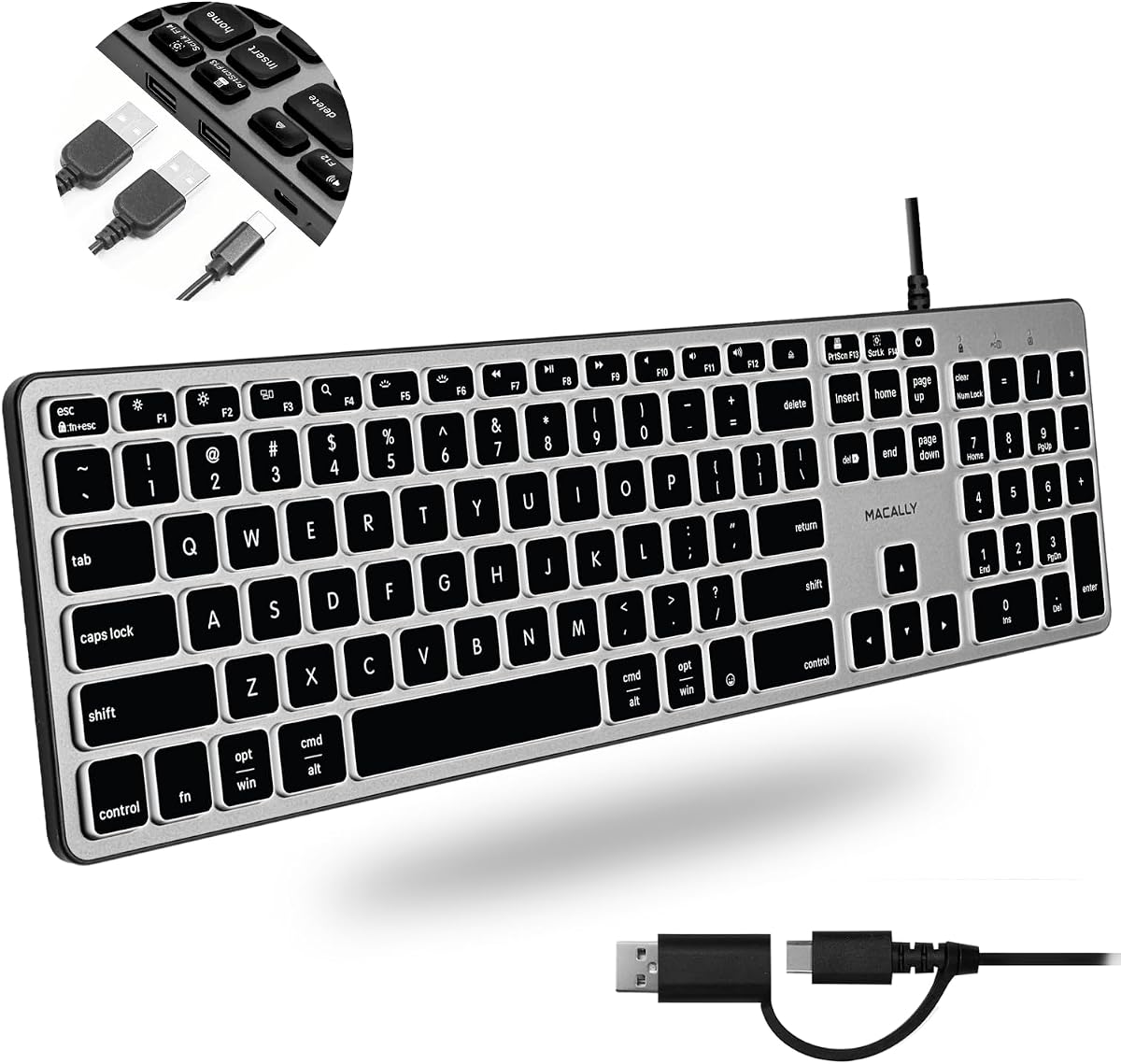
Macally Wired Keyboard for Mac with USB Hub
4.4Editor score
Compatible with Mac and PC
Adjustable LED backlighting
Two USB-A and one USB-C port
Discover the top ten keyboards with built-in USB ports. This guide compares features, compatibility, and performance to help you find the perfect hub keyboard.
Finding a keyboard with a USB port can streamline your workspace by reducing cable clutter and simplifying peripheral connections. These devices act as both an input tool and a convenient hub for flash drives, mice, or webcams. Whether you need a budget-friendly option or a premium mechanical build, there is a solution tailored to your specific workflow needs.
We evaluated ten distinct models based on port availability, build quality, and overall user experience. Our analysis focused on how well each keyboard integrates with different operating systems and handles daily tasks. We considered factors like typing comfort, additional features such as backlighting or media controls, and the reliability of the integrated USB hubs.
Each pick below highlights unique strengths ranging from compact designs to full-size layouts with advanced switching technology. You will find detailed breakdowns of specifications and practical benefits for every product listed. Please note that product availability and pricing fluctuate frequently, so verify current details before making your final purchase decision.
4.4Editor score

4.2Editor score

4.3Editor score
This table provides a side-by-side comparison of all ten selected models. It highlights key specifications and unique features to help you quickly identify the best match for your desk setup and technical requirements.





The Adesso AKB-132HB stands out as a practical solution for users needing immediate access to multiple USB peripherals. With a solid rating and a very competitive price, it offers a reliable typing experience without unnecessary complexity. The inclusion of three USB hubs makes it a versatile choice for desktop setups requiring frequent device switching.
We may earn a commission when you buy through this link, at no additional cost to you.
This keyboard excels in convenience by integrating multimedia hotkeys directly into the layout. Users can instantly access favorite media players or Windows applications without navigating menus. The quiet membrane switches ensure a pleasant typing environment, making it suitable for shared office spaces or home environments where noise reduction is valued.
While the build quality is straightforward, the keyboard delivers on its core promise of functionality and cost-effectiveness. The lack of backlighting or premium materials is a trade-off for its budget-friendly nature. However, for users prioritizing port access and basic multimedia control, these limitations are easily acceptable.
We recommend this keyboard for students, home office workers, or anyone looking to declutter their desk. It provides essential features without demanding a high investment. If you need a dependable hub keyboard that works right out of the box, this model is an excellent starting point.
Using the built-in hubs reduces the need to reach behind your computer for flash drives or mice, keeping your immediate workspace organized.
Multimedia hotkeys allow quick access to entertainment and system functions, streamlining your workflow during breaks or multitasking sessions.
We may earn a commission when you buy through this link, at no additional cost to you.
The Macally Wired Keyboard offers exceptional versatility by supporting both Mac and PC environments seamlessly. Its ability to auto-detect the operating system and adjust key layouts instantly is a standout feature for multi-device users. The addition of USB-C alongside USB-A ports ensures compatibility with modern peripherals and legacy devices alike.
We may earn a commission when you buy through this link, at no additional cost to you.
Brightness control is a key strength here, with three adjustable levels for white LED backlighting. This allows for comfortable typing in low-light conditions without straining the eyes. The slim profile design complements modern desktop setups, making it a stylish addition that does not compromise on functional connectivity.
Although it lacks wireless capabilities, the wired connection ensures stable performance without battery concerns. The keyboard feels solid for its price point, though it does not offer advanced mechanical feedback. Users looking for a reliable hybrid solution will find the trade-offs well worth the cost savings.
This product is ideal for users with mixed operating systems who need a single keyboard solution. Whether you switch between a MacBook and a Windows PC, the auto-detection feature simplifies the transition. It represents a smart budget choice for those needing modern port options.
The auto OS detection feature ensures all 107 keys work correctly whether you are on macOS, Windows, or Linux systems.
Including both USB-A and USB-C ports means you can connect older mice and newer drives without needing extra adapters.
We may earn a commission when you buy through this link, at no additional cost to you.
This keyboard is specifically designed to match the aesthetic and functional requirements of modern Mac users. The space gray finish provides a seamless look when paired with iPads or MacBooks. It features three USB ports, allowing users to connect multiple devices directly to the keyboard without cluttering the computer's limited ports.
We may earn a commission when you buy through this link, at no additional cost to you.
The low-profile design with integrated typing angle promotes a natural wrist position during long typing sessions. Quiet scissor switches offer a comfortable tactile experience without the noise typical of mechanical keyboards. This makes it suitable for office environments where noise levels need to be kept low.
While the design is sleek, users should note the cable is not detachable which limits flexibility in cable management. However, the plug-and-play reliability ensures immediate functionality across various Apple devices. The combination of style and utility makes it a strong contender for Apple ecosystem users.
We suggest this keyboard for professionals using multiple Apple devices who value clean aesthetics. It simplifies your desk setup by centralizing ports in an attractive package. If you prioritize looks and quiet performance over advanced customization, this is a solid choice.
The space gray color matches perfectly with Apple devices, creating a unified and professional look on your desk.
It works reliably with Mac Mini, MacBooks, and even iPads, making it a great central hub for your Apple gear.
We may earn a commission when you buy through this link, at no additional cost to you.
The Logitech K120 is a classic choice for basic typing needs where reliability is paramount. It features a standard full-size layout with deep-profile keys that provide comfortable feedback for daily use. Its high rating reflects its reputation for durability and ease of setup without any driver installation.
We may earn a commission when you buy through this link, at no additional cost to you.
One of its strongest features is the spill-resistant design which protects internal components from accidental liquid damage. This adds longevity to the device, making it suitable for environments where coffee or water might be nearby. The use of recycled plastic also appeals to eco-conscious buyers.
While it lacks the USB port functionality of other models in this list, it excels as a pure typing tool. Users looking specifically for a hub will need to look elsewhere. However, for standard input tasks, it offers exceptional value and performance.
We recommend this for budget-focused buyers or secondary workstations where advanced features are unnecessary. It is a reliable workhorse that gets the job done efficiently. If you need a no-frills keyboard that lasts, this is a top candidate.
The spill-resistant design and durable keys ensure the keyboard survives daily wear and tear in busy environments.
Just plug it into a USB port and start typing immediately with no software installation required.
We may earn a commission when you buy through this link, at no additional cost to you.
This keyboard is designed for users who need a smaller footprint without sacrificing connectivity. The compact layout removes the number pad to save space while retaining two extra USB hubs for essential peripherals. It is perfect for tight desk setups or laptop users requiring a secondary keyboard.
We may earn a commission when you buy through this link, at no additional cost to you.
The construction quality is solid with durable UV-coated key caps that resist fading. Membrane switches provide a responsive feel and are rated for 10 million keystrokes, ensuring a long operational life. A long five-foot cable allows for flexible placement on your desk.
The absence of a number pad is a trade-off for the space saving. This makes it less ideal for data entry roles but perfect for general typing. The integrated hubs ensure you can still connect a mouse and flash drive easily.
We suggest this for those with limited desk real estate who still need peripheral connectivity. It balances functionality and size well for a low cost. If you prefer a smaller keyboard, this model is a practical solution.
The compact design clears significant desk space, allowing more room for documents or other tools.
With two side ports you can connect a mouse and scanner without reaching for your computer ports.
We may earn a commission when you buy through this link, at no additional cost to you.
This keyboard addresses accessibility needs with keys that are four times larger than standard fonts. This makes it easier for visually impaired users or seniors to find and press the correct keys without strain. The white LED backlighting provides further assistance in low-light environments.
We may earn a commission when you buy through this link, at no additional cost to you.
The full-size layout ensures all standard keys are present, so users do not need to learn a new system. Ergonomic feet allow the keyboard to be tilted for a comfortable wrist position during extended use. It is spill-resistant which adds to the durability in various environments.
While it does not offer advanced USB hub features like other premium models, its primary function is clear and effective. The setup is straightforward with no drivers needed. It focuses on usability for those who need clear visibility.
We recommend this for elderly users or anyone struggling to see standard keyboard labels. It combines accessibility with standard functionality seamlessly. If readability is your top priority, this model offers excellent value and support.
The large print keys and backlighting ensure you can see exactly what you are typing at all times.
Ergonomic feet reduce hand fatigue so you can type comfortably for longer periods.
We may earn a commission when you buy through this link, at no additional cost to you.
The Dell Wired Keyboard KB216 is designed for clean and efficient office typing. Its chiclet style keys offer a modern look that fits well in professional environments. The keyboard is lightweight and compact, making it easy to move around or store in a desk drawer.
We may earn a commission when you buy through this link, at no additional cost to you.
Typing comfort is maintained through a low profile design that reduces finger travel. This makes it comfortable for extended use without causing strain. It is specifically optimized for use with Dell desktops and laptops but works generally with other computers.
Lacking a USB hub it is strictly an input device. However for its price and reliability it serves well as a secondary option. The simple design means there are fewer points of failure during daily use.
We suggest this for corporate environments needing simple and reliable input tools. It matches Dell systems perfectly but works elsewhere too. If you need a basic keyboard for work, this is a strong pick.
The slim profile and minimalist black design fit well into corporate workstations and home offices.
It provides consistent performance for daily tasks without needing complex setup or drivers.
We may earn a commission when you buy through this link, at no additional cost to you.
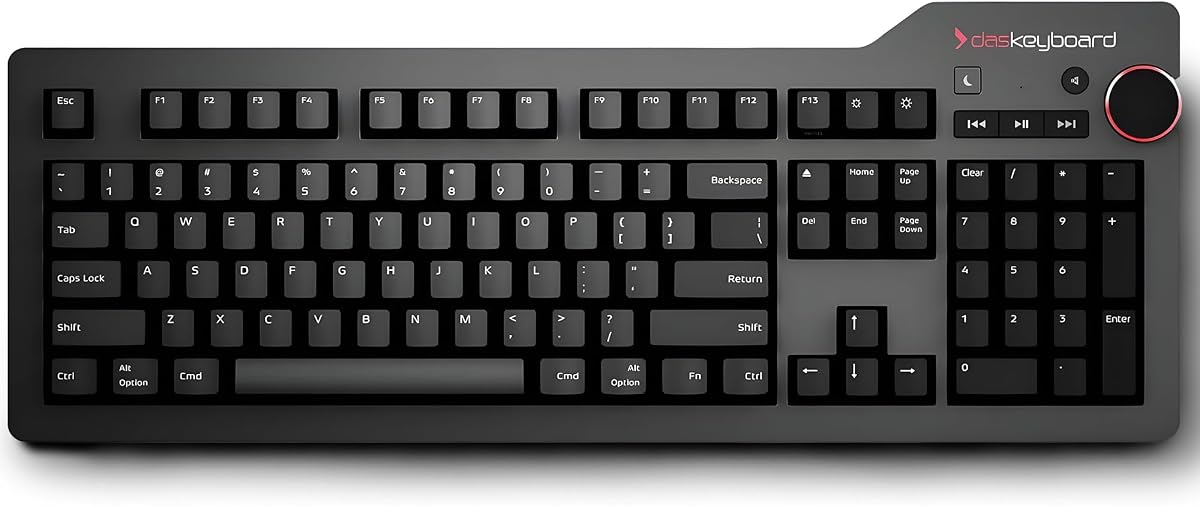
This keyboard is designed for professionals who demand the best typing experience. It features Cherry MX Blue switches that provide precise tactile and audio feedback. The aluminum top panel adds significant durability and a premium aesthetic to your desk setup.
We may earn a commission when you buy through this link, at no additional cost to you.
It includes a USB 3.0 hub which allows fast data transfer for peripherals. This is ideal for users working with large files or high-speed storage devices. The large volume knob is easily accessible, making media adjustments seamless while typing.
The clicky sound of the switches may be too loud for quiet offices but satisfies those who prefer tactile feedback. At a higher price point it is an investment in quality and longevity. The build quality supports over 50 million keystrokes.
We recommend this for Mac users who value mechanical feel and premium materials. If you type heavily and want a device that feels solid this is an excellent choice. The hub and knob add practical utility for power users.
Cherry MX switches offer a distinct tactile bump that helps typing accuracy and speed significantly.
USB 3.0 hubs enable ten times faster file transfers compared to standard USB 2.0 connections.
We may earn a commission when you buy through this link, at no additional cost to you.
Similar to the Mac version this model targets Windows and Linux users with premium mechanical performance. It features gold-plated switches to prevent rust and ensure long-term reliability. Full N-Key Rollover ensures all keystrokes are registered simultaneously, which is vital for gamers and fast typists.
We may earn a commission when you buy through this link, at no additional cost to you.
The USB 3.0 hub remains a key feature allowing high-speed data exchange. The large volume knob provides easy control over media without interrupting your workflow. It lacks backlighting which keeps the focus on function and build quality.
The investment cost is justified by the durability and typing experience it offers. Users who type for hours will appreciate the tactile precision and sturdy construction. It is a tool designed for productivity and longevity.
We suggest this for developers and writers who value high-quality mechanical keys. If you want a keyboard that feels premium and performs reliably this is a top tier choice. It excels in both gaming and professional work environments.
Gold-plated switches resist oxidation ensuring consistent performance over millions of keystrokes.
Full N-Key Rollover ensures no inputs are missed even during complex multi-key commands.
We may earn a commission when you buy through this link, at no additional cost to you.
This keyboard serves as a genuine replacement option for various Dell desktop and laptop models. It includes 14 hot keys that provide quick access to common tasks like email and volume control. The USB hub integration ensures you can connect additional peripherals easily.
We may earn a commission when you buy through this link, at no additional cost to you.
The spill-resistant design protects your investment from common accidents. A removable palm rest adds flexibility for cleaning and personal comfort preferences. It offers a standard experience tailored to business and home office setups.
It is ideal for businesses needing to replace worn out keyboards without changing system setups. The familiarity of the layout ensures users do not need to adjust. It balances basic functionality with essential multimedia features.
We recommend this for Dell users needing a reliable and compatible replacement. It matches the quality of original equipment without the high cost. If you are replacing an existing keyboard this is a practical choice.
Designed to integrate smoothly with Dell workstations for consistent performance.
The removable palm rest allows for thorough cleaning to maintain hygiene.
We may earn a commission when you buy through this link, at no additional cost to you.
Selecting the right keyboard involves considering port needs, compatibility, and typing comfort. This guide outlines the key factors to help you make an informed decision.
Check how many USB ports the keyboard includes and what types they are. Some models offer three standard USB-A ports while others include USB-C for modern devices. Ensure the ports support the peripherals you need to connect daily.
Choose a model with the correct mix of ports for your devices to avoid needing separate hubs.
Verify that the keyboard works seamlessly with your operating system. Mac keyboards often have specific key layouts that may not work perfectly on Windows without configuration. Look for auto OS detection features for easier switching.
Confirm compatibility to ensure all keys and shortcuts function correctly on your system.
Decide between membrane and mechanical switches based on your preference. Mechanical switches offer tactile feedback and durability while membrane switches are quieter and more affordable. Consider the noise level for your environment.
Choose a switch type that matches your typing style and workspace noise requirements.
Look for keyboards made with durable materials like aluminum or high-quality plastic. A solid build ensures the device can withstand daily use and accidental spills. Check for spill-resistant designs if you work near drinks.
Invest in a well-built keyboard to ensure longevity and reliability over time.
Determine if you need a full-size layout with a number pad or a compact one. A full-size layout is better for data entry while a compact design saves desk space. Ensure the size fits your physical workspace comfortably.
Select a layout that matches your workflow and desk dimensions for optimal comfort.
If you work in low light conditions consider a keyboard with LED backlighting. Adjustable brightness levels help reduce eye strain during night shifts. This feature is particularly useful for users with vision impairments.
Opt for backlighting if visibility is a priority for your typing environment.
Many models include dedicated hot keys for media control and shortcuts. These keys allow you to manage volume or launch apps quickly without using the mouse. Check which specific shortcuts are included to see if they fit your needs.
Look for media controls that streamline your access to common system functions.
The length of the USB cable determines how far you can place the keyboard from your computer. A longer cable offers more flexibility for large desks. Ensure the cable is durable and does not tangle easily.
Check the cable length to ensure it reaches comfortably from your computer to your workspace.
Start by connecting the keyboard directly to an available USB port on your computer. If it has a USB-C connection ensure your computer supports that standard. Most models are plug-and-play so no drivers are needed for basic typing.
Plug in your peripherals such as mice or flash drives into the USB ports on the keyboard. This allows you to access your devices without reaching behind your computer. Ensure the devices are secure to prevent accidental disconnection during use.
Keep your keyboard clean by regularly wiping the keys with a dry cloth. Use compressed air to remove dust from between the keys. Avoid spilling liquids on the keyboard even if it is spill-resistant to ensure longevity.
Not all keyboards support charging through their USB ports. Some provide data only while others can charge devices. Check the product specifications to confirm if the ports support charging current.
Many keyboards support both systems with auto OS detection. However some models are optimized specifically for Mac or Windows layouts. Always check the compatibility details before purchasing.
Use a soft cloth or compressed air to remove dust. Do not use water directly on the keys. For spills wipe immediately and let it dry before reconnecting to the computer.
This may be due to insufficient power from the port. Try connecting the device directly to the computer to rule out hardware issues. Ensure your peripherals are within the supported power limits.
Yes USB 3.0 ports offer faster data transfer speeds than 2.0. This is useful for large files and external drives. Check the product specs to confirm the USB version included.
Mechanical keyboards generally use similar power to membrane ones. However high performance models may draw slightly more. Ensure your USB port can provide adequate power for all connected devices.
Choosing the right keyboard depends on your specific needs for connectivity and typing experience. The models covered range from budget-friendly options to premium mechanical builds. Each offers unique advantages such as port variety and specialized layouts.
Prioritize factors like compatibility and port types to ensure seamless integration with your devices. Consider the typing feel that works best for you whether it is quiet membrane or tactile mechanical. Your workflow will benefit from the right choice.
Remember to check current prices and availability before buying. Products may vary slightly over time so verifying details ensures you get the best deal. We hope this guide helps you find the perfect hub keyboard.